
AXIOMUNC500 Silkscreen Legend
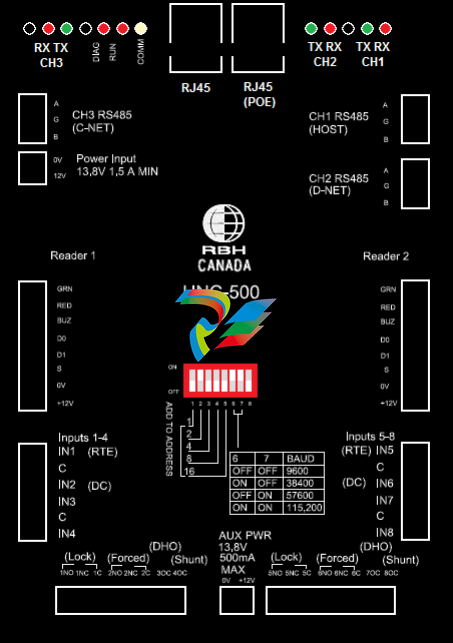
The UNC500 has been designed to take over the functionality of the Axiom NC100 (network controller),
an RC-2 (reader controller) and an LIF (local area network interface). The network interface can also
contain a POE (power over Ethernet) converter.
Communication
The UNC500 has three RS485 ports and an Ethernet 10/100 interface. Depending on the hardware
configuration all three channels may not be available. Communications from the host computer running
Axiom software can be achieved in the following ways; either via Ethernet through a socket interface or
via RS485 through a direct connection to a designated channel. The Ethernet interface may be single or
dual ported 10/100 Mbs, depending on how the board is configured. The UNC500‟s RS485 channels 1,
2, or 3 may be programmed as „HOST‟, „DNET‟, „NCNET‟, or „CNET‟. Use the DIP switch to select
baud rate for Host communications as 9600, 38400, 57600, or 115200.
Networks
There are three networks supported by the UNC500 these are:
1) Host Communications through the Ethernet or direct connection.
2) Device Communications for devices such as additional RC-2s starting at address 2, Alarm Keypads,
IOC-16 controllers, and PC100.
3) Controller Communications for controllers such as additional UNC500s or for NC100s via:
a. NCNET a protocol designed for RS485 communications between UNC500‟s only.
b. CNET for connection with NC100‟s.
Outputs
There are four form C relays and four open collector outputs that can be programmed as general purpose
or default applications. Although the contacts are rated at 12 amperes at 125vac the surge protectors
prevent voltages greater then 40vac or 56vdc from being applied. The recommended use of the relays is
to provide isolated outputs for driving electric strikes or magnetic locks at a maximum voltage of 24v.
The open collector outputs are current limited to 100 milli-amperes direct current only.
Auxiliary Power
A thermal fuse protected power output rated at 500 milli-amps 12Vdc.
Inputs
There are eight inputs used for sensor connections. Four are configured as general purpose and four are
either programmed for default application or for general purpose. The software provides configuration
information used to decode the state of the contacts. The following table illustrates the seven circuit type
assignments. Note that when an input is armed it will only report alarm or restore states. All “normal”
states are translated to “restore” and all other states are translated to “alarm”.
Reader Interface
Two standard wiegand interfaces provide the following connections for typical proximity readers:
1) Thermal fuse protected power (500ma @12vdc).
2) Wiegand data interface.
3) Reader tamper input (s). Initially if open it will be ignored but once a short is connected it will
report a reader tamper alarm whenever the input is opened.
4) LED and beeper outputs are open collector current limited to 100ma.
Battery Charger
The battery charger routes input power from the 12v input source or 15V POE module through a series
power resistor (24 Ω) and constantly monitors the battery voltage. If the battery voltage exceeds 13.8v
the battery charger turns off until the voltage has reached 12v. If the battery terminals are not connected
this could lead to a constant pulsing of the battery charger output and reporting the battery state as battery
– low, battery – normal. To prevent this from happening the battery test cycle is initiated when ten
cycles are counted. If the battery test fails the charger is turned off until a power failure is detected or a
battery is re-applied.
Reverse Battery Protection
A combination of a three ampere diode and a 1.6 amp thermal fuse protects against accidental connection
of a battery in the reverse direction.
Battery Test
A battery test cycle is operator initiated or scheduled. When initiated the charger is turned off and a
24Ω resistor provides a load to the battery for about ten seconds. If during this period the voltage drops
below 10 volts a battery alarm message is sent to the host, otherwise a battery normal message is sent.
Fuse Monitoring
Besides monitoring the battery voltage the UNC500 also monitors the input voltage (DC), auxiliary
voltage (aux) and the reader voltage (reader) and reports to the host whenever the state changes.
Diagnostic LED’s
Each RS485 circuit has a red and green LED to indicate when a signal is received or transmitted.
Diagnostic 1 is a bicolour LED when red indicates receiving data from the host and when green indicates
transmission of data.
Diagnostic 2 will flash slowly when connected to the host and quickly when not connected.
Diagnostic 3 will flash when a power problem such as a low battery or low auxiliary power is detected.
Tamper Detection
A tamper wire may be connected to JP1 located close to the power resistors on the board. A short to this
input is normal and an open is alarm.
RAM Memory
The static ram memories hold the database from the host that is downloaded using Axiom software. The
coin cell provides power to these memories as well as the real time clock.
Flash Memory
The UNC500 also has flash memory that is used for set-up parameters and firmware. Firmware may be
upgraded using two methodologies for the whole application or just the formats. To upgrade the whole
application the software will select the network controller and pass an RBH file. To upgrade just the
formats the software will select the first RC-2 device and pass a different RBH file.
The AxiomV™ access control system consists of one or more network controllers (NC-100 or UNC500).
All information required by the controller is downloaded from the PC and stored locally non-volatile
flash memory. This information includes configuration data, cardholder records, access levels,
schedules, and all other records necessary for the operation of the system. The controller operates
independent of the PC and all decision-making is performed locally, even in the event of total power loss.
The UNC500 contains a powerful 32-bit micro-controller and has either 2Mb, 4Mb, or 8Mb of RAM.
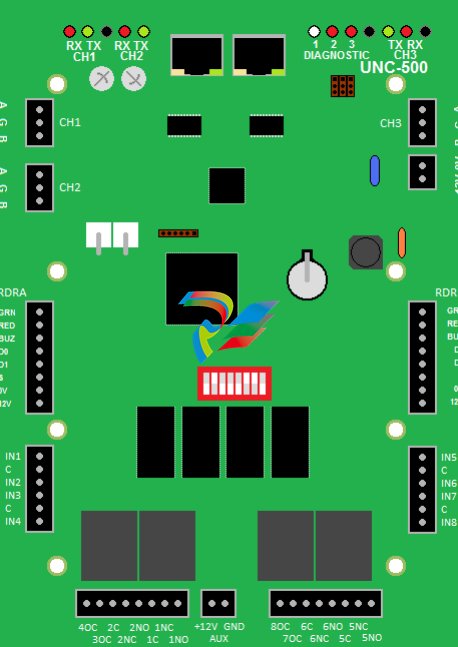
Connection Details
Power Input
The UNC500 controller requires 13.8vdc to be supplied from an external source.
CH1 RS485 (HOST)
The Host port connects the UNC500 to a PC through an RS485 interface.
CH2 RS485 (D-NET)
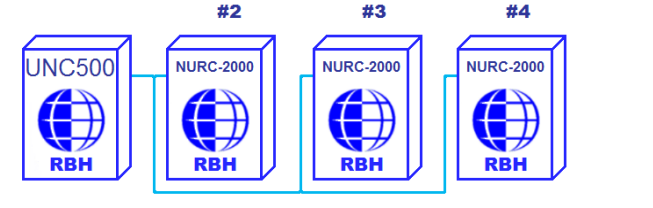
The D-NET (Device Network) connects local device controllers (RC-2, IOC-16,
SafeSuite Panels, NRC2000, or NURC2000) to the UNC500 controller on a high-speed
bi-directional RS485 network. Connect CH2 on the UNC500 to CH1 on the first device
controller, and then connect it to CH1 on the next device controller on the D-NET and so
on. (see the D-NET diagram on page16)
CH3 RS485 (NCNET)
The NCNET (Controller Network) connects the UNC500 controller to other on a highspeed bi-directional RS485 network. CH3 on the master controller connects to CH3 on
the next UNC500 on the network or to CH1 on the next NC-100 controller in the
network (if the Arcnet option is added). (see NCNET diagram on page14.)
DIP Switch Settings
The UNC500 DIP switch controls the device‟s address and serial port baud rate. The
system must be powered down if the controller address is changed using DIP switches 1
through 5. DIP switch changes for a change in baud rate are processed immediately and
do not require a power down.
Note: To Reset Panel – All DIP switches must be off.
DIP Switch
DIP Switch Function
1 - 5 Controller Address
6,7 Controller Baud Rate
8 not used
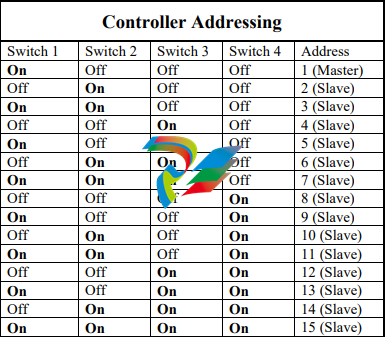
Controller Addressing
Use DIP switches 1, 2, 3, 4, and 5 to select the controller address. The address is binary
coded and the switch settings for all fifteen possible addresses are given below. The
fifth DIP Switch is not usable at this time
Master Controller
Each network must have a single unit designated as the master controller. The master
controller connects to the PC. Setting the DIP switch address to 1 will automatically
designate a unit as the master controller.
Slave Controller
All controllers addressed 2 through 15 are referred to as slave controllers.
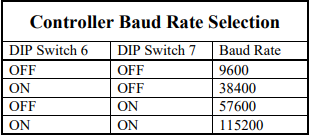
CH1 RS485 Port Baud Rate Selection (Master Only)
The controller's serial port baud rate is set with controller DIP switches 6 and 7. This
setting determines the speed used to communicate with the PC; the controller baud rate
must be the same as the baud rate set for the port within the AxiomV™ software. The
default baud rate is 9600.
PC Connection
The master controller is connected to either a serial port on the PC or through the local
Ethernet via a static IP address. The means of communication is configured in the
AxiomV™ software under Network Properties/Port Type.
RS485 Connection
The RS485 interface allows the distance between the controller and the PC to be up to
4000 feet (1200 meters) at 38.4k baud. RS485 requires a twisted pair cable 22AWG.
Termination is built into the UNC500 and the USB-RS485 module
PC to UNC500 Connection – RS485 Wiring
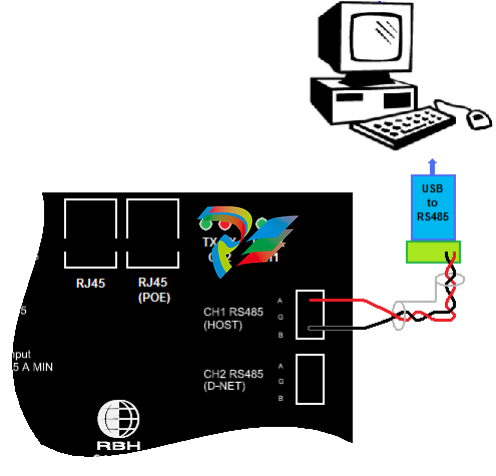
Cable Specification
Twisted pair, shielded, 18 to 22 AWG
Maximum Cable Length
4000 feet (1200 meters)
UNC500 TCP/IP Connection
The master controller in some installations may not be directly connected to the PC and
may be linked by the local Ethernet. The system supports a static IP address only
[default address is 192.168.168.125]. To change the IP address of the unit you can either
use IPLocator [a utility program provided by RBH] or Telnet.
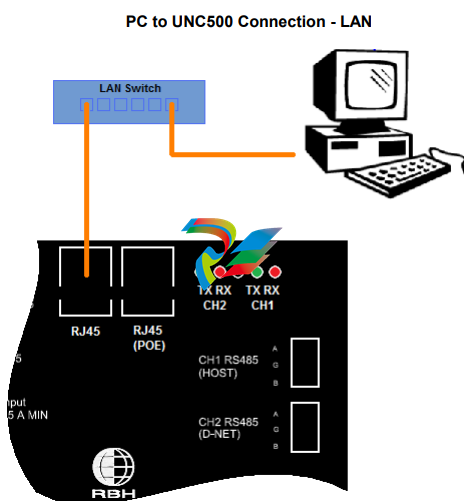
To program the UNC500 through Telnet you first have to set all DIP switches off.
Connect to the panel with an Ethernet cable and configure your computer to have IP
address 192.168.168.20 [remember to reconfigure your machine’s IP address back
when you are done]. In the „cmd‟ window type the following „telnet 192.168.168.125‟.
If a connection is made the following message will be displayed.
Telnet Opened on port 23
2 MEG RAM detected.
A password is required in order to change user parameters. The default password is
„password‟. The password can be changed by the user. After entering the password the
following items are available for the use to alter.
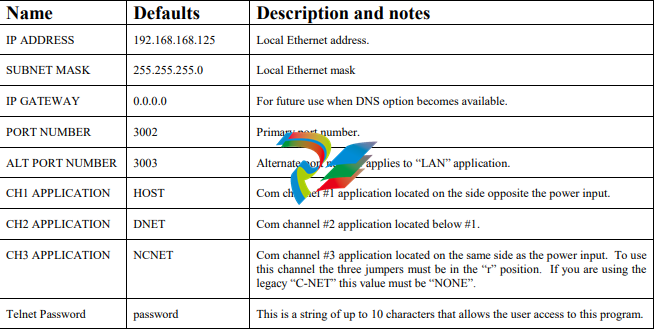
CNET (Controller Network)
Up to fifteen network controllers can be linked together and feed into a single
communication port on the PC. Controller number 1 is designated the master controller
and may be connected to the PC using serial or TCP/IP communications. The remaining
controllers are referred to as slaves and can only communicate to the PC through the
master unit.
NCNET (Controller Network)
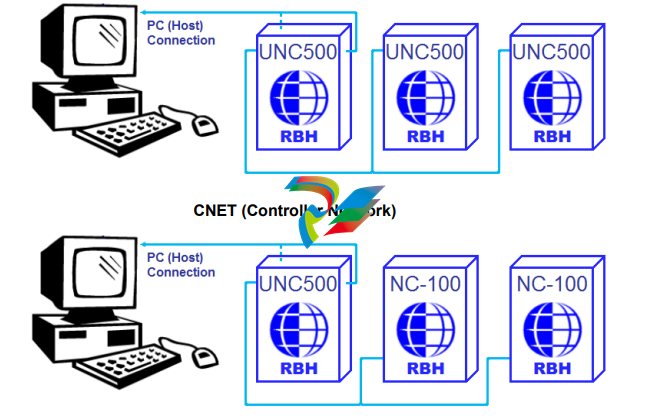
UNC500 controller can only be connected to NC-100 controller if the Arcnet option has
been added [C-Net]. To get the Arcnet to function you need to set jumpers JP5, JP6, &
JP7 to „A‟ (for Arcnet), and configure CH3 in the Telnet setup to be „none‟.
When combining UNC500s and NC100s; connect CH2 of the previous panel and CH1 of
the next panel to CH3 (C-NET) of the UNC500. Since the C-Net is a loop; the previous
panel to the first panel is the last panel, and the next panel from the last panel is the first
panel.
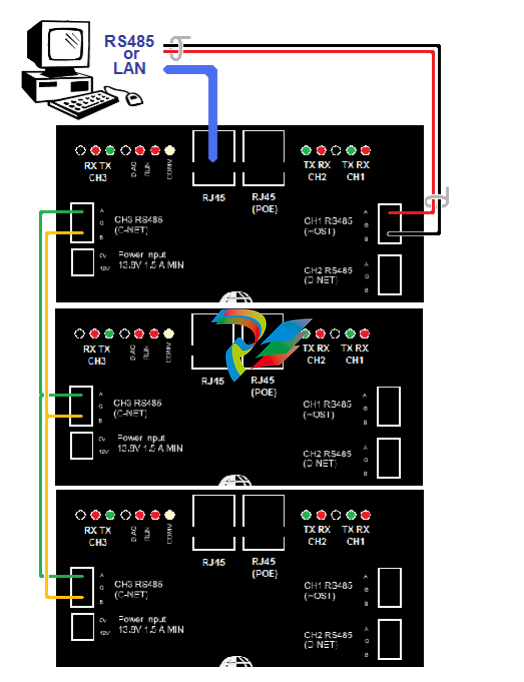
NCNET Cable
Use 20 to 22 AWG shielded stranded twisted pair cable for all C-NET connections.
NCNET Maximum Cable Length
The maximum distance for any link in the C-NET is 2500 feet (760 meters) and the total
length cannot exceed 10000 feet (3000 meters).
D-NET Device Network
Up to four RC-2 reader controllers, and up to sixteen IOC-16 input/output controllers,
may be connected to each network controller in the C-NET using high speed RS485
communications.
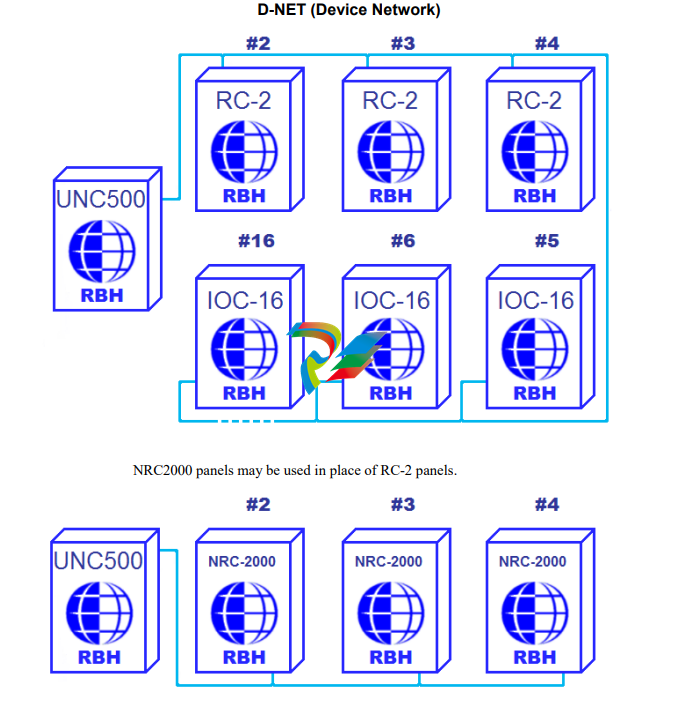
NURC2000 may also be used in place of RC-2 panels.
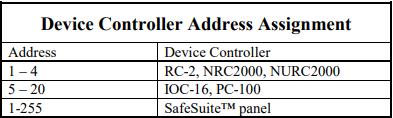
The D-NET connects IOC-16, RC-2, SafeSuite™ panels, PC-100, NRC2000, and
NURC2000 devices in a daisy chain fashion (parallel connection) to the network
controller. Device controllers do not have to be addressed sequentially. However, using
sequential device controller addressing is recommended as this makes your cabling
diagrams easier to follow and simplifies troubleshooting as the devices are in the correct
numerical sequence.
-
 DEIF RMF-112D Frequency relay
 -
 DEIF RMC-142D Current relay
 -
 DEIF RMC-132D Current relay
 -
 DEIF RMC-131D Current relay
 -
 DEIF RMC-122D Current relay
 -
 DEIF RMC-121D Current relay
 -
 DEIF RMC-111D Current relay
 -
 DEIF MVR-V211 Busbar Protection
 -
 DEIF MVR-T257 Transformer Differential Protection
 -
 DEIF MVR-T256 Transformer Differential Protection
 -
 DEIF MVR-T216 Transformer Differential Protection
 -
DEIF MVR-T215 Transformer Protection
-
 DEIF MVR-M257 Motor Differential Protection
 -
 DEIF MVR-M255 Motor Protection
 -
 DEIF MVR-M215 Motor Protection
 -
 DEIF MVR-M210 Motor Protection
 -
 DEIF MVR-G257 Generator Differential Protection
 -
 DEIF MVR-G215 Generator Protection
 -
 DEIF MVR-F255 Directional Feeder Protection
 -
 DEIF MVR-F215 Directional Feeder Protection
 -
DEIF MVR-F210 Feeder Protection
-
 DEIF MVR-F205 Directional Feeder Protection
 -
 DEIF MVR-F201 Basic Feeder Protection
 -
DEIF MVR-200 series Medium Voltage Relay
-
 DEIF MDR-2 Multi-differential relay
 -
 DEIF LMR-122D Loss of mains relay
 -
 DEIF LMR-111D Loss of mains relay
 -
 DEIF APU-4 Advanced G59 and G99 protection unit
 -
 DEIF iE 650 PLC - The most robust programmable automation controller available
 -
 DEIF iE 350 PLC - Programmable Automation PLC Controller
 -
 DEIF iE 250 PLC Versatile and modular intelligent energy PLC controller
 -
 DEIF PPM-3 EDG Protection and Power Management
 -
 DEIF AGC 3X 4198000234E AUTOMATIC GENSET CONTROLLER
 -
 SAUTER ASF123 Damper actuator with spring return
 -
SAUTER ASF122 Damper actuator with spring return
-
SAUTER ASF113F122 Damper actuator with spring return
-
SAUTER ASF113F120 Damper actuator with spring return
-
SAUTER ASF112F122 Damper actuator with spring return
-
SAUTER ASF112F120 Damper actuator with spring return
-
 SAUTER ASM 124/134 series - ASM134F130 Damper actuator
 -
SAUTER ASM 134 series - ASM134SF132 Damper actuator
-
SAUTER ASM 124/134 series - ASM124SF132 Damper actuator
-
SAUTER ASM 124/134 series - ASM124F122 Damper actuator
-
SAUTER ASM 124/134 series - ASM124F120 Damper actuator
-
 SAUTER Valve actuator ASM 105S/115S series ASM115SF152
 -
SAUTER Valve actuator ASM 105S/115S series ASM105SF152
-
SAUTER Valve actuator ASM 105S/115S series ASM115SF132
-
SAUTER Valve actuator ASM 105/115 series ASM105SF132
-
 SAUTER Valve actuator ASM 105/115 series ASM115F122
 -
SAUTER Valve actuator ASM 105/115 series ASM115F120
-
SAUTER Valve actuator ASM 105/115 series ASM105F122
-
SAUTER Valve actuator ASM 105/115 series ASM105F120
-
SAUTER Valve actuator ASM 105/115 series ASM105F10
-
 SAUTER AKF113S Rotating actuator AKF 112/113 series
 -
SAUTER AKF113F122 Rotating actuator AKF 112/113 series
-
SAUTER AKF113F120 Rotating actuator AKF 112/113 series
-
SAUTER AKF112F122 Rotating actuator AKF 112/113 series
-
SAUTER AKF112F120 Rotating actuator AKF 112/113 series
-
 SAUTER AKM115SAF332: Smart Actuator for ball valve, BACnet/IP
 -
 SAUTER AKM115SAF232 Rotating Actuator AKM 115SA Smart Actuator
 -
 SAUTER AKM115SF152 Rotating Actuator AKM 105S/115S Series
 -
SAUTER AKM115SF132 Rotating Actuator AKM 105S/115S Series
-
SAUTER AKM105SF132 Rotating Actuator AKM 105S/115S Series
-
 SAUTER AKM115F122 Rotating actuator AKM 105/115 series
 -
 SAUTER Rotating actuator AKM 105/115 series AKM115F120
 -
SAUTER Rotating actuator AKM 105/115 series AKM105F122
-
SAUTER Rotating actuator AKM 105/115 series AKM105F120
-
 SAUTER Continuous actuator for unit valves, with stroke AXS215S
 -
 SAUTER Linear valve actuator AXT/AXS series AXT211
 -
SAUTER Linear valve actuator AXT/AXS series AXT201
-
 SAUTER Linear valve actuator AXM/AXF series AXF217S
 -
SAUTER Linear valve actuator AXM/AXF series AXM217S
-
SAUTER AXM217SF404 is an electric actuator for unit valves.
-
SAUTER AXM217SF402 is an electric actuator for unit valves.
-
SAUTER Linear valve actuator AXM/AXF series AXM217
-
 SAUTER Linear valve actuator AVF 124/125 series AVF125S
 -
SAUTER Linear valve actuator AVF 124/125 series AVF124S
-
SAUTER Linear valve actuator AVF 124/125 series AVF124S
-
 SAUTER AVM322S-R Linear valve actuator AVM 234S series
 -
SAUTER AVM322-R Linear valve actuator AVM 234S series
-
SAUTER AVM322SF132 Linear valve actuator AVM 234S series
-
 SAUTER AVM321SF132 Linear Valve Actuator
 -
 GE Power Conversion P112-6053 Advanced Micro Controller (AMC2)
 -
GE Power Conversion P111-6053 Advanced Micro Controller (AMC2)
-
 GE Power Conversion P110-6053 Advanced Micro Controller (AMC2)
 -
 GE Power Conversion P122-6052 Advanced Micro Controller (AMC2)
 -
GE Power Conversion P121-6052 Advanced Micro Controller (AMC2)
-
 GE Power Conversion P112-6152 Advanced Micro Controller (AMC2)
 -
GE Power Conversion P110-6152 Advanced Micro Controller (AMC2)
-
GE Power Conversion P112-6052 Advanced Micro Controller (AMC2)
-
GE P106-6052 AMC2 Advanced Micro Controller Unit
-
SAUTER AVF234SF232 Linear valve actuator AVM 234S series
-
SAUTER AVF234SF132 Linear valve actuator AVM 234S series
-
 SAUTER Linear valve actuator AVM 234S series AVM234SF132-6
 -
SAUTER Linear valve actuator AVM 234S series AVM234SF132-5
-
SAUTER Linear valve actuator AVM 234S series AVM234SF132
-
SAUTER Linear valve actuator AVM215SF132-7
-
SAUTER Linear valve actuator AVM215SF132R
-
 Linear valve actuator AVM 115SA Smart Actuator AVM115SAF332
 -
Linear valve actuator AVM 115SA Smart Actuator AVM115SAF232
-
 SAUTER Linear valve actuator AVM 105S/115S series AVM115SF132
 -
SAUTER Linear valve actuator AVM 105S/115S series AVM105SF132
-
 SAUTER AVM115F901 Linear Valve Actuator
 -
SAUTER AVM115F122 Linear Valve Actuator
-
SAUTER AVM115F120 Linear Valve Actuator
-
SAUTER AVM105F122 Linear Valve Actuator
-
 SAUTER AVM105F120 Linear Valve Actuator
 -
 SAUTER AVM105F100 Linear Valve Actuator
 -
 AEROTECH SM Series High-Performance Stepper Motors
 -
 AEROTECH BLMSC Series Linear Motors
 -
 AEROTECH Custom Linear Motors
 -
 AEROTECH BMS Series Brushless, Slotless Rotary Motors
 -
 AEROTECH BM Series Brushless Rotary Motors
 -
 AEROTECH BLMX Series Linear Motors
 -
 AEROTECH BLMH Series Linear Motors
 -
 AEROTECH BLM Series Linear Motors
 -
 AEROTECH BLMC Series Linear Motors
 -
 AEROTECH BLMUC-143 Linear motor forcer with thermistor
 -
AEROTECH BLMUC-111 Linear motor forcer with thermistor
-
AEROTECH BLMUC-95 Linear motor forcer with thermistor
-
AEROTECH BLMUC-79 Linear motor forcer with thermistor
-
AEROTECH BLMUC Series Linear Motors
-
 AEROTECH Automation1 FLEX Distributed Amplifier Multi-Axis Servo Control System
 -
 AEROTECH Automation1 HXA4 6-Axis Hexapod Servo Drive
 -
 AEROTECH Automation1 iHXA4 6-Axis Hexapod Servo Drive with Motion Controller
 -
 AEROTECH Modular System Control Console
 -
 AEROTECH TV Series Transformers
 -
 AEROTECH TM Series Transformers


