DELIFGenerator Paralleling Controller, GPC-3 - Generator Protection Unit, GPU-3/ GPU-3 Hydro - Paralleling and Protection Unit, PPU-3
1.1 Warnings, legal information and safety
1.1.1 Warnings and notes
Throughout this document, a number of warnings and notes with helpful user information will be presented. To ensure that these are
noticed, they will be highlighted as follows in order to separate them from the general text.
Warnings
DANGER!
This highlights dangerous situations. If the guidelines are not followed, these situations could result in death, serious
personal injury, and equipment damage or destruction.
CAUTION
This highlights potentially dangerous situations. If the guidelines are not followed, these situations could result in personal
injury or damaged equipment.
Notes
INFO
Notes provide general information, which will be helpful for the reader to bear in mind.
1.1.2 Legal information and disclaimer
DEIF takes no responsibility for installation or operation of the generator set or switchgear. If there is any doubt about how to install
or operate the engine/generator or switchgear controlled by the Multi-line 2 unit, the company responsible for the installation or the
operation of the equipment must be contacted.
NOTE The Multi-line 2 unit is not to be opened by unauthorised personnel. If opened anyway, the warranty will be lost.
Disclaimer
DEIF A/S reserves the right to change any of the contents of this document without prior notice.
The English version of this document always contains the most recent and up-to-date information about the product. DEIF does not
take responsibility for the accuracy of translations, and translations might not be updated at the same time as the English document.
If there is a discrepancy, the English version prevails.
1.1.3 Safety issues
Installing and operating the Multi-line 2 unit may imply work with dangerous currents and voltages. Therefore, the installation should
only be carried out by authorised personnel who understand the risks involved in working with live electrical equipment.
DANGER!
Be aware of the hazardous live currents and voltages. Do not touch any AC measurement inputs as this could lead to injury
or death.
1.1.4 Electrostatic discharge awareness
Sufficient care must be taken to protect the terminal against static discharges during the installation. Once the unit is installed and
connected, these precautions are no longer necessary.
1.1.5 Factory settings
The Multi-line 2 unit is delivered from factory with certain factory settings. These are based on average values and are not
necessarily the correct settings for matching the engine/generator set in question. Precautions must be taken to check the settings
before running the engine/generator set.
1.2 About the Operator's Manual
1.2.1 General purpose
This Operator's Manual mainly includes general product information, display readings, push-button and LED functions, alarm
handling descriptions and presentation of the log list.
The general purpose of this document is to give the operator important information to be used in the daily operation of the unit.
DANGER!
Please make sure to read this document before starting to work with the Multi-line 2 unit and the generator set to be
controlled. Failure to do this could result in human injury or damage to the equipment.
1.2.2 Intended users
This Operator's Manual is mainly intended for the daily user. On the basis of this document, the operator will be able to carry out
simple procedures such as start/stop and control of the generator set.
1.2.3 Contents and overall structure
This document is divided into chapters, and in order to make the structure simple and easy to use, each chapter will begin from the
top of a new page.
2.1 General
This chapter deals with the display unit including the push-button and LED functions.
2.2 Display (DU-2) layouts
INFO
The display dimensions are H × W = 115 × 220 mm (4.528” × 9.055”).
2.2.1 GPC
GPC – standard
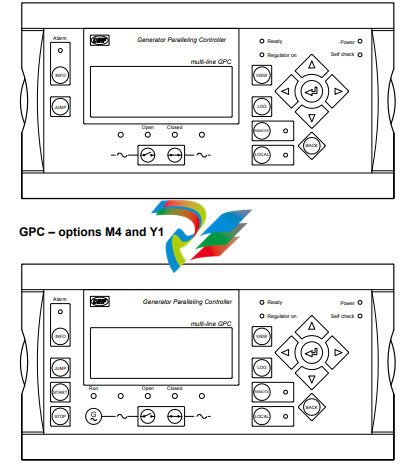
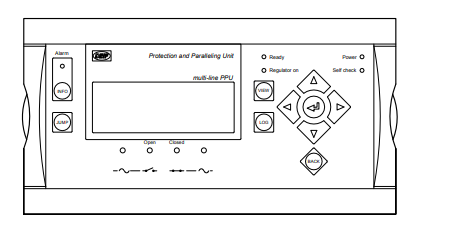
2.3 Display push-buttons and LEDs
2.3.1 Push-button functions
The functions for all display push-buttons are described below:
INFO: Moves directly to the alarm list where all unacknowledged and present alarms are displayed.
JUMP: Enters a specific menu number selection. All settings have a specific number attached to them. The JUMP button
enables the user to select and display any setting without having to navigate through the menus.
VIEW: Shifts the first line displaying in the setup menus. Push two seconds to switch to master display in case more than
one display is connected (master password is required).
LOG: Jumps directly to the event and alarm log.
Moves the cursor left for manoeuvring in the menus.
Increases the value of the selected set point (in the setup menu). In daily use, this button function is used to switch
between displayed percentage or real value of produced power (kW), reactive power (kvar) and apparent power
(kVA) in View 3 (V3).
Selects the underscored entry in the fourth line of the display.
Decreases the value of the selected set point (in the setup menu). In daily use, this button function is used to switch
between displayed percentage or real value of produced power (kW), reactive power (kvar) and apparent power
(kVA) in View 3 (V3).
Moves the cursor right for manoeuvring in the menus.
-
 BACHMANN MBUS201-Master Feldbusmodul - Adapter
-
 BACHMANN SEM201 SERCOS Master Modul
-
 BACHMANN DNM201 DeviceNet-Master
-
 BACHMANN DPM200 PROFIBUS®-DP-Master-Modul
-
 BACHMANN CM202 CAN-Interface-Modul
-
 BACHMANN CS200/x Buskoppler für M200-Module
-
 BACHMANN ERS202 Ethernet-Remote-Station
-
 BACHMANN RS204 Schnittstellenmodul
-
 BACHMANN EM213 Industrie-Ethernet-Master
-
 BACHMANN PVA208 Proportionalventilverstärker
-
 BACHMANN PVA204 Proportionalventilverstärker
-
 BACHMANN ACR222/2 Schrittmotormodul
-
 BACHMANN PWM202 Pulsweitenmodulationsmodul
-
 BACHMANN ISI222/x Positioniermodul
-
 BACHMANN CNT204/x Zählermodule
-
 BACHMANN DMS202 Dehnmessstreifen-Eingangsmodul
-
 BACHMANN TI214/x Temperaturerfassungsmodul
-
 BACHMANN PTAI216 Temperaturerfassungsmodul
-
 BACHMANN AO204/SI Analog-Ausgangsmodule
-
 BACHMANN AO202/SI Analog-Ausgangsmodul
-
BACHMANN AO202 Analog-Ausgangsmodul
-
 BACHMANN AI204/x Analog-Eingangsmodule
-
 BACHMANN AI208/SI Analog-Eingangsmodul
-
 BACHMANN AI204/SI Analog-Eingangsmodul
-
 BACHMANN AI202/SI Analog-Eingangsmodul
-
 BACHMANN AIO288/x Analog-Ein-/Ausgangsmodule
-
 BACHMANN AIO208/SI Universal-Analog-Ein-/Ausgangsmodul
-
 BACHMANN AIO204/SI Universal-Analog-Ein-/Ausgangsmodul
-
 BACHMANN AIO202/SI Universal-Analog-Ein-/Ausgangsmodul
-
 BACHMANN AIO216 Universal-Analog-Ein-/Ausgangsmodul
-
 BACHMANN AIO208 Universal-Analog-Ein-/Ausgangsmodul
-
 BACHMANN AIC214 Schwingungssensor-Eingangsmodul
-
 BACHMANN AIC206 Schwingungssensor-Eingangsmodull
-
 BACHMANN GIO212 Universal-Ein-/Ausgangsmodul
-
 BACHMANN DOR206/230 Digital-Relais-Ausgangsmodul
-
 BACHMANN DIO280 Digital-Ein-/Ausgangsmodul
-
 BACHMANN DIO264 Digital-Ein-/Ausgangsmodul
-
 BACHMANN DIO248 Digital-Ein-/Ausgangsmodul
-
 BACHMANN DIO232 Digital-Ein-/Ausgangsmodul
-
 BACHMANN DIO216/x Digital-Ein-/Ausgangsmodul
-
 BACHMANN DO232 Digital-Ausgangsmodul
-
 BACHMANN DO216 Digital-Ausgangsmodul
-
 BACHMANN DI232/x Digital-Eingangsmodul
-
 BACHMANN DI216 Digital-Eingangsmodul
-
 BACHMANN MC200 Prozessormodule
-
 BACHMANN MX200 Prozessormodule
-
 Beckhoff FC9002 | Ethernet card, 2 channels, PCI
-
 Beckhoff FC7502 | Sercos II master card, 2 channels, PCI™
-
 Beckhoff FC7501 | Sercos II master card, 1 channel, PCI™
-
 Beckhoff FC5322 | CAN FD card, 2 channels, PCIe® x1
-
 Beckhoff FC5321 | CAN FD card, 1 channel, PCIe® x1
-
 Beckhoff FC5202 | DeviceNet®, master/slave card, 2 channels, PCI™
-
 Beckhoff FC5201 | DeviceNet® master/slave card, 1 channel, PCI™
-
 Beckhoff FC5122 | CANopen master/slave card, 2 channels, PCIe® x1
-
 Beckhoff FC5121 | CANopen master/slave card, 1 channel, PCIe® x1
-
 Beckhoff FC5102 | CANopen master/slave card, 2 channels, PCI™
-
 Beckhoff FC5101 | CANopen master/slave card, 1 channel, PCI™
-
 Beckhoff FC3122 | PROFIBUS master/slave card, 2 channels, PCIe® x1
-
 Beckhoff FC3121 | PROFIBUS master/slave card, 1 channel, PCIe® x1
-
 Beckhoff FC3102 | PROFIBUS master/slave card, 2 channels, PCI™
-
 Beckhoff FC3101 | PROFIBUS master/slave card, 1 channel, PCI™
-
 Beckhoff FC1428 | EtherCAT G master card, 8 channels, PCIe® x4
-
 Beckhoff FC1121 | EtherCAT slave card, 1 channel, PCIe® x1
-
 Beckhoff FC1100 | EtherCAT slave card, 1 channel, PCI™
-
 Beckhoff FC1028 | EtherCAT master card, 16 channels, PCIe® x4
-
 Beckhoff FC9062 | Gigabit Ethernet PCIe® module, 2-channel
-
 Beckhoff C9900-R266 | NOVRAM PCIe® module
-
Beckhoff FC3161 | PROFIBUS master/slave PCIe® module, 1 channel
-
 Beckhoff C9900-E301 | RS232 PCIe® module, 2 channels
-
 Beckhoff C9900-E277 | USB 3.0 PCIe® module, 2 channels
-
 Beckhoff C9900-E276 | PCIe® module for CP-Link 4 – The Two Cable Display Link
-
 Beckhoff C9900-E271 | USB Extender 2.0 Tx PCIe® module, 1 channel
-
 Beckhoff CU8803-000x | Transmitter box for CP-Link 4 – The One Cable Display Link
-
 Beckhoff CU8802-000x | Transmitter box for CP-Link-4 – The Two Cable Display Link
-
 Beckhoff CU8851 | USB extension, USB Extended 2.0 receiver box
-
 Beckhoff CU8801-0000 | USB extension, USB Extended 2.0 transmitter box
-
 Beckhoff CU8880-0010 | Ethernet controller with USB input
-
 Beckhoff CU8871 | USB CFast slot
-
 Beckhoff CU8870 | USB CompactFlash® slot
-
 Beckhoff CU8815 | DVI splitter
-
 Beckhoff CU8810-0010 | DVI splitter with USB extender
-
 Beckhoff CU8006 | 4-port USB 3.0 hub
-
 Beckhoff C9900-U332-0010 | Battery pack
-
 Beckhoff C9900-U330 | Battery pack
-
 Beckhoff C6670-0010 | Control cabinet industrial server
-
 Beckhoff C6670-0020 | Control cabinet industrial server
-
 Beckhoff C6240-0070 | Control cabinet Industrial PC
-
 Beckhoff C6240-0080 | Control cabinet Industrial PC
-
 Beckhoff C6675-0060 | Control cabinet Industrial PC
-
 Beckhoff C6675-0070 | Control cabinet Industrial PC
-
 Beckhoff C6650-0050 | Control cabinet Industrial PC
-
 Beckhoff C6650-0070 | Control cabinet Industrial PC
-
 Beckhoff C6640-0060 | Control cabinet Industrial PC
-
 Beckhoff C6640-0070 | Control cabinet Industrial PC
-
 Beckhoff C5210-0030 | 19-inch slide-in Industrial PC
-
 Beckhoff C5210-0040 | 19-inch slide-in Industrial PC
-
Beckhoff C5210-0050 | 19-inch slide-in Industrial PC
-
 Beckhoff C5240-0010 | 19-inch slide-in Industrial PC
-
 Beckhoff C5240-0030 | 19-inch slide-in Industrial PC
-
 Beckhoff C7015-0020 | Ultra-compact Industrial PC in IP65
-
Beckhoff C7015-0030 | Ultra-compact Industrial PC in IP65
-
 Beckhoff C6525-0060 | Fanless built-in Industrial PC
-
 Beckhoff C6525-0070 | Fanless built-in Industrial PC
-
 Beckhoff C6525-0080 | Fanless built-in Industrial PC
-
 Beckhoff C6515-0060 | Fanless built-in Industrial PC
-
 Beckhoff C6515-0070 | Fanless built-in Industrial PC
-
 Beckhoff C6515-0080 | Fanless built-in Industrial PC
-
 Beckhoff C6043-0090 | Ultra-compact Industrial PC with NVIDIA® GPU
-
 Beckhoff C6040-0090 | Ultra-compact Industrial PC
-
 Beckhoff C6032-0060 | Ultra-compact Industrial PC
-
Beckhoff C6032-0070 | Ultra-compact Industrial PC
-
 Beckhoff C6032-0080 | Ultra-compact Industrial PC
-
 Beckhoff C6030-0070 | Ultra-compact Industrial PC
-
 Beckhoff C6030-0080 | Ultra-compact Industrial PC
-
 Beckhoff C6027-0000 | Fanless ultra-compact Industrial PC
-
 Beckhoff C6027-0010 | Fanless ultra-compact Industrial PC
-
 Beckhoff C6025-0000 | Fanless ultra-compact Industrial PC
-
 Beckhoff C6025-0010 | Fanless ultra-compact Industrial PC
-
 Beckhoff C6025-0020 | Fanless ultra-compact Industrial PC
-
 Beckhoff C6930-0060 | Control cabinet Industrial PC
-
 Beckhoff C6930-0070 | Control cabinet Industrial PC
-
 Beckhoff C6930-0080 | Control cabinet Industrial PC
-
 Beckhoff C6925-0030 | Fanless control cabinet Industrial PC
-
Beckhoff C6925-0040 | Fanless control cabinet Industrial PC
-
 Beckhoff C6915-0010 | Fanless control cabinet Industrial PC
-
Beckhoff C6915-0020 | Fanless control cabinet Industrial PC
-
 Beckhoff C6905-0010 | Economy control cabinet Industrial PC
-
 Beckhoff C6905-0020 Economy control cabinet Industrial PC