DOOSANDOOSAN AC SERVO MOTOR/DRIVE VISION DVSC - TM Series
Installation and wiring
1.1. Designations
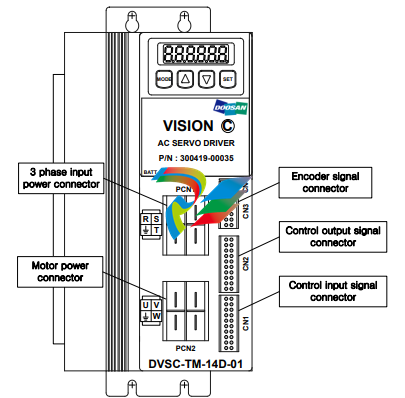
Designations of DOOSAN AC Servo Motor and Drive are as follows.
Please refer to this section for system installation and after service.
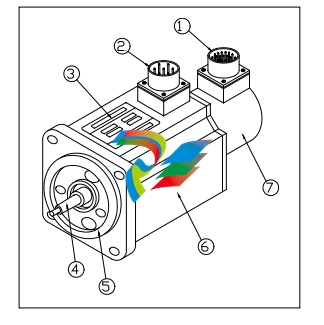
1)Encoder Connector 2)Power Connector 3)Name Plate 4)Shaft 5 )Flange 6 )Frame 7 )Encoder
1.2. Environmental conditions
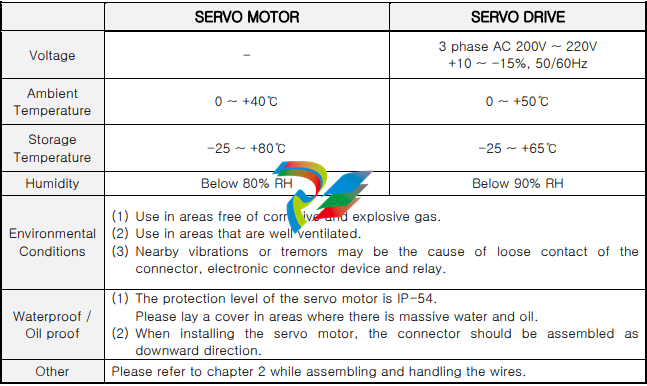
This product was designed for indoor usage.
Caution : If used in different circumstances and environment other than stated below, damages
may occur.
Please use under the following conditions.
1.3. Installation method
1.3.1. Assembling of the servo motor
▷ Warning: While assembling the servo motor, avoid dropping it.
▷ Caution: While mounting the servo motor horizontally, the connector should be assembled
facing downward.
▷ The servo motor can be mounted horizontally or vertically.
▷ To prevent vibrations and extend the life of coupling and bearing, the motor shaft and the loading
shaft should be precisely aligned. Use flexible coupling when connecting directly to the load.
① The outer part of the coupling should be measured at four equidistant points each 90˚ apart,
and the gap between the maximum and the minimum readings should not exceed 0.03㎜.
② The center point of the motor and the loading shaft should be precisely aligned.
▷ Avoid excessive radial and thrust load to the motor shaft and also avoid impact that is more
than 10G when mounting the gear, coupling, pulley and etc. at the same time.
▷ A minus load means continuous operation in the regenerative braking state, when the motor is
rotated by load. The regenerative braking capacity of the servo drive is short term rated
specification equivalent to stop time of the motor. Thus, it should not be used in minus load that
generates continuous regenerative braking.
ex) Servo system for descending objects(without counterweight)
▷ The admissible load inertia into the motor shaft is within 5 times than the inertia of applied servo
motor. If it exceeds this, during deceleration it may cause regenerative malfunction.
The following steps should be taken if the load inertia exceeds more than 5 times the inertia of
the servo motor.
- Reduce the current limit. – Decelerate slowly.(Slow Down)
- Lower the maximum speed in use.
1.3.2. Mounting of the servo drive
▷ Warning: To prevent electric shock, turn off the power while mounting or uninstalling.
▷ While installing the panel, the size of the panel, cooling and wiring should be considered in
order to maintain a difference of temperature below 5℃ between the panel temperature and the
surrounding temperature in accordance with heat value of the equipment and box size.
▷ If a heating element is placed nearby, the surrounding temperature of the servo drive should be
maintained below 55℃ at all cases despite temperature rise by convection and radiation. Use a
fan to ventilate sealed inner air, and proper ventilation should be used for convection of the air.
▷ If a vibrating element is placed nearby, the drive should be mounted on shock absorbing surface.
▷ If the servo drive be exposed to corrosive gas for a long time, may cause damages to connecting
devices such as relay and circuit breaker, thus it should be avoided.
▷ Environmental conditions such as high temperature, high humidity, excessive dust and metal
particles should be avoided.
◆ Mounting method
▷ There should be a space wider than 100㎜ below and above the servo drive.
▷ There should be a space wider than 30㎜ on both sides of the servo drive.
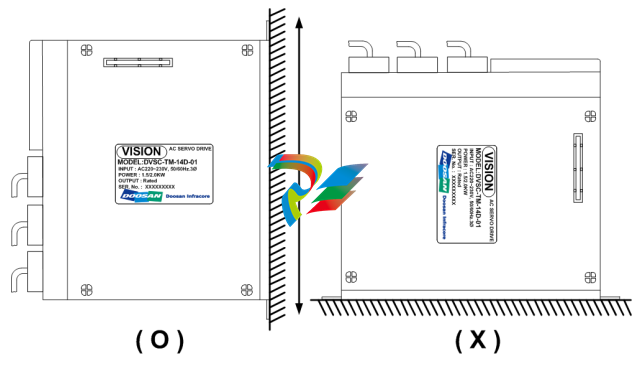
▷ Mount the servo drive vertically. Do not use if it is mounted horizontally.
1.4. Wiring
▶ For signal lines and encoder lines, use twisted lines or multi-core shielded twisted-pair lines.
The length for command input lines should be maximum 3m, and the encoder line should be
maximum 10m or less.
Wiring must be done in shortest distance and the remaining length should be cut.
▶ The ground circuit should be a thick line. Usage of third-class grounding or above (ground
resistance 100Ω or less) is recommended. Also, make sure to ground at one-point grounding.
▶ The following precautions should be taken to avoid malfunction due to noise.
- The noise filter should be placed as near as possible.
- Mount a surge absorber to the coil of the relay, electromagnetic contacts, solenoids and etc.
- The power line (AC input, motor input line) and the signal line should be placed 30㎝ apart
or more. Do not put them into the same duct or tie them in a bundle.
- If the power source of the servo drive is used in common with an electric welder or electrical
discharge machine, or a high-frequency noise source is present, attach noise filter to the
power or the input circuits.
- Since the core wire of the signal line cable is as thin as only 0.2 ~ 0.3㎟, excessive force to the
line should be avoided to prevent damages.
1.5. Noise treatment
For wiring and grounding of the servo drive, the effect of switching noise which is generated by the
built-in IPM should be reduced as much as possible. Unexpected effect by outside noise should be
reduced as much as possible.
▶ Grounding method
The servo drive supplies power to the motor according to the switching of the IPM device.
Thus the Cf dv/dt current flows from the power component to the floating capacity of the motor.
-
 BACHMANN MBUS201-Master Feldbusmodul - Adapter
-
 BACHMANN SEM201 SERCOS Master Modul
-
 BACHMANN DNM201 DeviceNet-Master
-
 BACHMANN DPM200 PROFIBUS®-DP-Master-Modul
-
 BACHMANN CM202 CAN-Interface-Modul
-
 BACHMANN CS200/x Buskoppler für M200-Module
-
 BACHMANN ERS202 Ethernet-Remote-Station
-
 BACHMANN RS204 Schnittstellenmodul
-
 BACHMANN EM213 Industrie-Ethernet-Master
-
 BACHMANN PVA208 Proportionalventilverstärker
-
 BACHMANN PVA204 Proportionalventilverstärker
-
 BACHMANN ACR222/2 Schrittmotormodul
-
 BACHMANN PWM202 Pulsweitenmodulationsmodul
-
 BACHMANN ISI222/x Positioniermodul
-
 BACHMANN CNT204/x Zählermodule
-
 BACHMANN DMS202 Dehnmessstreifen-Eingangsmodul
-
 BACHMANN TI214/x Temperaturerfassungsmodul
-
 BACHMANN PTAI216 Temperaturerfassungsmodul
-
 BACHMANN AO204/SI Analog-Ausgangsmodule
-
 BACHMANN AO202/SI Analog-Ausgangsmodul
-
BACHMANN AO202 Analog-Ausgangsmodul
-
 BACHMANN AI204/x Analog-Eingangsmodule
-
 BACHMANN AI208/SI Analog-Eingangsmodul
-
 BACHMANN AI204/SI Analog-Eingangsmodul
-
 BACHMANN AI202/SI Analog-Eingangsmodul
-
 BACHMANN AIO288/x Analog-Ein-/Ausgangsmodule
-
 BACHMANN AIO208/SI Universal-Analog-Ein-/Ausgangsmodul
-
 BACHMANN AIO204/SI Universal-Analog-Ein-/Ausgangsmodul
-
 BACHMANN AIO202/SI Universal-Analog-Ein-/Ausgangsmodul
-
 BACHMANN AIO216 Universal-Analog-Ein-/Ausgangsmodul
-
 BACHMANN AIO208 Universal-Analog-Ein-/Ausgangsmodul
-
 BACHMANN AIC214 Schwingungssensor-Eingangsmodul
-
 BACHMANN AIC206 Schwingungssensor-Eingangsmodull
-
 BACHMANN GIO212 Universal-Ein-/Ausgangsmodul
-
 BACHMANN DOR206/230 Digital-Relais-Ausgangsmodul
-
 BACHMANN DIO280 Digital-Ein-/Ausgangsmodul
-
 BACHMANN DIO264 Digital-Ein-/Ausgangsmodul
-
 BACHMANN DIO248 Digital-Ein-/Ausgangsmodul
-
 BACHMANN DIO232 Digital-Ein-/Ausgangsmodul
-
 BACHMANN DIO216/x Digital-Ein-/Ausgangsmodul
-
 BACHMANN DO232 Digital-Ausgangsmodul
-
 BACHMANN DO216 Digital-Ausgangsmodul
-
 BACHMANN DI232/x Digital-Eingangsmodul
-
 BACHMANN DI216 Digital-Eingangsmodul
-
 BACHMANN MC200 Prozessormodule
-
 BACHMANN MX200 Prozessormodule
-
 Beckhoff FC9002 | Ethernet card, 2 channels, PCI
-
 Beckhoff FC7502 | Sercos II master card, 2 channels, PCI™
-
 Beckhoff FC7501 | Sercos II master card, 1 channel, PCI™
-
 Beckhoff FC5322 | CAN FD card, 2 channels, PCIe® x1
-
 Beckhoff FC5321 | CAN FD card, 1 channel, PCIe® x1
-
 Beckhoff FC5202 | DeviceNet®, master/slave card, 2 channels, PCI™
-
 Beckhoff FC5201 | DeviceNet® master/slave card, 1 channel, PCI™
-
 Beckhoff FC5122 | CANopen master/slave card, 2 channels, PCIe® x1
-
 Beckhoff FC5121 | CANopen master/slave card, 1 channel, PCIe® x1
-
 Beckhoff FC5102 | CANopen master/slave card, 2 channels, PCI™
-
 Beckhoff FC5101 | CANopen master/slave card, 1 channel, PCI™
-
 Beckhoff FC3122 | PROFIBUS master/slave card, 2 channels, PCIe® x1
-
 Beckhoff FC3121 | PROFIBUS master/slave card, 1 channel, PCIe® x1
-
 Beckhoff FC3102 | PROFIBUS master/slave card, 2 channels, PCI™
-
 Beckhoff FC3101 | PROFIBUS master/slave card, 1 channel, PCI™
-
 Beckhoff FC1428 | EtherCAT G master card, 8 channels, PCIe® x4
-
 Beckhoff FC1121 | EtherCAT slave card, 1 channel, PCIe® x1
-
 Beckhoff FC1100 | EtherCAT slave card, 1 channel, PCI™
-
 Beckhoff FC1028 | EtherCAT master card, 16 channels, PCIe® x4
-
 Beckhoff FC9062 | Gigabit Ethernet PCIe® module, 2-channel
-
 Beckhoff C9900-R266 | NOVRAM PCIe® module
-
Beckhoff FC3161 | PROFIBUS master/slave PCIe® module, 1 channel
-
 Beckhoff C9900-E301 | RS232 PCIe® module, 2 channels
-
 Beckhoff C9900-E277 | USB 3.0 PCIe® module, 2 channels
-
 Beckhoff C9900-E276 | PCIe® module for CP-Link 4 – The Two Cable Display Link
-
 Beckhoff C9900-E271 | USB Extender 2.0 Tx PCIe® module, 1 channel
-
 Beckhoff CU8803-000x | Transmitter box for CP-Link 4 – The One Cable Display Link
-
 Beckhoff CU8802-000x | Transmitter box for CP-Link-4 – The Two Cable Display Link
-
 Beckhoff CU8851 | USB extension, USB Extended 2.0 receiver box
-
 Beckhoff CU8801-0000 | USB extension, USB Extended 2.0 transmitter box
-
 Beckhoff CU8880-0010 | Ethernet controller with USB input
-
 Beckhoff CU8871 | USB CFast slot
-
 Beckhoff CU8870 | USB CompactFlash® slot
-
 Beckhoff CU8815 | DVI splitter
-
 Beckhoff CU8810-0010 | DVI splitter with USB extender
-
 Beckhoff CU8006 | 4-port USB 3.0 hub
-
 Beckhoff C9900-U332-0010 | Battery pack
-
 Beckhoff C9900-U330 | Battery pack
-
 Beckhoff C6670-0010 | Control cabinet industrial server
-
 Beckhoff C6670-0020 | Control cabinet industrial server
-
 Beckhoff C6240-0070 | Control cabinet Industrial PC
-
 Beckhoff C6240-0080 | Control cabinet Industrial PC
-
 Beckhoff C6675-0060 | Control cabinet Industrial PC
-
 Beckhoff C6675-0070 | Control cabinet Industrial PC
-
 Beckhoff C6650-0050 | Control cabinet Industrial PC
-
 Beckhoff C6650-0070 | Control cabinet Industrial PC
-
 Beckhoff C6640-0060 | Control cabinet Industrial PC
-
 Beckhoff C6640-0070 | Control cabinet Industrial PC
-
 Beckhoff C5210-0030 | 19-inch slide-in Industrial PC
-
 Beckhoff C5210-0040 | 19-inch slide-in Industrial PC
-
Beckhoff C5210-0050 | 19-inch slide-in Industrial PC
-
 Beckhoff C5240-0010 | 19-inch slide-in Industrial PC
-
 Beckhoff C5240-0030 | 19-inch slide-in Industrial PC
-
 Beckhoff C7015-0020 | Ultra-compact Industrial PC in IP65
-
Beckhoff C7015-0030 | Ultra-compact Industrial PC in IP65
-
 Beckhoff C6525-0060 | Fanless built-in Industrial PC
-
 Beckhoff C6525-0070 | Fanless built-in Industrial PC
-
 Beckhoff C6525-0080 | Fanless built-in Industrial PC
-
 Beckhoff C6515-0060 | Fanless built-in Industrial PC
-
 Beckhoff C6515-0070 | Fanless built-in Industrial PC
-
 Beckhoff C6515-0080 | Fanless built-in Industrial PC
-
 Beckhoff C6043-0090 | Ultra-compact Industrial PC with NVIDIA® GPU
-
 Beckhoff C6040-0090 | Ultra-compact Industrial PC
-
 Beckhoff C6032-0060 | Ultra-compact Industrial PC
-
Beckhoff C6032-0070 | Ultra-compact Industrial PC
-
 Beckhoff C6032-0080 | Ultra-compact Industrial PC
-
 Beckhoff C6030-0070 | Ultra-compact Industrial PC
-
 Beckhoff C6030-0080 | Ultra-compact Industrial PC
-
 Beckhoff C6027-0000 | Fanless ultra-compact Industrial PC
-
 Beckhoff C6027-0010 | Fanless ultra-compact Industrial PC
-
 Beckhoff C6025-0000 | Fanless ultra-compact Industrial PC
-
 Beckhoff C6025-0010 | Fanless ultra-compact Industrial PC
-
 Beckhoff C6025-0020 | Fanless ultra-compact Industrial PC
-
 Beckhoff C6930-0060 | Control cabinet Industrial PC
-
 Beckhoff C6930-0070 | Control cabinet Industrial PC
-
 Beckhoff C6930-0080 | Control cabinet Industrial PC
-
 Beckhoff C6925-0030 | Fanless control cabinet Industrial PC
-
Beckhoff C6925-0040 | Fanless control cabinet Industrial PC
-
 Beckhoff C6915-0010 | Fanless control cabinet Industrial PC
-
Beckhoff C6915-0020 | Fanless control cabinet Industrial PC
-
 Beckhoff C6905-0010 | Economy control cabinet Industrial PC
-
 Beckhoff C6905-0020 Economy control cabinet Industrial PC