
Understanding Loop Diagrams and Process Loop Sheets

From an installation and maintenance electrician’s point of view, two of the most useful types of drawings that can be included in a contract drawing set are loop diagrams and process loop sheets. These detail drawings show how each piece of equipment (e.g., instrument, motor starter, valve actuator, etc.) is to be wired to the control system. This article provides an overview of loop diagrams/process loop sheets and explains why creating and maintaining them is worth the effort.
From P&IDs to process loop sheets and diagrams
Piping and instrument diagrams (P&IDs) are developed at the beginning of a project to define the equipment, piping and automation and control components needed to implement a process, including the control loops. P&ID drawings provide an overall summary of the process. Together with facility layout drawings, the P&ID drawings provide an overall view of a facility, what it does and where the equipment is located. For large facilities, an additional set of drawings called process flow diagrams (PFDs) are sometimes created to summarize the P&IDs even further.
With the P&ID drawings in hand, the various design disciplines can create individual drawing sets to show how different aspects of the plant are to be built. These will include structural drawings, civil engineering drawings, architectural drawings, mechanical drawings, electrical drawings and so on. From an electrical and instrumentation/contro perspective, these drawing sets will also include electrical power distribution (lighting panels, MCCs) drawings, control panel drawings (e.g., PLC panels) and loop diagrams and/or process loop sheets.
The instrumentation/control designer determines whether to use loop diagrams or process loop sheets. They both provide similar guidance for installation and maintenance electricians but, depending on the project type, one may be a better fit than the other.
A process loop sheet (PLS) provides the details for loops by illustrating all the devices and equipment in an instrumentation loop, how the various pieces interact and how the process data is transmitted to the control room. It only provides summary information about the individual wiring details. Alternatively, this information can be arranged in a loop diagram (LD) format, where the same information is shown but in the form of more detailed wiring instructions on a wire-by-wire basis down to the terminal screw.
Depending on the contractor or maintenance team, either process loop sheets or loop diagrams may be more suitable. The chief takeaway is that it is better to work out the wiring details of instrumentation and control devices during design rather than during construction. It is much easier (and cheaper) to make design decisions than to have an electrician trying to sort out the design while the construction clock is ticking.
A water and wastewater example
For example, water and wastewater plants are typically designed to accommodate influent flow rates that are not consistent from one hour to the next. These flow rates are generally expressed as low flow rate, average daily flow rate, and maximum flow rate, and are indicated in the description blocks on the process loop sheet. In a typical water/ wastewater plant, there are generally pump stations, screenings and grit removal, clarifier filters, odor control, various types of chemical injections and storage tanks in the process loop, all of which may affect the flow rate. Flow, pressure and temperature measuring devices transmit data to local PLC/ DCS control panels that interface through software with operator workstations typically located in the central control room. The loop diagram shows the processes and equipment in the control loop, and the process loop sheet provides explanations and other essential information. Sometimes the loop diagram and process loop sheet are combined as a single drawing.
Throughout the life of the instrumentation system, including its construction, installation, commissioning and operations, process loop sheets are accessed by personnel in multiple disciplines in the enterprise, as well as vendors and contractors. It is a resource used to document and explain how the control system and its instrumentation, motor starters and valve actuators have been designed to operate and how they have been installed.
Due to the number of people using loop diagrams and process loop sheets, it is recommended to use a standardized symbol and nomenclature structure so everyone involved in the project can understand the components and the process. The best practice is to use the symbols and terminology developed by the International Society of Automation (ISA) and documented in ANSI/ISA-5.1-2022, Instrumentation Symbols and Identification. It is equally important to ensure that the information on the process loop sheets is complete. Also, as with any drawings, the sheet should be assigned a revision date and include the name of the designer who last updated and checked it.
Loop diagrams explained
Put succinctly, a loop diagram is a type of detail drawing that shows—on an instrumentby-instrument and device-by-device basis—how input/output (I/O) signals from equipment are to be wired to the control system. Loop diagrams show the specific wiring details down to the level of terminal screws, junction boxes, cable labels and wire labels.
Most loop drawings (see Figure 1) are produced using a computer-aided design (CAD) package or auto-generated by an advanced plant design software package. A loop diagram is usually focused on a specific instrument or device but may include multiple sensors/actuators if they are related to each other process-wise. The use of “typicals” (a generic diagram that applies to multiple instruments/devices) is not recommended, as it defeats the purpose of the loop diagram containing instrument/device-specific I/O addresses and wiring details. Loop diagrams are generally the same size as other drawings in the drawing package for the plant. For example, the use of B-size (11” × 17”), D-size (22” × 34”), or E-size (34” × 44”) drawings sizes are relatively common in North America.

Loop diagrams are not a new concept. ISA standard ISA-5.4-1991, Instrument Loop Diagrams, covers a general version focused on instrumentation I/O wiring. Commonly known as ISA-5.4, the ISA loop diagram standard has been around since the 1950s and includes many good examples and best practices for creating effective loop diagrams.
Process loop sheets versus loop diagrams. Process loop sheets, developed later, are a type of summarized loop diagram that includes additional process information. They are intended to help the installation and maintenance electricians install and troubleshoot equipment and provide additional context regarding its use. This context typically includes minimum and maximum temperatures, pressures, flows and other process values, along with expected signal values during start-up, shutdown, steady-state and at-rest conditions. For example, a process loop sheet for a magnetic flowmeter is shown in Figure 2. In the sample loop sheet, a flowmeter is reading the flow through a bar screen, totalizing it and then sending the reading to a PLC remote I/O panel. The reading is then used for various functions within the automation system.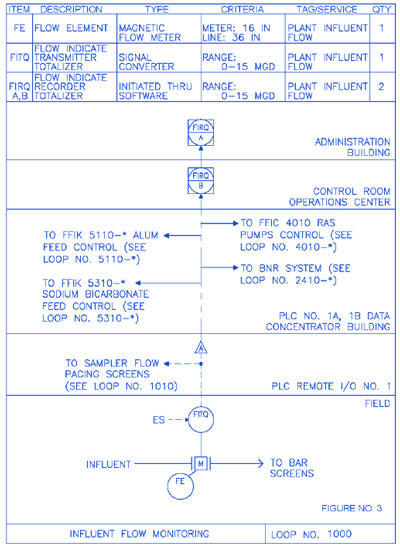
Benefits of loop diagrams. There are many benefits from taking the time to create loop diagrams during the detailed design phase of a project. A major benefit is the ability to identify and fix problems during the design phase rather than during construction. It is significantly less expensive to sort out a design issue during the design phase (when it is easy to fix on paper) than during the construction of a facility.
Examples of potential design issues for process equipment include mismatched I/O signals, wrong power supply voltages, misranged signal scaling, missing I/O signals and missing installation details. These problems can cause delays and cost overruns when they must be fixed during a project’s construction or commissioning phase.
In a typical capital project, it is not uncommon for an hour of work on-site during the construction phase to be up to 10 times more expensive than an hour of work during the paper-based design phase. Using a loop diagram during installation and maintenance can save thousands of dollars in terms of time savings and avoiding delays associated with investigation or troubleshooting.
For example, when installing a new motorized actuator with a loop diagram in hand, the electrical installation is as simple as hooking up the wires. The loop diagram provides a comprehensive guide for the installation electrician. The drawing will show what wires are needed, how to label them, and which I/O terminal screws to wire them to. The power connection details will also be shown. The loop diagram will also detail and summarize the voltages and scaling of all of the various signals.
If a loop diagram is not provided, the installation electrician will first have to search the PLC panel drawings to determine which I/O signals to wire to the actuator (if the descriptions in the PLC panel are clear). Next, they must review the motor control center (MCC) or lighting panel schedules to determine the intended power source for the device. Then the electrician will need to find the installation manual for the actuator (often not shipped with the actuator), to match the various terminals on the actuator with the requested I/O signals and power connections.
Because the design engineer has likely not looked at these signals together (i.e., there was no corresponding loop diagram to be subjected to QA/QC), often there will be minor I/O errors in the design. The electrician will need to resolve the errors on-site or issue a request for information (RFI) to the design team to obtain the necessary data. All of this is very time-consuming during the construction phase, and the contractors are under tremendous pressure to get the plant built.
Likewise, suppose an installed valve actuator requires troubleshooting. In an ideal situation, an as-built loop diagram or process loop sheet for the actuator will include all the information the maintenance electrician will need to check the power and signals to/from the actuator. (When a construction project is completed, the design engineer will prepare an updated set of the contract drawings called “as-built” or “for record” that captures the details of what was actually built verses the initial plans.) However, suppose there is no loop diagram for the actuator. The electrician will have to search through PLC panel drawings, other drawings and equipment manuals to determine how the actuator is wired and powered.
Often, if there are no loop diagrams, no drawing will exist that shows how the terminal screws of the valve actuator have been wired and what the terminals and configuration do. Thus, without a loop diagram, a simple 10-minute troubleshooting task can turn into hours of difficult trial-and-error troubleshooting to find the issue.
Process loop sheets may be drawn by hand or produced in a drawing application such as AutoCAD (see Figure 3). On small projects, the sheets can easily be attached to the contract specification documents or placed with the engineering specifications to create an efficient and manageable document.
A process loop sheet is typically divided into as many horizontal layers—from the bottom of the drawing to the top—as required to show the entire loop diagram from the field device (at the bottom) to the control room (at the top). The following paragraphs provide an overview of the example Process Loop Sheet shown in Figure 4.
The top layer, just below the equipment description blocks, is the control room or administrative office at the end of the loop. The field device is always located in the bottom layer with intermediate layers denoting the path between the device and the control room, such as local control panels, remote I/O cabinets, PLC or DCS panels, or a fiber optic communication system. Each device and piece of equipment is assigned a unique ID to indicate that it is in a specific instrument loop. Best practice is to use the ISA-5.1 standards for assignment instrument IDs. However some SCADA systems may use different labeling systems, so these labels should also included if applicable.
The process loop sheet example in Figure 4 contains additional installation, commissioning and troubleshooting information. The following paragraphs provide an explanation of the various pieces of information contained on this process loop sheet example.
Data fields. The process loop sheet contains fields where the designer can enter data. Each field contains a key piece of information about the device, instrument, or equipment connected to the control system. The loop name and number fields are located at the bottom of the sheet. The fields at the top of the form are referred to as description blocks. These blocks include detailed information about all the instruments and components in the loop diagram. A separate row is created for each instrument or device in the loop.
Loop name. This is a brief description of the process being monitored or controlled.
Loop number. This is a unique, four-digit number identifying the instrument loop.
Item. This is a unique, four-digit alpha identifier for each piece of field equipment in the loop. These identifiers, called instrument codes, are defined in the ISA-5.1 standard for instrumentation. Identifiers for other devices will be typically defined in an end-user-specific standard. It is important to note that there are many of the same types of instruments. That is why each device and piece of equipment should be assigned a unique ID that is only used once at the plant. For example, ISA-5.1 provides a method of doing this using loop numbers, but each plant may have its own internal convention. The important takeaway is that the identifier must be unique.
Description. This area explains the identifiers in the Item block. This block is valuable to anyone unfamiliar with ISA standard terminology and/or the plant’s instrument/ device tagging system.
Type. This block provides details about each device. For example, it may identify a flow element (FE) as either a magnetic flow meter, a Venturi flow tube, or an ultrasonic flow meter.
Criteria. This block contains requirements that are unique to the device or piece of equipment, such as the color of a pilot light lens, calibrated pressure, temperature, low-flow range requirements, elevations of level switches and analysis analyzer ranges. This block or the Type block may also contain information indicating which contractor is responsible for providing the device or piece of equipment. If there are special installation or commissioning requirements that are unique to a particular instrument, these will sometimes be also included on the process loop sheet.
Tag/service. This block is used to identify the item and what it does in the process. This is useful for an individual who does not understand the process or plant requirements, as well as someone assembling a control panel who must identify each piece of equipment on the panel by the process that is either being controlled or monitored.
Quantity. This is the number of items.For example, if multiple items of the same type are needed a quantity is listed rather than having multiple row entries. Likewise if similar, but slightly different, items are needed it is best to list them separately in separate rows.
The example process loop sheet in Figure 4 shows that the influent flow meter sends a 4–20 mA signal via analog output to all devices throughout the diagram. In addition to providing a flow rate signal to the control system, the meter also records the average daily flow and keeps a 24-hour record, a process known as totalizing (denoted by the “Q” in the ISA-style identifier tag). The A and B labels on the FIRQ symbols indicate that the same information is transmitted to both devices, meaning that there are devices that show the totalized flow in both the control room and the administration center.
The line types used on a process loop sheet are the same as those used on the process part of a loop diagram. That is, dashed lines for electrical signals and solid lines for piping. Figure 5 provides an overview of the line types commonly used to process loop sheets. The intent of using process loop sheets is to provide enough detailed information so that an installation electrician can know how to wire a piece of equipment and how it is used.

Further examples
Both loop diagrams and process loop sheets can range from simple to complex depending on the equipment (instrumentation, devices, control elements, etc.) they describe. The example of a complex loop diagram in Figure 6 is from ISA-5.4. It shows an orifice-plate-based flow transmitter (which uses a differential pressure transmitter to read the flow based on the pressure drop across an orifice plate) and a flow control valve on a pumped fill line to a tank.
The field I/O wiring passes through a junction box in a cable spreading room; there is another set of junction terminals at the rear of a panel; then, there is a flow controller/PLC shown in a front-facing panel. Though showing older technology, the diagram in Figure 6 shows the amount of wiring/installation details that can be included on a loop diagram.

Figure 7 shows a more complex process loop sheet. In this example, multiple I/O signals are wired to a chemical feed pump. The process loop sheet shows how the signals are wired from the pump to an interface junction box, to a fluoride system control panel, and then into a PLC system. Though it does not show the exact wire terminal details, it shows the flow of the signals so an installation or maintenance technician can easily see where the signals are being routed as part of the system.
Depending on the type and complexity of the project, it may be preferable to create a set of loop diagrams, a set of process loop sheets, or a combination of both. This will depend on the system designer and what they feel is necessary to provide clear instructions to the installation electrician for the system. Ideally, if both loop diagrams and process loop sheets are created, they can be used together to create an accurate account of how the system should be installed and how it has been installed once construction/commissioning is complete.
Summary
Loop diagrams and process loop sheets are two types of detail drawings that, though they take time to prepare, can result in considerable savings in the construction, installation and commissioning phases of a project. These savings result from the installation electrician having clear instructions on how to wire and test the system instead of doing the detailed wiring design on-the-fly in the field as part of the construction process.
The production of loop diagrams and process flow sheets also makes it possible for many design issues to be seen and rectified during the design phase rather than during construction. Though there is a cost to prepare these drawings, the benefits of having them greatly outweigh the preparation cost. Hence, many instrumentation professionals refer to loop diagrams and process loop sheets as the “instrumentation engineer’s goldmine”—they are worth their weight in gold when undertaking a project.Understanding Loop Diagrams and Process Loop Sheets
From an installation and maintenance electrician’s point of view, two of the most useful types of drawings that can be included in a contract drawing set are loop diagrams and process loop sheets. These detail drawings show how each piece of equipment (e.g., instrument, motor starter, valve actuator, etc.) is to be wired to the control system. This article provides an overview of loop diagrams/process loop sheets and explains why creating and maintaining them is worth the effort.
From P&IDs to process loop sheets and diagrams
Piping and instrument diagrams (P&IDs) are developed at the beginning of a project to define the equipment, piping and automation and control components needed to implement a process, including the control loops. P&ID drawings provide an overall summary of the process. Together with facility layout drawings, the P&ID drawings provide an overall view of a facility, what it does and where the equipment is located. For large facilities, an additional set of drawings called process flow diagrams (PFDs) are sometimes created to summarize the P&IDs even further.
With the P&ID drawings in hand, the various design disciplines can create individual drawing sets to show how different aspects of the plant are to be built. These will include structural drawings, civil engineering drawings, architectural drawings, mechanical drawings, electrical drawings and so on. From an electrical and instrumentation/contro perspective, these drawing sets will also include electrical power distribution (lighting panels, MCCs) drawings, control panel drawings (e.g., PLC panels) and loop diagrams and/or process loop sheets.
The instrumentation/control designer determines whether to use loop diagrams or process loop sheets. They both provide similar guidance for installation and maintenance electricians but, depending on the project type, one may be a better fit than the other.
A process loop sheet (PLS) provides the details for loops by illustrating all the devices and equipment in an instrumentation loop, how the various pieces interact and how the process data is transmitted to the control room. It only provides summary information about the individual wiring details. Alternatively, this information can be arranged in a loop diagram (LD) format, where the same information is shown but in the form of more detailed wiring instructions on a wire-by-wire basis down to the terminal screw.
Depending on the contractor or maintenance team, either process loop sheets or loop diagrams may be more suitable. The chief takeaway is that it is better to work out the wiring details of instrumentation and control devices during design rather than during construction. It is much easier (and cheaper) to make design decisions than to have an electrician trying to sort out the design while the construction clock is ticking.
A water and wastewater example
For example, water and wastewater plants are typically designed to accommodate influent flow rates that are not consistent from one hour to the next. These flow rates are generally expressed as low flow rate, average daily flow rate, and maximum flow rate, and are indicated in the description blocks on the process loop sheet. In a typical water/ wastewater plant, there are generally pump stations, screenings and grit removal, clarifier filters, odor control, various types of chemical injections and storage tanks in the process loop, all of which may affect the flow rate. Flow, pressure and temperature measuring devices transmit data to local PLC/ DCS control panels that interface through software with operator workstations typically located in the central control room. The loop diagram shows the processes and equipment in the control loop, and the process loop sheet provides explanations and other essential information. Sometimes the loop diagram and process loop sheet are combined as a single drawing.
Throughout the life of the instrumentation system, including its construction, installation, commissioning and operations, process loop sheets are accessed by personnel in multiple disciplines in the enterprise, as well as vendors and contractors. It is a resource used to document and explain how the control system and its instrumentation, motor starters and valve actuators have been designed to operate and how they have been installed.
Due to the number of people using loop diagrams and process loop sheets, it is recommended to use a standardized symbol and nomenclature structure so everyone involved in the project can understand the components and the process. The best practice is to use the symbols and terminology developed by the International Society of Automation (ISA) and documented in ANSI/ISA-5.1-2022, Instrumentation Symbols and Identification. It is equally important to ensure that the information on the process loop sheets is complete. Also, as with any drawings, the sheet should be assigned a revision date and include the name of the designer who last updated and checked it.
Loop diagrams explained
Put succinctly, a loop diagram is a type of detail drawing that shows—on an instrumentby-instrument and device-by-device basis—how input/output (I/O) signals from equipment are to be wired to the control system. Loop diagrams show the specific wiring details down to the level of terminal screws, junction boxes, cable labels and wire labels.
Most loop drawings (see Figure 1) are produced using a computer-aided design (CAD) package or auto-generated by an advanced plant design software package. A loop diagram is usually focused on a specific instrument or device but may include multiple sensors/actuators if they are related to each other process-wise. The use of “typicals” (a generic diagram that applies to multiple instruments/devices) is not recommended, as it defeats the purpose of the loop diagram containing instrument/device-specific I/O addresses and wiring details. Loop diagrams are generally the same size as other drawings in the drawing package for the plant. For example, the use of B-size (11” × 17”), D-size (22” × 34”), or E-size (34” × 44”) drawings sizes are relatively common in North America.
Loop diagrams are not a new concept. ISA standard ISA-5.4-1991, Instrument Loop Diagrams, covers a general version focused on instrumentation I/O wiring. Commonly known as ISA-5.4, the ISA loop diagram standard has been around since the 1950s and includes many good examples and best practices for creating effective loop diagrams.
Process loop sheets versus loop diagrams. Process loop sheets, developed later, are a type of summarized loop diagram that includes additional process information. They are intended to help the installation and maintenance electricians install and troubleshoot equipment and provide additional context regarding its use. This context typically includes minimum and maximum temperatures, pressures, flows and other process values, along with expected signal values during start-up, shutdown, steady-state and at-rest conditions. For example, a process loop sheet for a magnetic flowmeter is shown in Figure 2. In the sample loop sheet, a flowmeter is reading the flow through a bar screen, totalizing it and then sending the reading to a PLC remote I/O panel. The reading is then used for various functions within the automation system.
Benefits of loop diagrams. There are many benefits from taking the time to create loop diagrams during the detailed design phase of a project. A major benefit is the ability to identify and fix problems during the design phase rather than during construction. It is significantly less expensive to sort out a design issue during the design phase (when it is easy to fix on paper) than during the construction of a facility.
Examples of potential design issues for process equipment include mismatched I/O signals, wrong power supply voltages, misranged signal scaling, missing I/O signals and missing installation details. These problems can cause delays and cost overruns when they must be fixed during a project’s construction or commissioning phase.
In a typical capital project, it is not uncommon for an hour of work on-site during the construction phase to be up to 10 times more expensive than an hour of work during the paper-based design phase. Using a loop diagram during installation and maintenance can save thousands of dollars in terms of time savings and avoiding delays associated with investigation or troubleshooting.
For example, when installing a new motorized actuator with a loop diagram in hand, the electrical installation is as simple as hooking up the wires. The loop diagram provides a comprehensive guide for the installation electrician. The drawing will show what wires are needed, how to label them, and which I/O terminal screws to wire them to. The power connection details will also be shown. The loop diagram will also detail and summarize the voltages and scaling of all of the various signals.
If a loop diagram is not provided, the installation electrician will first have to search the PLC panel drawings to determine which I/O signals to wire to the actuator (if the descriptions in the PLC panel are clear). Next, they must review the motor control center (MCC) or lighting panel schedules to determine the intended power source for the device. Then the electrician will need to find the installation manual for the actuator (often not shipped with the actuator), to match the various terminals on the actuator with the requested I/O signals and power connections.
Because the design engineer has likely not looked at these signals together (i.e., there was no corresponding loop diagram to be subjected to QA/QC), often there will be minor I/O errors in the design. The electrician will need to resolve the errors on-site or issue a request for information (RFI) to the design team to obtain the necessary data. All of this is very time-consuming during the construction phase, and the contractors are under tremendous pressure to get the plant built.
Likewise, suppose an installed valve actuator requires troubleshooting. In an ideal situation, an as-built loop diagram or process loop sheet for the actuator will include all the information the maintenance electrician will need to check the power and signals to/from the actuator. (When a construction project is completed, the design engineer will prepare an updated set of the contract drawings called “as-built” or “for record” that captures the details of what was actually built verses the initial plans.) However, suppose there is no loop diagram for the actuator. The electrician will have to search through PLC panel drawings, other drawings and equipment manuals to determine how the actuator is wired and powered.
Often, if there are no loop diagrams, no drawing will exist that shows how the terminal screws of the valve actuator have been wired and what the terminals and configuration do. Thus, without a loop diagram, a simple 10-minute troubleshooting task can turn into hours of difficult trial-and-error troubleshooting to find the issue.
Process loop sheets may be drawn by hand or produced in a drawing application such as AutoCAD (see Figure 3). On small projects, the sheets can easily be attached to the contract specification documents or placed with the engineering specifications to create an efficient and manageable document.
A process loop sheet is typically divided into as many horizontal layers—from the bottom of the drawing to the top—as required to show the entire loop diagram from the field device (at the bottom) to the control room (at the top). The following paragraphs provide an overview of the example Process Loop Sheet shown in Figure 4.
The top layer, just below the equipment description blocks, is the control room or administrative office at the end of the loop. The field device is always located in the bottom layer with intermediate layers denoting the path between the device and the control room, such as local control panels, remote I/O cabinets, PLC or DCS panels, or a fiber optic communication system. Each device and piece of equipment is assigned a unique ID to indicate that it is in a specific instrument loop. Best practice is to use the ISA-5.1 standards for assignment instrument IDs. However some SCADA systems may use different labeling systems, so these labels should also included if applicable.
The process loop sheet example in Figure 4 contains additional installation, commissioning and troubleshooting information. The following paragraphs provide an explanation of the various pieces of information contained on this process loop sheet example.
Data fields. The process loop sheet contains fields where the designer can enter data. Each field contains a key piece of information about the device, instrument, or equipment connected to the control system. The loop name and number fields are located at the bottom of the sheet. The fields at the top of the form are referred to as description blocks. These blocks include detailed information about all the instruments and components in the loop diagram. A separate row is created for each instrument or device in the loop.
Loop name. This is a brief description of the process being monitored or controlled.
Loop number. This is a unique, four-digit number identifying the instrument loop.
Item. This is a unique, four-digit alpha identifier for each piece of field equipment in the loop. These identifiers, called instrument codes, are defined in the ISA-5.1 standard for instrumentation. Identifiers for other devices will be typically defined in an end-user-specific standard. It is important to note that there are many of the same types of instruments. That is why each device and piece of equipment should be assigned a unique ID that is only used once at the plant. For example, ISA-5.1 provides a method of doing this using loop numbers, but each plant may have its own internal convention. The important takeaway is that the identifier must be unique.
Description. This area explains the identifiers in the Item block. This block is valuable to anyone unfamiliar with ISA standard terminology and/or the plant’s instrument/ device tagging system.
Type. This block provides details about each device. For example, it may identify a flow element (FE) as either a magnetic flow meter, a Venturi flow tube, or an ultrasonic flow meter.
Criteria. This block contains requirements that are unique to the device or piece of equipment, such as the color of a pilot light lens, calibrated pressure, temperature, low-flow range requirements, elevations of level switches and analysis analyzer ranges. This block or the Type block may also contain information indicating which contractor is responsible for providing the device or piece of equipment. If there are special installation or commissioning requirements that are unique to a particular instrument, these will sometimes be also included on the process loop sheet.
Tag/service. This block is used to identify the item and what it does in the process. This is useful for an individual who does not understand the process or plant requirements, as well as someone assembling a control panel who must identify each piece of equipment on the panel by the process that is either being controlled or monitored.
Quantity. This is the number of items.For example, if multiple items of the same type are needed a quantity is listed rather than having multiple row entries. Likewise if similar, but slightly different, items are needed it is best to list them separately in separate rows.
The example process loop sheet in Figure 4 shows that the influent flow meter sends a 4–20 mA signal via analog output to all devices throughout the diagram. In addition to providing a flow rate signal to the control system, the meter also records the average daily flow and keeps a 24-hour record, a process known as totalizing (denoted by the “Q” in the ISA-style identifier tag). The A and B labels on the FIRQ symbols indicate that the same information is transmitted to both devices, meaning that there are devices that show the totalized flow in both the control room and the administration center.
The line types used on a process loop sheet are the same as those used on the process part of a loop diagram. That is, dashed lines for electrical signals and solid lines for piping. Figure 5 provides an overview of the line types commonly used to process loop sheets. The intent of using process loop sheets is to provide enough detailed information so that an installation electrician can know how to wire a piece of equipment and how it is used.
Further examples
Both loop diagrams and process loop sheets can range from simple to complex depending on the equipment (instrumentation, devices, control elements, etc.) they describe. The example of a complex loop diagram in Figure 6 is from ISA-5.4. It shows an orifice-plate-based flow transmitter (which uses a differential pressure transmitter to read the flow based on the pressure drop across an orifice plate) and a flow control valve on a pumped fill line to a tank.
The field I/O wiring passes through a junction box in a cable spreading room; there is another set of junction terminals at the rear of a panel; then, there is a flow controller/PLC shown in a front-facing panel. Though showing older technology, the diagram in Figure 6 shows the amount of wiring/installation details that can be included on a loop diagram.
Figure 7 shows a more complex process loop sheet. In this example, multiple I/O signals are wired to a chemical feed pump. The process loop sheet shows how the signals are wired from the pump to an interface junction box, to a fluoride system control panel, and then into a PLC system. Though it does not show the exact wire terminal details, it shows the flow of the signals so an installation or maintenance technician can easily see where the signals are being routed as part of the system.
Depending on the type and complexity of the project, it may be preferable to create a set of loop diagrams, a set of process loop sheets, or a combination of both. This will depend on the system designer and what they feel is necessary to provide clear instructions to the installation electrician for the system. Ideally, if both loop diagrams and process loop sheets are created, they can be used together to create an accurate account of how the system should be installed and how it has been installed once construction/commissioning is complete.
Summary
Loop diagrams and process loop sheets are two types of detail drawings that, though they take time to prepare, can result in considerable savings in the construction, installation and commissioning phases of a project. These savings result from the installation electrician having clear instructions on how to wire and test the system instead of doing the detailed wiring design on-the-fly in the field as part of the construction process.
The production of loop diagrams and process flow sheets also makes it possible for many design issues to be seen and rectified during the design phase rather than during construction. Though there is a cost to prepare these drawings, the benefits of having them greatly outweigh the preparation cost. Hence, many instrumentation professionals refer to loop diagrams and process loop sheets as the “instrumentation engineer’s goldmine”—they are worth their weight in gold when undertaking a project.Understanding Loop Diagrams and Process Loop Sheets
From an installation and maintenance electrician’s point of view, two of the most useful types of drawings that can be included in a contract drawing set are loop diagrams and process loop sheets. These detail drawings show how each piece of equipment (e.g., instrument, motor starter, valve actuator, etc.) is to be wired to the control system. This article provides an overview of loop diagrams/process loop sheets and explains why creating and maintaining them is worth the effort.
From P&IDs to process loop sheets and diagrams
Piping and instrument diagrams (P&IDs) are developed at the beginning of a project to define the equipment, piping and automation and control components needed to implement a process, including the control loops. P&ID drawings provide an overall summary of the process. Together with facility layout drawings, the P&ID drawings provide an overall view of a facility, what it does and where the equipment is located. For large facilities, an additional set of drawings called process flow diagrams (PFDs) are sometimes created to summarize the P&IDs even further.
With the P&ID drawings in hand, the various design disciplines can create individual drawing sets to show how different aspects of the plant are to be built. These will include structural drawings, civil engineering drawings, architectural drawings, mechanical drawings, electrical drawings and so on. From an electrical and instrumentation/contro perspective, these drawing sets will also include electrical power distribution (lighting panels, MCCs) drawings, control panel drawings (e.g., PLC panels) and loop diagrams and/or process loop sheets.
The instrumentation/control designer determines whether to use loop diagrams or process loop sheets. They both provide similar guidance for installation and maintenance electricians but, depending on the project type, one may be a better fit than the other.
A process loop sheet (PLS) provides the details for loops by illustrating all the devices and equipment in an instrumentation loop, how the various pieces interact and how the process data is transmitted to the control room. It only provides summary information about the individual wiring details. Alternatively, this information can be arranged in a loop diagram (LD) format, where the same information is shown but in the form of more detailed wiring instructions on a wire-by-wire basis down to the terminal screw.
Depending on the contractor or maintenance team, either process loop sheets or loop diagrams may be more suitable. The chief takeaway is that it is better to work out the wiring details of instrumentation and control devices during design rather than during construction. It is much easier (and cheaper) to make design decisions than to have an electrician trying to sort out the design while the construction clock is ticking.
A water and wastewater example
For example, water and wastewater plants are typically designed to accommodate influent flow rates that are not consistent from one hour to the next. These flow rates are generally expressed as low flow rate, average daily flow rate, and maximum flow rate, and are indicated in the description blocks on the process loop sheet. In a typical water/ wastewater plant, there are generally pump stations, screenings and grit removal, clarifier filters, odor control, various types of chemical injections and storage tanks in the process loop, all of which may affect the flow rate. Flow, pressure and temperature measuring devices transmit data to local PLC/ DCS control panels that interface through software with operator workstations typically located in the central control room. The loop diagram shows the processes and equipment in the control loop, and the process loop sheet provides explanations and other essential information. Sometimes the loop diagram and process loop sheet are combined as a single drawing.
Throughout the life of the instrumentation system, including its construction, installation, commissioning and operations, process loop sheets are accessed by personnel in multiple disciplines in the enterprise, as well as vendors and contractors. It is a resource used to document and explain how the control system and its instrumentation, motor starters and valve actuators have been designed to operate and how they have been installed.
Due to the number of people using loop diagrams and process loop sheets, it is recommended to use a standardized symbol and nomenclature structure so everyone involved in the project can understand the components and the process. The best practice is to use the symbols and terminology developed by the International Society of Automation (ISA) and documented in ANSI/ISA-5.1-2022, Instrumentation Symbols and Identification. It is equally important to ensure that the information on the process loop sheets is complete. Also, as with any drawings, the sheet should be assigned a revision date and include the name of the designer who last updated and checked it.
Loop diagrams explained
Put succinctly, a loop diagram is a type of detail drawing that shows—on an instrumentby-instrument and device-by-device basis—how input/output (I/O) signals from equipment are to be wired to the control system. Loop diagrams show the specific wiring details down to the level of terminal screws, junction boxes, cable labels and wire labels.
Most loop drawings (see Figure 1) are produced using a computer-aided design (CAD) package or auto-generated by an advanced plant design software package. A loop diagram is usually focused on a specific instrument or device but may include multiple sensors/actuators if they are related to each other process-wise. The use of “typicals” (a generic diagram that applies to multiple instruments/devices) is not recommended, as it defeats the purpose of the loop diagram containing instrument/device-specific I/O addresses and wiring details. Loop diagrams are generally the same size as other drawings in the drawing package for the plant. For example, the use of B-size (11” × 17”), D-size (22” × 34”), or E-size (34” × 44”) drawings sizes are relatively common in North America.
Loop diagrams are not a new concept. ISA standard ISA-5.4-1991, Instrument Loop Diagrams, covers a general version focused on instrumentation I/O wiring. Commonly known as ISA-5.4, the ISA loop diagram standard has been around since the 1950s and includes many good examples and best practices for creating effective loop diagrams.
Process loop sheets versus loop diagrams. Process loop sheets, developed later, are a type of summarized loop diagram that includes additional process information. They are intended to help the installation and maintenance electricians install and troubleshoot equipment and provide additional context regarding its use. This context typically includes minimum and maximum temperatures, pressures, flows and other process values, along with expected signal values during start-up, shutdown, steady-state and at-rest conditions. For example, a process loop sheet for a magnetic flowmeter is shown in Figure 2. In the sample loop sheet, a flowmeter is reading the flow through a bar screen, totalizing it and then sending the reading to a PLC remote I/O panel. The reading is then used for various functions within the automation system.
Benefits of loop diagrams. There are many benefits from taking the time to create loop diagrams during the detailed design phase of a project. A major benefit is the ability to identify and fix problems during the design phase rather than during construction. It is significantly less expensive to sort out a design issue during the design phase (when it is easy to fix on paper) than during the construction of a facility.
Examples of potential design issues for process equipment include mismatched I/O signals, wrong power supply voltages, misranged signal scaling, missing I/O signals and missing installation details. These problems can cause delays and cost overruns when they must be fixed during a project’s construction or commissioning phase.
In a typical capital project, it is not uncommon for an hour of work on-site during the construction phase to be up to 10 times more expensive than an hour of work during the paper-based design phase. Using a loop diagram during installation and maintenance can save thousands of dollars in terms of time savings and avoiding delays associated with investigation or troubleshooting.
For example, when installing a new motorized actuator with a loop diagram in hand, the electrical installation is as simple as hooking up the wires. The loop diagram provides a comprehensive guide for the installation electrician. The drawing will show what wires are needed, how to label them, and which I/O terminal screws to wire them to. The power connection details will also be shown. The loop diagram will also detail and summarize the voltages and scaling of all of the various signals.
If a loop diagram is not provided, the installation electrician will first have to search the PLC panel drawings to determine which I/O signals to wire to the actuator (if the descriptions in the PLC panel are clear). Next, they must review the motor control center (MCC) or lighting panel schedules to determine the intended power source for the device. Then the electrician will need to find the installation manual for the actuator (often not shipped with the actuator), to match the various terminals on the actuator with the requested I/O signals and power connections.
Because the design engineer has likely not looked at these signals together (i.e., there was no corresponding loop diagram to be subjected to QA/QC), often there will be minor I/O errors in the design. The electrician will need to resolve the errors on-site or issue a request for information (RFI) to the design team to obtain the necessary data. All of this is very time-consuming during the construction phase, and the contractors are under tremendous pressure to get the plant built.
Likewise, suppose an installed valve actuator requires troubleshooting. In an ideal situation, an as-built loop diagram or process loop sheet for the actuator will include all the information the maintenance electrician will need to check the power and signals to/from the actuator. (When a construction project is completed, the design engineer will prepare an updated set of the contract drawings called “as-built” or “for record” that captures the details of what was actually built verses the initial plans.) However, suppose there is no loop diagram for the actuator. The electrician will have to search through PLC panel drawings, other drawings and equipment manuals to determine how the actuator is wired and powered.
Often, if there are no loop diagrams, no drawing will exist that shows how the terminal screws of the valve actuator have been wired and what the terminals and configuration do. Thus, without a loop diagram, a simple 10-minute troubleshooting task can turn into hours of difficult trial-and-error troubleshooting to find the issue.
Process loop sheets may be drawn by hand or produced in a drawing application such as AutoCAD (see Figure 3). On small projects, the sheets can easily be attached to the contract specification documents or placed with the engineering specifications to create an efficient and manageable document.
A process loop sheet is typically divided into as many horizontal layers—from the bottom of the drawing to the top—as required to show the entire loop diagram from the field device (at the bottom) to the control room (at the top). The following paragraphs provide an overview of the example Process Loop Sheet shown in Figure 4.
The top layer, just below the equipment description blocks, is the control room or administrative office at the end of the loop. The field device is always located in the bottom layer with intermediate layers denoting the path between the device and the control room, such as local control panels, remote I/O cabinets, PLC or DCS panels, or a fiber optic communication system. Each device and piece of equipment is assigned a unique ID to indicate that it is in a specific instrument loop. Best practice is to use the ISA-5.1 standards for assignment instrument IDs. However some SCADA systems may use different labeling systems, so these labels should also included if applicable.
The process loop sheet example in Figure 4 contains additional installation, commissioning and troubleshooting information. The following paragraphs provide an explanation of the various pieces of information contained on this process loop sheet example.
Data fields. The process loop sheet contains fields where the designer can enter data. Each field contains a key piece of information about the device, instrument, or equipment connected to the control system. The loop name and number fields are located at the bottom of the sheet. The fields at the top of the form are referred to as description blocks. These blocks include detailed information about all the instruments and components in the loop diagram. A separate row is created for each instrument or device in the loop.
Loop name. This is a brief description of the process being monitored or controlled.
Loop number. This is a unique, four-digit number identifying the instrument loop.
Item. This is a unique, four-digit alpha identifier for each piece of field equipment in the loop. These identifiers, called instrument codes, are defined in the ISA-5.1 standard for instrumentation. Identifiers for other devices will be typically defined in an end-user-specific standard. It is important to note that there are many of the same types of instruments. That is why each device and piece of equipment should be assigned a unique ID that is only used once at the plant. For example, ISA-5.1 provides a method of doing this using loop numbers, but each plant may have its own internal convention. The important takeaway is that the identifier must be unique.
Description. This area explains the identifiers in the Item block. This block is valuable to anyone unfamiliar with ISA standard terminology and/or the plant’s instrument/ device tagging system.
Type. This block provides details about each device. For example, it may identify a flow element (FE) as either a magnetic flow meter, a Venturi flow tube, or an ultrasonic flow meter.
Criteria. This block contains requirements that are unique to the device or piece of equipment, such as the color of a pilot light lens, calibrated pressure, temperature, low-flow range requirements, elevations of level switches and analysis analyzer ranges. This block or the Type block may also contain information indicating which contractor is responsible for providing the device or piece of equipment. If there are special installation or commissioning requirements that are unique to a particular instrument, these will sometimes be also included on the process loop sheet.
Tag/service. This block is used to identify the item and what it does in the process. This is useful for an individual who does not understand the process or plant requirements, as well as someone assembling a control panel who must identify each piece of equipment on the panel by the process that is either being controlled or monitored.
Quantity. This is the number of items.For example, if multiple items of the same type are needed a quantity is listed rather than having multiple row entries. Likewise if similar, but slightly different, items are needed it is best to list them separately in separate rows.
The example process loop sheet in Figure 4 shows that the influent flow meter sends a 4–20 mA signal via analog output to all devices throughout the diagram. In addition to providing a flow rate signal to the control system, the meter also records the average daily flow and keeps a 24-hour record, a process known as totalizing (denoted by the “Q” in the ISA-style identifier tag). The A and B labels on the FIRQ symbols indicate that the same information is transmitted to both devices, meaning that there are devices that show the totalized flow in both the control room and the administration center.
The line types used on a process loop sheet are the same as those used on the process part of a loop diagram. That is, dashed lines for electrical signals and solid lines for piping. Figure 5 provides an overview of the line types commonly used to process loop sheets. The intent of using process loop sheets is to provide enough detailed information so that an installation electrician can know how to wire a piece of equipment and how it is used.
Further examples
Both loop diagrams and process loop sheets can range from simple to complex depending on the equipment (instrumentation, devices, control elements, etc.) they describe. The example of a complex loop diagram in Figure 6 is from ISA-5.4. It shows an orifice-plate-based flow transmitter (which uses a differential pressure transmitter to read the flow based on the pressure drop across an orifice plate) and a flow control valve on a pumped fill line to a tank.
The field I/O wiring passes through a junction box in a cable spreading room; there is another set of junction terminals at the rear of a panel; then, there is a flow controller/PLC shown in a front-facing panel. Though showing older technology, the diagram in Figure 6 shows the amount of wiring/installation details that can be included on a loop diagram.
Figure 7 shows a more complex process loop sheet. In this example, multiple I/O signals are wired to a chemical feed pump. The process loop sheet shows how the signals are wired from the pump to an interface junction box, to a fluoride system control panel, and then into a PLC system. Though it does not show the exact wire terminal details, it shows the flow of the signals so an installation or maintenance technician can easily see where the signals are being routed as part of the system.
Depending on the type and complexity of the project, it may be preferable to create a set of loop diagrams, a set of process loop sheets, or a combination of both. This will depend on the system designer and what they feel is necessary to provide clear instructions to the installation electrician for the system. Ideally, if both loop diagrams and process loop sheets are created, they can be used together to create an accurate account of how the system should be installed and how it has been installed once construction/commissioning is complete.
Summary
Loop diagrams and process loop sheets are two types of detail drawings that, though they take time to prepare, can result in considerable savings in the construction, installation and commissioning phases of a project. These savings result from the installation electrician having clear instructions on how to wire and test the system instead of doing the detailed wiring design on-the-fly in the field as part of the construction process.
The production of loop diagrams and process flow sheets also makes it possible for many design issues to be seen and rectified during the design phase rather than during construction. Though there is a cost to prepare these drawings, the benefits of having them greatly outweigh the preparation cost. Hence, many instrumentation professionals refer to loop diagrams and process loop sheets as the “instrumentation engineer’s goldmine”—they are worth their weight in gold when undertaking a project.Understanding Loop Diagrams and Process Loop Sheets
From an installation and maintenance electrician’s point of view, two of the most useful types of drawings that can be included in a contract drawing set are loop diagrams and process loop sheets. These detail drawings show how each piece of equipment (e.g., instrument, motor starter, valve actuator, etc.) is to be wired to the control system. This article provides an overview of loop diagrams/process loop sheets and explains why creating and maintaining them is worth the effort.
From P&IDs to process loop sheets and diagrams
Piping and instrument diagrams (P&IDs) are developed at the beginning of a project to define the equipment, piping and automation and control components needed to implement a process, including the control loops. P&ID drawings provide an overall summary of the process. Together with facility layout drawings, the P&ID drawings provide an overall view of a facility, what it does and where the equipment is located. For large facilities, an additional set of drawings called process flow diagrams (PFDs) are sometimes created to summarize the P&IDs even further.
With the P&ID drawings in hand, the various design disciplines can create individual drawing sets to show how different aspects of the plant are to be built. These will include structural drawings, civil engineering drawings, architectural drawings, mechanical drawings, electrical drawings and so on. From an electrical and instrumentation/contro perspective, these drawing sets will also include electrical power distribution (lighting panels, MCCs) drawings, control panel drawings (e.g., PLC panels) and loop diagrams and/or process loop sheets.
The instrumentation/control designer determines whether to use loop diagrams or process loop sheets. They both provide similar guidance for installation and maintenance electricians but, depending on the project type, one may be a better fit than the other.
A process loop sheet (PLS) provides the details for loops by illustrating all the devices and equipment in an instrumentation loop, how the various pieces interact and how the process data is transmitted to the control room. It only provides summary information about the individual wiring details. Alternatively, this information can be arranged in a loop diagram (LD) format, where the same information is shown but in the form of more detailed wiring instructions on a wire-by-wire basis down to the terminal screw.
Depending on the contractor or maintenance team, either process loop sheets or loop diagrams may be more suitable. The chief takeaway is that it is better to work out the wiring details of instrumentation and control devices during design rather than during construction. It is much easier (and cheaper) to make design decisions than to have an electrician trying to sort out the design while the construction clock is ticking.
A water and wastewater example
For example, water and wastewater plants are typically designed to accommodate influent flow rates that are not consistent from one hour to the next. These flow rates are generally expressed as low flow rate, average daily flow rate, and maximum flow rate, and are indicated in the description blocks on the process loop sheet. In a typical water/ wastewater plant, there are generally pump stations, screenings and grit removal, clarifier filters, odor control, various types of chemical injections and storage tanks in the process loop, all of which may affect the flow rate. Flow, pressure and temperature measuring devices transmit data to local PLC/ DCS control panels that interface through software with operator workstations typically located in the central control room. The loop diagram shows the processes and equipment in the control loop, and the process loop sheet provides explanations and other essential information. Sometimes the loop diagram and process loop sheet are combined as a single drawing.
Throughout the life of the instrumentation system, including its construction, installation, commissioning and operations, process loop sheets are accessed by personnel in multiple disciplines in the enterprise, as well as vendors and contractors. It is a resource used to document and explain how the control system and its instrumentation, motor starters and valve actuators have been designed to operate and how they have been installed.
Due to the number of people using loop diagrams and process loop sheets, it is recommended to use a standardized symbol and nomenclature structure so everyone involved in the project can understand the components and the process. The best practice is to use the symbols and terminology developed by the International Society of Automation (ISA) and documented in ANSI/ISA-5.1-2022, Instrumentation Symbols and Identification. It is equally important to ensure that the information on the process loop sheets is complete. Also, as with any drawings, the sheet should be assigned a revision date and include the name of the designer who last updated and checked it.
Loop diagrams explained
Put succinctly, a loop diagram is a type of detail drawing that shows—on an instrumentby-instrument and device-by-device basis—how input/output (I/O) signals from equipment are to be wired to the control system. Loop diagrams show the specific wiring details down to the level of terminal screws, junction boxes, cable labels and wire labels.
Most loop drawings (see Figure 1) are produced using a computer-aided design (CAD) package or auto-generated by an advanced plant design software package. A loop diagram is usually focused on a specific instrument or device but may include multiple sensors/actuators if they are related to each other process-wise. The use of “typicals” (a generic diagram that applies to multiple instruments/devices) is not recommended, as it defeats the purpose of the loop diagram containing instrument/device-specific I/O addresses and wiring details. Loop diagrams are generally the same size as other drawings in the drawing package for the plant. For example, the use of B-size (11” × 17”), D-size (22” × 34”), or E-size (34” × 44”) drawings sizes are relatively common in North America.
Loop diagrams are not a new concept. ISA standard ISA-5.4-1991, Instrument Loop Diagrams, covers a general version focused on instrumentation I/O wiring. Commonly known as ISA-5.4, the ISA loop diagram standard has been around since the 1950s and includes many good examples and best practices for creating effective loop diagrams.
Process loop sheets versus loop diagrams. Process loop sheets, developed later, are a type of summarized loop diagram that includes additional process information. They are intended to help the installation and maintenance electricians install and troubleshoot equipment and provide additional context regarding its use. This context typically includes minimum and maximum temperatures, pressures, flows and other process values, along with expected signal values during start-up, shutdown, steady-state and at-rest conditions. For example, a process loop sheet for a magnetic flowmeter is shown in Figure 2. In the sample loop sheet, a flowmeter is reading the flow through a bar screen, totalizing it and then sending the reading to a PLC remote I/O panel. The reading is then used for various functions within the automation system.
Benefits of loop diagrams. There are many benefits from taking the time to create loop diagrams during the detailed design phase of a project. A major benefit is the ability to identify and fix problems during the design phase rather than during construction. It is significantly less expensive to sort out a design issue during the design phase (when it is easy to fix on paper) than during the construction of a facility.
Examples of potential design issues for process equipment include mismatched I/O signals, wrong power supply voltages, misranged signal scaling, missing I/O signals and missing installation details. These problems can cause delays and cost overruns when they must be fixed during a project’s construction or commissioning phase.
In a typical capital project, it is not uncommon for an hour of work on-site during the construction phase to be up to 10 times more expensive than an hour of work during the paper-based design phase. Using a loop diagram during installation and maintenance can save thousands of dollars in terms of time savings and avoiding delays associated with investigation or troubleshooting.
For example, when installing a new motorized actuator with a loop diagram in hand, the electrical installation is as simple as hooking up the wires. The loop diagram provides a comprehensive guide for the installation electrician. The drawing will show what wires are needed, how to label them, and which I/O terminal screws to wire them to. The power connection details will also be shown. The loop diagram will also detail and summarize the voltages and scaling of all of the various signals.
If a loop diagram is not provided, the installation electrician will first have to search the PLC panel drawings to determine which I/O signals to wire to the actuator (if the descriptions in the PLC panel are clear). Next, they must review the motor control center (MCC) or lighting panel schedules to determine the intended power source for the device. Then the electrician will need to find the installation manual for the actuator (often not shipped with the actuator), to match the various terminals on the actuator with the requested I/O signals and power connections.
Because the design engineer has likely not looked at these signals together (i.e., there was no corresponding loop diagram to be subjected to QA/QC), often there will be minor I/O errors in the design. The electrician will need to resolve the errors on-site or issue a request for information (RFI) to the design team to obtain the necessary data. All of this is very time-consuming during the construction phase, and the contractors are under tremendous pressure to get the plant built.
Likewise, suppose an installed valve actuator requires troubleshooting. In an ideal situation, an as-built loop diagram or process loop sheet for the actuator will include all the information the maintenance electrician will need to check the power and signals to/from the actuator. (When a construction project is completed, the design engineer will prepare an updated set of the contract drawings called “as-built” or “for record” that captures the details of what was actually built verses the initial plans.) However, suppose there is no loop diagram for the actuator. The electrician will have to search through PLC panel drawings, other drawings and equipment manuals to determine how the actuator is wired and powered.
Often, if there are no loop diagrams, no drawing will exist that shows how the terminal screws of the valve actuator have been wired and what the terminals and configuration do. Thus, without a loop diagram, a simple 10-minute troubleshooting task can turn into hours of difficult trial-and-error troubleshooting to find the issue.
Process loop sheets may be drawn by hand or produced in a drawing application such as AutoCAD (see Figure 3). On small projects, the sheets can easily be attached to the contract specification documents or placed with the engineering specifications to create an efficient and manageable document.
A process loop sheet is typically divided into as many horizontal layers—from the bottom of the drawing to the top—as required to show the entire loop diagram from the field device (at the bottom) to the control room (at the top). The following paragraphs provide an overview of the example Process Loop Sheet shown in Figure 4.
The top layer, just below the equipment description blocks, is the control room or administrative office at the end of the loop. The field device is always located in the bottom layer with intermediate layers denoting the path between the device and the control room, such as local control panels, remote I/O cabinets, PLC or DCS panels, or a fiber optic communication system. Each device and piece of equipment is assigned a unique ID to indicate that it is in a specific instrument loop. Best practice is to use the ISA-5.1 standards for assignment instrument IDs. However some SCADA systems may use different labeling systems, so these labels should also included if applicable.
The process loop sheet example in Figure 4 contains additional installation, commissioning and troubleshooting information. The following paragraphs provide an explanation of the various pieces of information contained on this process loop sheet example.
Data fields. The process loop sheet contains fields where the designer can enter data. Each field contains a key piece of information about the device, instrument, or equipment connected to the control system. The loop name and number fields are located at the bottom of the sheet. The fields at the top of the form are referred to as description blocks. These blocks include detailed information about all the instruments and components in the loop diagram. A separate row is created for each instrument or device in the loop.
Loop name. This is a brief description of the process being monitored or controlled.
Loop number. This is a unique, four-digit number identifying the instrument loop.
Item. This is a unique, four-digit alpha identifier for each piece of field equipment in the loop. These identifiers, called instrument codes, are defined in the ISA-5.1 standard for instrumentation. Identifiers for other devices will be typically defined in an end-user-specific standard. It is important to note that there are many of the same types of instruments. That is why each device and piece of equipment should be assigned a unique ID that is only used once at the plant. For example, ISA-5.1 provides a method of doing this using loop numbers, but each plant may have its own internal convention. The important takeaway is that the identifier must be unique.
Description. This area explains the identifiers in the Item block. This block is valuable to anyone unfamiliar with ISA standard terminology and/or the plant’s instrument/ device tagging system.
Type. This block provides details about each device. For example, it may identify a flow element (FE) as either a magnetic flow meter, a Venturi flow tube, or an ultrasonic flow meter.
Criteria. This block contains requirements that are unique to the device or piece of equipment, such as the color of a pilot light lens, calibrated pressure, temperature, low-flow range requirements, elevations of level switches and analysis analyzer ranges. This block or the Type block may also contain information indicating which contractor is responsible for providing the device or piece of equipment. If there are special installation or commissioning requirements that are unique to a particular instrument, these will sometimes be also included on the process loop sheet.
Tag/service. This block is used to identify the item and what it does in the process. This is useful for an individual who does not understand the process or plant requirements, as well as someone assembling a control panel who must identify each piece of equipment on the panel by the process that is either being controlled or monitored.
Quantity. This is the number of items.For example, if multiple items of the same type are needed a quantity is listed rather than having multiple row entries. Likewise if similar, but slightly different, items are needed it is best to list them separately in separate rows.
The example process loop sheet in Figure 4 shows that the influent flow meter sends a 4–20 mA signal via analog output to all devices throughout the diagram. In addition to providing a flow rate signal to the control system, the meter also records the average daily flow and keeps a 24-hour record, a process known as totalizing (denoted by the “Q” in the ISA-style identifier tag). The A and B labels on the FIRQ symbols indicate that the same information is transmitted to both devices, meaning that there are devices that show the totalized flow in both the control room and the administration center.
The line types used on a process loop sheet are the same as those used on the process part of a loop diagram. That is, dashed lines for electrical signals and solid lines for piping. Figure 5 provides an overview of the line types commonly used to process loop sheets. The intent of using process loop sheets is to provide enough detailed information so that an installation electrician can know how to wire a piece of equipment and how it is used.
Further examples
Both loop diagrams and process loop sheets can range from simple to complex depending on the equipment (instrumentation, devices, control elements, etc.) they describe. The example of a complex loop diagram in Figure 6 is from ISA-5.4. It shows an orifice-plate-based flow transmitter (which uses a differential pressure transmitter to read the flow based on the pressure drop across an orifice plate) and a flow control valve on a pumped fill line to a tank.
The field I/O wiring passes through a junction box in a cable spreading room; there is another set of junction terminals at the rear of a panel; then, there is a flow controller/PLC shown in a front-facing panel. Though showing older technology, the diagram in Figure 6 shows the amount of wiring/installation details that can be included on a loop diagram.
Figure 7 shows a more complex process loop sheet. In this example, multiple I/O signals are wired to a chemical feed pump. The process loop sheet shows how the signals are wired from the pump to an interface junction box, to a fluoride system control panel, and then into a PLC system. Though it does not show the exact wire terminal details, it shows the flow of the signals so an installation or maintenance technician can easily see where the signals are being routed as part of the system.
Depending on the type and complexity of the project, it may be preferable to create a set of loop diagrams, a set of process loop sheets, or a combination of both. This will depend on the system designer and what they feel is necessary to provide clear instructions to the installation electrician for the system. Ideally, if both loop diagrams and process loop sheets are created, they can be used together to create an accurate account of how the system should be installed and how it has been installed once construction/commissioning is complete.
Summary
Loop diagrams and process loop sheets are two types of detail drawings that, though they take time to prepare, can result in considerable savings in the construction, installation and commissioning phases of a project. These savings result from the installation electrician having clear instructions on how to wire and test the system instead of doing the detailed wiring design on-the-fly in the field as part of the construction process.
The production of loop diagrams and process flow sheets also makes it possible for many design issues to be seen and rectified during the design phase rather than during construction. Though there is a cost to prepare these drawings, the benefits of having them greatly outweigh the preparation cost. Hence, many instrumentation professionals refer to loop diagrams and process loop sheets as the “instrumentation engineer’s goldmine”—they are worth their weight in gold when undertaking a project.Understanding Loop Diagrams and Process Loop Sheets
From an installation and maintenance electrician’s point of view, two of the most useful types of drawings that can be included in a contract drawing set are loop diagrams and process loop sheets. These detail drawings show how each piece of equipment (e.g., instrument, motor starter, valve actuator, etc.) is to be wired to the control system. This article provides an overview of loop diagrams/process loop sheets and explains why creating and maintaining them is worth the effort.
From P&IDs to process loop sheets and diagrams
Piping and instrument diagrams (P&IDs) are developed at the beginning of a project to define the equipment, piping and automation and control components needed to implement a process, including the control loops. P&ID drawings provide an overall summary of the process. Together with facility layout drawings, the P&ID drawings provide an overall view of a facility, what it does and where the equipment is located. For large facilities, an additional set of drawings called process flow diagrams (PFDs) are sometimes created to summarize the P&IDs even further.
With the P&ID drawings in hand, the various design disciplines can create individual drawing sets to show how different aspects of the plant are to be built. These will include structural drawings, civil engineering drawings, architectural drawings, mechanical drawings, electrical drawings and so on. From an electrical and instrumentation/contro perspective, these drawing sets will also include electrical power distribution (lighting panels, MCCs) drawings, control panel drawings (e.g., PLC panels) and loop diagrams and/or process loop sheets.
The instrumentation/control designer determines whether to use loop diagrams or process loop sheets. They both provide similar guidance for installation and maintenance electricians but, depending on the project type, one may be a better fit than the other.
A process loop sheet (PLS) provides the details for loops by illustrating all the devices and equipment in an instrumentation loop, how the various pieces interact and how the process data is transmitted to the control room. It only provides summary information about the individual wiring details. Alternatively, this information can be arranged in a loop diagram (LD) format, where the same information is shown but in the form of more detailed wiring instructions on a wire-by-wire basis down to the terminal screw.
Depending on the contractor or maintenance team, either process loop sheets or loop diagrams may be more suitable. The chief takeaway is that it is better to work out the wiring details of instrumentation and control devices during design rather than during construction. It is much easier (and cheaper) to make design decisions than to have an electrician trying to sort out the design while the construction clock is ticking.
A water and wastewater example
For example, water and wastewater plants are typically designed to accommodate influent flow rates that are not consistent from one hour to the next. These flow rates are generally expressed as low flow rate, average daily flow rate, and maximum flow rate, and are indicated in the description blocks on the process loop sheet. In a typical water/ wastewater plant, there are generally pump stations, screenings and grit removal, clarifier filters, odor control, various types of chemical injections and storage tanks in the process loop, all of which may affect the flow rate. Flow, pressure and temperature measuring devices transmit data to local PLC/ DCS control panels that interface through software with operator workstations typically located in the central control room. The loop diagram shows the processes and equipment in the control loop, and the process loop sheet provides explanations and other essential information. Sometimes the loop diagram and process loop sheet are combined as a single drawing.
Throughout the life of the instrumentation system, including its construction, installation, commissioning and operations, process loop sheets are accessed by personnel in multiple disciplines in the enterprise, as well as vendors and contractors. It is a resource used to document and explain how the control system and its instrumentation, motor starters and valve actuators have been designed to operate and how they have been installed.
Due to the number of people using loop diagrams and process loop sheets, it is recommended to use a standardized symbol and nomenclature structure so everyone involved in the project can understand the components and the process. The best practice is to use the symbols and terminology developed by the International Society of Automation (ISA) and documented in ANSI/ISA-5.1-2022, Instrumentation Symbols and Identification. It is equally important to ensure that the information on the process loop sheets is complete. Also, as with any drawings, the sheet should be assigned a revision date and include the name of the designer who last updated and checked it.
Loop diagrams explained
Put succinctly, a loop diagram is a type of detail drawing that shows—on an instrumentby-instrument and device-by-device basis—how input/output (I/O) signals from equipment are to be wired to the control system. Loop diagrams show the specific wiring details down to the level of terminal screws, junction boxes, cable labels and wire labels.
Most loop drawings (see Figure 1) are produced using a computer-aided design (CAD) package or auto-generated by an advanced plant design software package. A loop diagram is usually focused on a specific instrument or device but may include multiple sensors/actuators if they are related to each other process-wise. The use of “typicals” (a generic diagram that applies to multiple instruments/devices) is not recommended, as it defeats the purpose of the loop diagram containing instrument/device-specific I/O addresses and wiring details. Loop diagrams are generally the same size as other drawings in the drawing package for the plant. For example, the use of B-size (11” × 17”), D-size (22” × 34”), or E-size (34” × 44”) drawings sizes are relatively common in North America.
Loop diagrams are not a new concept. ISA standard ISA-5.4-1991, Instrument Loop Diagrams, covers a general version focused on instrumentation I/O wiring. Commonly known as ISA-5.4, the ISA loop diagram standard has been around since the 1950s and includes many good examples and best practices for creating effective loop diagrams.
Process loop sheets versus loop diagrams. Process loop sheets, developed later, are a type of summarized loop diagram that includes additional process information. They are intended to help the installation and maintenance electricians install and troubleshoot equipment and provide additional context regarding its use. This context typically includes minimum and maximum temperatures, pressures, flows and other process values, along with expected signal values during start-up, shutdown, steady-state and at-rest conditions. For example, a process loop sheet for a magnetic flowmeter is shown in Figure 2. In the sample loop sheet, a flowmeter is reading the flow through a bar screen, totalizing it and then sending the reading to a PLC remote I/O panel. The reading is then used for various functions within the automation system.
Benefits of loop diagrams. There are many benefits from taking the time to create loop diagrams during the detailed design phase of a project. A major benefit is the ability to identify and fix problems during the design phase rather than during construction. It is significantly less expensive to sort out a design issue during the design phase (when it is easy to fix on paper) than during the construction of a facility.
Examples of potential design issues for process equipment include mismatched I/O signals, wrong power supply voltages, misranged signal scaling, missing I/O signals and missing installation details. These problems can cause delays and cost overruns when they must be fixed during a project’s construction or commissioning phase.
In a typical capital project, it is not uncommon for an hour of work on-site during the construction phase to be up to 10 times more expensive than an hour of work during the paper-based design phase. Using a loop diagram during installation and maintenance can save thousands of dollars in terms of time savings and avoiding delays associated with investigation or troubleshooting.
For example, when installing a new motorized actuator with a loop diagram in hand, the electrical installation is as simple as hooking up the wires. The loop diagram provides a comprehensive guide for the installation electrician. The drawing will show what wires are needed, how to label them, and which I/O terminal screws to wire them to. The power connection details will also be shown. The loop diagram will also detail and summarize the voltages and scaling of all of the various signals.
If a loop diagram is not provided, the installation electrician will first have to search the PLC panel drawings to determine which I/O signals to wire to the actuator (if the descriptions in the PLC panel are clear). Next, they must review the motor control center (MCC) or lighting panel schedules to determine the intended power source for the device. Then the electrician will need to find the installation manual for the actuator (often not shipped with the actuator), to match the various terminals on the actuator with the requested I/O signals and power connections.
Because the design engineer has likely not looked at these signals together (i.e., there was no corresponding loop diagram to be subjected to QA/QC), often there will be minor I/O errors in the design. The electrician will need to resolve the errors on-site or issue a request for information (RFI) to the design team to obtain the necessary data. All of this is very time-consuming during the construction phase, and the contractors are under tremendous pressure to get the plant built.
Likewise, suppose an installed valve actuator requires troubleshooting. In an ideal situation, an as-built loop diagram or process loop sheet for the actuator will include all the information the maintenance electrician will need to check the power and signals to/from the actuator. (When a construction project is completed, the design engineer will prepare an updated set of the contract drawings called “as-built” or “for record” that captures the details of what was actually built verses the initial plans.) However, suppose there is no loop diagram for the actuator. The electrician will have to search through PLC panel drawings, other drawings and equipment manuals to determine how the actuator is wired and powered.
Often, if there are no loop diagrams, no drawing will exist that shows how the terminal screws of the valve actuator have been wired and what the terminals and configuration do. Thus, without a loop diagram, a simple 10-minute troubleshooting task can turn into hours of difficult trial-and-error troubleshooting to find the issue.
Process loop sheets may be drawn by hand or produced in a drawing application such as AutoCAD (see Figure 3). On small projects, the sheets can easily be attached to the contract specification documents or placed with the engineering specifications to create an efficient and manageable document.
A process loop sheet is typically divided into as many horizontal layers—from the bottom of the drawing to the top—as required to show the entire loop diagram from the field device (at the bottom) to the control room (at the top). The following paragraphs provide an overview of the example Process Loop Sheet shown in Figure 4.
The top layer, just below the equipment description blocks, is the control room or administrative office at the end of the loop. The field device is always located in the bottom layer with intermediate layers denoting the path between the device and the control room, such as local control panels, remote I/O cabinets, PLC or DCS panels, or a fiber optic communication system. Each device and piece of equipment is assigned a unique ID to indicate that it is in a specific instrument loop. Best practice is to use the ISA-5.1 standards for assignment instrument IDs. However some SCADA systems may use different labeling systems, so these labels should also included if applicable.
The process loop sheet example in Figure 4 contains additional installation, commissioning and troubleshooting information. The following paragraphs provide an explanation of the various pieces of information contained on this process loop sheet example.
Data fields. The process loop sheet contains fields where the designer can enter data. Each field contains a key piece of information about the device, instrument, or equipment connected to the control system. The loop name and number fields are located at the bottom of the sheet. The fields at the top of the form are referred to as description blocks. These blocks include detailed information about all the instruments and components in the loop diagram. A separate row is created for each instrument or device in the loop.
Loop name. This is a brief description of the process being monitored or controlled.
Loop number. This is a unique, four-digit number identifying the instrument loop.
Item. This is a unique, four-digit alpha identifier for each piece of field equipment in the loop. These identifiers, called instrument codes, are defined in the ISA-5.1 standard for instrumentation. Identifiers for other devices will be typically defined in an end-user-specific standard. It is important to note that there are many of the same types of instruments. That is why each device and piece of equipment should be assigned a unique ID that is only used once at the plant. For example, ISA-5.1 provides a method of doing this using loop numbers, but each plant may have its own internal convention. The important takeaway is that the identifier must be unique.
Description. This area explains the identifiers in the Item block. This block is valuable to anyone unfamiliar with ISA standard terminology and/or the plant’s instrument/ device tagging system.
Type. This block provides details about each device. For example, it may identify a flow element (FE) as either a magnetic flow meter, a Venturi flow tube, or an ultrasonic flow meter.
Criteria. This block contains requirements that are unique to the device or piece of equipment, such as the color of a pilot light lens, calibrated pressure, temperature, low-flow range requirements, elevations of level switches and analysis analyzer ranges. This block or the Type block may also contain information indicating which contractor is responsible for providing the device or piece of equipment. If there are special installation or commissioning requirements that are unique to a particular instrument, these will sometimes be also included on the process loop sheet.
Tag/service. This block is used to identify the item and what it does in the process. This is useful for an individual who does not understand the process or plant requirements, as well as someone assembling a control panel who must identify each piece of equipment on the panel by the process that is either being controlled or monitored.
Quantity. This is the number of items.For example, if multiple items of the same type are needed a quantity is listed rather than having multiple row entries. Likewise if similar, but slightly different, items are needed it is best to list them separately in separate rows.
The example process loop sheet in Figure 4 shows that the influent flow meter sends a 4–20 mA signal via analog output to all devices throughout the diagram. In addition to providing a flow rate signal to the control system, the meter also records the average daily flow and keeps a 24-hour record, a process known as totalizing (denoted by the “Q” in the ISA-style identifier tag). The A and B labels on the FIRQ symbols indicate that the same information is transmitted to both devices, meaning that there are devices that show the totalized flow in both the control room and the administration center.
The line types used on a process loop sheet are the same as those used on the process part of a loop diagram. That is, dashed lines for electrical signals and solid lines for piping. Figure 5 provides an overview of the line types commonly used to process loop sheets. The intent of using process loop sheets is to provide enough detailed information so that an installation electrician can know how to wire a piece of equipment and how it is used.
Further examples
Both loop diagrams and process loop sheets can range from simple to complex depending on the equipment (instrumentation, devices, control elements, etc.) they describe. The example of a complex loop diagram in Figure 6 is from ISA-5.4. It shows an orifice-plate-based flow transmitter (which uses a differential pressure transmitter to read the flow based on the pressure drop across an orifice plate) and a flow control valve on a pumped fill line to a tank.
The field I/O wiring passes through a junction box in a cable spreading room; there is another set of junction terminals at the rear of a panel; then, there is a flow controller/PLC shown in a front-facing panel. Though showing older technology, the diagram in Figure 6 shows the amount of wiring/installation details that can be included on a loop diagram.
Figure 7 shows a more complex process loop sheet. In this example, multiple I/O signals are wired to a chemical feed pump. The process loop sheet shows how the signals are wired from the pump to an interface junction box, to a fluoride system control panel, and then into a PLC system. Though it does not show the exact wire terminal details, it shows the flow of the signals so an installation or maintenance technician can easily see where the signals are being routed as part of the system.
Depending on the type and complexity of the project, it may be preferable to create a set of loop diagrams, a set of process loop sheets, or a combination of both. This will depend on the system designer and what they feel is necessary to provide clear instructions to the installation electrician for the system. Ideally, if both loop diagrams and process loop sheets are created, they can be used together to create an accurate account of how the system should be installed and how it has been installed once construction/commissioning is complete.
Summary
Loop diagrams and process loop sheets are two types of detail drawings that, though they take time to prepare, can result in considerable savings in the construction, installation and commissioning phases of a project. These savings result from the installation electrician having clear instructions on how to wire and test the system instead of doing the detailed wiring design on-the-fly in the field as part of the construction process.
The production of loop diagrams and process flow sheets also makes it possible for many design issues to be seen and rectified during the design phase rather than during construction. Though there is a cost to prepare these drawings, the benefits of having them greatly outweigh the preparation cost. Hence, many instrumentation professionals refer to loop diagrams and process loop sheets as the “instrumentation engineer’s goldmine”—they are worth their weight in gold when undertaking a project.
-
 Alstom IRVI20 - REGULATION INTERFACE BOARD
 -
 ABB DRIVEMONITOR VERSION 4000 DRIVE MODULE RBOX316-ABB-00
 -
D20MIC10BASE-T 820-0756 Network card
-
 WES13-3 5167-0001-0210 CPU/Auxiliary Control board
 -
 WES13-3 2508-21001 Embedded digital module
 -
D20ME 526-2005-216943 control module
-
 D20EME 0526-21170-1 Enhanced Master Communications Module for D20 Substation RTUs
 -
.jpg) 2400-21004 / 2010-3101-0442 – Redundant Power Supply Module for Mark VIe Turbine Control
2400-21004 / 2010-3101-0442 – Redundant Power Supply Module for Mark VIe Turbine Control -
 PACSystems™ IC695CPE400 RX3i 64 MB
 -
 DS200DCFBG2BNC DC2000 DC Feedback Board
 -
 OLDI Ethernet interface module 56SAM-844
 -
 IS200BPPBH2CAA Mark VIe Power Supply Module
 -
 IS210MACCH2AEG Motor Control and Communication Module
 -
 IS210MACCH2AGG Mark VIe Speedtronic Turbine Control Module
 -
 IS200AEPAH1AFD Printed circuit board
 -
IS200AEPAH1ACB Analog I/O Module
-
 IS200WREAS1ADB AERO TRIP TB DBRD sub-board
 -
 IS200WETAH1AEC large board component made Mark VI system
 -
 IS200AEPAH1AHD A High-Precision Excitation Control Board for Turbine Systems
 -
 IS200WEMAH1AEA Control board
 -
IS210MACCH1AGG processor card
-
 IS230TNRLH1B Discrete Output Modular Assembly
 -
 Mark V Series DS200PCCAG1ACB PCB Power Connect Card
 -
 DS200SI0CG1AEA Instantaneous overcurrent card
 -
 DS200SHVMG1AGE Analog I/O board
 -
 DS200SI0CG1A6A Input/Output Module
 -
 DS200SHVMG1AFE SCR High Voltage Interface Board
 -
 DS200RT8AG3AHC Relay Output Terminal Board
 -
 DS200FSAAG1ABA PCB Field Supply Gate Amplifier Board
 -
 531X307LTBAFG1 F31X307LTBA LAN I/O Terminal Board
 -
 ABB AFS670 19" Ruggedized Switch AFS670-EREEDDDSSEEEEEEEPZYX05.1.0
 -
 NI Controller for VXI VXIPC-871B
 -
 IS200EPMCH1GE Mark VIe Patch Cord Power Distribution Card
 -
 VMICPCI-7632-03310 IS215UCCAH3A 350-657362-003310J GE gas turbine system control processor board
 -
 WEA13-13 2508-21001 Control Module / I/O Board
 -
WES5120 2340-21004 Controller Main Module
-
 WES5120 2340-21006 Field Controller Master Unit Module
 -
WESDAC D20ME 18-MAR-13 Excitation Control Module
-
 D20 EME 2400-21004 Ethernet communication and expansion module
 -
 GE DS3800XTFP1E1C Thyristor Fan Out Board Brand
 -
 GE SR745-W2-P1-G1-HI-A-L-R-E Feeder protection relay
 -
 GE IS230TNDSH2A Discrete Output Relay Module Brand
 -
 GE Fanuc IS200TDBSH2ACC Mark VI Terminal Board Brand
 -
 GE PMC-0247RC-282000 350-93750247-282000F Disk Drive
 -
GE PMC-0247RC-282000 350-93750247-282000F Disk Drive
-
 GE VMIVME-1150 Serial Communications Controller
 -
 GE VMIVME-5576 Fiber-Optic Reflective Memory with Interrupts
 -
GE VMIC Isolated Digital Output VMIVME-2170A
-
 GE MULTILIN 760 FEEDER MANAGEMENT RELAY 760-P5-G5-S5-HI-A20-R-E
 -
GE IS200AEPAH1BKE IS215WEPAH2BB Printed circuit board
-
 GE IS210BPPCH1A Mark VIe I/O Pack Processor Card
 -
 GE IS220PRTDH1A 336A4940CSP6 High-Performance RTD Input Module
 -
GE IS220PDIAH1BE 336A5026ADP4 Discrete Input Module
-
 GE IS420ESWBH3A IONET Switch Module
 -
 GE 516TX 336A4940DNP516TX 16-port Ethernet switch
 -
 GE EVMECNTM13 Embedded control module
 -
GE EVPBDP0001 EVPBDP032 control module
-
 GE Hydran M2-X Enhanced Monitoring with Extended Sensor Life
 -
 GE UR6CH Digital I/O Module
 -
 GE IC695CPU315-CD Central processing unit
 -
 GE 531X305NTBAMG1 DR Terminal Board
 -
 GE 531X305NTBALG1 NTB/3TB Terminal Board 531X Series
 -
 GE 531X305NTBAJG1 NTB/3TB Terminal Board.
 -
GE 531X305NTBAHG1 NTB/3TB Terminal Board 531X
-
 GE 531X305NTBAEG1 is a PCB that functions as a DR terminal board.
 -
General Electric 531X305NTBACG1 NTB/3TB Terminal Board 531X
-
 GE Digital Energy D20 Analog Input Module
 -
 GE 94-164136-001 main board Control board
 -
 GE 269 PLUS-D/O-100P-125V Digital motor relay
 -
 GALIL DMC-9940 High-performance motion controller
 -
FUJI NP1BS-08 base plate
-
 FUJI NP1Y32T09P1 Transistor drain type digital output module
 -
 FUJI NP1Y16R-08 Digital Output Module
 -
 FUJI NP1X3206-A High-speed digital input module
 -
 FUJI NP1AYH4I-MR current output module
 -
 FUJI NP1S-22 Power module redundancy
 -
 FUJI RPXD2150-1T servo drive module
 -
 FUJI FVR008E7S-2UX Ac frequency converter
 -
 FUJI Ac frequency converter FVR008E7S-2
 -
 FUJI FVR004G5B-2 Small general-purpose frequency converter
 -
 FUJI A50L-2001-0232 Industrial control module
 -
 FUJI A50L-001-0266#N High-performance servo amplifier
 -
 Honeywell FS7-2173-2RP Gas sensor
 -
 Honeywell 10106/2/1 Digital Input Module in Stock
 -
FRCE SYS68K CPU-40 B/16 PLC core processor module
-
Foxboro FBM I/O cards PBCO-D8-009
-
 Foxboro AD916AE Digital Control System (DCS) Module
 -
 GE SR750-P5-G5-S5-HI-A20-R-E Multilin Relay
 -
.jpg) FOXBORO H90 H90C9AA0117S Industrial Computer Workstation
FOXBORO H90 H90C9AA0117S Industrial Computer Workstation -
FOXBORO RH928AW | I/A Series Relay Output Module
-
.jpg) Foxboro N-2AX+DIO Multi-functional input/output module
Foxboro N-2AX+DIO Multi-functional input/output module -
 Foxboro RH924WA FCP280 Fiber Optic Network Adapter
 -
 FOXBORO H92 Versatile Hardware Component In
 -
 Foxboro FBM218 P0922VW HART® Communication Redundant Output Interface Module
 -
 Foxboro E69F-TI2-J-R-S E69F Series Current-To-Pneumatic Signal Converter
 -
 Foxboro E69F-BI2-S Converter
 -
.jpg) Foxboro H92A049E0700 The host of the DCS control station
Foxboro H92A049E0700 The host of the DCS control station -
 Foxboro H90C9AA0117S Industrial computer workstation
 -
 Foxboro RH101AA High-performance industrial control module
 -
 Foxboro P0922YU FPS400-24 I/A Series Power supply
 -
.png) FOXBORO P0973LN Chassis-based managed switch with independent power supply
FOXBORO P0973LN Chassis-based managed switch with independent power supply -
.jpg) FOXBORO P0926PA Input/output module
FOXBORO P0926PA Input/output module -
 Fanuc A06B-6050-H402 3 AXIS ANALOG AC SERVO DRIVE
 -
.jpg) FOXBORO L0130AD L0130AE-0H Power module group
FOXBORO L0130AD L0130AE-0H Power module group -
_lVjBYb.jpg) FOXBORO 0399085B 0303440C+0303458A Combination Control Module
FOXBORO 0399085B 0303440C+0303458A Combination Control Module -
 FOXBORO SY-0399095E (SY-0303451D+SY-0303460E) Process control board
 -
.jpg) FOXBORO 0399071D 0303440C+0303443B Input/Output (I/O) Module
FOXBORO 0399071D 0303440C+0303443B Input/Output (I/O) Module -
.jpg) FOXBORO RH924UQ Redundant Controller module
FOXBORO RH924UQ Redundant Controller module -
 FFOXBORO E69F-TI2-S current pneumatic converter
 -
 FOXBORO FBM219 RH916RH Discrete I/O Module
 -
 FOXBORO FBM227 P0927AC Module
 -
.jpg) FOXBORO 0399144 SY-0301059F SY-1025115C/SY-1025120E I/O module
FOXBORO 0399144 SY-0301059F SY-1025115C/SY-1025120E I/O module -
.jpg) FOXBORO SY-60399001R SY-60301001RB Industrial Control Module
FOXBORO SY-60399001R SY-60301001RB Industrial Control Module -
 FOXBORO 0399143 SY-0301060R SY-1025115C SY-1025120E Combined control board
 -
 FOXBORO 873EC-JIPFGZ electrodeless conductivity analyzer
 -
 FOXBORO P0916PH (High-density HART I/O Module)
 -
 FOXBORO 870ITEC-AYFNZ-7 Intelligent Electrochemical Transmitters
 -
 FOXBORO Compact FBM240. Redundant with Readback, Discrete
 -
 FOXBORO FBM208/b, Redundant with Readback, 0 to 20 mA I/O Module
 -
 FOXBORO FBM201e Analog Input (0 to 20 mA) Interface Modules
 -
.jpg) FOXBORO P0916WG Terminal cable
FOXBORO P0916WG Terminal cable -
 FOXBORO P0926MX 2-Port Splitter
 -
.jpg) FOXBORO AD908JQ High-Frequency Module
FOXBORO AD908JQ High-Frequency Module -
.jpg) FOXBORO AD916CC Processor module
FOXBORO AD916CC Processor module -
 Foxboro DCS FBM206 Pulse Input Module
 -
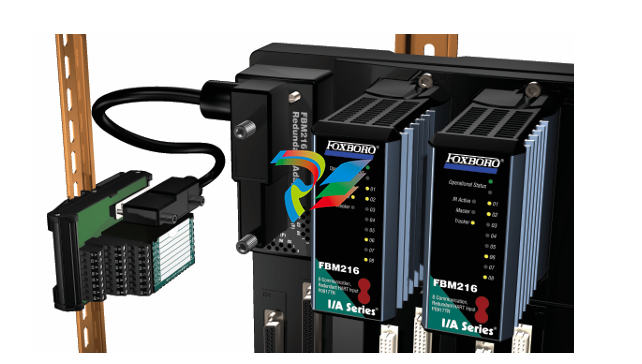 FOXBORO FBM216 HART® Communication Redundant Input Interface Module
 -
 Foxboro p0903nu 1×8 unit sub-component module
 -
 Foxboro P0911SM Industrial control module