
ABBDCS800 Quick guide DCS800 Drives (20 A to 5200 A)
ABB Drive Service EN
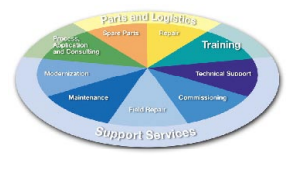
In order to offer the same after sales
service to our customer around the
world, ABB has created the DRIVE
SERVICE CONCEPT.
ABB's after sales service is globally
consistent due to common targets,
rules, and the way of operation. This
means for our customers:
Please visit the ABB drive service
homepage
www.abb.com/drivesservices
ABB Drive Service FR
Pour offrir la même qualité de service
à tous nos clients, ABB a créé DRIVE
SERVICE CONCEPT.
Dans le monde entier, les équipes
de service proposent les mêmes
prestations aux mêmes conditions
avec les mêmes objectifs.
Pour en savoir plus, connectez-vous sur ABB drive service
homepage
www.abb.com/drivesservices
ABB Drive Service DE
Um jedem Kunden rund um die
Welt die gleiche Service Dienstleistung anbieten zu können, hat ABB
das DRIVE SERVICE CONCEPT
entwickelt.
Durch die Definition von einheitlichen
Zielen, Regeln, und Arbeitsvorschriften kann ABB die Dienstleitungs
Produkte weltweit auf gleichwertig
hohem Qualitätsniveau anbieten. Für
unsere Kunden bedeuted dies:
Bitte besuchen Sie die ABBHomepage Service für Antriebe
www.abb.com/drivesservices
ABB Drive Service IT
ABB ha creato il DRIVE SERVICE
CENCEPT, con lo scopo di offrire ai
nostri clienti lo stesso servizio post
vendita in tutto il mondo.
Attraverso la definizione di obbiettivi
comuni, ruoli e modo di operare, le
attività post vendita di ABB offrono
sevizi coerenti nella loro globalità. Per
i nostri clienti questo significa:
Vi invitiamo a visitare la homepage
ABB drive service
www.abb.com/drivesservices
ABB Drive Service ES
Para poder ofrecer el mismo servicio posventa a nuestros clientes
en todo el mundo, ABB ha creado
el CONCEPTO DE SERVICIO DE
CONVERTIDORES.
El servicio posventa de ABB está
mundialmente consolidado gracias
a unos objetivos y normas comunes,
así como a su funcionamiento. Esto
significa para nuestros clientes:
Visiten el portal de convertidores
de ABB
Brief instructions for CD and documents overview
We appreciate that you purchased an ABB DC drive
power converter and thank you for the trust you put in our
products.
This brochure was put together to make sure that you continue
to be satisfied with our product. It is intended to provide you
with a brief overview of the product's key data, EMC notes,
typical applications, start-up and trouble-shooting.
If you need more information about the product you are
provided with a CD-ROM in addition to this brief documentation. The CD-ROM is part of this document and features
the following contents:
Documentation
Our documentation is basically structured according to the
following system:
Technical catalogue (3ADW000192)
as comprehensive information to engineer complete DC
drive systems.
Hardware manual (3ADW000194)
as detailed information, with all important particulars about
the individual components, like module dimensions, electronic
boards, fans and auxiliary components.
Information for mechanical and electrical installation are
also included.
Firmware Manual (3ADW000193)
detailed information with all important issues about firmware
and setting of parameters. The manual includes information
for start-up and maintenance of the entire drive, in detailed
form.
This manual also includes Fault and Alarm codes and information for trouble shooting.
Service Manual (3ADW000195)
for maintenance and repair of the converters.
Applications
DCS800 DC Drive can include application software e.g.
cranes, winders. In such case following procedures and
assistants can be blocked or not completed. Please check
for further documentation and manuals (check parameter
4.03, 83.01).
Additional information about applications (e.g. 12-pulse)
and technical accessories (e.g. Hardware extension or
Field bus interfaces) are handled by separate manuals. See
table DCS800 Drive manuals.
System requirements to use the CD-ROM
• Operating system WINDOWS 2000, XP
• ACROBAT READER 4.0 is
sufficient (we recommend
8.0 - included on the CDROM)
In case the CD ROM does not start automatically please
double-click on Setup.exe.
Further support
In addition we offer further support, since we can only be
satisfied when you, as our customer, are satisfied with us
and our products.
Internet
On the ABB homepage under
www.abb.com/dc
you'll find abundant information for
• DC products
• service support
• the latest updates
• tools
• downloads, etc.
Please don't hesitate to visit us.
Contacts
If you require any further information, please contact your
nearest ABB Drives office or send an email to:
DC-Drives@de.abb.com
Please give us your name, your company address and
phone number. We immediately put you in contact with our
specialist.
Notes on EMC
You will find further information in publication:
Technical Guide chapter:
EMC Compliant Installation and Configuration for
a Power Drive System
The paragraphs below describe selection of
the electrical components in conformity with
the EMC Guideline.
The aim of the EMC Guideline is, as the name
implies, to achieve electromagnetic compatibility with other products and systems. The
guideline ensures that the emissions from
the product concerned are so low that they
do not impair another product‘s interference
immunity.
In the context of the EMC Guideline, two
aspects must be borne in mind:
• the product‘s interference immunity
• the product‘s actual emissions
The EMC Guideline expects EMC to be taken
into account when a product is being developed;
however, EMC cannot be designed in, it can only
be quantitatively measured.
Note on EMC conformity
The conformity procedure is the responsibility of
both the power converter‘s supplier and the manufacturer of the machine or system concerned, in
proportion to their share in expanding the electrical
equipment involved.
For compliance with the protection objectives
of the German EMC Act (EMVG) in systems and
machines, the following EMC standards must
be satisfied:
Product Standard EN 61800-3
EMC standard for drive systems (PowerDriveSystem), interference immunity and emissions
in residential areas, enterprise zones with light
industry and in industrial facilities.
This standard must be complied with in the EU
for satisfying the EMC requirements for systems
and machines!
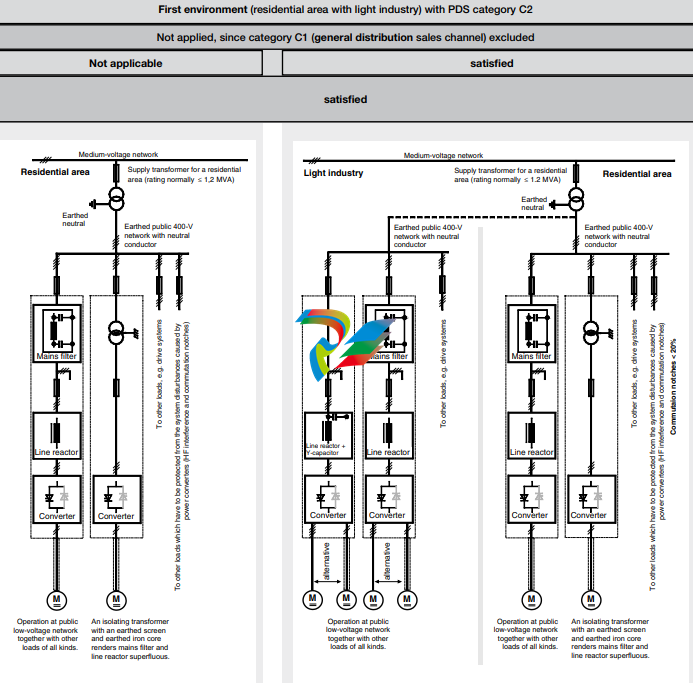
Classification
The following overview utilises the
terminology and indicates the action required in accordance with
Product Standard
EN 61800-3
For the DCS800 series, the limit
values for emitted interference
are complied with, provided the
measure indicated is carried
out. PDS of category C2 (formerly restricted distribution in
first environment) is intended to
be installed and commissioned
only by a professional (person
or organization with necessary
skills in installing and/or commissioning PDS including their
EMC aspects).
For power converters without
additional components, the following warning applies:
This is a product of category C2
under IEC 61800-3:2004. In a
domestic/residential environment
this product may cause radio
interference in which case supplementary mitigation measures
my be required.
The field supply is not depicted
in this overview diagram. For the
field current cables, the same
rules apply as for the armaturecircuit cables.
M M M M
emv_clssif_b.dsf
Converter
transformer
Case-referenced EMC analysis
alternative
Converter
transformer
with earthed
iron core
(and earthed
screen where
appropriate)
alternative
I > 400 A
and/or
U > 500 V
Operation with separate power converter transformer. If there
are other loads at the same secondary winding, these must be
able to cope with the commutation gaps caused by the power
converter. In some cases, commutating reactors will be
required.
To other loads, e.g. drive systems
Converter Converter
Line reactor
Medium-voltage network
Industrial
zone
For emitted interference, the following apply:
EN 61000-6-3 Specialised basic standard for emissions in light industry
can be satisfied with special features (mains filters, screened
power cables) in the lower rating range *(EN 50081-1).
EN 61000-6-4 Specialised basic standard for emissions in industry
*(EN 50081-2)
For interference immunity, the following apply:
EN 61000-6-1 Specialised basic standard for interference immunity in
residential areas *(EN 50082-1)
EN 61000-6-2 Specialised basic standard for interference immunity in industry. If this standard is satisfied, then the EN 61000-6-1
standard is automatically satisfied as well *(EN 50082-2).
* The generic standards are given in brackets
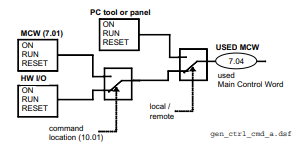
START, STOP and E-STOP control
The relay logic can be split into three parts:
a: Generation of the ON/OFF and START/STOP command:
The commands represented by K20 and K21 (latching interface relay) can be e.g. generated by a PLC and transferred to
the terminals of the converter either by relays, using galvanic
isolation or directly via 24V signals.
These commands can be as well transferred via serial
communication. Even a mixed solution can be realized by
selecting different possibilities for the one or the other signal
(see parameter group 11).
b: Generation of control and monitoring signals:
The main contactor K1 for the armature circuit is controlled
by a dry contact (DO 8) located on the SDCS-PIN-4. Status
of fans and fans klixon can be monitored by means of fan
ack signals: MotFanAck (10.06) and ConvFanAck (10.20).
c: OFF2, OFF3 Stop function:
Beside ON/OFF and START/STOP, the drive is equipped
with two additional stop functions, OFF2 and OFF3, according to Profibus standard. OFF3 is a scalable stop function
(rampstop, max torque stop, dynamic braking …) to perform
stop category 1. This function should be connected to the
E-STOP button without any time delay. In case of ramp stop
selection the, K 15 timer relay must be set longer than the
EStopRamp (22.04). For COAST selection, the drive opens
the main contactor immediately.
OFF2 switches off DC current as fast as possible and prepares the drive for opening main contactor or drop down
mains supply. For a normal DC motor load the time to switch
OFF the DC current is below 20 ms. This function should be
connected to all signals and safety functions opening the main
contactor. This function is important for 4-quadrant drives.
Do not open main contactor during regenerative current.
The correct sequence is
1. switch off regenerative current
2. then open the main contactor
In case of the E-STOP is hit, the information is transferred
to the converter via digital input 5. In case of rampstop, or
max torque selection the converter will decelerate the motor
and then open main contactor.
If the drive has not finished the function within the K15 timer
setting, the drive must get the command to switch OFF the
current via K16. After K16 timer set has elapsed the main
contactor is opened independent of the drives status.

Notes For North American Installations
1. EMC conformity is not usually required in North America. In most cases, the section “Notes on EMC” can be
bypassed. In this manual, you will see references to DIN, EN
and VDE standards. These are European standards and,
generally, do not apply to North America. It is, however,
the responsibility of the user to determine which standards
need to be followed.
2. If using a DC contactor, you must connect an auxiliary
contact to a digital input of your choice and set para. MainContAck accordingly. Set the following parameters:
MainContAck (10.21) = DI-1 (or any input you
choose for the DC cont.
auxiliary contact)
DO8BitNo (14.16) = 10
MainContCtrlMode (21.16) = DCcontact (3)
Set these parameters AFTER macros are loaded but BEFORE
the drive is commissioned.
Digital output 8 (DO-8) must be used to turn the DC
contactor on and off.
3. If using Dynamic Braking, the drive allows you to select the stopping method under three different situations.
Parameters 21.02, 21.03 and 21.04 select the stopping
method for loss of
the OnOff, run command (StartStop, Jog1, Jog2, etc.), and
E-Stop input, respectively.
Each can be set to:
• RampStop • TorqueLimit
• CoastStop • DynBraking
In order to command the drive to perform a DB stop, one
or more of these parameters must be set to DynBraking.
Most users will want the drive to ramp stop when OnOff or a
run command (StartStop, Jog1, Jog2, etc.) input is cleared,
and dynamically brake when the E-Stop input is cleared. In
that case, use the following settings:
• Off1Mode (21.02) = RampStop
• StopMode (21.03) = RampStop
• E StopMode (21.04) = DynBraking
However, any case is allowed and the final decision is left
to the user.
Other parameters control stops during faults.
See:
LocalLossCtrl (30.27) ComLossCtrl (30.28)
FaultStopMode (30.30) SpeedFbFltMode (30.36)
If using EMF feedback with dynamic braking, set:
• DynBrakeDly (50.11) = t
Where: t = the time (sec) it normally takes the motor
to stop during dynamic braking
DC contactor US:
DC contactor US K1.1 is a special designed contactor with 2x
NO contacts for C1 and D1 connection and 1x NC contact for
connection of Dynamic Brake resistor RB.
The contactor should be controlled by signal 6.03 Bit 10.
The acknowledge can be connected to parameter:
10.21 MainContAck
10.23 DCBreakAck
Overview of the Installation and Commissioning Process
This is to protect the motor and converter if a commutation
fault should occur. NOTE: DC output fuses are the same
type and size as AC line fuses.
Line reactor:
All thyristor-based dc converters cause notching in the AC
line due to motor commutation. A properly sized line reactor
will mitigate the effect on the line. Unless the converter uses
a dedicated isolation transformer, each converter requires
its own line reactor.
AC or DC contactor:
A contactor is required to safely disconnect the motor from
the incoming power when the converter is off. The contactor
can be installed between the line and the converter (an AC
contactor) or between the converter and the motor (a DC
contactor). Do not use both.
IMPORTANT: Other equipment may be necessary depending on application and local codes.
Step 1:
Check converter for damage. Contact ABB Technical Support
if damage is found. In North America, call 1-800-435-7365
(1-800-HELP-365)
Step 2:
Select supporting hardware for the converter:
For specific recommendations for fuses, reactors, and
contactors, see the DCS800 hardware manual or technical
catalog.
Circuit breaker or disconnect:
Current rating = Idc * 0.816 * 1.25 (min)
= Idc * 0.816 * 2.50 (max)
Where: Idc = nominal DC motor current
Fuses:
AC Line Fuses: To properly protect the converter, semiconductor fuses on the incoming AC power line are required
in all cases.
DC Output Fuses: Fuses between the motor and the
converter are required for all regenerative (4-Q) converters.
Step 3:
Mount and wire the converter and supporting hardware inside an industrial enclosure with adequate cooling (DCS800
modules have rating of NEMA type OPEN).
The following control and signal wiring is required:
o If using an AC contactor, we recommend wiring an auxiliary contact to the digital input you have designated as
MainContAck (10.21) or Start/Stop (10.16).
o If using a DC contactor, you must wire an auxiliary contact
from the contactor to the digital input you have designated
as MainContAck (10.21).
o Wire 115 or 230 Vac 1-phase power to terminal block 99
for converter control power.
o Wire 1-phase power to converter for cooling fans. See
table and wiring diagrams in this manual.
• D1 – D3 frames: 115/230 Vac selectable. Fan
terminal X2 is on top of the converter.
• D4 frame: If type code includes +S171, use 115
Vac; otherwise use 230 Vac. Fan terminal X2 is
on top of the converter.
o Wire tachometer or encoder to terminal block X3 (tacho)
or X5 (encoder).
o Wire analog inputs (e.g., speed reference) and outputs
(e.g., meters for motor voltage, current) to terminal block
X3 and/or X4.
o Wire high speed serial interface if needed. (Requires
optional fieldbus interface board.)
o The DCS800 allows you to choose the usage of each
digital and analog input and output. The converter has
factory default settings which can be changed by loading
a macro, but some designations are universal. They
include:
• Digital input 5: Estop
• Digital input 6: Fault reset
• Digital input 7: On/Off (maintained) or On-Start
(pulsed)
• *Digital input 8: Start/Stop (maintained) or OffStop (pulsed)
• Digital output 8: Main Contactor On (3 Amps
max. at 115 – 230 Vac)
*except Hand/Auto macro
o Other signals may be required depending on your application (e.g., motor fan acknowledge input, Off2 input,
fan-on output, brake output).
o You will select the macro and / or choose the configuration
for digital and analog inputs and outputs in step 2 of the
commissioning process, or by updating group 10 and 14
parameters.
o Check all wire terminations (with continuity tester) before
proceeding to the next step.
Step 4:
Connect the drive system to incoming power and the motor to
the converter (both field and armature) as well as accessory
equipment (motor fan, thermal switch, brake, etc.).
o See hardware manual for typical cable size and tightening
torque recommendations.
o IMPORTANT: Be sure all safety equipmentis properly
sized for your application
Step 5:
Apply control power to the converter.
o IMPORTANT: See section “Safety and Operating
Instructions” in this manual before proceeding.
o Apply power to terminal block 99 and X2. The keypad
should light up and show the menu screen. The converter
fans should start to run (if converter has fans).
Step 6:
Commission the converter using Drive Windows Light
(preferred) or the control panel.
o IMPORTANT: Seesafetyalertsandgeneralinstructions
in the section “Commissioning” before proceeding.
o Install the DCS800 PC tools on your computer. Instructions
are in this manual. Use DriveWindow Light to commission
your converter.
o If no PC is available, commission your drive using the
control panel as follows:
• On the control panel, press the softkey to select
MENU.
• Using the down arrow, select ASSISTANTS. Then
press ENTER.
• Starting with “name plate data,” press SEL.
Change the value with the arrow keys. Then press
SAVE.
• Repeat above with other parameters. Follow
directions on the screen.
Configuring and Displaying analog and digital I/O
HINT: To see if the drive is responding to an “on” or “run” command, view signal 8.08.
Control Panel:
o Digital Status: View signal 8.05 (DI’s) or 8.06 (DO’s).
Display is in hexadecimal.
o Configure digital inputs with Group 10.
o Analog Status: View signal 5.03 (AI1) or 5.11 (AO1).
Display is in Volts.
o Configure analog speed ref. with Group 11.
DriveWindow Light:
o Connect to the DCS800 and go on line by clicking on
File, then New Online Drive.
o Click on Wizard, at left side of the screen.
o Click on Advanced.
o Check the box for “I/O assistant,” then click on Next.
o Click on “edit parameters” in the appropriate section
(analog or digital inputs or outputs).
Safety and operating instructions
for drive converters DCS / DCF / DCR
1. General
In operation, drive converters, depending on their degree of
protection, may have live, uninsulated, and possibly also moving
or rotating parts, as well as hot surfaces.
In case of inadmissible removal of the required covers, of
improper use, wrong installation or maloperation, there is the
danger of serious personal injury and damage to property.
For further information, see documentation.
All operations serving transport, installation and commissioning
as well as maintenance are to be carried out by skilled technical personnel (Observe IEC 364 or CENELEC HD 384 or DIN
VDE 0100 and IEC 664 or DIN/VDE 0110 and national accident
prevention rules!).
For the purposes of these basic safety instructions, “skilled
technical personnel” means persons who are familiar with the
installation, mounting, commissioning and operation of the
product and have the qualifications needed for the performance
of their functions.
2. Intended use
Drive converters are components designed for inclusion in electrical installations or machinery.
In case of installation in machinery, commissioning of the drive
converter (i.e. the starting of normal operation) is prohibited until
the machinery has been proved to conform to the provisions of
the directive 89/392/EEC (Machinery Safety Directive - MSD).
Account is to be taken of EN 60204.
Commissioning (i.e. the starting of normal opertion) is admissible
only where conformity with the EMC directive (89/336/EEC) has
been established.
The drive converters meet the requirements of the low-voltage
directive 73/23/EEC. They are subject to the harmonized standards of the series prEN 50178/DIN VDE 0160 in conjunction with
EN 60439-1/ VDE 0660, part 500, and EN 60146/ VDE 0558.
The technical data as well as information concerning the supply conditions shall be taken from the rating plate and from the
documentation and shall be strictly observed.
3. Transport, storage
The instructions for transport, storage and proper use shall be
complied with.
The climatic conditions shall be in conformity with prEN 50178.
4. Installation
The installation and cooling of the appliances shall be in accordance with the specifications in the pertinent documentation.
The drive converters shall be protected against excessive
strains. In particular, no components must be bent or isolating
distances altered in the course of transportation or handling. No
contact shall be made with electronic components and contacts.
Drive converters contain electrostatic sensitive components
which are liable to damage through improper use. Electric
components must not be mechanically damaged or destroyed
(potential health risks).
5. Electrical connection
When working on live drive converters, the applicable national
accident prevention rules (e.g. VBG 4) must be complied with.
The electrical installation shall be carried out in accordance with
the relevant requirements (e.g. cross-sectional areas of conductors, fusing, PE connection). For further information, see documentation.
Instructions for the installation in accordance with EMC requirements, like screening, earthing, location of filters and wiring,
are contained in the drive converter documentation. They must
always be complied with, also for drive converters bearing a
CE marking. Observance of the limit values required by EMC
law is the responsibility of the manufacturer of the installation or
machine.
6. Operation
Installations which include drive converters shall be equipped
with additional control and protective devices in accordance with
the relevant applicable safety requirements, e.g. Act respecting
technical equipment, accident prevention rules etc. Changes
to the drive converters by means of the operating software are
admissible.
After disconnection of the drive converter from the voltage
supply, live appliance parts and power terminals must not be
touched immediately because of possibly energized capacitors.
In this respect, the corresponding signs and markings on the
drive converter must be respected.
During operation, all covers and doors shall be kept closed.
7. Maintenance and servicing
The manufacturer’s documentation shall be followed.
Keep safety instructions in a safe place!
Installing the DCS800 PC tools on Your computer
After inserting the DCS800 CD all programs and documentation
necessary to work with the DCS800 will be automatically installed.
This includes:
1. DriveWindow Light for parameterization, commissioning and
service
2. Hitachi FDT 2.2 for firmware download
3. Installation CD of DCS800 Drive for e.g. DWL Wizard, ABB
documents
4. CoDeSys for 61131 application programming
Attention:
If You do not want to install a certain program just skip it by using
Cancel at the beginning of the program’s wizar
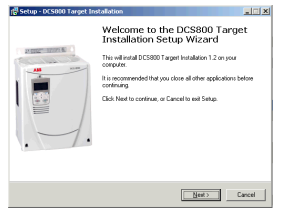
If the installation routine does not start automatically:
- Go to Start/Run and browse for setup.exe on the CD. Now start
the installation by confirming with OK
- Compact installtion for DriveWindow Light + Commsioning
Wizard + DriveWindow Light AP is reccomended

Steps to connect Drive to PC
• The documentation can be found under
C:ABBDCS800Docu
• Remove design cover from the converter module
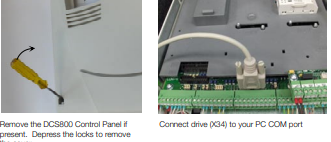
• Start DriveWindow Light PC tool
Check the communication setting of your COM port

If You use USB to COM port interface or PCMCIA / COM adapters double check the active COM enabled
Start => Settings => Control Panel => System => Hardware
=> Device Manager
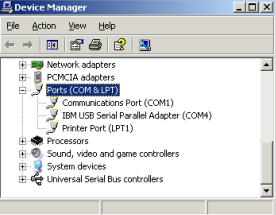
COM address of USB interface can change after the next boot
procedure or after disconnecting and reconnecting of the USB
interface.
Note:
PCMCIA to COM Port provide a stable and faster drive interface.
Utilize DriveWindow Light or DCS800 Panel Wizard continue
with chapter Commissioning in this manual.
For commissioning by DriveWindow find a workspace description in the DCS800 Firmware manual.
Danger! High voltage: this symbol warns of high
voltages which may result in injuries to persons
and/or damage to equipment. Where appropriate,
the text printed adjacent to this symbol describes
how risk of this kind may be avoided.
General warning: this symbol warns of non-electrical risks and dangers which may result in serious
or even fatal injuries to persons and/or damage to
equipment. Where appropriate, the text printed
adjacent to this symbol describes how risk of this
kind may be avoided.
General instructions
• This short commissioning refers to Chapter 5 Connection examples of this publication.
• Safety and operating instructions - see chapter 6
of this publication.
• Recommendations for motor and field voltages see
Technical catalogue.
• In accordance with DIN 57 100 Part 727 / VDE 0100
Part 727, precautions must be taken to enable the
drive to be shut down, e.g. in the event of danger.
The unit’s digital inputs or the control panel are not
sufficient as the sole measure for this purpose!
Warning of electrostatic discharge: this symbol
warns you against electrostatic discharges which
may damage to unit. Where appropriate, the text
printed adjacent to this symbol describes how risk
of this kind may be avoided.
NEC motor overload protection
The DCS800 provides a solid-state motor overload
protection in accordance with the NEC. The overload
protection (e.g. protection level in percent of full-load
motor current) can be adjusted by parameters in
group 31 and group 99.
The instructions can be found in chapter Motor
thermal model of the DCS800 Firmware manual.
Preparations
• Check unit for any damage!
• Install unit and wire it up
• Supply voltage level / Rated value correct for electronics and fan?
• Supply voltage level / Rated value correct for armature-circuit converter?
• Supply voltage level / Rated value correct for field
supply?
• Wiring / cross-sections, etc. correct?
• EMERGENCY STOP functioning properly?
• COAST STOP functioning properly?
Standard Features
• kompakt
• Höchste Leistungsfähigkeit
• Einfachste Bedienung
• Komfortable Assistenten, z. B. zur Inbetriebnahme
oder Fehlersuche
• Skalierbar für alle Anwendungen
• Frei programmierbar dank eingebauter IEC61131-SPS
DCS800 Gleichstromantriebe
Technische Daten DCS800
Nennanschlusssp. 230 bis 1.200 V
+/–10%, 3~
Frequenz 50 bis 60 Hz +/–5 Hz
Elektronikspg. 115 bis 230 V
–15% / +10%, 1~
DC Ausgangsstrom 20 bis 5.200 A
Überlastbarkeit 200%
Umgebungsgrenzwerte
Umgebungstemp. 0° bis +40° C
40°bis 55°C
Stromreduktion
Lagertemperatur –40° bis +55° C
Transporttemp. –40° bis +70° C
Relative 5 bis 95%, nicht
Luftfeuchtigkeit kondensierend
max. 50% zw. 0° und
5° C
Verschmutzungsgrad Klasse 2
Schutzgrad IP 00
Betriebshöhe bis 1.000 m üNN
Nennstrom
Über 1.000 m üNN
Stromreduktion
Ein-/ Ausgänge
Digitale Eingänge 8 Standard,
bis 14 optional
Digitale Ausgänge 8 Standard,
bis 12 optional
Analoge Eingänge 4 Standard
+/–10 V; 0/2…10 V bis 8 optional
+/–2 0mA; 0/4…20 mA
Analoge Ausgänge 3 Standard
(1x Iist) +/-10 V; 0/2…10 V bis 7
optional –20 mA; 0/4…20 mA
PC-Tools
DriveWindow Light
kostenlos mit jedem Antrieb,
Standard RS232 Verbindung
DriveWindow Echtzeit optische
Verbindung
ControlBuilder DCS800
IEC61131 Programmierung
DriveSize Antriebs- und
Motorauslegung
Wartung / Diagnose
Fernwartung von jedem InternetPC aus
• mit Internet Browser / Internet
Explorer
• oder mit DriveWindow Vollzugriff
via OPC
Zulassungen
Adaptive Programmierung
fertige antriebsspezifische
Blöcke, darunter
• Freier Prozessregler (PI-Regler)
• Ein/Ausgänge
Mit Bedien-Panel oder PC-Tool,
ohne zusätzliche Hardware
Drehzahlrückführung
EMK
Analoger Tachometer
Inkrementalgeber
Zweiter Inkrementalgeber möglich
(RTAC)
Kommunikation
Verfügbare serielle Schnittstellen
• Ethernet • Profibus
• CANopen • DeviceNet
• ControlNet • DDCS
• Modbus
• CS31 • AF100
• Selma2
Industrial IT© enabled
DCSLink Peer-to-Peer
• bis 800 kBaud, < 2,5 ms
• Master-Follower
• Anker-Feldstromrichter
• frei definierbare Daten
Hochstromlösungen
• 12-puls bis 20.000 A, seriell und
parallel
• Hart parallel und sequenziell
• bis 1.500 V
Schutzfunktionen
Tachosignalüberwachung • Temperatur • Überlast • Überdrehzahl
• Motor blockiert • Motorüberstrom • Motorüberspannung •
Feldüberstrom • Feldüberspannung • Mindestfeldstrom • Drehzahl Null • Ankerstromwelligkeit •
Netz Über- und Unterspannung
Integrierte IEC 61131-SPS
• Offenes Programmiertool
ControlBuilder DCS800
• Unterstützung aller fünf IECSprachen
• Antriebsspezifische
Funktionsblöcke
• Speicherung in Memory Karte
• Online Debugging und Forcing
Kurzanweisung CD und Dokumentationsübersicht
Wir freuen uns, dass Sie einen ABB DC-Stromrichter erworben haben und bedanken uns für das Vertrauen, welches
Sie unseren Produkten entgegengebracht haben.
Damit Sie auch weiterhin mit unserem Produkt zufrieden sind,
haben wir diese Broschüre für Sie zusammengestellt. Sie
soll hauptsächlich dazu dienen, ihnen einen kurzen Überblick
über das Produkt, EMV Hinweise, typische Anwendungen,
Inbetriebnahme und Fehlersuche zu verschaffen.
Benötigen Sie weitere Informationen zum Produkt, wurde
zusätzlich mit dieser Broschüre eine CD-ROM geliefert.
Die CD-ROM ist Teil dieser Broschüre und hat folgende
Bestandteile:
Dokumentation
Unsere Dokumentation ist folgendermaßen aufgebaut:
Technischer Katalog (3ADW000192)
als umfassende Information zur Planung kompletter DCStromrichter.
Hardware Handbuch (3ADW000194)
als Detailinformation mit allen wichtigen Angaben zu
den Einzelkomponenten, wie z.B. Modulabmaße, Elektronikkarten, Lüfter und Zusatzkomponenten.
Informationen über die mechanische- und elektrisch Installation sind auch enthalten.
Firmware Handbuch (3ADW000193)
Detailinformation mit allen wichtigen Angaben zur Firmware
und Einstellungen der Parameter. Dieses Handbuch enthält
mit allen notwendigen Informationen zur Inbetriebnahme.
Außerdem sind sowohl alle Fehler- und Alarmmeldungen
aufgelistet als auch Informationen zur Fehlersuche.
Service Manual (3ADW000195)
für die Wartung und Reparatur der Stromrichter.
Applikationen
Der DCS800 DC-Stromrichter kann auch Applikationsprogramme enthalten z.B. für Kräne und Wickler. In solchen Fällen
ist es möglich, daß die folgenden Anweisungen oder diverse
Assistenten entweder gesperrt sind oder nicht beendet werden können. Bitte mit Hilfe weiterführender Dokumentation
überprüfen (siehe auch Parameter 4.03 und 83.01).
Weitere Informationen über Applikationen (z.B. 12-Puls)
und technisches Zubehör (z.B. Hardwareerweiterungen oder
Feldbusadapter) werden in separaten Handbüchern behandelt. Siehe Tabelle DCS800 Antrieb Handbücher.
Systemvoraussetzungen für die Nutzung
der CD ROM
• Betriebssystem WINDOWS
2000, XP
• ACROBAT READER 4.0
ist ausreichend (empfohlen
wird 8.0 - auf der CD ROM
enthalten)
In case the CD ROM does not start automatically please
double-click on Setup.exe.
Weitere Unterstützung
Wir bieten Ihnen darüber hinaus weitere Unterstützung an,
denn nur wenn Sie als Kunde mit uns und unseren Produkten
zufrieden sind, können auch wir zufrieden sein.
Internet
Auf der ABB Homepage unter
www.abb.com/dc
finden Sie viele Informationen zu
• DC Produkten
• Service
• neueste Updates
• Anwendersoftware
• Downloads etc.
Bitte zögern Sie nicht uns dort zu besuchen.
Kontakte
Benötigen Sie weitere Informationen, sprechen Sie bitte Ihr
nächstgelegenes ABB Drives Büro an oder schreiben Sie
eine E-Mail an:
DC-Drives@de.abb.com
Geben Sie bitte Ihren Namen, Ihre Firmenadresse und Telefonnummer an und wir werden Ihnen umgehend den für
Sie zuständigen Ansprechpartner mitteilen.
-
 DEIF FAS-113DG Synchronisation & circuit breaker closing
 -
 DEIF FAS-115DG Synchronisation & circuit breaker closing
 -
 DEIF HAS-111DG Synchronisation & circuit breaker closing
 -
 DEIF LSU-122DG Load sharing, paralleling & operation
 -
 DEIF LSU-114DG Load sharing, paralleling & operation
 -
 DEIF LSU-113DG Load sharing, paralleling & operation
 -
 DEIF LSU-112DG Load sharing, paralleling & operation
 -
 DEIF RMF-112D Frequency relay
 -
 DEIF RMC-142D Current relay
 -
 DEIF RMC-132D Current relay
 -
 DEIF RMC-131D Current relay
 -
 DEIF RMC-122D Current relay
 -
 DEIF RMC-121D Current relay
 -
 DEIF RMC-111D Current relay
 -
 DEIF MVR-V211 Busbar Protection
 -
 DEIF MVR-T257 Transformer Differential Protection
 -
 DEIF MVR-T256 Transformer Differential Protection
 -
 DEIF MVR-T216 Transformer Differential Protection
 -
DEIF MVR-T215 Transformer Protection
-
 DEIF MVR-M257 Motor Differential Protection
 -
 DEIF MVR-M255 Motor Protection
 -
 DEIF MVR-M215 Motor Protection
 -
 DEIF MVR-M210 Motor Protection
 -
 DEIF MVR-G257 Generator Differential Protection
 -
 DEIF MVR-G215 Generator Protection
 -
 DEIF MVR-F255 Directional Feeder Protection
 -
 DEIF MVR-F215 Directional Feeder Protection
 -
DEIF MVR-F210 Feeder Protection
-
 DEIF MVR-F205 Directional Feeder Protection
 -
 DEIF MVR-F201 Basic Feeder Protection
 -
DEIF MVR-200 series Medium Voltage Relay
-
 DEIF MDR-2 Multi-differential relay
 -
 DEIF LMR-122D Loss of mains relay
 -
 DEIF LMR-111D Loss of mains relay
 -
 DEIF APU-4 Advanced G59 and G99 protection unit
 -
 DEIF iE 650 PLC - The most robust programmable automation controller available
 -
 DEIF iE 350 PLC - Programmable Automation PLC Controller
 -
 DEIF iE 250 PLC Versatile and modular intelligent energy PLC controller
 -
 DEIF PPM-3 EDG Protection and Power Management
 -
 DEIF AGC 3X 4198000234E AUTOMATIC GENSET CONTROLLER
 -
 SAUTER ASF123 Damper actuator with spring return
 -
SAUTER ASF122 Damper actuator with spring return
-
SAUTER ASF113F122 Damper actuator with spring return
-
SAUTER ASF113F120 Damper actuator with spring return
-
SAUTER ASF112F122 Damper actuator with spring return
-
SAUTER ASF112F120 Damper actuator with spring return
-
 SAUTER ASM 124/134 series - ASM134F130 Damper actuator
 -
SAUTER ASM 134 series - ASM134SF132 Damper actuator
-
SAUTER ASM 124/134 series - ASM124SF132 Damper actuator
-
SAUTER ASM 124/134 series - ASM124F122 Damper actuator
-
SAUTER ASM 124/134 series - ASM124F120 Damper actuator
-
 SAUTER Valve actuator ASM 105S/115S series ASM115SF152
 -
SAUTER Valve actuator ASM 105S/115S series ASM105SF152
-
SAUTER Valve actuator ASM 105S/115S series ASM115SF132
-
SAUTER Valve actuator ASM 105/115 series ASM105SF132
-
 SAUTER Valve actuator ASM 105/115 series ASM115F122
 -
SAUTER Valve actuator ASM 105/115 series ASM115F120
-
SAUTER Valve actuator ASM 105/115 series ASM105F122
-
SAUTER Valve actuator ASM 105/115 series ASM105F120
-
SAUTER Valve actuator ASM 105/115 series ASM105F10
-
 SAUTER AKF113S Rotating actuator AKF 112/113 series
 -
SAUTER AKF113F122 Rotating actuator AKF 112/113 series
-
SAUTER AKF113F120 Rotating actuator AKF 112/113 series
-
SAUTER AKF112F122 Rotating actuator AKF 112/113 series
-
SAUTER AKF112F120 Rotating actuator AKF 112/113 series
-
 SAUTER AKM115SAF332: Smart Actuator for ball valve, BACnet/IP
 -
 SAUTER AKM115SAF232 Rotating Actuator AKM 115SA Smart Actuator
 -
 SAUTER AKM115SF152 Rotating Actuator AKM 105S/115S Series
 -
SAUTER AKM115SF132 Rotating Actuator AKM 105S/115S Series
-
SAUTER AKM105SF132 Rotating Actuator AKM 105S/115S Series
-
 SAUTER AKM115F122 Rotating actuator AKM 105/115 series
 -
 SAUTER Rotating actuator AKM 105/115 series AKM115F120
 -
SAUTER Rotating actuator AKM 105/115 series AKM105F122
-
SAUTER Rotating actuator AKM 105/115 series AKM105F120
-
 SAUTER Continuous actuator for unit valves, with stroke AXS215S
 -
 SAUTER Linear valve actuator AXT/AXS series AXT211
 -
SAUTER Linear valve actuator AXT/AXS series AXT201
-
 SAUTER Linear valve actuator AXM/AXF series AXF217S
 -
SAUTER Linear valve actuator AXM/AXF series AXM217S
-
SAUTER AXM217SF404 is an electric actuator for unit valves.
-
SAUTER AXM217SF402 is an electric actuator for unit valves.
-
SAUTER Linear valve actuator AXM/AXF series AXM217
-
 SAUTER Linear valve actuator AVF 124/125 series AVF125S
 -
SAUTER Linear valve actuator AVF 124/125 series AVF124S
-
SAUTER Linear valve actuator AVF 124/125 series AVF124S
-
 SAUTER AVM322S-R Linear valve actuator AVM 234S series
 -
SAUTER AVM322-R Linear valve actuator AVM 234S series
-
SAUTER AVM322SF132 Linear valve actuator AVM 234S series
-
 SAUTER AVM321SF132 Linear Valve Actuator
 -
 GE Power Conversion P112-6053 Advanced Micro Controller (AMC2)
 -
GE Power Conversion P111-6053 Advanced Micro Controller (AMC2)
-
 GE Power Conversion P110-6053 Advanced Micro Controller (AMC2)
 -
 GE Power Conversion P122-6052 Advanced Micro Controller (AMC2)
 -
GE Power Conversion P121-6052 Advanced Micro Controller (AMC2)
-
 GE Power Conversion P112-6152 Advanced Micro Controller (AMC2)
 -
GE Power Conversion P110-6152 Advanced Micro Controller (AMC2)
-
GE Power Conversion P112-6052 Advanced Micro Controller (AMC2)
-
GE P106-6052 AMC2 Advanced Micro Controller Unit
-
SAUTER AVF234SF232 Linear valve actuator AVM 234S series
-
SAUTER AVF234SF132 Linear valve actuator AVM 234S series
-
 SAUTER Linear valve actuator AVM 234S series AVM234SF132-6
 -
SAUTER Linear valve actuator AVM 234S series AVM234SF132-5
-
SAUTER Linear valve actuator AVM 234S series AVM234SF132
-
SAUTER Linear valve actuator AVM215SF132-7
-
SAUTER Linear valve actuator AVM215SF132R
-
 Linear valve actuator AVM 115SA Smart Actuator AVM115SAF332
 -
Linear valve actuator AVM 115SA Smart Actuator AVM115SAF232
-
 SAUTER Linear valve actuator AVM 105S/115S series AVM115SF132
 -
SAUTER Linear valve actuator AVM 105S/115S series AVM105SF132
-
 SAUTER AVM115F901 Linear Valve Actuator
 -
SAUTER AVM115F122 Linear Valve Actuator
-
SAUTER AVM115F120 Linear Valve Actuator
-
SAUTER AVM105F122 Linear Valve Actuator
-
 SAUTER AVM105F120 Linear Valve Actuator
 -
 SAUTER AVM105F100 Linear Valve Actuator
 -
 AEROTECH SM Series High-Performance Stepper Motors
 -
 AEROTECH BLMSC Series Linear Motors
 -
 AEROTECH Custom Linear Motors
 -
 AEROTECH BMS Series Brushless, Slotless Rotary Motors
 -
 AEROTECH BM Series Brushless Rotary Motors
 -
 AEROTECH BLMX Series Linear Motors
 -
 AEROTECH BLMH Series Linear Motors
 -
 AEROTECH BLM Series Linear Motors
 -
 AEROTECH BLMC Series Linear Motors
 -
 AEROTECH BLMUC-143 Linear motor forcer with thermistor
 -
AEROTECH BLMUC-111 Linear motor forcer with thermistor
-
AEROTECH BLMUC-95 Linear motor forcer with thermistor
-
AEROTECH BLMUC-79 Linear motor forcer with thermistor


