GEMark* VIe Controller Standard Block Library
Introduction
Blocks are software subroutines that are included in the tasks to be run in the controller. Within the ToolboxST* application,
the connections are accomplished graphically using pins and wires to form a data flow diagram. The blocks run in the order
listed in the task. The connections between the blocks are RAM memory elements through which data is passed. These
elements are referred to as variables. Each variable has a defined data type and must be connected to pins of the same data
type. Some block pins accept multiple data types and others are capable of converting from one data type to another.
Each block entry in the library consists of the following:
• Block name and category
• Block description
• Block diagram
• Pin definitions
• Application notes (optional)
Each block has a full name and a simple name. The full name is descriptive and too long to display in a block diagram. For
this reason, all blocks have a simple name. The simple name is displayed in the ToolboxST application.
Floating point (REAL and LREAL) values conform to IEEE® 754. The standard defines certain computational exceptions that
may produce non-standard results, such as divide by zero. These non-standard values include infinities and Not a Numbers
(NaNs), which, if used in subsequent calculations, produce additional non-standard results. The software has been designed to
prevent the production and proliferation of such values. Function block descriptions may include additional details concerning
floating point exception handling where needed.
Block Libraries also contain rubber blocks, which are sized according to the number of pins used. Within the library, the
blocks are grouped functionally to simplify the task of converting ideas into blocks. For example, the Controller Monitor
(CTRLR_MON) block is a member of the System category.
Note Pin names are given modifiers that provide additional information about the pin.
A graphical representation of the software for each block is provided in the form of a block diagram that includes the simple
block name and block configuration pins and variable pins, which transfer data in and out of the block. The pins are located
on the block diagram according to their usage. All input pins (pins read by the block) and block configuration pins are listed
on the left. All output pins (pins written by the block) and state pins (pins read and written by the block) are listed on the
right. The pin name is listed beside each pin inside the block diagram border.
Pin Name Modifiers Description
^ prefixed with a carat (^ONREQ) Pin is rising-edge sensitive
[ ] suffixed with square brackets (STATE[4]) Pin expects a variable that is an array of the size indicated
within the brackets
Block Data Type
The pin data type identifier is listed beside the pin outside of the block diagram border. The basic data types used in the block
libraries are BOOL, INT, UINT, REAL, LREAL, DINT and UDINT. Blocks with data types ANY_NUM and ANY must have
the Block Data Type set to match the intended data type of the block output.
Note The default value of Boolean inputs is False unless the input is a block Enable, in which case the default is True and
the default value of inputs with data types INT, UINT, DINT, UDINT, REAL and LREAL is 0, until otherwise specified.
The block content provides tables to define the input and output pins. Each entry includes the block name for the variable,
basic data type, typical scaling units, and a description of the variable. Typical scaling units are supplied for reference only;
specific applications may use other scaling units as appropriate.
Data Type Identifier Basic Data Type Description
A Any (ANY) Any data type
B Boolean (BOOL) 8-bit Boolean
I Integer (INT) 16-bit Signed Integer
DI Double Integer (DINT) 32-bit (Long) Signed Integer
R Real (REAL) 32-bit Floating Point
LR Long Real (LREAL) 64-bit (Long) Floating Point
UI Unsigned Integer (UINT) 16-bit Unsigned Integer
UDI Unsigned Double Integer (UDINT) 32-bit (Long) Unsigned Integer
N Numeric (ANY_NUM) Any data type except Boolean
S Analog or Boolean (Simple) Any simple data type
Data Type Identifier Type Definition Modifier Description
# m Build time constant
Note The Block Data Type is set in the block Property Editor.
Changing Data Type of a Variant Block
There are few blocks that support more than one data type as an input and/or output.
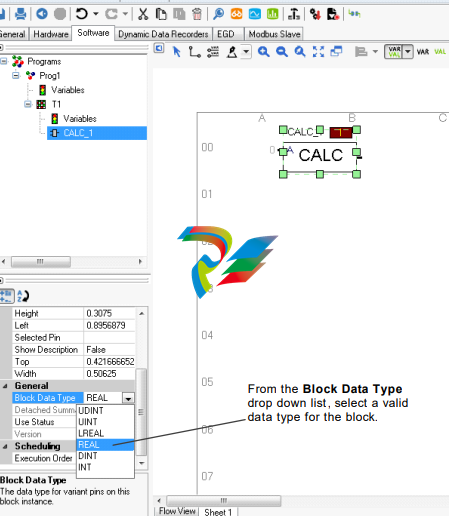
➢ To change the block data type
1. Select the block for which to change the data type.
2. From the Block Properties window, expand the General section.
3. From the Property Editor, select the Block Data Type.
4. From the Block Data Type drop-down box, select a valid data type for the block
Legacy Category Blocks
Some of the controller software blocks have been put into the Legacy Category (this is the category that is used by the
ToolboxST Block Diagram Editor). This category is different than the blocks that reside in the Legacy Block Library. Legacy
category blocks are supported but not recommended for use in any new controller applications (ControlST V05.02 or later).
They are in the LEGACY category because no new development is to be done to add any new functionality to these blocks. In
many cases, there is a newer block that is preferred for use as a replacement for these blocks, as listed in the following table.
Legacy Category Rationale
Legacy
Category Block
Replacement
Block
Reason
_COMMENT_BF _COMMENT _COMMENT is equivalent to the current functionality of _COMMENT_BF
_COMMENT_BF used to provided a carriage-return/page-feed in the Mark VI and early
versions of Mark VIe controllers
TIMER TIMER_V2 TIMER_V2 supports AT_TIME output to RESET input
TRAN_DLY TRAN_DLY_V2 TRAN_DLY_V2 corrects existing issues with TRAN_DLY, which could not be made backwards
compatible
Note LEGACY category blocks are hidden by default in the ToolboxST application. Refer to the ToolboxST User Guide
(GEH-6700) for steps to display these blocks if needed for legacy support.
Absolute Value (ABS)
Block Category: ABS, Math
The Absolute Value (ABS) block outputs the absolute value of the input, IN.
Note This is a variant block that supports any one the following block data types: Integer, Double Integer, Real, Long Real,
Unsigned Integer, Unsigned Double Integer. The default data type is Real. Refer to the section, Changing Data Type of a
Variant Block.
ABS Block
This block propagates quality status if the status operations are enabled. Refer to the section, Status Monitoring (STATUS_
MONITORING).
Input
Name Data Type Description
IN Any_num† Input value
† Value with status, if status option is enabled.
Output
Name Data Type Description
OUT Any_num† Absolute value of the input
† Value with status, if status option is enabled.
Add (ADD)
Block Category: ADD, Math
The Add (ADD) block is an expandable block that adds up to 32 inputs. The sum of the connected inputs is set as the output.
Furthermore, if no inputs are connected, the output will be 0.
Note This is a variant block that supports any one the following block data types: Integer, Double Integer, Real, Long Real,
Unsigned Integer, Unsigned Double Integer. The default data type is Real. Refer to the section, Changing Data Type of a
Variant Block.
This block propagates quality status if the status operations are enabled. Refer to the section, Status Monitoring (STATUS_
MONITORING).
ADD Block
Inputs
Name Data Type Description
IN1 Any_num† First input
↓ ↓ ↓
INn Any_num† N'th input
† Value with status, if status option is enabled.
Output
Name Data Type Description
OUT Any_num† Output
† Value with status, if status option is enabled.
Analog Alarm (ANALOG_ALARM)
Block Category: ANALOG_ALARM, Analog Operations
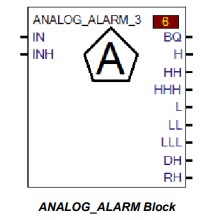
The Analog Alarm (ANALOG_ALARM) block documents the configuration of an analog alarm. It has no associated runtime
operation; it is effectively an application code comment. When the IN pin is connected to a numeric variable, the block
displays the configuration of the analog alarms for that variable.
Note Alarm bits must be enabled to display as pins.
Each analog alarm consists of a main numeric variable and a number of SubVariables that either configure the alarms or hold
individual alarm bits. Each of these SubVariables is represented by a pin on the ANALOG_ALARM block.
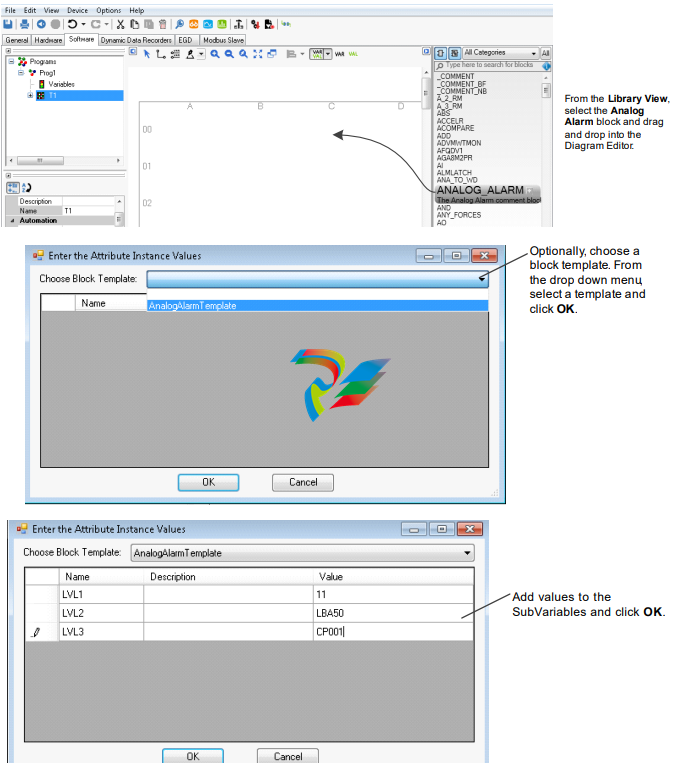
➢ To create or edit configuration: double-click the ANALOG_ALARM block.
(Optional) Alarm Block Template Configuration
An alarm block template may be used to define variable aliasing behavior for blocks.
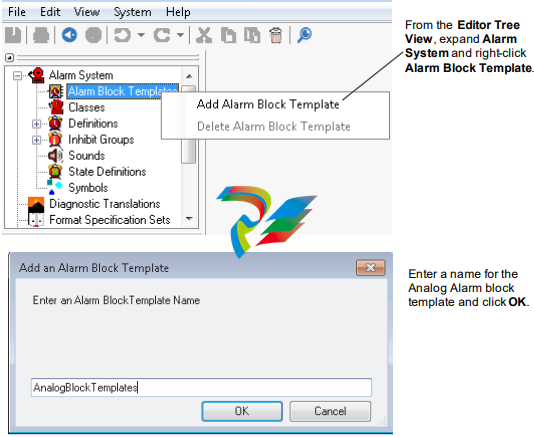
➢ To create and configure an Analog Alarm block template
1. From the System Editor, select Edit, and System Information.
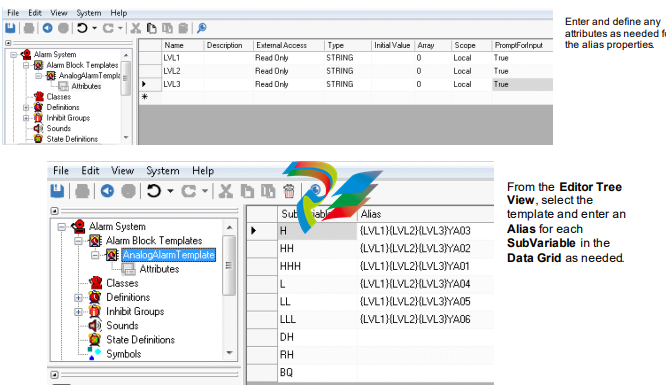
2. If any attributes are required for the block template, create or add attributes as needed. From the Tree View, expand the
block template and select Attributes.
ToolboxST Configuration
➢ To insert the block in the ToolboxST application
1. From the Tree View, select a task in to display the Block Diagram Editor in the Summary View
-
 NZMH2-A80-NA Eaton Series NZM complete molded case circuit breaker
 -
 Eaton Cutler-Hammer HFD3030 6639C86G87 3 Pole 30A 600V Circuit Breaker
 -
 Moeller XV-230-57CNN-1-13-1 HMI PLC Panel Touchscreen 5.7"
 -
 EATON CEAG CU CG-S , 40071360300 Control Unit
 -
 EATON SDN90186 MOTOR CONTROL CENTER
 -
EATON HMCP150U4 CIRCUIT BREAKER
-
 Eaton 7801C57 Digitrip Optimizer Hand Held Programmer
 -
 Eaton HMCP400R5 Circuit Breaker
 -
 EATON MP-3000 SAFETY RELAY 66D2032GX1 5A
 -
 EATON PGGLOBL1701DPRO 1785T Touch Panel
 -
 Eaton, Moeller, Easy MFD-CP8-NT
 -
 Eaton WL-35717F Vacuum Interrupter
 -
 EATON VICKERS EEA-PAM-535-A-32 AMPLIFIER CARD
 -
 EATON FP5000-00 / FP5200-00 66D2041G11 FEEDER PROTECTION RELAY
 -
 Eaton IQ-504 120VAC Modular Overload Relay
 -
 Beckhoff CX5620-0225 CPU module
 -
 Beckhoff CX5620-0220 CPU module
 -
Beckhoff CX5620-0215 CPU module, Beckhoff RT Linux®
-
 Beckhoff CX5620-0210 CPU module, Beckhoff RT Linux®
 -
 Beckhoff CX5620-0195 CPU module
 -
Beckhoff CX5620-0190 CPU module
-
Beckhoff CX5620-0185 CPU module
-
Beckhoff CX5620-0175 CPU module
-
 Beckhoff CX5620-0170 CPU module
 -
Beckhoff CX5620-0163 CPU module
-
Beckhoff CX5620-0161 CPU module
-
Beckhoff CX5620-0160 CPU module
-
Beckhoff CX5620-0100 CPU module
-
 Beckhoff CX5120-0195 CPU module
 -
 Beckhoff CX5120-0190 CPU module
 -
Beckhoff CX5120-0185 CPU module
-
Beckhoff CX5120-0175 CPU module
-
 Beckhoff CX5120-0170 CPU module
 -
Beckhoff CX5120-0163 CPU module
-
Beckhoff CX5120-0162 CPU module,
-
Beckhoff CX5120-0161 CPU module
-
Beckhoff CX5120-0150 CPU module
-
Beckhoff CX5120-0143 CPU module
-
Beckhoff CX5120-0142 CPU module
-
Beckhoff CX5120-0141 CPU module
-
Beckhoff CX5120-0140 CPU module
-
Beckhoff CX5120-0130 CPU module
-
Beckhoff CX5120-0123 CPU module
-
 Beckhoff CX5120-0122 CPU module
 -
Beckhoff CX5120-0120 CPU module, Microsoft Windows Embedded Standard 7 P
-
 Beckhoff CX5120-0113 CPU module
 -
Beckhoff CX5120-0112 CPU module
-
Beckhoff CX5120-0111 CPU module
-
 Beckhoff CX5120-0110 CPU module, Microsoft Windows Embedded Compact 7
 -
Beckhoff CX5120-0100 CPU module, no operating system
-
Beckhoff C6017-0040 | Fanless ultra-compact Industrial PC
-
Beckhoff C6017 | Fanless ultra-compact Industrial PC
-
 Beckhoff C6015-0030 | Fanless ultra-compact Industrial PC
 -
Beckhoff C6015-0040 | Fanless ultra-compact Industrial PC
-
Beckhoff C6015 | Fanless ultra-compact Industrial PC
-
Beckhoff C6015 | Fanless ultra-compact Industrial PC
-
 Beckhoff CX2500-M510 | Fieldbus master module
 -
 Beckhoff CX2500-M310 | Fieldbus master module
 -
 Beckhoff CX2500-B510 | Fieldbus slave module
 -
 Beckhoff CX2500-B310 | Fieldbus slave module PROFIBUS for CX20xx, CX52x0. CX53x0. CX56x0
 -
 Beckhoff CX2500-0070 | USB 3.0 module for CX20xx, CX52xx, CX53x0. CX56x0
 -
 Beckhoff CX2500-0062 | 2.5 Gbit Ethernet module for CX20xx, CX52x0. CX53x0. CX56x0
 -
 Beckhoff CX2500-1061 | Power over Ethernet module for CX20xx, CX52x0. CX53x0. CX56x0
 -
 Beckhoff CX2500-1060 | Ethernet module for CX20xx, CX52x0. CX53x0. CX56x0
 -
 Beckhoff CX2500-0031 | Serial Interface RS485/RS422 for CX20xx, CX52x0. CX53x0. CX56x0
 -
 Beckhoff CX2500-0030 | Serial Interface RS232 for CX20xx, CX52x0. CX53x0. CX56x0
 -
 Beckhoff CX5230-0195 CPU module
 -
Beckhoff CX5230-0190 CPU module
-
Beckhoff CX5230-0175 CPU module,
-
Beckhoff CX5230-0170 CPU module
-
Beckhoff CX5230-0100 CPU module, no operating system, no TwinCAT
-
 Beckhoff CU8130-0240 | UPS modul, battery-backed
 -
 Beckhoff CU8130-0120 | UPS module, battery-backed
 -
 Beckhoff CU8110-0120 | UPS module, capacitive
 -
 Beckhoff CU8110-0060 | UPS module, capacitive
 -
 Beckhoff CX5130-0195 CPU module
 -
 Beckhoff CX5130-0190 CPU module
 -
Beckhoff CX5130-0185 CPU module
-
Beckhoff CX5130-0170 CPU module, Microsoft Windows 10 IoT Enterprise 2019 LTSC
-
Beckhoff CX5130-0163 CPU module
-
Beckhoff CX5130-0162 CPU module
-
 Beckhoff CX5130-0161 CPU module
 -
Beckhoff CX5130-0160 CPU module
-
Beckhoff CX5130-0155 CPU module
-
Beckhoff CX5130-0150 CPU module
-
Beckhoff CX5130-0143 CPU module
-
Beckhoff CX5130-0142 CPU module
-
Beckhoff CX5130-0140 CPU module
-
Beckhoff CX5130-0135 CPU module
-
Beckhoff CX5130-0130 CPU module
-
Beckhoff CX5130-0125 CPU module
-
 Beckhoff CX5130-0123 CPU module
 -
Beckhoff CX5130-0122 CPU module
-
Beckhoff CX5130-0121 CPU module
-
 Beckhoff CX5130-0115 CPU module
 -
Beckhoff CX5130-0113 CPU module
-
Beckhoff CX5130-0112 CPU module
-
Beckhoff CX5130-0111 CPU module
-
Beckhoff CX5130-0110 CPU module, Microsoft Windows Embedded Compact 7. no TwinCAT
-
Beckhoff CX5130-0100 CPU module, no operating system, no TwinCAT
-
 DEIF FAS-113DG Synchronisation & circuit breaker closing
 -
 DEIF FAS-115DG Synchronisation & circuit breaker closing
 -
 DEIF HAS-111DG Synchronisation & circuit breaker closing
 -
 DEIF LSU-122DG Load sharing, paralleling & operation
 -
 DEIF LSU-114DG Load sharing, paralleling & operation
 -
 DEIF LSU-113DG Load sharing, paralleling & operation
 -
 DEIF LSU-112DG Load sharing, paralleling & operation
 -
 DEIF RMF-112D Frequency relay
 -
 DEIF RMC-142D Current relay
 -
 DEIF RMC-132D Current relay
 -
 DEIF RMC-131D Current relay
 -
 DEIF RMC-122D Current relay
 -
 DEIF RMC-121D Current relay
 -
 DEIF RMC-111D Current relay
 -
 DEIF MVR-V211 Busbar Protection
 -
 DEIF MVR-T257 Transformer Differential Protection
 -
 DEIF MVR-T256 Transformer Differential Protection
 -
 DEIF MVR-T216 Transformer Differential Protection
 -
DEIF MVR-T215 Transformer Protection
-
 DEIF MVR-M257 Motor Differential Protection
 -
 DEIF MVR-M255 Motor Protection
 -
 DEIF MVR-M215 Motor Protection
 -
 DEIF MVR-M210 Motor Protection
 -
 DEIF MVR-G257 Generator Differential Protection
 -
 DEIF MVR-G215 Generator Protection
 -
 DEIF MVR-F255 Directional Feeder Protection
 -
 DEIF MVR-F215 Directional Feeder Protection
 -
DEIF MVR-F210 Feeder Protection