ABB SDCS-CON-4 Digital inputs
equipment..
WARNING!
• Only qualified electricians are allowed to install and maintain the drive!
• Never work on the drive, motor cable or motor when main power is applied.
Always ensure by measuring with a multimeter (impedance at least 1 Mohm)
that:
1. Voltage between drive input phases U1, V1 and W1 and the frame is
close to 0 V.
2. Voltage between terminals C+ and D- and the frame is close to 0 V.
• Do not work on the control cables when power is applied to the drive or to the
external control circuits. Externally supplied control circuits may cause
dangerous voltages inside the drive even when the main power on the drive is
switched off.
• Do not make any insulation resistance or voltage withstand tests on the drive or
drive modules.
• Isolate the motor cables from the drive when testing the insulation resistance or
voltage withstand of the cables or the motor.
• When reconnecting the motor cable, always check that the C+ and D- cables
are connected with the proper terminal.
Note:
• The motor cable terminals on the drive are at a dangerously high voltage when
the main power is on, regardless of whether the motor is running or not.
• Depending on the external wiring, dangerous voltages (115 V, 220 V or 230 V)
may be present on the relay outputs of the drive system (e.g. SDCS-IOB-2 and
RDIO).
• DCS800 with enclosure extension: Before working on the drive, isolate the
whole drive from the supply
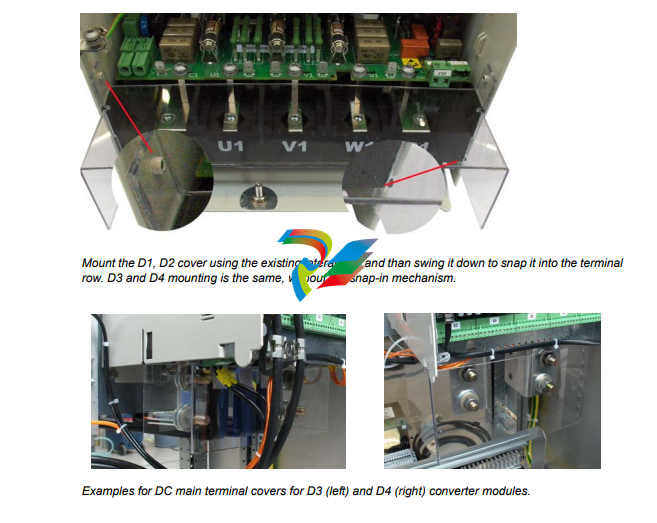
Terminal cover according to VBG 4 regulations
For converter modules size D1 - D4 shrouds for protection against contact are
provided.
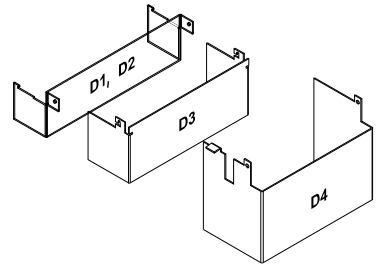 Id No. | Id No. |
| 3ADT631137P0001 | D1, D2 |
| 3ADV400208P0001 | D3 |
| 3ADV400207P0001 | D4 |
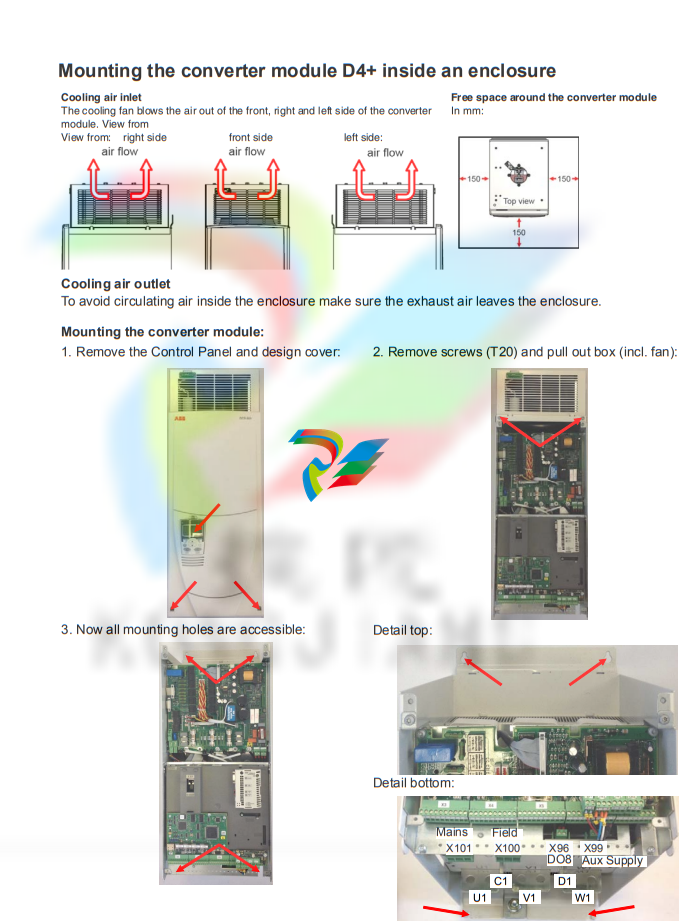
Chapter overview
This chapter contains the instructions that must be followed when selecting the
motor, cables, protections, cable routing and way of operation for the drive system.
Always follow local regulations. This chapter applies to all DCS800 converter
modules.
Attention:
If the recommendations given by ABB are not followed, the drive may experience
problems that the warranty does not cover. See also Technical Guide.
Options
Line reactors (L1)
For armature and field supply.
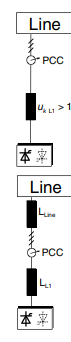
When thyristor converters operate, the line voltage is short-circuited during
commutation from one thyristor to the next. This operation causes voltage dips in the
mains PCC (point of common coupling). For the connection of a power converter
system to the mains, one of the following configurations applies:
Configuration A
When using a converter, a minimum of impedance is required to
ensure proper performance of the snubber circuit. Use a line reactor
to meet this minimum impedance requirement. The value must
therefore not drop below 1 % uk (relative impedance voltage). It
should not exceed 10 % uk, due to considerable voltage drops at the
converters outputs.
Configuration B
If special requirements have to be met at the PCC (standards like EN
61 800-3, DC and AC drives at the same line, etc), different criteria
must be applied for selecting a line reactor. These requirements are
often defined as a voltage dip in percent of the nominal supply
voltage. The combined impedance of ZLine and ZL1 constitute the total
series impedance of the installation. The ratio between the line
impedance and the line reactor impedance determines the voltage dip
at the PCC. In such cases, line chokes with an impedance around 4 %
are often used.
Example calculation with ukLine = 1 % and ukL1 = 4 %:
Voltage dip = ZLine / (ZLine + ZL1) = 20 %. Detailed calculations see
Technical Guide.
Start, Stop and E-Stop control The relay logic is splitted into four parts: 1: Generation of the On / Off and Start / Stop command: The commands represented by K20 and K21 (latching interface relay) can also be generated by a PLC and transferred to the terminals of the converter either by relays, using galvanic isolation or directly via 24 V signals. There is no need to use hardwired signals. Transfer these commands via serial communication. Even a mixed solution can be realized by selecting different possibilities for the one or the other signal (see parameter group 11). 2: Generation of control and monitoring signals: Control the main contactor K1 for the armature circuit by the dry contact of DO8 located on the SDCS-PIN-4 or SDCS-POW-4. The status of motor (K6) and converter (K8) fans can be monitored by means of MotFanAck (10.06) and ConvFanAck (10.20). 3: Off2 (Coast Stop) and Off3 (E-stop): Beside On / Off and Start / Stop the drive is equipped with two additional stop functions Off2 (Coast Stop) and Off3 (E-stop) according to Profibus standard. Off3 (E-stop) is scalable via E StopMode (21.04) to perform stop category 1. Connect this function to the E-stop push button without any time delay. In case of E StopMode (21.04) = RampStop the K15 timer relay must be set longer than E StopRamp (22.04). For E StopMode (21.04) = Coast the drive opens the main contactor immediately. Off2 (Coast Stop) switches the DC current off as fast as possible and prepares the drive to open the main contactor or drop the mains supply. For a normal DC motor load the time to force the DC current to zero is below 20 ms. This function should be connected to all signals and safety functions opening the main contactor. This function is important for 4-Q drives. Do not open main contactor during regenerative current. The correct sequence is: 1. switch off regenerative current 2. then open the main contactor In case the E-stop push button is hit, the information is transferred to the converter via DI5. In case E StopMode (21.04) = RampStop or TorqueLimit the converter will decelerate the motor and then open the main contactor. If the drive has not finished the function within the K15 timer setting, the drive must get the command to switch off the current via K16. After the K16 timer has elapsed, the main contactor is opened immediately, independent of the drive's status.
-
 Beckhoff C6675-0060 | Control cabinet Industrial PC
-
 Beckhoff C6675-0070 | Control cabinet Industrial PC
-
 Beckhoff C6650-0050 | Control cabinet Industrial PC
-
 Beckhoff C6650-0070 | Control cabinet Industrial PC
-
 Beckhoff C6640-0060 | Control cabinet Industrial PC
-
 Beckhoff C6640-0070 | Control cabinet Industrial PC
-
 Beckhoff C5210-0030 | 19-inch slide-in Industrial PC
-
 Beckhoff C5210-0040 | 19-inch slide-in Industrial PC
-
Beckhoff C5210-0050 | 19-inch slide-in Industrial PC
-
 Beckhoff C5240-0010 | 19-inch slide-in Industrial PC
-
 Beckhoff C5240-0030 | 19-inch slide-in Industrial PC
-
 Beckhoff C7015-0020 | Ultra-compact Industrial PC in IP65
-
Beckhoff C7015-0030 | Ultra-compact Industrial PC in IP65
-
 Beckhoff C6525-0060 | Fanless built-in Industrial PC
-
 Beckhoff C6525-0070 | Fanless built-in Industrial PC
-
 Beckhoff C6525-0080 | Fanless built-in Industrial PC
-
 Beckhoff C6515-0060 | Fanless built-in Industrial PC
-
 Beckhoff C6515-0070 | Fanless built-in Industrial PC
-
 Beckhoff C6515-0080 | Fanless built-in Industrial PC
-
 Beckhoff C6043-0090 | Ultra-compact Industrial PC with NVIDIA® GPU
-
 Beckhoff C6040-0090 | Ultra-compact Industrial PC
-
 Beckhoff C6032-0060 | Ultra-compact Industrial PC
-
Beckhoff C6032-0070 | Ultra-compact Industrial PC
-
 Beckhoff C6032-0080 | Ultra-compact Industrial PC
-
 Beckhoff C6030-0070 | Ultra-compact Industrial PC
-
 Beckhoff C6030-0080 | Ultra-compact Industrial PC
-
 Beckhoff C6027-0000 | Fanless ultra-compact Industrial PC
-
 Beckhoff C6027-0010 | Fanless ultra-compact Industrial PC
-
 Beckhoff C6025-0000 | Fanless ultra-compact Industrial PC
-
 Beckhoff C6025-0010 | Fanless ultra-compact Industrial PC
-
 Beckhoff C6025-0020 | Fanless ultra-compact Industrial PC
-
 Beckhoff C6930-0060 | Control cabinet Industrial PC
-
 Beckhoff C6930-0070 | Control cabinet Industrial PC
-
 Beckhoff C6930-0080 | Control cabinet Industrial PC
-
 Beckhoff C6925-0030 | Fanless control cabinet Industrial PC
-
Beckhoff C6925-0040 | Fanless control cabinet Industrial PC
-
 Beckhoff C6915-0010 | Fanless control cabinet Industrial PC
-
Beckhoff C6915-0020 | Fanless control cabinet Industrial PC
-
 Beckhoff C6905-0010 | Economy control cabinet Industrial PC
-
 Beckhoff C6905-0020 Economy control cabinet Industrial PC
-
 Beckhoff C6905-0030 Economy control cabinet Industrial PC
-
 Eaton SPN6084LEAXX2F Power Defense SB
-
 Eaton MPNC4N3LEAXXSW Magnum low voltage power circuit breaker
-
 EatonSP N8403YEAXX2H Power Defense SB
-
Eaton MPS8604WEAXX2C Magnum low voltage power circuit breaker
-
 Eaton MPS8404WEAXXSW Magnum low voltage power circuit breaker
-
 Eaton MPN6504LEAXX3A
-
Eaton MPSC323VEAXX2A Magnum low voltage power circuit breaker
-
 Eaton SPS6304WEAXX2F Power Defense SB
-
 Eaton MPN6504LEAXX2H Magnum low voltage power circuit breaker
-
 Eaton MPSC504HEAXX2H Magnum low voltage power circuit breake
-
 Eaton SPN85N3LEAXX2F Power Defense SB
-
 Eaton SPN6403CEAXX2F Power Defense SB
-
 Eaton MPSC5N4MEAXX3A Power Defense SB
-
Eaton SPSC124WEAXX2A Power Defense SB
-
 Eaton SPS85A4WEAXX2H Power Defense SB
-
 Eaton SPSC5N4MEAXX2A Power Defense SB
-
 Eaton MPN8403VEAXX2H Magnum low voltage power circuit breaker
-
 NZMB2-4-A200 MCCB NZM, NZM2 TM and Elec
-
 Eaton NZMN1-A63 Series NZM complete molded case circuit breaker
-
 Eaton NZMB1-S26-CNA Series NZM complete molded case circuit breaker
-
 Eaton NZMH2-A25-NA Series NZM complete molded case circuit breaker
-
 NZMH2-A200-BT-NA Eaton Series NZM complete molded case circuit breaker
-
 NZMN4-VEF1200-NA Eaton Series NZM complete molded case circuit breaker
-
 NZMH2-AF250-NA MCCB NZM, NZM2 TM and Elec
-
 NZMB1-AF60-NA Eaton Series NZM complete molded case circuit breaker
-
 NZMN1-A50 Eaton Series NZM complete molded case circuit breaker
-
 NZMH2-A80-NA Eaton Series NZM complete molded case circuit breaker
-
 Eaton Cutler-Hammer HFD3030 6639C86G87 3 Pole 30A 600V Circuit Breaker
-
 Moeller XV-230-57CNN-1-13-1 HMI PLC Panel Touchscreen 5.7"
-
 EATON CEAG CU CG-S , 40071360300 Control Unit
-
 EATON SDN90186 MOTOR CONTROL CENTER
-
EATON HMCP150U4 CIRCUIT BREAKER
-
 Eaton 7801C57 Digitrip Optimizer Hand Held Programmer
-
 Eaton HMCP400R5 Circuit Breaker
-
 EATON MP-3000 SAFETY RELAY 66D2032GX1 5A
-
 EATON PGGLOBL1701DPRO 1785T Touch Panel
-
 Eaton, Moeller, Easy MFD-CP8-NT
-
 Eaton WL-35717F Vacuum Interrupter
-
 EATON VICKERS EEA-PAM-535-A-32 AMPLIFIER CARD
-
 EATON FP5000-00 / FP5200-00 66D2041G11 FEEDER PROTECTION RELAY
-
 Eaton IQ-504 120VAC Modular Overload Relay
-
 Beckhoff CX5620-0225 CPU module
-
 Beckhoff CX5620-0220 CPU module
-
Beckhoff CX5620-0215 CPU module, Beckhoff RT Linux®
-
 Beckhoff CX5620-0210 CPU module, Beckhoff RT Linux®
-
 Beckhoff CX5620-0195 CPU module
-
Beckhoff CX5620-0190 CPU module
-
Beckhoff CX5620-0185 CPU module
-
Beckhoff CX5620-0175 CPU module
-
 Beckhoff CX5620-0170 CPU module
-
Beckhoff CX5620-0163 CPU module
-
Beckhoff CX5620-0161 CPU module
-
Beckhoff CX5620-0160 CPU module
-
Beckhoff CX5620-0100 CPU module
-
 Beckhoff CX5120-0195 CPU module
-
 Beckhoff CX5120-0190 CPU module
-
Beckhoff CX5120-0185 CPU module
-
Beckhoff CX5120-0175 CPU module
-
 Beckhoff CX5120-0170 CPU module
-
Beckhoff CX5120-0163 CPU module
-
Beckhoff CX5120-0162 CPU module,
-
Beckhoff CX5120-0161 CPU module
-
Beckhoff CX5120-0150 CPU module
-
Beckhoff CX5120-0143 CPU module
-
Beckhoff CX5120-0142 CPU module
-
Beckhoff CX5120-0141 CPU module
-
Beckhoff CX5120-0140 CPU module
-
Beckhoff CX5120-0130 CPU module
-
Beckhoff CX5120-0123 CPU module
-
 Beckhoff CX5120-0122 CPU module
-
Beckhoff CX5120-0120 CPU module, Microsoft Windows Embedded Standard 7 P
-
 Beckhoff CX5120-0113 CPU module
-
Beckhoff CX5120-0112 CPU module
-
Beckhoff CX5120-0111 CPU module
-
 Beckhoff CX5120-0110 CPU module, Microsoft Windows Embedded Compact 7
-
Beckhoff CX5120-0100 CPU module, no operating system
-
Beckhoff C6017-0040 | Fanless ultra-compact Industrial PC
-
Beckhoff C6017 | Fanless ultra-compact Industrial PC
-
 Beckhoff C6015-0030 | Fanless ultra-compact Industrial PC
-
Beckhoff C6015-0040 | Fanless ultra-compact Industrial PC
-
Beckhoff C6015 | Fanless ultra-compact Industrial PC
-
Beckhoff C6015 | Fanless ultra-compact Industrial PC
-
 Beckhoff CX2500-M510 | Fieldbus master module
-
 Beckhoff CX2500-M310 | Fieldbus master module
-
 Beckhoff CX2500-B510 | Fieldbus slave module
-
 Beckhoff CX2500-B310 | Fieldbus slave module PROFIBUS for CX20xx, CX52x0. CX53x0. CX56x0
-
 Beckhoff CX2500-0070 | USB 3.0 module for CX20xx, CX52xx, CX53x0. CX56x0