
ABBMNS® Digital ABB Ability™ Condition Monitoring for electrical systems - CMES User Management – Quick guide ABB Ability™ Condition Monitoring for electrical systems – CMES User Management Quick Guide
NOTICE
This document contains information about one or more ABB products and may include a description of or a
reference to one or more standards that may be generally relevant to the ABB products. The presence of any
such description of a standard or reference to a standard is not a representation that all of the ABB products
referenced in this document support all of the features of the described or referenced standard. In order to
determine the specific features supported by a particular ABB product, the reader should consult the product
specifications for the particular ABB product.
ABB may have one or more patents or pending patent applications protecting the intellectual property in the
ABB products described in this document.
The information in this document is subject to change without notice and should not be construed as a commitment by ABB. ABB assumes no responsibility for any errors that may appear in this document.
Products described or referenced in this document are designed to be connected and to communicate information and data through network interfaces, which should be connected to a secure net-work. It is the sole
responsibility of the system/product owner to provide and continuously ensure a secure connection between
the product and the system network and/or any other networks that may be connected.
The system/product owners must establish and maintain appropriate measures, including, but not limited to,
the installation of firewalls, application of authentication measures, encryption of data, installation of antivirus
programs, and so on, to protect these products, the network, its system, and interfaces against security
breaches, unauthorized access, interference, intrusion, leakage, and/or theft of data or information.
ABB performs functionality testing on the products and updates that we release. However, system/product
owners are ultimately responsible for ensuring that any product updates or other major system updates (to
include but not limited to code changes, configuration file changes, third-party software updates or patches,
hardware change out, and so on) are compatible with the security measures implemented. The system/ product owners must verify that the system and associated products function as expected in the environment in
which they are deployed.
In no event shall ABB be liable for direct, indirect, special, incidental or consequential damages of any nature or
kind arising from the use of this document, nor shall ABB be liable for incidental or consequential damages
arising from use of any software or hardware described in this document.
This document and parts thereof must not be reproduced or copied without written permission from ABB, and
the contents thereof must not be imparted to a third party nor used for any unauthorized purpose.
The software or hardware described in this document is furnished under a license and may be used, copied, or
disclosed only in accordance with the terms of such license. This product meets the requirements specified in
EMC Directive 2014/30/EU and in Low Voltage Directive 2014/35/EU.
The ABB Ability™ Condition Monitoring for electrical systems – CMES uses these open source components:
jquery version 3.2.1 Copyright JS Foundation and other contributors, https://js.foundation/
jqueryui.com 1.12.1 Copyright JS Foundation and other contributors, exact contribution history,
see https://github.com/jquery/jquery
perfect scrollbar 1.1.0 The MIT License (MIT) Copyright (c) 2012-2017 Hyunje Jun and other contributors
selectric 1.13.0 Copyright (c) 2016 Leonardo Santos
MIT license
Permission is hereby granted, free of charge, to any person obtaining a copy of this software and associated
documentation files (the "Software"), to deal in the Software without restriction, including without limitation
the rights to use, copy, modify, merge, publish, distribute, sublicense, and/or sell copies of the Software, and
to permit persons to whom the Software is furnished to do so, subject to the following conditions:
The above copyright notice and this permission notice shall be included in all copies or substantial portions of
the Software.
THE SOFTWARE IS PROVIDED "AS IS", WITHOUT WARRANTY OF ANY KIND, EXPRESS OR IMPLIED, INCLUDING
BUT NOT LIMITED TO THE WARRANTIES OF MERCHANTABILITY, FITNESS FOR A PARTICULAR PURPOSE AND
NONINFRINGEMENT. IN NO EVENT SHALL THE AUTHORS OR COPYRIGHT HOLDERS BE LIABLE FOR ANY CLAIM,
DAMAGES OR OTHER LIABILITY, WHETHER IN AN ACTION OF CONTRACT, TORT OR OTHERWISE, ARISING
FROM, OUT OF OR IN CONNECTION WITH THE SOFTWARE OR THE USE OR OTHER DEALINGS IN THE
SOFTWARE.
1. General
1.1. Target Group
The MNS Digital Edge device is the hardware platform for ABB Ability™ Condition Monitoring for electrical systems (in the following ‘CMES’).
Audiences of this manual are service technicians and switchgear operators on site.
This document describes the communication and user interfaces of the MNS Digital Edge device and CMES.
The reader shall be familiar with the terms and concept of ABB MNS Low Voltage Switchgear.
The reader shall be familiar with the terms and concept of Microsoft Windows®.
1.2. Terminology
List of the terms, acronyms, abbreviations and definitions that the document uses.
Abbreviation Term Description
CMES Abbreviation for on-premise ABB Ability™ Condition Monitoring for electrical systems
MNS Digital Edge Hardware platform for on-premise Edge computing, including CMES and cloud connectivity
MNS Modular Low Voltage Switchgear family from ABB
Windows OS Windows Operating System.
Windows® is a registered trademark of Microsoft
Corporation. All other trademarks are the property of their respective owners.
1.3. Related Documentation
[1] 1TGC908002M0203 ABB Ability Condition Monitoring for electrical systems – CMES - User
Manual
1.4. Related System Version
The content of this document is related to MNS Digital Release 2.0
2. Introduction
This document provides an introduction on how to setup or change login credentials for the
user management of the CMES.
2.1. Default settings
The MNS Digital Edge is provided from ABB with the custom specific project installed. Within
project specification the customer defines the number of users which have access to CMES
and the respective user roles. In this case ABB will set-up the CMES with the agreed user accounts. After delivery it’s mandatory to change at least the user passwords.
In case the users and roles are not defined from project, 2 default users are installed:
Administrator and Operator.
This is also valid when the MNS Digital Edge is ordered as spare part.
Default login credentials are:
Administrator
User name: EdgeGwAdmin
Password: PleaseChangeMe
Operator
User name: EdgeGwUser
Password: PleaseChangeMe
For cyber security reason, it’s mandatory to change the password after installation of the
MNS Digital Edge.
ABB will take no liability caused by using the default passwords.
Please contact your IT department about details of password management and cyber security measures in your company. A process for regular update of anti-virus software needs to
be implemented.
By default, the Windows Defender is installed and activated. Please ensure to update the Windows OS and the anti-virus software on regular basis.
3. Configuring the User Management for
the CMES
This chapter explains possible adaptions of the user management for users of the pre-installed MNS Digital Edge:
• Create a new user
• Adding a new user
• Changing users
• Changing passwords by Windows remote desktop application.
3.1. Creating a New User for CMES
To create a new user, you have to login as administrator. The following steps are describing
the workflow how to create a new user with the role “operator”. An operator has the permissions to acknowledge alarms. It is also described how to give a user the role “Read Only” at
the crucial steps. This user has no permission to acknowledge alarms.
Step Actions Remark
1 • Login by remote desktop1 as administrator
The password is provided from your ABB
contact together with the MNS
Digital Edge.
2 • Right click windows symbol “Computer Management”-Local Users
and Groups”
1To access the windows operating system alternatively a monitor, keypad and mouse can
be connected to the MNS Digital Edge.

The computer management window will open
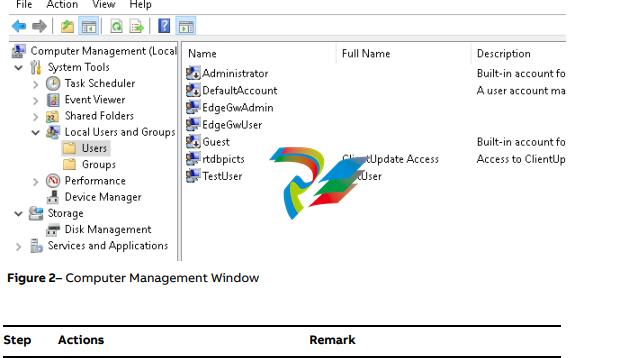
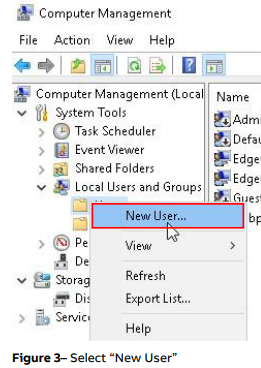
• Right Click at “Users” – “New User…”
• Enter new user name, password, Password never expires and press Create
and Close
3.2. Changing an existing User Password
Due to cyber security reasons a user should change its own password from time to time. This
could be done in following way:
Step Actions Remark
1 • Login by remote desktop with user
name and password
User login– Before user can login the
administrator has to add user to Remote Desktop Users (Right click windows symbol – Computer Management – Local Users and Groups –
Groups - Remote Desktop Users).
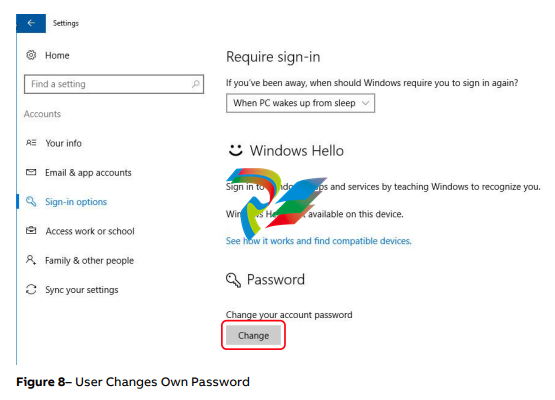
2 • Left click windows symbol – “Settings”
– “Accounts” – Sign-in options”
• Section Password – Press “Change”
button
• Enter current password, new password
twice and hint
• Press Next
• Press Finish
Change current password, see following
explanation about password complexity
requirements
Password Complexity Rules and Password History
The password has to contain characters from three of the following categories:
• Uppercase letters of European languages (A through Z, with diacritic marks, Greek and Cyrillic characters)
• Lowercase letters of European languages (a through z, sharp-s, with diacritic marks, Greek
and Cyrillic characters)
• Base 10 digits (0 through 9)
• Non-alphanumeric characters (special characters): (~!@#$%^&*_-+=`|(){}[]:;"'<>,.?/) Currency symbols such as the Euro or British Pound are not counted as special characters for
this policy setting.
• Any Unicode character that is categorized as an alphabetic character but is not uppercase
or lowercase. This includes Unicode characters from Asian languages
A new password is only accepted by Windows when it is differs from four previous passwords.
3.3. Changing the Password of Admin User
This chapter explains how to change password of the administrator user.
Step Actions Remark
1 • Login by remote desktop with admin
user name and password
Default is:
EdgeGwAdmin– “PleaseChangeMe”
The name of the user account has been
provided as a setup parameter during the
installation.
The admin user must have administrator
privileges (or other privileges for running
as a service and accessing the database
tables locally).
2 • Open Windows Explorer
• Goto folder “D:SoftwareSystemConfigurationScriptsChangeAdminPassword”
3 • Double click “Change Admin Password”
and continue with Yes
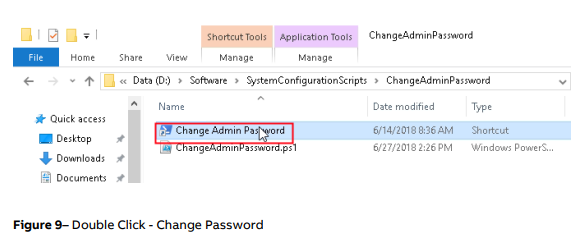
Figure 9– Double Click - Change Password
4 • Wait until following dialog pops up
-
 DEIF FAS-113DG Synchronisation & circuit breaker closing
 -
 DEIF FAS-115DG Synchronisation & circuit breaker closing
 -
 DEIF HAS-111DG Synchronisation & circuit breaker closing
 -
 DEIF LSU-122DG Load sharing, paralleling & operation
 -
 DEIF LSU-114DG Load sharing, paralleling & operation
 -
 DEIF LSU-113DG Load sharing, paralleling & operation
 -
 DEIF LSU-112DG Load sharing, paralleling & operation
 -
 DEIF RMF-112D Frequency relay
 -
 DEIF RMC-142D Current relay
 -
 DEIF RMC-132D Current relay
 -
 DEIF RMC-131D Current relay
 -
 DEIF RMC-122D Current relay
 -
 DEIF RMC-121D Current relay
 -
 DEIF RMC-111D Current relay
 -
 DEIF MVR-V211 Busbar Protection
 -
 DEIF MVR-T257 Transformer Differential Protection
 -
 DEIF MVR-T256 Transformer Differential Protection
 -
 DEIF MVR-T216 Transformer Differential Protection
 -
DEIF MVR-T215 Transformer Protection
-
 DEIF MVR-M257 Motor Differential Protection
 -
 DEIF MVR-M255 Motor Protection
 -
 DEIF MVR-M215 Motor Protection
 -
 DEIF MVR-M210 Motor Protection
 -
 DEIF MVR-G257 Generator Differential Protection
 -
 DEIF MVR-G215 Generator Protection
 -
 DEIF MVR-F255 Directional Feeder Protection
 -
 DEIF MVR-F215 Directional Feeder Protection
 -
DEIF MVR-F210 Feeder Protection
-
 DEIF MVR-F205 Directional Feeder Protection
 -
 DEIF MVR-F201 Basic Feeder Protection
 -
DEIF MVR-200 series Medium Voltage Relay
-
 DEIF MDR-2 Multi-differential relay
 -
 DEIF LMR-122D Loss of mains relay
 -
 DEIF LMR-111D Loss of mains relay
 -
 DEIF APU-4 Advanced G59 and G99 protection unit
 -
 DEIF iE 650 PLC - The most robust programmable automation controller available
 -
 DEIF iE 350 PLC - Programmable Automation PLC Controller
 -
 DEIF iE 250 PLC Versatile and modular intelligent energy PLC controller
 -
 DEIF PPM-3 EDG Protection and Power Management
 -
 DEIF AGC 3X 4198000234E AUTOMATIC GENSET CONTROLLER
 -
 SAUTER ASF123 Damper actuator with spring return
 -
SAUTER ASF122 Damper actuator with spring return
-
SAUTER ASF113F122 Damper actuator with spring return
-
SAUTER ASF113F120 Damper actuator with spring return
-
SAUTER ASF112F122 Damper actuator with spring return
-
SAUTER ASF112F120 Damper actuator with spring return
-
 SAUTER ASM 124/134 series - ASM134F130 Damper actuator
 -
SAUTER ASM 134 series - ASM134SF132 Damper actuator
-
SAUTER ASM 124/134 series - ASM124SF132 Damper actuator
-
SAUTER ASM 124/134 series - ASM124F122 Damper actuator
-
SAUTER ASM 124/134 series - ASM124F120 Damper actuator
-
 SAUTER Valve actuator ASM 105S/115S series ASM115SF152
 -
SAUTER Valve actuator ASM 105S/115S series ASM105SF152
-
SAUTER Valve actuator ASM 105S/115S series ASM115SF132
-
SAUTER Valve actuator ASM 105/115 series ASM105SF132
-
 SAUTER Valve actuator ASM 105/115 series ASM115F122
 -
SAUTER Valve actuator ASM 105/115 series ASM115F120
-
SAUTER Valve actuator ASM 105/115 series ASM105F122
-
SAUTER Valve actuator ASM 105/115 series ASM105F120
-
SAUTER Valve actuator ASM 105/115 series ASM105F10
-
 SAUTER AKF113S Rotating actuator AKF 112/113 series
 -
SAUTER AKF113F122 Rotating actuator AKF 112/113 series
-
SAUTER AKF113F120 Rotating actuator AKF 112/113 series
-
SAUTER AKF112F122 Rotating actuator AKF 112/113 series
-
SAUTER AKF112F120 Rotating actuator AKF 112/113 series
-
 SAUTER AKM115SAF332: Smart Actuator for ball valve, BACnet/IP
 -
 SAUTER AKM115SAF232 Rotating Actuator AKM 115SA Smart Actuator
 -
 SAUTER AKM115SF152 Rotating Actuator AKM 105S/115S Series
 -
SAUTER AKM115SF132 Rotating Actuator AKM 105S/115S Series
-
SAUTER AKM105SF132 Rotating Actuator AKM 105S/115S Series
-
 SAUTER AKM115F122 Rotating actuator AKM 105/115 series
 -
 SAUTER Rotating actuator AKM 105/115 series AKM115F120
 -
SAUTER Rotating actuator AKM 105/115 series AKM105F122
-
SAUTER Rotating actuator AKM 105/115 series AKM105F120
-
 SAUTER Continuous actuator for unit valves, with stroke AXS215S
 -
 SAUTER Linear valve actuator AXT/AXS series AXT211
 -
SAUTER Linear valve actuator AXT/AXS series AXT201
-
 SAUTER Linear valve actuator AXM/AXF series AXF217S
 -
SAUTER Linear valve actuator AXM/AXF series AXM217S
-
SAUTER AXM217SF404 is an electric actuator for unit valves.
-
SAUTER AXM217SF402 is an electric actuator for unit valves.
-
SAUTER Linear valve actuator AXM/AXF series AXM217
-
 SAUTER Linear valve actuator AVF 124/125 series AVF125S
 -
SAUTER Linear valve actuator AVF 124/125 series AVF124S
-
SAUTER Linear valve actuator AVF 124/125 series AVF124S
-
 SAUTER AVM322S-R Linear valve actuator AVM 234S series
 -
SAUTER AVM322-R Linear valve actuator AVM 234S series
-
SAUTER AVM322SF132 Linear valve actuator AVM 234S series
-
 SAUTER AVM321SF132 Linear Valve Actuator
 -
 GE Power Conversion P112-6053 Advanced Micro Controller (AMC2)
 -
GE Power Conversion P111-6053 Advanced Micro Controller (AMC2)
-
 GE Power Conversion P110-6053 Advanced Micro Controller (AMC2)
 -
 GE Power Conversion P122-6052 Advanced Micro Controller (AMC2)
 -
GE Power Conversion P121-6052 Advanced Micro Controller (AMC2)
-
 GE Power Conversion P112-6152 Advanced Micro Controller (AMC2)
 -
GE Power Conversion P110-6152 Advanced Micro Controller (AMC2)
-
GE Power Conversion P112-6052 Advanced Micro Controller (AMC2)
-
GE P106-6052 AMC2 Advanced Micro Controller Unit
-
SAUTER AVF234SF232 Linear valve actuator AVM 234S series
-
SAUTER AVF234SF132 Linear valve actuator AVM 234S series
-
 SAUTER Linear valve actuator AVM 234S series AVM234SF132-6
 -
SAUTER Linear valve actuator AVM 234S series AVM234SF132-5
-
SAUTER Linear valve actuator AVM 234S series AVM234SF132
-
SAUTER Linear valve actuator AVM215SF132-7
-
SAUTER Linear valve actuator AVM215SF132R
-
 Linear valve actuator AVM 115SA Smart Actuator AVM115SAF332
 -
Linear valve actuator AVM 115SA Smart Actuator AVM115SAF232
-
 SAUTER Linear valve actuator AVM 105S/115S series AVM115SF132
 -
SAUTER Linear valve actuator AVM 105S/115S series AVM105SF132
-
 SAUTER AVM115F901 Linear Valve Actuator
 -
SAUTER AVM115F122 Linear Valve Actuator
-
SAUTER AVM115F120 Linear Valve Actuator
-
SAUTER AVM105F122 Linear Valve Actuator
-
 SAUTER AVM105F120 Linear Valve Actuator
 -
 SAUTER AVM105F100 Linear Valve Actuator
 -
 AEROTECH SM Series High-Performance Stepper Motors
 -
 AEROTECH BLMSC Series Linear Motors
 -
 AEROTECH Custom Linear Motors
 -
 AEROTECH BMS Series Brushless, Slotless Rotary Motors
 -
 AEROTECH BM Series Brushless Rotary Motors
 -
 AEROTECH BLMX Series Linear Motors
 -
 AEROTECH BLMH Series Linear Motors
 -
 AEROTECH BLM Series Linear Motors
 -
 AEROTECH BLMC Series Linear Motors
 -
 AEROTECH BLMUC-143 Linear motor forcer with thermistor
 -
AEROTECH BLMUC-111 Linear motor forcer with thermistor
-
AEROTECH BLMUC-95 Linear motor forcer with thermistor
-
AEROTECH BLMUC-79 Linear motor forcer with thermistor


