
alstom AMS42/84 5B Amplifier SystemAmplifier Technology at its Best.
5B Amplifier System
Amplifier Technology at its Best.
AMS42/84
5B Amplifier System
Amplifier Technology at its Best.
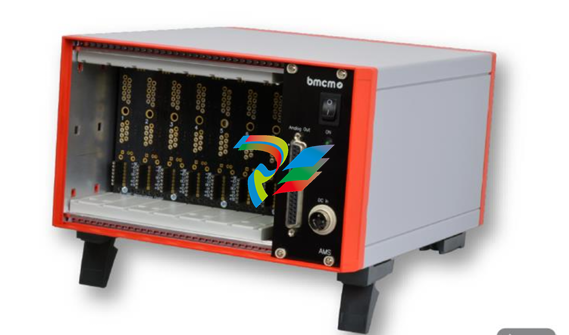
Compact or 19 Inch.
Get your amplifier technology wrapped up with
the AMS42/84. Available in a robust aluminum
housing as a mobile tabletop unit (AMS42) with
skid-proof, tip-up feet for 8 channels or as a
16-channel stationary version (AMS84) for 19''
rack systems.
Modular Concept.
Equip Individually. Be Flexible.
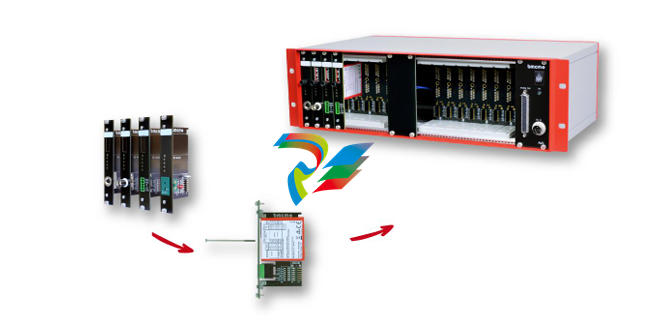
The AMS device is equipped with cassettes, on
which the required 5B measuring amplifiers are
mounted. The variety of available 5B modules
allows for the optimum adaptation of the
AMS42/84 to any special measuring task.
Choose Connector.
Mount 5B Amplifier. Done.
The available plug-in cassettes have different
connectors on the front panel. Depending on
the sensor or signal to be connected, the
suitable cassette can be chosen. The 5B
module only has to be fixed on the cassette
now and be integrated in the AMS system.
Clearly Safe.
Most of the 5B modules feature galvanic
isolation between the channels and from the
data acquisition and control system. This
perfectly protects the whole system against
high potentials and interferences.
Well Supplied.
The AMS42/84 is operated with 9-40V via an
external power supply.
Connection to the DAQ System.
The amplifier outputs are available at a D
Sub37 female connector. They are connected
to the input lines of a data acquisition system.
Combining the AMS42/84 with a measuring
card or DAQ system from bmcm makes a
powerful measurement system.
Accessories. Just Makes it Easier.
To individually equip the AMS devices, various
5B modules and plug-in cassettes as well as
other accessories (e.g. external power supply,
carrying handle, connection cable) are
provided.
Versions and Options.
Something for Everybody.
AMS42/84 versions with an integrated DAQ
system (USB, LAN) are also available. With the
8-channel extension AMS-EXT8. the number of
channels can optionally be increased to 16 in
the AMS42.
1 Installation
1.1 Assembly
a) Equip the AMS42/84 with the plug-in cassettes (see chapter 4.2) carrying the required 5B
modules.
b) Carefully push the cassette along the guide bars of the relevant slot until the 7-way pin
connector of the cassette and the pins of the 5B module are plugged into the corresponding
connectors on the AMS backplane.
c) If using the AMS42 with the option AMS-EXT8 (see chapter 4.4), the additional cassettes are
mounted on the back of the device.
d) For a tight installation, fix the front panel at both ends with screws to the housing. Bridge
unneeded slots by a blank panel (AMS-K-BLANK) to protect the device against outside
influences.
e) If the AMS84 is mounted to a 19'' rack system, the relevant input wiring should be prepared first
before attaching the device to the rack system with screws.
1.2 Software Installation and Start-up Procedure
a) Connect your PC data acquisition system to the 37-pin D-Sub female.
b) Attach an external power unit to the 3-pin DIN coupling for 9-40V power supply (use a supply
cable with a cross sectional area >1mm2) and turn on the AMS42/84 by pressing the switch to
"1" (ON) (see chapter 2.1 and 2.2).
c) Signals are attached at the specific connector of the respective AMS cassette panel.
• To change the cassettes, the power of the AMS device must be turned off!
• If the AMS system is operated standalone, additional grounding to enhance shielding is
recommended but not mandatory.
2 Connections / Assignments
All available connectors and operating elements of the
AMS42/84 are accessible on the right-hand side of the
device front.
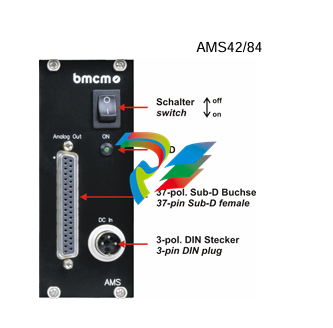
2.1 Switch and LED
The AMS42/84 is turned on (press "1") and off (press "0")
with the switch.
The green LED "ON" indicates the operation of the device.
2.2 Power Supply "DC In"
The AMS device is supplied with power (9..40V) via the 3
pin DIN plug. A power supply unit ZU-PW40W (24V, 1.67A
DC) is optionally available.
2.3 Analog Channels
8 (AMS42) or 16 (AMS84) analog signals can be connected to the
amplifier inputs available at the respective connectors of the cassette
panels.
Their assignment is illustrated in the data sheet of the AMS-K cassettes.
To connect a PC data acquisition system, these analog outputs are led
out to the 37-pin D-Sub female.
Depending on the application, the shield of the analog input cables can be applied to ground or 0V. Be
sure to connect at one end of the cable only. Run the signal ground separately if possible. Lay input
cable separately if possible.
• The housing of the D-Sub37 female is connected to the AMS housing (and ground eventually).
• If the device features 16 channels (AMS84. AMS42 + AMS-EXT8), the ground of the first eight
channels is not electrically connected to the ground of the next eight channels.
3 AMS Backplane
The AMS-backplane provides 8 slots for 5B modules and the AMS-K plug-in cassettes (see chapter
4.2) carrying the 5B modules. Two backplanes are integrated in the AMS84.
If the optional add-on AMS-EXT8 (see chapter 4.4) is used, eight slots each are available on the front
and on the back of the AMS42.
3.1 Ground-to-Ground Resistance
Ideally, the output ground is not electrically connected with the power supply ground. If, however, a
connection to ground is necessary (e.g. to use the output switch in the 5B module), the 2-pin jumper
-
 CTI 2500-ADP2-DISC Discrete Wiring Adapter for Series 500
 -
 CTI 2500-ADP1 Analog Wiring Adapter for Series 500
 -
 CTI 2500C-RADP-RS485 Remote Base Controller Adapter for Series 500
 -
 CTI 2500C-RADP-RBC Profibus RBC Adapter for Series 500
 -
 CTI 2500C-PADP-120V 120VAC 50W Power Supply for Series 500
 -
 CTI 2500-RADP RBC Adapter for Series 500
 -
 CTI 2500-R4500 520/530/DBC Adapter for Series 500 - MATURE
 -
 CTI 2500-PADP Power Supply Adapter for Series 500
 -
 CTI 2500-IADP I/O Adapter for Series 500
 -
 CTI 2500-VP15A-N4-W7 15" Flat-Panel PC with Windows® 7 Embedded
 -
 CTI 2500S-27-1750 Slice I/O, Ethernet, RS232/485. 900MHz, 2DIO / 4UAI / 2AI
 -
 CTI 2500S-26-1750 Slice I/O, Ethernet, RS232/485. 900MHz, 8DIO / 2UAI
 -
 CTI 2500S-23-1750 Slice I/O, Ethernet, RS232/485. 900MHz, 4DI / 4DO / 2UAI / 2AO
 -
 CTI 2500S-27-1550 Slice I/O, RS232/485. 2DIO / 4UAI / 2AI
 -
 CTI 2500S-26-1550 Slice I/O, RS232/485. 8DIO / 2UAI
 -
 CTI 2500S-23-1550 Slice I/O, RS232/485. 4DI / 4DO / 2UAI / 2AO
 -
 CTI 2500S-27-1050 Slice I/O, Ethernet, 2DIO / 4UAI / 2AI
 -
 CTI 2500S-26-1050 Slice I/O, Ethernet, 8DIO / 2UAI
 -
 CTI 2500S-23-1050 Slice I/O, Ethernet, 4DI / 4DO / 2UAI / 2AO
 -
 CTI 2500C-32F-CJC 32-Pin Field Wiring Connector with Cold Junction Compensation
 -
 CTI 2500C-32F 32-Pin Field Wiring Connector
 -
 CTI 2500C-8-TC Eight Thermocouple Inputs
 -
 CTI 2500C-8-RTD Eight RTD Inputs
 -
 CTI 2500C-8-RL-FC 8 Form-C Relay Outputs
 -
 CTI 2500C-8-IDO-24V 8 Isolated 24VDC Outputs
 -
 CTI 2500C-8-IDO-120V 8 Isolated 120VAC Outputs
 -
 CTI 2500C-16-DO-24V Sixteen 24VDC Digital Outputs
 -
 CTI 2500C-16-DO-120V Sixteen 120VAC Digital Outputs
 -
.png) CTI 500C-16-IDI-24V Sixteen Isolated 24V AC/DC Digital Inputs
CTI 500C-16-IDI-24V Sixteen Isolated 24V AC/DC Digital Inputs -
 CTI 2500C-16-IDI-120V Sixteen Isolated 120V AC/DC Digital Inputs
 -
 CTI 2500C-16-DIDO-SIM Sixteen Digital Input and Output SImulator
 -
 CTI 2500C-16-DI-24V Sixteen 24V AC/DC Digital Inputs
 -
 CTI 2500C-16-DI-120V Sixteen 120V AC/DC Digital Inputs
 -
 CTI 2500C-RBC-RS485 RS485 Remote Base Controller
 -
 CTI 2500C-RBC-PRF Profibus Remote Base Controller
 -
 CTI 2500C-PS-24V-35 35-Watt DC Power Supply
 -
 CTI 2500C-PS-120V-35 35-Watt AC Power Supply
 -
 CTI 2500C-R8 Eight-Slot Base
 -
 CTI 2500C-R4 Four-Slot Base
 -
 CTI 2500C-R16 Sixteen-Slot Base
 -
 CTI 2500C-2572-B Fast Ethernet TCP/IP Adapter
 -
 CTI 2500C-J750 Compact Janus PAC with 3MB Project Memory
 -
 CTI 2500C-C300 CPU with 512K User Memory
 -
 CTI 2500C-C200 CPU with 256K User Memory
 -
 CTI 2500C-C100 CPU with 128K User Memory
 -
 CTI 2500C-8-AO 8 Analog Outputs
 -
 CTI 2500C-8-AI 8 Analog Inputs
 -
 CTI 2559-FCAL Precision Calibration Connector
 -
 CTI 2559-FPC 40-Position Screw-Terminal Connector
 -
 CTI 2500-RFC PLC to RF Modem Cable
 -
 CTI 2500-40F 40-Position Standard Screw-Terminal Connector
 -
 CTI 2505 Vibration Sensor Interface Module
 -
 CTI 2554-A 4-Channel Isolated High Speed Counter Module
 -
 CTI 2553-A 2-Channel Mag Meter Input Module
 -
 CTI 2502 2-Channel High Speed Counter Input Module
 -
 CTI 2559-TC 8-Channel Thermocouple Input Module
 -
 CTI 2556-A 16-Channel Isolated Thermocouple Input Module
 -
 CTI 2556 16-Channel Isolated Thermocouple Input Module
 -
 CTI 2551-A 8-Channel Isolated Thermocouple Input Module
 -
 CTI 2559-RTD 8-Channel RTD Input Module
 -
 CTI 2557-A 16-Channel RTD Input Module
 -
 CTI 2557 16-Channel RTD Input Module
 -
 CTI 2552-A 8-Channel Isolated RTD Input Module
 -
 CTI 2534 8-Point Form-C Relay Output Module
 -
 CTI 2532 16-Point Form-A Relay Output Module
 -
 CTI 2531 32-Point Form-A Relay Output Module
 -
 CTI 2530 8-Point Form-C Relay Output Module
 -
 CTI 2562 8-Channel Analog Output Module
 -
 CTI 2560-A 8-Channel Isolated Analog Output Module
 -
 CTI 2501 8in/4out Analog Module
 -
 CTI 2558 8-Channel Analog Input Module
 -
 CTI 2555-A 16-Channel Analog Input Module
 -
 CTI 2550-A 8-Channel Isolated Analog Input Module
 -
 CTI 2599 8/16/32-Point AC Output Module
 -
 CTI 2598-8 8-Point AC Output Module
 -
 CTI 2598 8/16-Point AC Output Module
 -
 CTI 2597 8/16/32-Point DC Output Module
 -
 CTI 2596-8 8-Point DC Output Module
 -
 CTI 2596 8/16-Point DC Output Module
 -
 CTI 2595 16-Point TTL/Word Output Module
 -
 CTI 2591-EF 16-Point Isolated 11-146 VDC Output with Front Panel Accessible Fuses
 -
 CTI 2591-A 16-Point Isolated 11-146 VDC Output Module
 -
 CTI 2590-EF 16-Point Isolated 20-132 VAC Output with Front Panel Accessible Fuses
 -
 CTI 2590-A 16-Point Isolated Discrete 20-132 VAC Output Module
 -
 CTI 2589-B 8/16/32-Point Universal Discrete Input Module
 -
 CTI 2589-A 8/16/32-Point Universal Discrete Input Module
 -
 CTI 2588-8 8-Point Universal Discrete Input Module
 -
 CTI 2585 16-Point TTL/Word Input Module
 -
 CTI 2582 16-Point Isolated 125 VDC Input Module
 -
 CTI 2581 16-Point Isolated 12-56 VDC Input Module
 -
 CTI 2580 16-Point Isolated 95-132 VAC Input Module
 -
 CTI 2500-TAP RS485 Network Tap
 -
 CTI 2500-RIO-B RS485 Remote Base Controller
 -
 CTI 2500-RIO-A RS485 Remote Base Controller
 -
 CTI 2500-RBC Profibus Remote Base Controller
 -
 CTI 2515-A 100-Watt AC/DC Power Supply with Redundancy Support
 -
 CTI 2515 100-Watt AC Power Supply (MATURE - replaced by 2515-A)
 -
 CTI 2513-A 75-Watt DC Power Supply with Redundancy Support
 -
 CTI 2513 75-Watt 24VDC Power Supply
 -
 CTI 2512-A 75-Watt AC/DC Power Supply with Redundancy Support
 -
 CTI 2512 75-Watt AC/DC Power Supply
 -
 CTI 2510 125 VDC Power Supply
 -
 CTI 2500-SSB Single Slot Blank Front Panel
 -
 CTI 2500-R11-A Eleven-Slot Redundant Base
 -
 CTI 2500P-R16 Sixteen-Slot Base with High-Speed Channel
 -
 CTI 2500P-R8 Eight-Slot Base with High-Speed Channel
 -
 CTI 2500P-R4 Four-Slot Base with High-Speed Channel
 -
 CTI 2541 Redundant Processor Manager Module
 -
 CTI 2577 Profibus DP Slave Adapter
 -
 CTI 2573-MOD Serial Interface Adapter with MODBUS
 -
 CTI 2572-AF Fast Ethernet TCP/IP Adapter with Optical Fiber Connection
 -
 CTI 2572-A Fast Ethernet TCP/IP Adapter
 -
 CTI 2572 Ethernet TCP/IP Adapter
 -
 CTI 2572-B Fast Ethernet TCP/IP Adapter
 -
 CTI 2576 DeviceNet™ Scanner Module (MATURE)
 -
 CTI 2500P-ECC1 Ethernet Communications Coprocessor
 -
 CTI 2500P-JACP Janus Application Coprocessor
 -
 CTI 2500P-ACP1 Application Coprocessor (MATURE - replaced by 2500P-JACP)
 -
 CTI 2500P-J450 Janus PAC with 2MB Project Memory
 -
 CTI 2500-C400 CPU with 3072K User Memory
 -
 CTI 2500-C300 CPU with 512K User Memory
 -
 CTI 2500-C200 CPU with 256K User Memory
 -
 CTI 2500-C100 CPU with 128K User Memory
 -
 CTI 2500P-J750 Janus PAC with 3MB Project Memory
 -
 Shinkawa WHF3006M Displacement Converter
 -
Shinkawa JBP-220 (P-24-94A / P-24-94B) Circuit Board Module
-
 SHINKAWA WKN-142K5 2-WIRE VIBRATION TRANSDUCER
 -
Shinkawa FRP-321 (P-26-54A / P-26-54B) Circuit Board Module


