
PhoenixPHOENIX CONTACT GmbH & Co. KG Flachsmarktstraße 8, 32825 Blomberg, Germany Fax +49-(0)5235-341200, Phone +49-(0)5235-300
PORTUGUÊS
Fonte de alimentação com ciclo primário
– Cuidado: Perigo de morte devido a choque elétrico. Nunca
trabalhe com tensão ligada.
– A fonte de alimentação possui certificação para ser ligada a
redes elétricas TN, TT e IT trifásicas (redes em estrela) com
uma tensão de fase máxima de 240 V AC
– A fonte de alimentação precisa ser ligável fora da fonte de
energia do sistema, de acordo com as disposições da
EN 60950-1 (por ex. através de proteção de linha primária)!
– A fonte de alimentação é um aparelho para instalação
integrada. O grau de proteção IP20 do módulo foi concebido
para um ambiente limpo e seco.
– Montar a fonte de alimentação na posição de instalação
normal. Posição dos bornes de conexão L/N/ embaixo.
– Aterrar o borne de equipamento do condutor de proteção.
– Dimensionar e proteger o quanto necessário a ligação
primária e secundária.
– Os parâmetros para a conexão, como por exemplo, para
saber o comprimento de decapagem necessário para a
ligação com e sem terminal tubular, podem ser consultados
na tabela correspondente.
– Após a instalação, cobrir a área de bornes, para evitar o
contato não permitido com peças energizadas (por ex.
instalação no quadro de comando).
– A fonte de alimentação é isenta de manutenção. Os
consertos só podem ser executados pelo fabricante. A
abertura da caixa anula a garantia.
– A proteção dos equipamentos é anulada em caso de
utilização indevida.
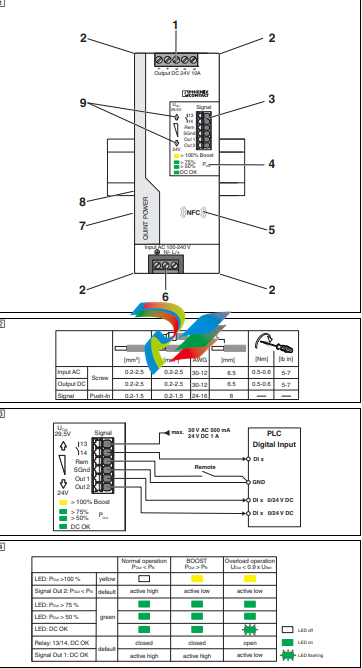
1. Denominação dos elementos ()
1. Terminal de conexão tensão de saída: Output DC +/-
2. Recepção para cinta de cabos
3. Terminais de conexão para sinalização
4. Indicadores de status e diagnóstico
5. Interface NFC (Near Field Communication). Configura-se
este aparelho em estado desenergizado ou em modo de
repouso (SLEEP MODE).
6. Tensão de entrada do terminal de conexão: Input L/N/
7. Protetor de surto por descarga de gás (lado esquerdo do
invólucro) contra sobretensão. Ao verificar o isolamento
(>0,8 kV AC ou 1,1 kV DC), desconectar o protetor de surto
por descarga de gás (remover o parafuso Philips)
8. Adaptador universal para trilho de fixação (parte traseira do
dispositivo)
9. Tecla da tensão de saída (-)/ (+)
2. Terminais de conexão e de sinalização ( - )
– 13/14: contato de comutação sem potencial
– Rem: entrada remoto < 1,5 k (SLEEP MODE)
– SGnd (Signal Ground): sinais do potencial de referência,
isolados galvanicamente da tensão de saída
– Out 1: DC OK (digital: 0/24 V DC)
– Out 2: POut < PN (digital: 0/24 V DC)
As características técnicas aqui apresentadas referem-se
a um aparelho entregue em padrão de fábrica. Aparelhos
com parâmetros personalizados para clientes podem
apresentar características técnicas diferentes destas.
Antes de colocação em funcionamento, ler as instruções
de montagem e detectar se há danificações no aparelho.
Outras informações encontram-se respectiva na ficha
técnica em phoenixcontact.net/products.
Avisos de segurança e alertas
O aparelho somente pode ser instalado, colocado em
funcionamento e operado por pessoal técnico qualificado.
Devem ser cumpridas as normas nacionais de segurança
e prevenção de acidentes.
ATENÇÃO: Perigo de queimaduras
Os dissipadores da fonte de corrente podem alcançar,
dependendo do nível de uso, temperaturas
UL 508 NOTA
Utilizar cabo de cobre com uma temperatura de operação de
75 °C (temperatura ambiente 55 °C) e
90 °C (temperatura ambiente 75 °C).
UL 60950 NOTA
Utilizar terminais tubulares para cabos flexíveis.
GL NOTA
Fechar áreas de bornes não utilizadas
ITALIANO
Alimentazione switching
– Attenzione: pericolo di morte a causa di scosse elettriche.
Non lavorare mai in presenza di tensione.
– L'alimentatore è omologato per la connessione a reti elettriche
TN, TT e IT (collegamento a stella) con tensione tra le fasi di
max. 240 V AC.
– L’alimentazione di corrente va collegata al di fuori senza
tensione, secondo le disposizioni della norma EN 60950-1
(per es. mediante la protezione di linea sul lato primario).
– L'alimentatore è un apparecchio da incorporare. Il grado di
protezione IP20 dell'apparecchio è previsto per un ambiente
pulito e asciutto.
– Montare l'alimentatore in posizione di montaggio normale.
Posizione inferiore dei morsetti di connessione L/N/.
– Collegare a terra il morsetto per dispositivo conduttore di
protezione .
– Prevedere dimensioni e protezione sufficienti per il cablaggio
primario e secondario.
– I parametri di connessione, ad esempio la lunghezza del tratto
da spelare necessaria per il cablaggio con e senza capocorda
montato, sono riportati nella tabella corrispondente.
– Dopo l'installazione coprire il vano di connessione in modo da
evitare contatti delle parti sotto tensione (ad es. montaggio nel
quadro elettrico).
– L'alimentatore non richiede manutenzione. Eventuali
interventi di riparazione possono essere eseguiti soltanto dal
produttore. L'apertura della custodia comporta il decadere
della garanzia.
– L'uso non conforme comporta il decadimento della protezione
dei dispositivi.
1. Denominazione degli elementi ()
1. Morsetto di connessione tensione di uscita: Output DC +/-
2. Connessione per fascette fermacavi
3. Morsetti di connessione segnalazione
4. Segnalazioni di stato e di diagnostica
5. Interfaccia NFC (Near Field Communication). Il dispositivo
viene configurato in assenza di tensione o in SLEEP MODE.
6. Morsetto di connessione tensione d'ingresso: input L/N/
7. Scaricatore a gas (lato sinistro della custodia) per protezione
contro le sovratensioni. Per la verifica dell'isolamento
(>0,8 kV AC o 1,1 kV DC), scollegare lo scaricatore a gas
(rimuovere la vite a croce).
8. Adattatore universale per il fissaggio su guida (lato posteriore
del dispositivo)
9. Comando tensione di uscita (-)/ (+)
2. Morsetti di connessione e di segnale ( - )
– 13/14: contatto di commutazione a potenziale zero
– Rem: ingresso Remote <1,5 k (SLEEP MODE)
– SGnd (Signal Ground): potenziale di riferimento segnali, con
separazione galvanica dalla tensione di uscita
– Out 1: DC OK (digitale: 0/24 V DC)
– Out 2: POut < PN (digitale: 0/24 V DC)
Le caratteristiche tecniche riportate si riferiscono alla versione
standard del dispositivo fornita dalla fabbrica. I dispositivi
parametrizzati in funzione di esigenze specifiche del cliente
possono presentare caratteristiche tecniche differenti.
Prima della messa in funzione, leggere le istruzioni di
installazione e verificare che il dispositivo non presenti danni.
Ulteriori informazioni sono disponibili nella scheda tecnica
alla pagina phoenixcontact.net/products.
Avvertenze sulla sicurezza e sui pericoli
L'installazione, la messa in funzione e l'uso dello
strumento si devono affidare esclusivamente a tecnici
qualificati. Rispettare le norme di sicurezza e
antinfortunistiche nazionali.
AVVERTENZA: Pericolo di ustioni
Gli elementi di raffreddamento dell'alimentatore possono
accettare temperature >65 °C a seconda del carico
UL 508 NOTA:
Utilizzare cavi di rame con una temperatura di esercizio
75 °C (temperatura ambiente 55 °C) e
90 °C (temperatura ambiente 75 °C).
UL 60950 NOTA:
Utilizzare capocorda per cavi flessibili.
GL NOTA:
Chiudere i vani morsetto non utilizzati.
FRANÇAIS
Alimentation à découpage primaire
– Attention : danger de mort par électrocution. Ne jamais
travailler sur un module sous tension.
– L'alimentation est homologuée pour le raccordement aux
circuits électriques triphasés TN, TT et IT (réseau en étoile) à
tension de conducteur externe maximum de 240 V AC.
– L'alimentation doit pouvoir être coupée depuis l'extérieur
conformément aux dispositions de la norme EN 60950-1 (par
exemple, via le disjoncteur de ligne côté primaire).
– L'alimentation est encastrable. L'indice de protection IP20 est
valable dans un environnement propre et sec.
– Monter l'alimentation à son emplacement normal. Les bornes
de raccordement L/N/ sont situées en bas.
– Raccorder le bloc de jonction d'appareil du conducteur de
protection à la terre.
– Dimensionner et protéger les câblages primaire et secondaire
correctement.
– Les paramètres de branchement tels la longueur à dénuder
du câblage avec et sans embout se trouvent dans le tableau
correspondant.
– Après installation, recouvrir la zone des bornes pour éviter
tout contact fortuit avec des pièces sous tension (par
exemple, montage en armoire).
– L'alimentation ne nécessite aucun entretien. Seul le
constructeur est autorisé à effectuer des réparations.
L'ouverture du boîtier provoque l'extinction de la garantie.
– Une utilisation non conforme supprime toute protection de
l'appareil.
1. Désignation des éléments ()
1. Tension de sortie à la borne de raccordement : Output DC +/-
2. Logement pour attache-câble
3. Bornes de raccordement signalisation
4. Voyants de diagnostic et d'état
5. Interface NFC (Near Field Communication). L'appareil est
configuré hors tension ou en mode de veille (SLEEP MODE).
6. Tension d'entrée à la borne de raccordement : entrée L/N/
7. Eclateur à gaz (côté gauche du boîtier) de protection
antisurtension. Lors du contrôle de l'isolation (>0,8 kV AC ou
1,1 kV DC), défaire le contact de l'éclateur à gaz (déposer la
vis cruciforme)
8. Adaptateur universel pour profilé (arrière de l'appareil)
9. Bouton tension de sortie (-)/ (+)
2. Bornes de raccordement et de signal ( - )
– 13/14 : contact de commutation indépendant du potentiel
– Rem : entrée à distance < 1,5 k (SLEEP MODE)
– SGnd (Signal Ground) : signaux potentiel de référence, isolés
galvaniquement de la tension de sortie
– Out 1 : DC OK (TOR : 0/24 V DC)
– Out 2 : POut < PN (tout-ou-rien : 0/24 V DC)
Les caractéristiques techniques indiquées correspondent
à l'état de l'appareil standard à la sortie d'usine. Les
appareils paramétrés selon les besoins du client peuvent
présenter des caractéristiques techniques différentes.
Avant la mise en service, lire les instructions d'installation
et vérifier si l'appareil présente des dommages.
Vous trouverez de plus amples informations dans la fiche
technique correspondante sur le site phoenixcontact.net/
products.
Consignes de sécurité et avertissements
L'appareil ne doit être installé, mis en service et utilisé que
par du personnel qualifié. Respecter la législation
nationale en vigueur en matière de sécurité et de
prévention des accidents.
AVERTISSEMENT : Risque de brûlure
Les dissipateurs de chaleur de l'alimentation en tension
peuvent prendre une température >65 °C, selon le niveau
d'utilisation
UL 508 REMARQUE :
Utiliser les câbles en cuivre à une température de service
75 °C (température ambiante 55 °C) et
90 °C (température ambiante 75 °C).
UL 60950 REMARQUE:
Utiliser des embouts pour câbles flexibles.
GL REMARQUE :
Obturer les espaces de raccordement inutilisés.
ENGLISH
Primary-switched power supply unit
– Caution: Risk of electric shock. Never carry out work when
voltage is present.
– The power supply is approved for the connection to TN, TT
and IT power grids (star networks) with a maximum phase-tophase voltage of 240 V AC
– The device must be switched off outside the power supply in
accordance with the regulations of EN 60950-1 (e.g., by
means of line protection on the primary side).
– The power supply is a built-in device. The protection class
IP20 of the device is meant to be applied in a clean and dry
environment.
– Mount the power supply unit in the standard installation
position. Position of the L/N/ connection terminal blocks at
bottom.
– Connect the protective conductor device terminal block
with ground.
– Ensure that the primary-side wiring and secondary-side wiring
are the correct size and have sufficient fuse protection.
– You can find the connection parameters, such as the
necessary stripping length for the wiring with and without
ferrule, in the associated table.
– Cover termination area after installation in order to avoid
accidental contact with live parts (e. g., installation in control
cabinet).
– The power supply is maintenance-free. Repairs may only be
carried out by the manufacturer. The warranty no longer
applies if the housing is opened.
– Improper use invalidates the device protection.
1. Designation of the elements ()
1. Connection terminal block output voltage: Output DC +/-
2. Accommodation for cable binders
3. Connection terminal block signaling
4. Status and diagnostics indicators
5. NFC interface (Near Field Communication). The device is
configured when it is disconnected from voltage or in SLEEP
MODE.
6. Connection terminal block input voltage: input L/N/
7. Gas-filled surge arrester (left side of housing) for surge
protection. Disconnect gas-filled surge arrester (remove
Phillips head screw) during dielectric test (>0.8 kV AC or
1.1 kV DC)
8. Universal DIN rail adapter (rear of housing)
9. Button output voltage (-)/ (+)
2. Connection and signal terminal blocks ( - )
– 13/14: floating switch contact
– Rem: remote input <1.5 k (SLEEP MODE)
– SGnd (Signal Ground): reference potential signals,
electrically isolated from output voltage
– Out 1: DC OK (digital: 0/24 V DC)
– Out 2: POut < PN (digital: 0/24 V DC)
The technical characteristics indicated relate to the factory
setting of the standard device. Devices with customerspecific parameterizations may have different technical
characteristics.
Prior to startup, read the installations notes and check the
device for damage.
For additional information, please refer to the
corresponding data sheet at phoenixcontact.net/products.
Safety and warning instructions
Only professionals may install, start up, and operate the
device. Observe the national safety and accident
prevention regulations.
WARNING: Risk of burns
The heatsinks of the power supply can reach temperatures
>65 °C, depending on the load
UL 508 NOTE:
Use copper cables for operating temperatures of
75 °C (ambient temperature 55 °C)
90 °C (ambient temperature 75 °C).
UL 60950 NOTE:
Use ferrules for flexible cables.
GL NOTE:
Tighten screws on all unused terminals.
DEUTSCH
Primär getaktete Stromversorgung
– Vorsicht: Lebensgefahr durch Stromschlag. Niemals bei
anliegender Spannung arbeiten.
– Die Stromversorgung ist für den Anschluss an TN-, TT- und
IT-Stromnetze (Sternnetze) mit einer Außenleiterspannung
von maximal 240 V AC zugelassen
– Stromversorgung muss nach den Bestimmungen der
EN 60950-1 von außerhalb spannungslos zu schalten sein
(z. B. durch den primärseitigen Leitungsschutz).
– Die Stromversorgung ist ein Einbaugerät. Die Schutzart IP20
des Geräts ist für eine saubere und trockene Umgebung
vorgesehen.
– Stromversorgung in Normaleinbaulage montieren. Lage der
Anschlussklemmen L/N/ unten.
– Schutzleiter-Geräteklemme mit Erde verbinden.
– Primär- und sekundärseitige Verdrahtung ausreichend
dimensionieren und absichern.
– Die Anschlussparameter, wie z. B. erforderliche
Abisolierlänge für die Verdrahtung mit und ohne
Aderendhülse entnehmen Sie bitte der zugehörigen Tabelle.
– Nach der Installation den Klemmenbereich abdecken, um
unzulässiges Berühren spannungsführender Teile zu
vermeiden (z. B. Einbau im Schaltschrank).
– Die Stromversorgung ist wartungsfrei. Reparaturen sind nur
durch den Hersteller durchführbar. Bei Öffnen des Gehäuses
erlischt die Garantie.
– Durch unsachgemäßen Gebrauch erlischt der Geräteschutz.
1. Bezeichnung der Elemente ()
1. Anschlussklemme Ausgangsspannung: Output DC +/-
2. Aufnahme für Kabelbinder
3. Anschlussklemmen Signalisierung
4. Status- und Diagnoseanzeigen
5. NFC-Schnittstelle (Near Field Communication). Das Gerät
wird spannungsfrei oder im SLEEP MODE konfiguriert.
6. Anschlussklemme Eingangsspannung: Input L/N/
7. Gasableiter (linke Gehäuseseite) für Überspannungsschutz.
Bei Isolationsprüfung (>0,8 kV AC oder 1,1 kV DC)
Gasableiter dekontaktieren (Kreuzschraube entfernen)
8. Universal-Tragschienenadapter (Geräterückseite)
9. Taster Ausgangsspannung (-)/ (+)
2. Anschluss- und Signalklemmen ( - )
– 13/14: potenzialfreier Schaltkontakt
– Rem: Remote-Eingang <1,5 k (SLEEP MODE)
– SGnd (Signal Ground): Bezugspotenzial Signale, galvanisch
getrennt von der Ausgangsspannung
– Out 1: DC OK (digital: 0/24 V DC)
– Out 2: POut < PN (digital: 0/24 V DC)
Die angegebenen technischen Merkmale beziehen sich
auf die werkseitige Auslieferung des Standardgeräts.
Kundenspezifisch parametrierte Geräte können
abweichende technische Merkmale aufweisen.
Vor Inbetriebnahme die Einbauanweisung lesen und das
Gerät auf Beschädigung prüfen.
Weitere Informationen finden Sie im zugehörigen
Datenblatt unter phoenixcontact.net/products.
Sicherheits- und Warnhinweise
Nur qualifiziertes Fachpersonal darf das Gerät installieren,
in Betrieb nehmen und bedienen. Nationale Sicherheitsund Unfallverhütungsvorschriften sind einzuhalten.
WARNUNG: Verbrennungsgefahr
Die Kühlkörper der Stromversorgung können je nach
Auslastung Temperaturen >65 °C annehmen.
UL 508 HINWEIS:
Kupferkabel verwenden mit einer Betriebstemperatur
75 °C (Umgebungstemperatur 55 °C) und
90 °C (Umgebungstemperatur 75 °C).
UL 60950 HINWEIS:
Aderendhülsen für flexible Kabel verwenden.
GL HINWEIS:
Ungenutzte Klemmräume schließen.
-
 DEIF RMF-112D Frequency relay
 -
 DEIF RMC-142D Current relay
 -
 DEIF RMC-132D Current relay
 -
 DEIF RMC-131D Current relay
 -
 DEIF RMC-122D Current relay
 -
 DEIF RMC-121D Current relay
 -
 DEIF RMC-111D Current relay
 -
 DEIF MVR-V211 Busbar Protection
 -
 DEIF MVR-T257 Transformer Differential Protection
 -
 DEIF MVR-T256 Transformer Differential Protection
 -
 DEIF MVR-T216 Transformer Differential Protection
 -
DEIF MVR-T215 Transformer Protection
-
 DEIF MVR-M257 Motor Differential Protection
 -
 DEIF MVR-M255 Motor Protection
 -
 DEIF MVR-M215 Motor Protection
 -
 DEIF MVR-M210 Motor Protection
 -
 DEIF MVR-G257 Generator Differential Protection
 -
 DEIF MVR-G215 Generator Protection
 -
 DEIF MVR-F255 Directional Feeder Protection
 -
 DEIF MVR-F215 Directional Feeder Protection
 -
DEIF MVR-F210 Feeder Protection
-
 DEIF MVR-F205 Directional Feeder Protection
 -
 DEIF MVR-F201 Basic Feeder Protection
 -
DEIF MVR-200 series Medium Voltage Relay
-
 DEIF MDR-2 Multi-differential relay
 -
 DEIF LMR-122D Loss of mains relay
 -
 DEIF LMR-111D Loss of mains relay
 -
 DEIF APU-4 Advanced G59 and G99 protection unit
 -
 DEIF iE 650 PLC - The most robust programmable automation controller available
 -
 DEIF iE 350 PLC - Programmable Automation PLC Controller
 -
 DEIF iE 250 PLC Versatile and modular intelligent energy PLC controller
 -
 DEIF PPM-3 EDG Protection and Power Management
 -
 DEIF AGC 3X 4198000234E AUTOMATIC GENSET CONTROLLER
 -
 SAUTER ASF123 Damper actuator with spring return
 -
SAUTER ASF122 Damper actuator with spring return
-
SAUTER ASF113F122 Damper actuator with spring return
-
SAUTER ASF113F120 Damper actuator with spring return
-
SAUTER ASF112F122 Damper actuator with spring return
-
SAUTER ASF112F120 Damper actuator with spring return
-
 SAUTER ASM 124/134 series - ASM134F130 Damper actuator
 -
SAUTER ASM 134 series - ASM134SF132 Damper actuator
-
SAUTER ASM 124/134 series - ASM124SF132 Damper actuator
-
SAUTER ASM 124/134 series - ASM124F122 Damper actuator
-
SAUTER ASM 124/134 series - ASM124F120 Damper actuator
-
 SAUTER Valve actuator ASM 105S/115S series ASM115SF152
 -
SAUTER Valve actuator ASM 105S/115S series ASM105SF152
-
SAUTER Valve actuator ASM 105S/115S series ASM115SF132
-
SAUTER Valve actuator ASM 105/115 series ASM105SF132
-
 SAUTER Valve actuator ASM 105/115 series ASM115F122
 -
SAUTER Valve actuator ASM 105/115 series ASM115F120
-
SAUTER Valve actuator ASM 105/115 series ASM105F122
-
SAUTER Valve actuator ASM 105/115 series ASM105F120
-
SAUTER Valve actuator ASM 105/115 series ASM105F10
-
 SAUTER AKF113S Rotating actuator AKF 112/113 series
 -
SAUTER AKF113F122 Rotating actuator AKF 112/113 series
-
SAUTER AKF113F120 Rotating actuator AKF 112/113 series
-
SAUTER AKF112F122 Rotating actuator AKF 112/113 series
-
SAUTER AKF112F120 Rotating actuator AKF 112/113 series
-
 SAUTER AKM115SAF332: Smart Actuator for ball valve, BACnet/IP
 -
 SAUTER AKM115SAF232 Rotating Actuator AKM 115SA Smart Actuator
 -
 SAUTER AKM115SF152 Rotating Actuator AKM 105S/115S Series
 -
SAUTER AKM115SF132 Rotating Actuator AKM 105S/115S Series
-
SAUTER AKM105SF132 Rotating Actuator AKM 105S/115S Series
-
 SAUTER AKM115F122 Rotating actuator AKM 105/115 series
 -
 SAUTER Rotating actuator AKM 105/115 series AKM115F120
 -
SAUTER Rotating actuator AKM 105/115 series AKM105F122
-
SAUTER Rotating actuator AKM 105/115 series AKM105F120
-
 SAUTER Continuous actuator for unit valves, with stroke AXS215S
 -
 SAUTER Linear valve actuator AXT/AXS series AXT211
 -
SAUTER Linear valve actuator AXT/AXS series AXT201
-
 SAUTER Linear valve actuator AXM/AXF series AXF217S
 -
SAUTER Linear valve actuator AXM/AXF series AXM217S
-
SAUTER AXM217SF404 is an electric actuator for unit valves.
-
SAUTER AXM217SF402 is an electric actuator for unit valves.
-
SAUTER Linear valve actuator AXM/AXF series AXM217
-
 SAUTER Linear valve actuator AVF 124/125 series AVF125S
 -
SAUTER Linear valve actuator AVF 124/125 series AVF124S
-
SAUTER Linear valve actuator AVF 124/125 series AVF124S
-
 SAUTER AVM322S-R Linear valve actuator AVM 234S series
 -
SAUTER AVM322-R Linear valve actuator AVM 234S series
-
SAUTER AVM322SF132 Linear valve actuator AVM 234S series
-
 SAUTER AVM321SF132 Linear Valve Actuator
 -
 GE Power Conversion P112-6053 Advanced Micro Controller (AMC2)
 -
GE Power Conversion P111-6053 Advanced Micro Controller (AMC2)
-
 GE Power Conversion P110-6053 Advanced Micro Controller (AMC2)
 -
 GE Power Conversion P122-6052 Advanced Micro Controller (AMC2)
 -
GE Power Conversion P121-6052 Advanced Micro Controller (AMC2)
-
 GE Power Conversion P112-6152 Advanced Micro Controller (AMC2)
 -
GE Power Conversion P110-6152 Advanced Micro Controller (AMC2)
-
GE Power Conversion P112-6052 Advanced Micro Controller (AMC2)
-
GE P106-6052 AMC2 Advanced Micro Controller Unit
-
SAUTER AVF234SF232 Linear valve actuator AVM 234S series
-
SAUTER AVF234SF132 Linear valve actuator AVM 234S series
-
 SAUTER Linear valve actuator AVM 234S series AVM234SF132-6
 -
SAUTER Linear valve actuator AVM 234S series AVM234SF132-5
-
SAUTER Linear valve actuator AVM 234S series AVM234SF132
-
SAUTER Linear valve actuator AVM215SF132-7
-
SAUTER Linear valve actuator AVM215SF132R
-
 Linear valve actuator AVM 115SA Smart Actuator AVM115SAF332
 -
Linear valve actuator AVM 115SA Smart Actuator AVM115SAF232
-
 SAUTER Linear valve actuator AVM 105S/115S series AVM115SF132
 -
SAUTER Linear valve actuator AVM 105S/115S series AVM105SF132
-
 SAUTER AVM115F901 Linear Valve Actuator
 -
SAUTER AVM115F122 Linear Valve Actuator
-
SAUTER AVM115F120 Linear Valve Actuator
-
SAUTER AVM105F122 Linear Valve Actuator
-
 SAUTER AVM105F120 Linear Valve Actuator
 -
 SAUTER AVM105F100 Linear Valve Actuator
 -
 AEROTECH SM Series High-Performance Stepper Motors
 -
 AEROTECH BLMSC Series Linear Motors
 -
 AEROTECH Custom Linear Motors
 -
 AEROTECH BMS Series Brushless, Slotless Rotary Motors
 -
 AEROTECH BM Series Brushless Rotary Motors
 -
 AEROTECH BLMX Series Linear Motors
 -
 AEROTECH BLMH Series Linear Motors
 -
 AEROTECH BLM Series Linear Motors
 -
 AEROTECH BLMC Series Linear Motors
 -
 AEROTECH BLMUC-143 Linear motor forcer with thermistor
 -
AEROTECH BLMUC-111 Linear motor forcer with thermistor
-
AEROTECH BLMUC-95 Linear motor forcer with thermistor
-
AEROTECH BLMUC-79 Linear motor forcer with thermistor
-
AEROTECH BLMUC Series Linear Motors
-
 AEROTECH Automation1 FLEX Distributed Amplifier Multi-Axis Servo Control System
 -
 AEROTECH Automation1 HXA4 6-Axis Hexapod Servo Drive
 -
 AEROTECH Automation1 iHXA4 6-Axis Hexapod Servo Drive with Motion Controller
 -
 AEROTECH Modular System Control Console
 -
 AEROTECH TV Series Transformers
 -
 AEROTECH TM Series Transformers


