
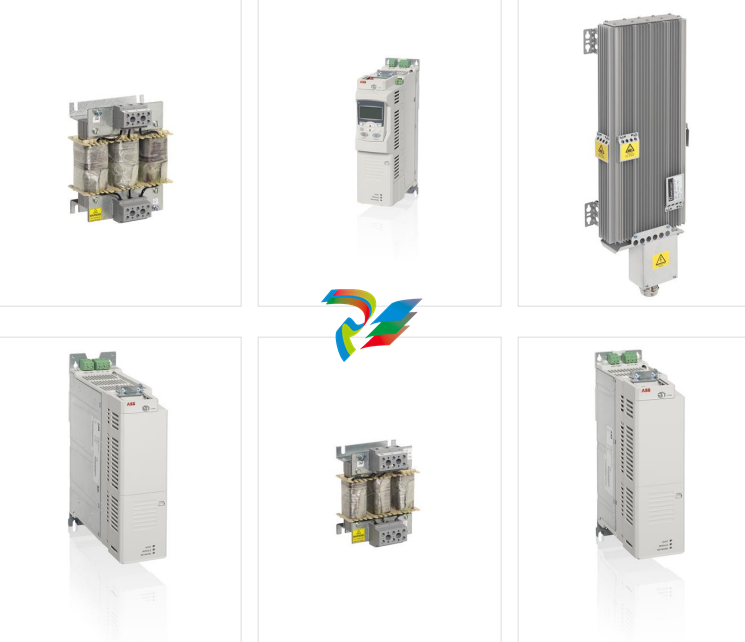
ABB ACS850 general-purpose frequency converter
 What this chapter contains
This chapter contains the safety instructions which you must follow when installing,
operating and servicing the drive. If ignored, physical injury or death may follow, or
damage may occur to the drive, motor or driven equipment. Read the safety
instructions before you work on the unit.
Use of warnings
Warnings caution you about conditions which can result in serious injury or death
and/or damage to the equipment and advise on how to avoid the danger. The
following warning symbols are used in this manualElectricity warning warns of hazards from electricity which can cause
physical injury and/or damage to the equipment.
General warning warns about conditions, other than those caused by
electricity which can result in physical injury and/or damage to the
equipment.
Electrostatic sensitive devices warning warns of electrostatic
discharge which can damage the equipment.
Hot surface warning warns of component surfaces that may become
hot enough to cause burns if touched.
What this chapter contains
This chapter contains the safety instructions which you must follow when installing,
operating and servicing the drive. If ignored, physical injury or death may follow, or
damage may occur to the drive, motor or driven equipment. Read the safety
instructions before you work on the unit.
Use of warnings
Warnings caution you about conditions which can result in serious injury or death
and/or damage to the equipment and advise on how to avoid the danger. The
following warning symbols are used in this manualElectricity warning warns of hazards from electricity which can cause
physical injury and/or damage to the equipment.
General warning warns about conditions, other than those caused by
electricity which can result in physical injury and/or damage to the
equipment.
Electrostatic sensitive devices warning warns of electrostatic
discharge which can damage the equipment.
Hot surface warning warns of component surfaces that may become
hot enough to cause burns if touched.
Safety in installation and maintenance Electr
ical safety These warnings are intended for all who work on the drive, motor cable or motor. WARNING! Ignoring the following instructions can cause physical injury or death, or damage to the equipment: • Only qualified electricians are allowed to install and maintain the drive. • Never work on the drive, motor cable or motor when main power is applied. After disconnecting the input power, always wait for 5 min to let the intermediate circuit capacitors discharge before you start working on the drive, motor or motor cable. Always ensure by measuring with a multimeter (impedance at least 1 Mohm) that: 1. voltage between drive input phases U1, V1 and W1 and the frame is close to 0 V. 2. voltage between terminals UDC+ and UDC- and the frame is close to 0 V. • Do not work on the control cables when power is applied to the drive or to the external control circuits. Externally supplied control circuits may cause dangerous voltages inside the drive even when the main power on the drive is switched off. • Do not make any insulation or voltage withstand tests on the drive or drive modules. Note: • The motor cable terminals on the drive are at a dangerously high voltage when the input power is on, regardless of whether the motor is running or not. • The brake control terminals (UDC+, UDC-, R+ and R- terminals) carry a dangerous DC voltage (over 500 V). • Depending on the external wiring, dangerous voltages (115 V, 220 V or 230 V) may be present on the terminals of relay outputs (X2) or Safe torque off (X6). • The Safe torque off function does not remove the voltage from the main and auxiliary circuits.
Grounding These instructions are intended for all who are responsible for the grounding of the drive. WARNING! Ignoring the following instructions can cause physical injury, death, increased electromagnetic interference and equipment malfunction: • Ground the drive, motor and adjoining equipment to ensure personnel safety in all circumstances, and to reduce electromagnetic emission and interference. • Make sure that grounding conductors are adequately sized as required by safety regulations. • In a multiple-drive installation, connect each drive separately to protective earth (PE). • Where EMC emissions must be minimized, make a 360° high frequency grounding of cable entries at the cabinet lead-through in order to suppress electromagnetic disturbances. In addition, connect the cable shields to protective earth (PE) in order to meet safety regulations. Note: • Power cable shields are suitable for equipment grounding conductors only when adequately sized to meet safety regulations. • As the normal leakage current of the drive is higher than 3.5 mA AC or 10 mA DC, a fixed protective earth connection is required by EN 61800-5-1, 4.3.5.5.2.
Permanent magnet motor drives These are additional warnings concerning permanent magnet motor drives. WARNING! Ignoring the instructions can cause physical injury or death, or damage to the equipment. • Do not work on the drive when the permanent magnet motor is rotating. Also, when the supply power is switched off and the drive is stopped, a rotating permanent magnet motor feeds power to the intermediate circuit of the drive and the supply connections become live. Before installation and maintenance work on the drive: • Stop the motor. • Ensure that there is no voltage on the drive power terminals according to step 1 or 2, or if possible, according to the both steps. 1. Disconnect the motor from the drive with a safety switch or by other means. Measure that there is no voltage present on the drive input, output or DC terminals (U1, V1, W1, U2, V2, W2, UDC+, UDC-). 2. Ensure that the motor cannot rotate during work. Make sure that no other system, like hydraulic crawling drives, is able to rotate the motor directly or through any mechanical connection like felt, nip, rope, etc. Measure that there is no voltage present on the drive input, output or DC terminals (U1, V1, W1, U2, V2, W2, UDC+, UDC-). Ground the drive output terminals temporarily by connecting them together as well as to the PE.
WARNING! Ignoring the following instructions can cause physical injury or death, or damage to the equipment: • - Lift the drive module using the lifting lugs attached to the top and base of the unit.
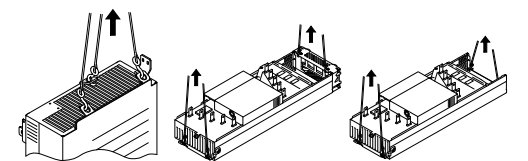
Handle the drive module carefully. Make sure that the module does not fall
down when moving it on the floor and during installation and maintenance
work: Open the support legs by pressing each leg a little down (1, 2) and
turning it aside. When ever possible secure the module also with chains.
- Do not tilt the drive module (A). It is heavy (over 160 kg [350 lb]) and its
center of gravity is high. The module will overturn from a sideways tilt of 5
degrees. Do not leave the module unattended on a sloping floor.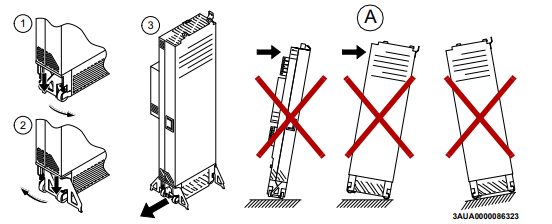
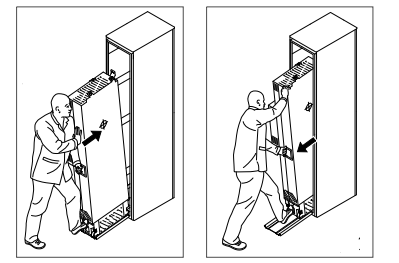
- Push the drive module into the cabinet and pull it from the cabinet carefully preferably with help from another person as shown below. Keep a constant pressure with one foot on the base of the module to prevent the module from falling on its back. Use safety shoes with metal toe cap to avoid foot injury. Do not use the ramp with plinth heights which exceed the maximum height marked on the ramp next to the fastening screw. (The maximum plinth height is 50 mm when the telescopic ramp is shortest and 150 mm when the ramp is longest.) Tighten the two fastening bolts of the ramp carefully
Beware of hot surfaces. Some parts, such as heatsinks of power semiconductors, remain hot for a while after disconnection of the electrical supply. • Make sure that dust from borings and grindings does not enter the drive when installing. Electrically conductive dust inside the unit may cause damage or malfunctioning. • Ensure sufficient cooling. • Do not fasten the drive by riveting or welding
Fiber optic cablesWARNING! Ignoring the following instructions can cause equipment malfunction and damage to the fiber optic cables: • Handle the fiber optic cables with care. When unplugging optic cables, always grab the connector, not the cable itself. Do not touch the ends of the fibers with bare hands as the fiber is extremely sensitive to dirt. The minimum allowed bend radius is 35 mm (1.4 in.).
WARNING! Ignoring the following instructions can cause damage to the printed circuit boards: • Wear a grounding wrist band when handling the boards. Do not touch the boards unnecessarily. The printed circuit boards contain components sensitive to electrostatic dischargeSafe start-up and operation General safety These warnings are intended for all who plan the operation of the drive or operate the drive.WARNING! Ignoring the following instructions can cause physical injury or death, or damage to the equipment: • Before adjusting the drive and putting it into service, make sure that the motor and all driven equipment are suitable for operation throughout the speed range provided by the drive. The drive can be adjusted to operate the motor at speeds above and below the speed provided by connecting the motor directly to the power line. • Do not activate any automatic fault reset functions of the drive control program if dangerous situations can occur. When activated, these functions will reset the drive and resume operation after a fault. • Do not control the motor with an AC contactor or disconnecting device; instead, use the control panel keys and , or commands via the I/O board of the drive. The maximum allowed number of charging cycles of the DC capacitors, ie, power-ups by applying power, is five in ten minutes. Note: • If an external source for start command is selected and it is ON, the drive will start immediately after an input voltage break or fault reset unless the drive is configured for 3-wire (a pulse) start/stop. • When the control location is not set to local, the stop key on the control panel will not stop the drivePermanent magnet motor drives WARNING! Do not run the motor over the rated speed. Motor overspeed leads to overvoltage which may damage or explode the capacitors in the intermediate circuit of the drive
Introduction to the manual
What this chapter contains
This chapter describes the intended audience and contents of the manual. It contains a flowchart of steps in checking the delivery, installing and commissioning the drive. The flowchart refers to chapters/sections in this manual and other manuals
Target audience
This manual is intended for persons who
• plan the cabinet assembly of the drive module and install the module into a userdefined cabinet
• plan the electrical installation of the drive cabinet
• make instructions for the end user of the drive concerning the mechanical
installation of the drive cabinet, connection of power and control cables to the
cabinet-installed drive and maintenance of the drive.
Read the manual before working on the drive. You are expected to know the
fundamentals of electricity, wiring, electrical components and electrical schematic
symbols.
The manual is written for readers worldwide. Both SI and imperial units are shown.
Contents of the manual
This manual contains the instructions and information for the basic drive module
configuration. The chapters of the manual are briefly described below.
Safety instructions give safety instructions for the installation, commissioning, operation and maintenance of the drive module.
Introduction to the manual introduces the manual
Operation principle and hardware description describes the drive module.
Planning the cabinet installation guides in planning drive cabinets and installing the drive module into a user-defined cabinet. The chapter gives cabinet layout examples and free space requirements around the module for cooling.
Planning the electrical installation instructs in the motor and cable selection, protections and cable routing
Installation describes how to install the drive module into a cabinet and connect the cables to the drive.
Start-up refers to the start-up instructions of the cabinet-installed drive
e. Fault tracing describes the LED indications and refers to the fault tracing instructions of the drive. Maintenance contains preventive maintenance instructions. Technical data contains the technical specifications of the drive module, eg, the ratings, sizes and technical requirements, provisions for fulfilling the requirements for CE and other markings. Dimension drawings contains dimension drawings of the drive module installed into a Rittal TS 8 cabinet. Example circuit diagram shows an example circuit diagram for a cabinet-installed drive module. Resistor braking describes how to select, protect and wire brake resistors. du/dt filters describes how to select du/dt filters for the drive. Categorization by frame size and option code The instructions, technical data and dimension drawings which concern only certain drive frame sizes are marked with the symbol of the frame size (G1 or G2). The frame size is marked on the type designation label. The instructions and technical data which concern only certain optional selections are marked with option codes, eg, +H381. The options included in the drive can be identified from the option codes visible on the type designation label. The option selections are listed in section Type designation key on page 35. Quick installation, commissioning and operating flowchart Task See Plan the installation. Check the ambient conditions, ratings, required cooling air flow, input power connection, compatibility of the motor, motor connection, and other technical data. Select the cables. Planning the cabinet installation (page 37) Planning the electrical installation (page 49) Technical data (page 125) Resistor braking (page 155) Option manual (if optional equipment is included) Unpack and check the units. Check that all necessary optional modules and equipment are present and correct. Only intact units may be started up. Moving and unpacking the unit (page 74) Checking the delivery (page 76) If the drive module has been non-operational for more than one year, the converter DC link capacitors need to be reformed. (Reforming the capacitors, page 12
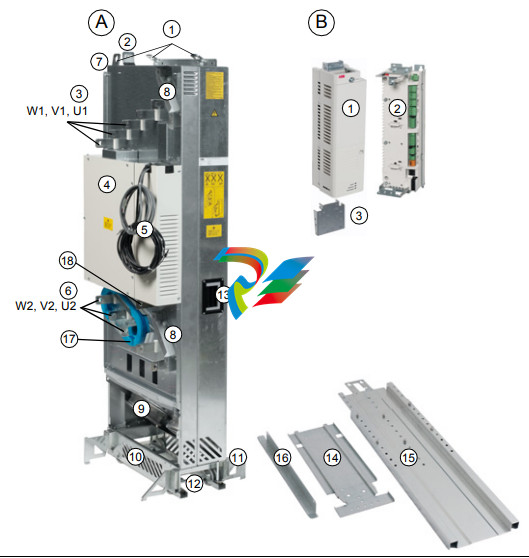
Item Description A Drive module 1 Lifting lugs 2 Fastening bracket 3 Input cable connection busbars and optional DC+ and DC- busbars (+H356) 4 Circuit board compartment 5 Power supply and fiber optic cables to be connected to the external control unit 6 Output cable connection busbars and optional brake resistor connection busbars (+D150) 7 PE terminal 8 Control cable duct 9 Main cooling fans 10 Pedestal 11 Retractable support legs
Item Description
12 Base fastening screws 13 Handle for pulling the drive module out of the cabinet 14 Pedestal guide plate 15 Telescopic extraction and insertion ramp 16 Top guide plate 17 Optional common mode filter (+E208) 18 Grounding busbar B Control unit (JCU) 1 Control unit with front cover 2 Control unit with front cover removed 3 Control cable clamp plate
Resistor braking
What this chapter contains This chapter describes how to select, protect and wire brake resistors. Availability of brake choppers and resistors Brake choppers are optionally available as built-in units, indicated in the type description by +D150. External resistors are available on request from ABB. When is resistor braking needed Typically, a drive system is equipped with brake choppers and resistors if: • high capacity braking is needed and the drive cannot be equipped with a regenerative supply unit • a backup for the regenerative supply unit is needed. Operation principle The energy generated by the motor during a fast deceleration of the drive typically causes the voltage to rise in the drive module intermediate DC circuit. The chopper connects the brake resistor to the intermediate DC circuit whenever the voltage in the circuit exceeds its maximum limit. Energy consumption by the resistor losses lowers the voltage until the resistor can be disconnected. Planning the braking system Selecting the brake circuit components 1. Calculate the maximum power (Pmax) generated by the motor during braking. 2. Select a suitable drive and brake resistor combination for the application according to the rating table on page 159. Take also account of other factors in the drive selection. The braking power must be greater than or equal to the maximum power generated by the motor during braking: 3. Check the resistor selection. The energy generated by the motor during a 400- second period must not exceed the resistor heat dissipation capacity ER. Note: If the ER value is not sufficient, it is possible to use a four-resistor assembly in which two standard resistors are connected in parallel, two in series. The ER value of the four-resistor assembly is four times the value specified for the standard resisto
Further information Product and service inquiries Address any inquiries about the product to your local ABB representative, quoting the type designation and serial number of the unit in question. A listing of ABB sales, support and service contacts can be found by navigating to www.abb.com/drives and selecting Sales, Support and Service network. Product training For information on ABB product training, navigate to www.abb.com/drives and select Training courses. Providing feedback on ABB Drives manuals Your comments on our manuals are welcome. Go to www.abb.com/drives and select Document Library – Manuals feedback form (LV AC drives). Document library on the Internet You can find manuals and other product documents in PDF format on the Internet. Go to www.abb.com/drives and select Document Library. You can browse the library or enter selection criteria, for example a document code, in the search field
-
 AEROTECH SM Series High-Performance Stepper Motors
 -
 AEROTECH BLMSC Series Linear Motors
 -
 AEROTECH Custom Linear Motors
 -
 AEROTECH BMS Series Brushless, Slotless Rotary Motors
 -
 AEROTECH BM Series Brushless Rotary Motors
 -
 AEROTECH BLMX Series Linear Motors
 -
 AEROTECH BLMH Series Linear Motors
 -
 AEROTECH BLM Series Linear Motors
 -
 AEROTECH BLMC Series Linear Motors
 -
 AEROTECH BLMUC-143 Linear motor forcer with thermistor
 -
AEROTECH BLMUC-111 Linear motor forcer with thermistor
-
AEROTECH BLMUC-95 Linear motor forcer with thermistor
-
AEROTECH BLMUC-79 Linear motor forcer with thermistor
-
AEROTECH BLMUC Series Linear Motors
-
 AEROTECH Automation1 FLEX Distributed Amplifier Multi-Axis Servo Control System
 -
 AEROTECH Automation1 HXA4 6-Axis Hexapod Servo Drive
 -
 AEROTECH Automation1 iHXA4 6-Axis Hexapod Servo Drive with Motion Controller
 -
 AEROTECH Modular System Control Console
 -
 AEROTECH TV Series Transformers
 -
 AEROTECH TM Series Transformers
 -
 AEROTECH UFM Noise Filter Module
 -
 AEROTECH MFM Motor Filter Module
 -
 AEROTECH MPG Handwheel Pendant
 -
 AEROTECH Automation1 Multi-Axis Joystick
 -
 AEROTECH ETM Enhanced Throughput Module
 -
 AEROTECH Automation1 XL4s High-Speed, Single-Phase Linear Servo Drive
 -
 AEROTECH Automation1 XL2e Enhanced, Compact Linear Servo Drive
 -
 Automation1 iXL2e Enhanced, Compact Linear Servo Drive with Motion Controller
 -
 AEROTECH Automation1 XL5e Enhanced, Linear Servo Drive
 -
 AEROTECH Automation1 iXL5e Enhanced Linear Servo Drive with Motion Controller
 -
 AEROTECH Automation1 GI4 Laser Scan Head Controller
 -
 AEROTECH Automation1 SI4 Stepper Interface
 -
AEROTECH Automation1 XI4 Servo Interface
-
 AEROTECH AEROTECH Automation1 iXI4 Servo Interface with Motion Controller
 -
 AEROTECH Automation1 XC6e Enhanced, High-Power PWM Servo Drive
 -
 AEROTECH Automation1 iXC6e Enhanced, High-Power PWM Servo Drive with Motion Controller
 -
 AEROTECH Automation1 XC2 Compact PWM Servo Drive
 -
 AEROTECH Automation1 XC4 PWM Servo Drive
 -
 AEROTECH Automation1 GL4 Galvo Laser Scan Head Linear Drive
 -
 AEROTECH Automation1 XC2e Enhanced, Compact Servo Drive with PWM+
 -
 AEROTECH Automation1 XC4e Enhanced, PWM Servo Drive
 -
 AEROTECH Automation1 XR3 Multi-Axis Servo Drive Rack
 -
 AEROTECH Automation1 iXR3 Multi-Axis Servo Drive Rack with Motion Controller
 -
 AEROTECH Automation1 iXC2 Compact PWM Servo Drive with Motion Controller
 -
 AEROTECH Automation1 iXC2e Enhanced, Compact PWM+ Servo Drive with Motion Controller
 -
 AEROTECH Automation1 iXC4 PWM Servo Drive with Motion Controller
 -
 AEROTECH Automation1 iXC4e Enhanced, PWM Servo Drive with Motion Controller
 -
 AEROTECH Automation1 iPC Industrial PC with Motion Controller
 -
 AEROTECH EPICS & TANGO Drivers for Distributed Control Systems
 -
 AEROTECH .NET, C, Python & LabVIEW APIs Custom Application Develotpmen
 -
 AEROTECH Automation1 Industrial Ethernet Support
 -
 AEROTECH Automation1 iSMC Intelligent, Software-Based Motion Controller
 -
 AEROTECH Automation1 iXA4 1- 2- or 4-Axis PWM Servo Drive with Motion Controller
 -
 AEROTECH Automation1 XA4 1- 2- or 4-Axis PWM Servo Drive
 -
 CTI 2500-ADP2-DISC Discrete Wiring Adapter for Series 500
 -
 CTI 2500-ADP1 Analog Wiring Adapter for Series 500
 -
 CTI 2500C-RADP-RS485 Remote Base Controller Adapter for Series 500
 -
 CTI 2500C-RADP-RBC Profibus RBC Adapter for Series 500
 -
 CTI 2500C-PADP-120V 120VAC 50W Power Supply for Series 500
 -
 CTI 2500-RADP RBC Adapter for Series 500
 -
 CTI 2500-R4500 520/530/DBC Adapter for Series 500 - MATURE
 -
 CTI 2500-PADP Power Supply Adapter for Series 500
 -
 CTI 2500-IADP I/O Adapter for Series 500
 -
 CTI 2500-VP15A-N4-W7 15" Flat-Panel PC with Windows® 7 Embedded
 -
 CTI 2500S-27-1750 Slice I/O, Ethernet, RS232/485. 900MHz, 2DIO / 4UAI / 2AI
 -
 CTI 2500S-26-1750 Slice I/O, Ethernet, RS232/485. 900MHz, 8DIO / 2UAI
 -
 CTI 2500S-23-1750 Slice I/O, Ethernet, RS232/485. 900MHz, 4DI / 4DO / 2UAI / 2AO
 -
 CTI 2500S-27-1550 Slice I/O, RS232/485. 2DIO / 4UAI / 2AI
 -
 CTI 2500S-26-1550 Slice I/O, RS232/485. 8DIO / 2UAI
 -
 CTI 2500S-23-1550 Slice I/O, RS232/485. 4DI / 4DO / 2UAI / 2AO
 -
 CTI 2500S-27-1050 Slice I/O, Ethernet, 2DIO / 4UAI / 2AI
 -
 CTI 2500S-26-1050 Slice I/O, Ethernet, 8DIO / 2UAI
 -
 CTI 2500S-23-1050 Slice I/O, Ethernet, 4DI / 4DO / 2UAI / 2AO
 -
 CTI 2500C-32F-CJC 32-Pin Field Wiring Connector with Cold Junction Compensation
 -
 CTI 2500C-32F 32-Pin Field Wiring Connector
 -
 CTI 2500C-8-TC Eight Thermocouple Inputs
 -
 CTI 2500C-8-RTD Eight RTD Inputs
 -
 CTI 2500C-8-RL-FC 8 Form-C Relay Outputs
 -
 CTI 2500C-8-IDO-24V 8 Isolated 24VDC Outputs
 -
 CTI 2500C-8-IDO-120V 8 Isolated 120VAC Outputs
 -
 CTI 2500C-16-DO-24V Sixteen 24VDC Digital Outputs
 -
 CTI 2500C-16-DO-120V Sixteen 120VAC Digital Outputs
 -
.png) CTI 500C-16-IDI-24V Sixteen Isolated 24V AC/DC Digital Inputs
CTI 500C-16-IDI-24V Sixteen Isolated 24V AC/DC Digital Inputs -
 CTI 2500C-16-IDI-120V Sixteen Isolated 120V AC/DC Digital Inputs
 -
 CTI 2500C-16-DIDO-SIM Sixteen Digital Input and Output SImulator
 -
 CTI 2500C-16-DI-24V Sixteen 24V AC/DC Digital Inputs
 -
 CTI 2500C-16-DI-120V Sixteen 120V AC/DC Digital Inputs
 -
 CTI 2500C-RBC-RS485 RS485 Remote Base Controller
 -
 CTI 2500C-RBC-PRF Profibus Remote Base Controller
 -
 CTI 2500C-PS-24V-35 35-Watt DC Power Supply
 -
 CTI 2500C-PS-120V-35 35-Watt AC Power Supply
 -
 CTI 2500C-R8 Eight-Slot Base
 -
 CTI 2500C-R4 Four-Slot Base
 -
 CTI 2500C-R16 Sixteen-Slot Base
 -
 CTI 2500C-2572-B Fast Ethernet TCP/IP Adapter
 -
 CTI 2500C-J750 Compact Janus PAC with 3MB Project Memory
 -
 CTI 2500C-C300 CPU with 512K User Memory
 -
 CTI 2500C-C200 CPU with 256K User Memory
 -
 CTI 2500C-C100 CPU with 128K User Memory
 -
 CTI 2500C-8-AO 8 Analog Outputs
 -
 CTI 2500C-8-AI 8 Analog Inputs
 -
 CTI 2559-FCAL Precision Calibration Connector
 -
 CTI 2559-FPC 40-Position Screw-Terminal Connector
 -
 CTI 2500-RFC PLC to RF Modem Cable
 -
 CTI 2500-40F 40-Position Standard Screw-Terminal Connector
 -
 CTI 2505 Vibration Sensor Interface Module
 -
 CTI 2554-A 4-Channel Isolated High Speed Counter Module
 -
 CTI 2553-A 2-Channel Mag Meter Input Module
 -
 CTI 2502 2-Channel High Speed Counter Input Module
 -
 CTI 2559-TC 8-Channel Thermocouple Input Module
 -
 CTI 2556-A 16-Channel Isolated Thermocouple Input Module
 -
 CTI 2556 16-Channel Isolated Thermocouple Input Module
 -
 CTI 2551-A 8-Channel Isolated Thermocouple Input Module
 -
 CTI 2559-RTD 8-Channel RTD Input Module
 -
 CTI 2557-A 16-Channel RTD Input Module
 -
 CTI 2557 16-Channel RTD Input Module
 -
 CTI 2552-A 8-Channel Isolated RTD Input Module
 -
 CTI 2534 8-Point Form-C Relay Output Module
 -
 CTI 2532 16-Point Form-A Relay Output Module
 -
 CTI 2531 32-Point Form-A Relay Output Module
 -
 CTI 2530 8-Point Form-C Relay Output Module
 -
 CTI 2562 8-Channel Analog Output Module
 -
 CTI 2560-A 8-Channel Isolated Analog Output Module
 -
 CTI 2501 8in/4out Analog Module
 -
 CTI 2558 8-Channel Analog Input Module
 -
 CTI 2555-A 16-Channel Analog Input Module
 -
 CTI 2550-A 8-Channel Isolated Analog Input Module
 -
 CTI 2599 8/16/32-Point AC Output Module


