
ABB Nextmove ESB-2 motion controller
Safety Notice
Only qualified personnel should attempt to start-up, program or troubleshoot this equipment. This
equipment may be connected to other machines that have rotating parts or parts that are controlled
by this equipment. Improper use can cause serious or fatal injury
Precautions

Do not touch any circuit board, power device or electrical connection before you first ensure that no high voltage is present at this equipment or other equipment to which it is connected. Electrical shock can cause serious or fatal injury. Only qualified personnel should attempt to start-up, program or troubleshoot this equipment.
Be sure that you are completely familiar with the safe operation and programming of this equipment. This equipment may be connected to other machines that have rotating parts or parts that are controlled by this equipment. Improper use can cause serious or fatal injury.
MEDICAL DEVICE / PACEMAKER DANGER: Magnetic and electromagnetic fields in the vicinity of current carrying conductors and industrial motors can result in a serious health hazard to persons with cardiac pacemakers, internal cardiac defibrillators, neurostimulators, metal implants, cochlear implants, hearing aids, and other medical devices. To avoid risk, stay away from the area surrounding a motor and its current carrying conductors.
The stop input to this equipment should not be used as the single means of achieving a safety critical stop. Drive disable, motor disconnect, motor brake and other means should be used as appropriate
Improper operation or programming may cause violent motion of the motor shaft and driven equipment. Be certain that unexpected motor shaft movement will not cause injury to personnel or damage to equipment. Peak torque of several times the rated motor torque can occur during control failure.
The safe integration of this equipment into a machine system is the responsibility of the machine designer. Be sure to comply with the local safety requirements at the place where the machine is to be used. In Europe these are the Machinery Directive, the ElectroMagnetic Compatibility Directive and the Low Voltage Directive. In the United States this is the National Electrical code and local codes.
Electrical components can be damaged by static electricity. Use ESD (electrostatic discharge) procedures when handling this equipment.
NextMove ESB-2 features
NextMove ESB-2 is a high performance multi-axis intelligent controller for servo and steppermotors.
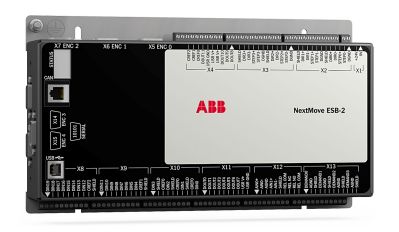
NextMove ESB-2 features the Mint motion control language. Mint is a structured form of Basic, custom designed for stepper or servo motion control applications. It allows you to get started very quickly with simple motion control programs. In addition, Mint includes a wide range of powerful commands for complex applications. Standard features include:
Control of 4 stepper axes and either 3 or 4 servo axes (model dependent). Additional encoder input for master follower applications. A wide variety of motion types including point to point moves, software cams and gearing. 20 general purpose digital inputs, software configurable as level or edge triggered. 12 general purpose digital outputs. 2 differential analog inputs with 12-bit resolution. 4 single-ended analog outputs with 12-bit resolution. USB 1.1 serial port (compatible with USB 2.0 and USB 3.0). CANopen protocol for communication with Mint controllers and other third party CANopen devices. Programmable in Mint. Drop-in replacement for NextMove ESB.
2.2.1 Identifying the catalog number
Different models of NextMove ESB-2 are available. As a reminder of which product has been installed, it is a good idea to write the catalog number in the space provided below.
To prevent equipment damage, be certain that input and output signals are
powered and referenced correctly.
To ensure reliable performance of this equipment be certain that all signals to/
from the NextMove ESB-2 are shielded correctly.
Avoid locating the NextMove ESB-2 immediately above or beside heat
generating equipment, or directly below water steam pipes.
Avoid locating the NextMove ESB-2 in the vicinity of corrosive substances or
vapors, metal particles and dust.
The safe operation of this equipment depends upon its use in the appropriate environment.
The following points must be considered:
The NextMove ESB-2 is designed to be mounted indoors, permanently fixed and
located.
The NextMove ESB-2 must be secured by the slots in the metal case.
The NextMove ESB-2 must be installed in an ambient temperature of 0 °C to 45 °C
(32 °F to 113 °F).
The NextMove ESB-2 must be installed in relative humidity levels of less than 80% for
temperatures up to 31 °C (87 °F) decreasing linearly to 50% relative humidity at 45 °C
(113 °F), non-condensing.
The NextMove ESB-2 must be installed where the pollution degree according to IEC
60664-1 shall not exceed 2.
There shall not be abnormal levels of nuclear radiation or X-rays.
Before touching the unit be sure to discharge static electricity from your body
and clothing by touching a grounded metal surface. Alternatively, wear an earth
strap while handling the unit.
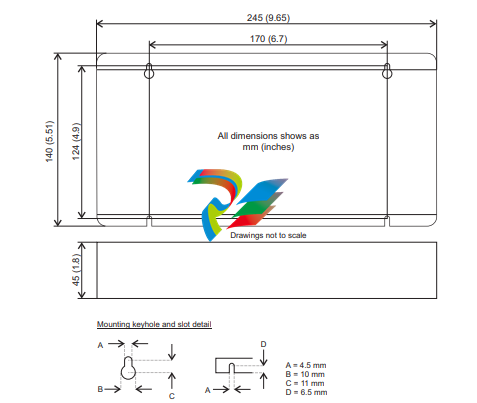
Ensure you have read and understood the location requirements in section 3.1.1. Mount the
NextMove ESB-2 using the supplied M4 screws. For effective cooling, the NextMove ESB-2
must be mounted on a smooth non-flammable vertical surface. Orientation must be as
shown in Figure 1, with the two slots in the metal carrier / heat sink assembly at the bottom.
4.2 Analog I/O The NextMove ESB-2 provides:
Two 12-bit resolution analog inputs.
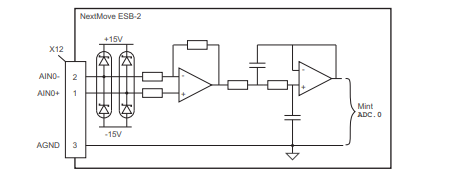
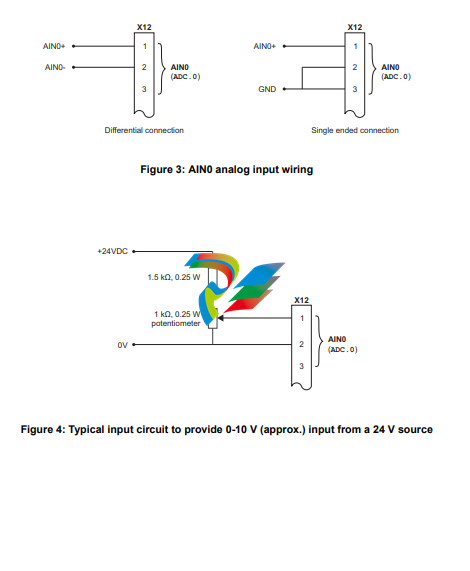
Four 12-bit resolution analog outputs. 4.2.1 Analog inputs The analog inputs are available on connector X12, pins 1 & 2 (AIN0) and 4 & 5 (AIN1). Differential inputs.
Voltage range: ±10 V.
Resolution: 12-bit with sign.
Input impedance: 120 kΩ.
Sampling frequency: 4 kHz maximum, 2 kHz if both inputs are enabled. The analog inputs pass through a differential buffer and second order low-pass filter with a cut-off frequency of approximately 1 kHz. Both inputs are normally sampled at 2 kHz. However, an input can be disabled by setting ADCMODE to 4 (_acOFF). With one input disabled, the remaining input will be sampled at 4 kHz. In Mint, analog inputs can be read using the ADC keyword. See the Mint help file for full details of ADC, ADCMODE and other related ADC... keywords.
4.2.2 Analog outputs
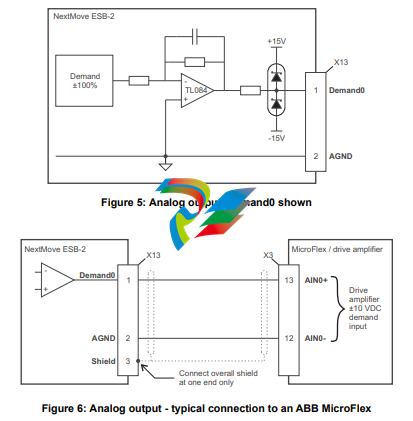
The four analog outputs are available on connector X13, as shown in section 4.1.1.
Four independent bipolar analog outputs.
Output range: ±10 V DC (±0.1%).
Resolution: 12-bit.
Output current: 2.5 mA maximum per output.
Update frequency: 10 kHz maximum (adjustable using the LOOPTIME keyword, factory
default 1 kHz).
Mint and the Mint Motion Library use analog outputs Demand0 to Demand3 to control drive amplifiers. Demand outputs 0 to 3 are used by axes configured as servo (see section 5.4.1). A Demand output may be used as a general purpose analog output if it is not assigned to a servo axis - see the DAC keyword in the Mint help file. The analog outputs may be used to drive loads of 4 kΩ or greater. Shielded twisted pair cable should be used. The shield connection should be made at one end only
4.3 Digital I/O
The NextMove ESB-2 provides:
20 general purpose digital inputs.
12 general purpose digital outputs.
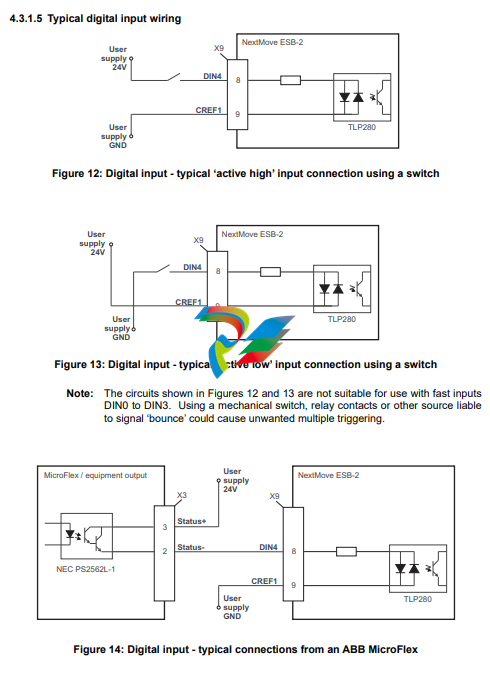
4.3.1 Digital inputs
Digital inputs are available on connectors X8, X9 and X10, as shown in section
4.1.1. The digital inputs are arranged in three groups, each with their own common
connection. This allows each group to be configured independently for ‘active high’
or ‘active low’ operation. The general purpose digital inputs DIN0 - DIN19 can be shared
between axes, and are programmable in Mint (using a range of keywords beginning with
the letters INPUT... ) to determine their active level and if they should be edge triggered. The
state of individual inputs can be read directly using the INX keyword. See the Mint help file.
A general purpose digital input can be assigned to a special purpose function such as a home,
limit, stop or error input. See the keywords HOMEINPUT, LIMITFORWARDINPUT, LIMITREVERSEINPUT,
STOPINPUT and ERRORINPUT in the Mint help file.
4.3.1.1 DIN0 - DIN3
Digital inputs DIN0 to DIN3 can be assigned as fast interrupts. These are used as high speed position latches, allowing any combination of axes to be captured by the hardware. The latency between input triggering and capture is 1 μs. Special Mint keywords (beginning with the letters FAST...) allow specific functions to be performed as a result of fast position inputs becoming active. See the Mint help file for details. Digital inputs DIN0 to DIN3 use CREF0 as their common connection.
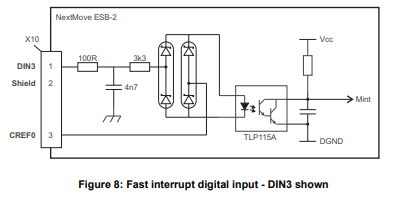
Note: The fast inputs are particularly sensitive to noise, so inputs must use shielded twisted pair cable. Do not connect mechanical switches, relay contacts or other sources liable to signal ‘bounce’ directly to the fast inputs. This could cause unwanted multiple triggering.
4.3.1.2 DIN4 - DIN11
Digital inputs DIN4 to DIN11 have a common specification:
Opto-isolated digital inputs.
Sampling frequency: 1 kHz.
Digital inputs DIN4 to DIN11 use CREF1 as their common connection.
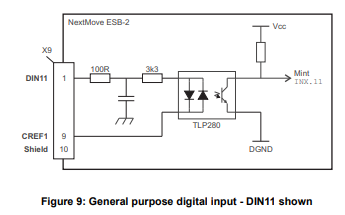
If an input is configured as edge triggered, the triggering pulse must have a duration of at least 1 ms (one software scan) to guarantee acceptance by Mint. The use of shielded cable for inputs is recommended.
4.3.1.3 DIN12 - DIN19.
Digital inputs DIN12 to DIN19 have the same elec
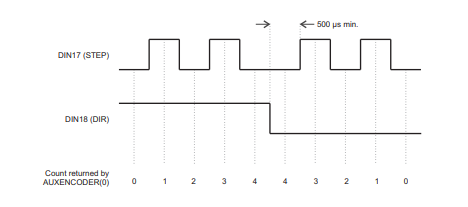
DIN17-DIN19 may also be used as an auxiliary encoder input. DIN17 accepts step (pulse)
signals and DIN18 accepts direction signals, allowing an external source to provide the
reference for the speed and direction of an axis. The step frequency (15 kHz maximum)
determines the speed, and the direction input determines the direction of motion. Both the
rising and falling edges of the signal on DIN17 cause an internal counter to be changed; see
Figure 11. If 5 V is applied to DIN18 (or it is left unconnected) the counter will increment. If
DIN18 is grounded the counter will be decremented. A minimum period of 500 µs is required
between transitions on the direction and step input to guarantee the change of direction has
been recognized.
Typically, one channel of an encoder signal (either A or B) is used to provide the step signal
on DIN17, allowing the input to be used as an auxiliary (master) encoder input. The input can
be used as a master position reference for cam, fly and follow move types. For this, the
MASTERSOURCE keyword must be used to configure the step input as a master (auxiliary)
encoder input. The master position reference can then be read with the AUXENCODER
keyword (using 0 as the channel parameter). Since a secondary encoder channel is not
used, DIN18 allows the direction of motion to be determined. The Z signal on DIN19 can be
supplied from the encoder's index signal, and may be read using the AUXENCODERZLATCH
keyword. See the Mint help file for details of each AUXENCODER... keyword.
Note that encoder input ENC 4 forms another auxiliary encoder input, using normal incremental encoder connections A, B and Z. This supports a higher frequency input and additional functionality - see section 4.4.3
4.4 Other I/O
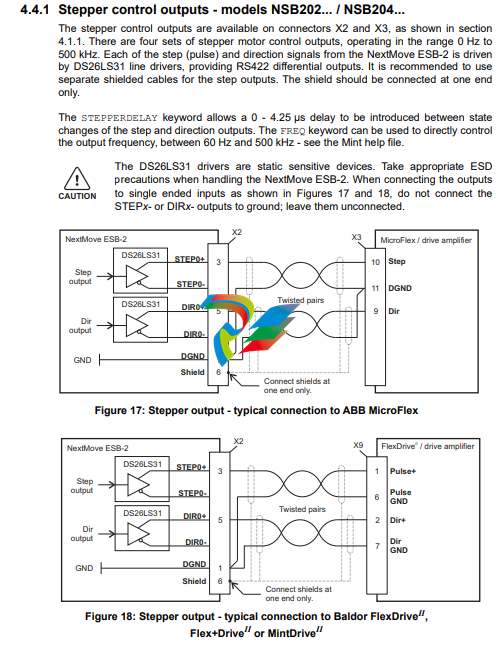
4.4.1 Stepper control outputs - models NSB202... / NSB204...
The stepper control outputs are available on connectors X2 and X3, as shown in section
4.1.1. There are four sets of stepper motor control outputs, operating in the range 0 Hz to
500 kHz. Each of the step (pulse) and direction signals from the NextMove ESB-2 is driven
by DS26LS31 line drivers, providing RS422 differential outputs. It is recommended to use
separate shielded cables for the step outputs. The shield should be connected at one end
only.
The STEPPERDELAY keyword allows a 0 - 4.25 μs delay to be introduced between state
changes of the step and direction outputs. The FREQ keyword can be used to directly control
the output frequency, between 60 Hz and 500 kHz - see the Mint help file.
The DS26LS31 drivers are static sensitive devices. Take appropriate ESD
precautions when handling the NextMove ESB-2. When connecting the outputs
to single ended inputs as shown in Figures 17 and 18, do not connect the
STEPx- or DIRx- outputs to ground; leave them unconnected.
4.4.2 Stepper control outputs - models NSB203... / NSB205...
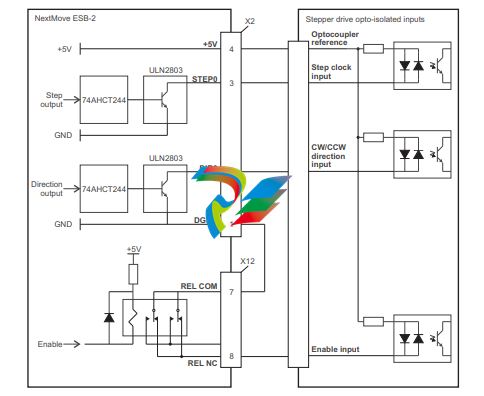
The stepper control outputs are available on connectors X2 and X3, as shown in section 4.1.1. There are four sets of stepper motor control outputs, operating in the range 0 Hz to 500 kHz. Each of the step (pulse) and direction signals from the NextMove ESB-2 is driven by a ULN2803 open collector Darlington output device. The STEPPERDELAY keyword allows a 0 - 4.25 μs delay to be introduced between state changes of the step and direction outputs. The FREQ keyword can be used to directly control the output frequency, between 60 Hz and 500 kHz - see the Mint help file.
The ULN2803 drivers are static sensitive devices. Take appropriate ESD precautions when handling the NextMove ESB-2. A 5 V, 600 mA supply is provided on connectors X2 and X3 for powering external circuits, as shown in Figure 19. The same 5 V supply is also present on connectors X5, X6, X7, X14 and X15 for powering encoders. Ensure that the total combined current demand of all 5 V outputs does not exceed 1.8 A. It is usually necessary to connect a 470 Ω pull-up resistor between the output and the 5 V supply (pin 4), especially where induced noise is affecting a step or direction output.
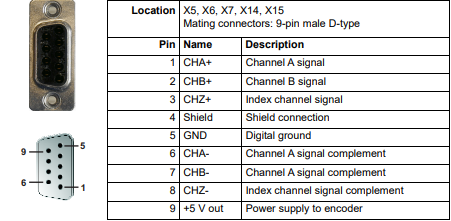
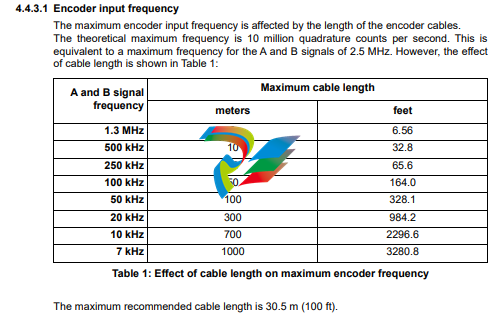
Five incremental encoders may be connected to NextMove ESB-2, each with complementary A, B and Z channel inputs. Each input channel uses a MAX3095 differential line receiver with pull up resistors and terminators. Encoders must provide RS422 differential signals. The use of individually shielded twisted pair cable is recommended. A 5 V (±5%), 250 mA supply is provided on each connector for powering the encoder. The same 5 V supply is also present on connectors X2 and X3 for powering external circuits (see sections 4.4.1 and 4.4.2). Ensure that the total combined current demand of all 5 V outputs does not exceed 1.85 A.
Encoder inputs ENC 0 - ENC 3 can be read and controlled with a range of Mint keywords
beginning with ENCODER... . When using these keywords, the encoder’s number is used
as the channel parameter. For example, Print ENCODER(2) reads the ENC 2 input.
Encoder input ENC 4 can be read and controlled with a range of Mint keywords
beginning with AUXENCODER... . When its position has been latched by a fast interrupt
(see section 4.3.1.1) it can also be controlled using Mint keywords beginning with
FASTAUX... . When using the AUXENCODER... or FASTAUX... keywords, the channel
parameter 1 is used (i.e. auxiliary encoder channel 1). For example,
Print FASTAUXENCODER(1) reads the latched value read from ENC 4. Note that
auxiliary encoder channel 0 is used to reference the auxiliary encoder input formed by
digital inputs DIN17 - DIN19 (see section 4.3.1.4).
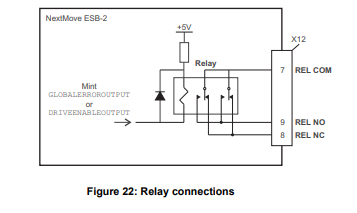
Relay connections
The relay connections are available on connector X12, as shown in section 4.1.1. The relay
outputs are isolated from any internal circuits in the NextMove ESB-2. In normal operation,
while there is no error, the relay is energized and REL COM is connected to REL NO. In the
event of an error or power loss, the relay is de-energized, and REL COM is connected to
REL NC. The relay can be controlled by the RELAY keyword, and can be configured as the
global error output by setting GLOBALERROROUTPUT to 1000 (_RELAY0). See the Mint help
file
USB port
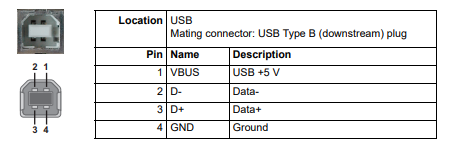
The USB connector can be used as an alternative method for connecting the NextMove ESB-2 to a PC running Mint WorkBench. The NextMove ESB-2 is a self-powered, USB 1.1 (12 Mbps) compatible device. If it is connected to a slower USB 1.0 host PC or hub, communication speed will be limited to the USB 1.0 specification (1.5 Mbps). If it is connected to a faster USB 2.0 (480 Mbps) or USB 3.0 (5 Gbps) host PC or hub, communication speed will remain at the USB 1.1 specification of the NextMove ESB-2. Ideally, the NextMove ESB-2 should be connected directly to a USB port on the host PC. If it is connected to a hub shared by other USB devices, communication could be affected by the activity of the other devices. The maximum recommended cable length is 5 m (16.4 ft).
Serial port
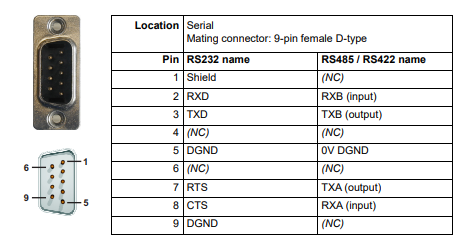
NextMove ESB-2 is available with either an RS232 or RS485 serial port (see section 2.2.1). The port is fully ESD protected to IEC 1000-4-2 (15 kV). When the NextMove ESB-2 is connected to Mint WorkBench, the Tools, Options menu item can be used to configure the serial port. The configuration can also be changed using the Mint keyword SERIALBAUD (see the Mint help file for details). It is stored in EEPROM and restored at power up. The port is capable of operation at up to 115.2 Kbaud on RS232.
Using RS232
The NextMove ESB-2 has a full-duplex RS232 serial port with the following preset configuration:
57.6 Kbaud
1 start bit
8 data bits
1 stop bit
No parity
Hardware handshaking lines RTS and CTS must be connected.
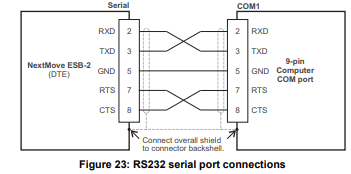
The RS232 port is configured as a DCE (Data Communications Equipment) unit so it is possible to operate the controller with any DCE or DTE (Data Terminal Equipment). Full duplex transmission with hardware handshaking is supported. Only the TXD, RXD and 0V GND connections are required for communication, but since many devices will check the RTS and CTS lines, these must also be connected. Pins 4 and 6 are linked on the NextMove ESB-2. The maximum recommended cable length is 3 m (10 ft) at 57.6 Kbaud (the factory preset rate). When using lower baud rates, longer cable lengths may be used up to maximum of 15 m (49 ft) at 9600 baud.
Multidrop using RS485 / RS422
Multidrop systems allow one device to act as a ‘network master’, controlling and interacting with the other (slave) devices on the network. The network master can be a controller such as NextMove ESB-2, a host application such as Mint WorkBench (or other custom application), or a programmable logic controller (PLC). RS422 may be used for multi-drop applications as shown in Figure 24. Four-wire RS485 may be used for single point-to-point applications involving only one controller. If firmware is updated over RS485/RS422, it can only be downloaded to the controller that was chosen in the Select Controller dialog in Mint WorkBench.
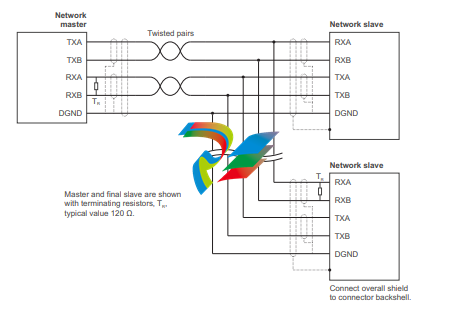
Figure 24: 4-wire RS422 multi-drop connections
Each transmit/receive (TX/RX) network requires a termination resistor at the final RX
connection, but intermediate devices must not be fitted with termination resistors. An
exception is where repeaters are being used which may correctly contain termination
resistors. Termination resistors are used to match the impedance of the load to the
impedance of the transmission line (cable) being used. Unmatched impedance causes the
transmitted signal to not be fully absorbed by the load. This causes a portion of the signal to
be reflected back into the transmission line as noise. If the source impedance, transmission
line impedance, and load impedance are all equal, the reflections (noise) are eliminated.
Termination resistors increase the load current and sometimes change the bias requirements
and increase the complexity of the system
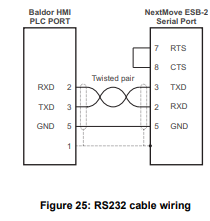
Connecting serial Baldor HMI Operator Panels
Serial Baldor HMI Operator Panels use a 15-pin male D-type connector (marked PLC
PORT), but the NextMove ESB-2 Serial connector uses a 9-pin male D-type connector. The
NextMove ESB-2 may be connected as shown in Figure 25:
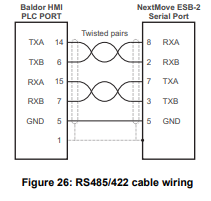
Alternatively, the Baldor HMI panel may be connected using RS485/422, as shown in Figure 26:
CAN
The CAN bus is a serial based network originally developed for automotive applications, but
now used for a wide range of industrial applications. It offers low-cost serial communications
with very high reliability in an industrial environment; the probability of an undetected error is
4.7x10⁻¹¹. It is optimized for the transmission of small data packets and therefore offers fast
update of I/O devices (peripheral devices) connected to the bus.
The CAN protocol only defines the physical attributes of the network, i.e. the electrical,
mechanical, functional and procedural parameters of the physical connection between
devices. The higher level network functionality on NextMove ESB-2 is defined by the
CANopen protocol, one of the most used standards for machine control.
In addition to supporting CANopen, Baldor has developed a proprietary protocol called
Baldor CAN. Both protocols are supported by NextMove ESB-2, but not at the same time.
This is because NextMove ESB-2 only has a single hardware CAN channel. Separate
firmware builds are available to support each of the protocols.
To determine which firmware is currently installed, start Mint WorkBench and connect to the
NextMove ESB-2 (see section 5.3.2). At the bottom of the Mint WorkBench window, the
status bar will show the name of the controller, followed by ‘CANopen’ or ‘Baldor CAN’. If the
correct option is not shown, it will be necessary to download alternative firmware by using the
Install System File and/or Download Firmware menu items in Mint WorkBench. The firmware
can be downloaded from www.abbmotion.com or, in Mint WorkBench, by using the Help, On
The Web, Firmware Updates menu option. See the Mint help file for details about
downloading firmware.
CAN connector
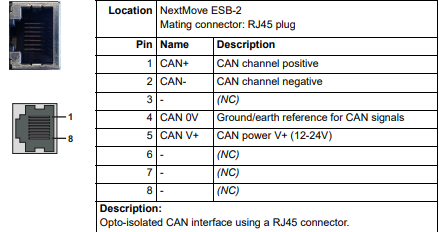
The CAN connection is made using the RJ45 connector on the NextMove ESB-2.
CAN wiring
A very low error bit rate over CAN can only be achieved with a suitable wiring scheme, so the
following points should be observed:
The two-wire data bus line may be routed parallel, twisted and/or shielded, depending on EMC requirements. ABB recommends a twisted pair cable with the shield/screen connected to the connector backshell, in order to reduce RF emissions and provide immunity to conducted interference. The bus must be terminated at both ends only (not at intermediate points) with resistors of a nominal value of 120 Ω. This is to reduce reflections of the electrical signals on the bus, which helps a node to interpret the bus voltage levels correctly. If the NextMove ESB-2 is at the end of the network then ensure that jumper JP1, located just behind the status display, is in position. This will connect an internal terminating resistor. To access the jumper it will be necessary to remove the top cover from the NextMove ESB-2. Before removing the top cover be sure to discharge static electricity from your body and clothing by touching a grounded metal surface. Alternatively, wear an earth strap while handling the unit. All cables and connectors should have a nominal impedance of 120 Ω. Cables should have a length related resistance of 70 mΩ/m and a nominal line delay of 5 ns/m. A range of suitable CAN cables are available from ABB, with part numbers beginning CBL004-5... . The maximum bus length depends on the bit-timing configuration (baud rate). The table opposite shows the approximate maximum bus length (worst-case), assuming 5 ns/m propagation delay and a total effective device internal in-out delay of 210 ns at 1 Mbit/s, 300 ns at 500 - 250 Kbit/s, 450 ns at 125 Kbit/s and 1.5 ms at 50 - 10 Kbit/s. (1) CAN baud rate not supported on Baldor CAN. (2) For bus lengths greater than about 1000 m, bridge or repeater devices may be needed. The compromise between bus length and CAN baud rate must be determined for each application. The CAN baud rate can be set using the BUSBAUD keyword. It is essential that all nodes on the network are configured to run at the same baud rate. The wiring topology of a CAN network should be as close as possible to a single line/bus structure. However, stub lines are allowed provided they are kept to a minimum (<0.3 m at 1 Mbit/s). The 0 V connection of all of the nodes on the network must be tied together through the CAN cabling. This ensures that the CAN signal levels transmitted by NextMove ESB-2 or CAN peripheral devices are within the common mode range of the receiver circuitry of other nodes on the network.
CANopen
The NextMove ESB-2 must have the CANopen firmware loaded to use this protocol
ABB has implemented a CANopen protocol in Mint (based on the ‘Communication Profile’ CiA DS-301) which supports both direct access to device parameters and time-critical process data communication. The NextMove ESB-2 design does not comply with a specific CANopen device profile (DS4xx), although it is able to support and communicate with the following devices:
Any third party digital and analog I/O device that is compliant with the ‘Device Profile for Generic I/O Modules’ (CiA DS-401). Baldor HMI (Human Machine Interface) operator panels, which are based on the ‘Device Profile for Human Machine Interfaces’ (DS403). Other ABB controllers with CANopen support for peer-to-peer access using extensions to the CiA specifications (DS301 and DS302). The functionality and characteristics of all ABB CANopen devices are defined in individual standardized (ASCII format) Electronic Data Sheets (EDS) which can be found on the Mint Motion Toolkit CD (OPT-SW-001), or downloaded from www.abbmotion.com. The configuration and management of a CANopen network must be carried out by a single node acting as the network master. This role can be performed by the NextMove ESB-2 when it is configured to be the Network Manager node (node ID 1), or by a third party CANopen master device. Up to 126 CANopen nodes (node IDs 2 to 127) can be added to the network by a NextMove ESB-2 Manager node using the Mint NODESCAN keyword. If successful, the nodes can then be connected to using the Mint CONNECT keyword. Any network and node related events can then be monitored using the Mint BUS1 event. Note: All CAN related Mint keywords are referenced to either CANopen or Baldor CAN using the ‘bus’ parameter. Although the NextMove ESB-2 has a single physical CAN bus channel that may be used to carry either protocol, Mint distinguishes between the protocols with the ‘bus’ parameter. For CANopen the ‘bus’ parameter must be set to 1. Please refer to the Mint help file for further details on CANopen, Mint keywords and keyword parameters
CAN opto-isolators and power supply
The NextMove ESB-2 CAN channel is opto-isolated, so a voltage in the range 12-24 V must be applied to pin 5 of the CAN connector. From this supply, an internal voltage regulator provides the 5 V at 100 mA required for the isolated CAN circuit. Connection of the supply can be achieved by modifying an existing cable (see Figure 27). However, it is recommended to use adaptor part OPT-CNV001 fitted at the HMI panel (Figure 28). This adaptor provides an RJ45 input to allow standard CAT 5e cable to be used between the HMI panel and the NextMove ESB-2. The adaptor also provides flying lead connections for the application of the CAN power supply. CAN cables supplied by ABB are ‘category 5’ and have a maximum current rating of 1 A, so the maximum number of NextMove ESB-2 units that may be used on one network is limited to ten. Due to the propagation delay of the opto-isolators, the 1 Mbit/s baud rate might not be attainable in some applications.
-
 AEROTECH SM Series High-Performance Stepper Motors
 -
 AEROTECH BLMSC Series Linear Motors
 -
 AEROTECH Custom Linear Motors
 -
 AEROTECH BMS Series Brushless, Slotless Rotary Motors
 -
 AEROTECH BM Series Brushless Rotary Motors
 -
 AEROTECH BLMX Series Linear Motors
 -
 AEROTECH BLMH Series Linear Motors
 -
 AEROTECH BLM Series Linear Motors
 -
 AEROTECH BLMC Series Linear Motors
 -
 AEROTECH BLMUC-143 Linear motor forcer with thermistor
 -
AEROTECH BLMUC-111 Linear motor forcer with thermistor
-
AEROTECH BLMUC-95 Linear motor forcer with thermistor
-
AEROTECH BLMUC-79 Linear motor forcer with thermistor
-
AEROTECH BLMUC Series Linear Motors
-
 AEROTECH Automation1 FLEX Distributed Amplifier Multi-Axis Servo Control System
 -
 AEROTECH Automation1 HXA4 6-Axis Hexapod Servo Drive
 -
 AEROTECH Automation1 iHXA4 6-Axis Hexapod Servo Drive with Motion Controller
 -
 AEROTECH Modular System Control Console
 -
 AEROTECH TV Series Transformers
 -
 AEROTECH TM Series Transformers
 -
 AEROTECH UFM Noise Filter Module
 -
 AEROTECH MFM Motor Filter Module
 -
 AEROTECH MPG Handwheel Pendant
 -
 AEROTECH Automation1 Multi-Axis Joystick
 -
 AEROTECH ETM Enhanced Throughput Module
 -
 AEROTECH Automation1 XL4s High-Speed, Single-Phase Linear Servo Drive
 -
 AEROTECH Automation1 XL2e Enhanced, Compact Linear Servo Drive
 -
 Automation1 iXL2e Enhanced, Compact Linear Servo Drive with Motion Controller
 -
 AEROTECH Automation1 XL5e Enhanced, Linear Servo Drive
 -
 AEROTECH Automation1 iXL5e Enhanced Linear Servo Drive with Motion Controller
 -
 AEROTECH Automation1 GI4 Laser Scan Head Controller
 -
 AEROTECH Automation1 SI4 Stepper Interface
 -
AEROTECH Automation1 XI4 Servo Interface
-
 AEROTECH AEROTECH Automation1 iXI4 Servo Interface with Motion Controller
 -
 AEROTECH Automation1 XC6e Enhanced, High-Power PWM Servo Drive
 -
 AEROTECH Automation1 iXC6e Enhanced, High-Power PWM Servo Drive with Motion Controller
 -
 AEROTECH Automation1 XC2 Compact PWM Servo Drive
 -
 AEROTECH Automation1 XC4 PWM Servo Drive
 -
 AEROTECH Automation1 GL4 Galvo Laser Scan Head Linear Drive
 -
 AEROTECH Automation1 XC2e Enhanced, Compact Servo Drive with PWM+
 -
 AEROTECH Automation1 XC4e Enhanced, PWM Servo Drive
 -
 AEROTECH Automation1 XR3 Multi-Axis Servo Drive Rack
 -
 AEROTECH Automation1 iXR3 Multi-Axis Servo Drive Rack with Motion Controller
 -
 AEROTECH Automation1 iXC2 Compact PWM Servo Drive with Motion Controller
 -
 AEROTECH Automation1 iXC2e Enhanced, Compact PWM+ Servo Drive with Motion Controller
 -
 AEROTECH Automation1 iXC4 PWM Servo Drive with Motion Controller
 -
 AEROTECH Automation1 iXC4e Enhanced, PWM Servo Drive with Motion Controller
 -
 AEROTECH Automation1 iPC Industrial PC with Motion Controller
 -
 AEROTECH EPICS & TANGO Drivers for Distributed Control Systems
 -
 AEROTECH .NET, C, Python & LabVIEW APIs Custom Application Develotpmen
 -
 AEROTECH Automation1 Industrial Ethernet Support
 -
 AEROTECH Automation1 iSMC Intelligent, Software-Based Motion Controller
 -
 AEROTECH Automation1 iXA4 1- 2- or 4-Axis PWM Servo Drive with Motion Controller
 -
 AEROTECH Automation1 XA4 1- 2- or 4-Axis PWM Servo Drive
 -
 CTI 2500-ADP2-DISC Discrete Wiring Adapter for Series 500
 -
 CTI 2500-ADP1 Analog Wiring Adapter for Series 500
 -
 CTI 2500C-RADP-RS485 Remote Base Controller Adapter for Series 500
 -
 CTI 2500C-RADP-RBC Profibus RBC Adapter for Series 500
 -
 CTI 2500C-PADP-120V 120VAC 50W Power Supply for Series 500
 -
 CTI 2500-RADP RBC Adapter for Series 500
 -
 CTI 2500-R4500 520/530/DBC Adapter for Series 500 - MATURE
 -
 CTI 2500-PADP Power Supply Adapter for Series 500
 -
 CTI 2500-IADP I/O Adapter for Series 500
 -
 CTI 2500-VP15A-N4-W7 15" Flat-Panel PC with Windows® 7 Embedded
 -
 CTI 2500S-27-1750 Slice I/O, Ethernet, RS232/485. 900MHz, 2DIO / 4UAI / 2AI
 -
 CTI 2500S-26-1750 Slice I/O, Ethernet, RS232/485. 900MHz, 8DIO / 2UAI
 -
 CTI 2500S-23-1750 Slice I/O, Ethernet, RS232/485. 900MHz, 4DI / 4DO / 2UAI / 2AO
 -
 CTI 2500S-27-1550 Slice I/O, RS232/485. 2DIO / 4UAI / 2AI
 -
 CTI 2500S-26-1550 Slice I/O, RS232/485. 8DIO / 2UAI
 -
 CTI 2500S-23-1550 Slice I/O, RS232/485. 4DI / 4DO / 2UAI / 2AO
 -
 CTI 2500S-27-1050 Slice I/O, Ethernet, 2DIO / 4UAI / 2AI
 -
 CTI 2500S-26-1050 Slice I/O, Ethernet, 8DIO / 2UAI
 -
 CTI 2500S-23-1050 Slice I/O, Ethernet, 4DI / 4DO / 2UAI / 2AO
 -
 CTI 2500C-32F-CJC 32-Pin Field Wiring Connector with Cold Junction Compensation
 -
 CTI 2500C-32F 32-Pin Field Wiring Connector
 -
 CTI 2500C-8-TC Eight Thermocouple Inputs
 -
 CTI 2500C-8-RTD Eight RTD Inputs
 -
 CTI 2500C-8-RL-FC 8 Form-C Relay Outputs
 -
 CTI 2500C-8-IDO-24V 8 Isolated 24VDC Outputs
 -
 CTI 2500C-8-IDO-120V 8 Isolated 120VAC Outputs
 -
 CTI 2500C-16-DO-24V Sixteen 24VDC Digital Outputs
 -
 CTI 2500C-16-DO-120V Sixteen 120VAC Digital Outputs
 -
.png) CTI 500C-16-IDI-24V Sixteen Isolated 24V AC/DC Digital Inputs
CTI 500C-16-IDI-24V Sixteen Isolated 24V AC/DC Digital Inputs -
 CTI 2500C-16-IDI-120V Sixteen Isolated 120V AC/DC Digital Inputs
 -
 CTI 2500C-16-DIDO-SIM Sixteen Digital Input and Output SImulator
 -
 CTI 2500C-16-DI-24V Sixteen 24V AC/DC Digital Inputs
 -
 CTI 2500C-16-DI-120V Sixteen 120V AC/DC Digital Inputs
 -
 CTI 2500C-RBC-RS485 RS485 Remote Base Controller
 -
 CTI 2500C-RBC-PRF Profibus Remote Base Controller
 -
 CTI 2500C-PS-24V-35 35-Watt DC Power Supply
 -
 CTI 2500C-PS-120V-35 35-Watt AC Power Supply
 -
 CTI 2500C-R8 Eight-Slot Base
 -
 CTI 2500C-R4 Four-Slot Base
 -
 CTI 2500C-R16 Sixteen-Slot Base
 -
 CTI 2500C-2572-B Fast Ethernet TCP/IP Adapter
 -
 CTI 2500C-J750 Compact Janus PAC with 3MB Project Memory
 -
 CTI 2500C-C300 CPU with 512K User Memory
 -
 CTI 2500C-C200 CPU with 256K User Memory
 -
 CTI 2500C-C100 CPU with 128K User Memory
 -
 CTI 2500C-8-AO 8 Analog Outputs
 -
 CTI 2500C-8-AI 8 Analog Inputs
 -
 CTI 2559-FCAL Precision Calibration Connector
 -
 CTI 2559-FPC 40-Position Screw-Terminal Connector
 -
 CTI 2500-RFC PLC to RF Modem Cable
 -
 CTI 2500-40F 40-Position Standard Screw-Terminal Connector
 -
 CTI 2505 Vibration Sensor Interface Module
 -
 CTI 2554-A 4-Channel Isolated High Speed Counter Module
 -
 CTI 2553-A 2-Channel Mag Meter Input Module
 -
 CTI 2502 2-Channel High Speed Counter Input Module
 -
 CTI 2559-TC 8-Channel Thermocouple Input Module
 -
 CTI 2556-A 16-Channel Isolated Thermocouple Input Module
 -
 CTI 2556 16-Channel Isolated Thermocouple Input Module
 -
 CTI 2551-A 8-Channel Isolated Thermocouple Input Module
 -
 CTI 2559-RTD 8-Channel RTD Input Module
 -
 CTI 2557-A 16-Channel RTD Input Module
 -
 CTI 2557 16-Channel RTD Input Module
 -
 CTI 2552-A 8-Channel Isolated RTD Input Module
 -
 CTI 2534 8-Point Form-C Relay Output Module
 -
 CTI 2532 16-Point Form-A Relay Output Module
 -
 CTI 2531 32-Point Form-A Relay Output Module
 -
 CTI 2530 8-Point Form-C Relay Output Module
 -
 CTI 2562 8-Channel Analog Output Module
 -
 CTI 2560-A 8-Channel Isolated Analog Output Module
 -
 CTI 2501 8in/4out Analog Module
 -
 CTI 2558 8-Channel Analog Input Module
 -
 CTI 2555-A 16-Channel Analog Input Module
 -
 CTI 2550-A 8-Channel Isolated Analog Input Module
 -
 CTI 2599 8/16/32-Point AC Output Module


