
Woodward Product Change Notification 06912
Product Change Notification 06912
(Revision B, 6/2013)
Overview
Woodward is releasing new ProTech®-GII models on 17 May 2013. These new models include the same
basic functionality as current ProTech-GII models, and include the improvements listed below as well as
new capabilities.
In an effort to minimize the risk of future application issues, and since the new/improved models are direct
drop-in replacements for the existing models, Woodward plans to change all existing models to “non
preferred” on 15 July 2013. and all new models to “preferred”. Refer to Table 1 below for specific part
number information. Depending on the migration rate to the new ProTech-GII models, Woodward plans to
inactivate all old non-preferred models within the next 12 to 18 months. Please inform affected purchasing
teams and customers accordingly.
Product Change / Improvement
The below listed “preferred” models include the following changes, improvements, and additions:
1.
All module speed inputs are shared with all other modules (A, B, C).
All module trip and alarm latch output statuses are shared with all other modules (A, B, C).
All module “Start”, “Reset”, and “Speed Failed Override” commands are shared with all other modules
(A, B, C).
Added Speed Redundancy Manager Block:
With all input sensors/channels healthy, each module to be configured to select the desired
speed (median, HSS, or LSS) to use for its alarm and trip logic.
Upon one failed input sensor/channel, each module to be configured to select the desired speed
(HSS or LSS) to use for its alarm and trip logic.
Upon two failed input sensors/channels, each module to be configured to select the desired
action (issue a trip command or use healthy speed input sensor/channel for its alarm and trip
logic).
Allows users to configure the use of 3 or 2 or 1 speed input sensors/channels.
Includes “Speed Difference Detection” alarm function. Note that this feature can be easily used to
assist in detecting a failed active or passive speed sensor.
Note: New speed redundancy manager logic allows users to configure the voting logic to meet Shell’s
2-out-of-2 voting requirement when only two inputs are available/healthy.
Added Acceleration Redundancy Manager Block:
With all input sensors/channels healthy, each module to be configured to select the desired
acceleration rate (median, HSS, or LSS) to use for its alarm and trip logic.
Upon one failed input sensor/channel, each module to be configured to select the desired
acceleration rate (HSS or LSS) to use for its alarm and trip logic.
Allows users to configure the use of 3 or 2 or 1 speed input sensors/channels.
Added Boolean Input Manager Functions:
Each of the ProTech-GII’s contact/Boolean inputs (Start, Reset, and Speed Failed Override) can
be configured to use the respective contact/Boolean input command from any or all of the other
modules.
When configured, any or all of the configured discrete input commands are “ORed” together.
Example—If module A’s “Reset” function is configured to use module A’s and module B’s “Reset”
contact input commands, then a “Reset” command received from the A or B module will activate
module A’s Reset logic.
Boolean Input Manager functions can only be configured from the ProTech-GII’s PCT software
service tool.
The ORed Boolean Input Manager functions, if configured, only manage the action of a module’s
contact inputs commands. The Reset and Start keys on the module’s front panel function
independently of the Boolean Input Manager and only affect the respective module’s action.
Added configurable “Failed Power Supply #1” and “Failed Power Supply #2” Alarm Override functions.
Allows users to configure the module to accept only one power supply, thus removing a nuisance
Failed Power Supply Alarm indication.
Changed Speed Fail Alarm function to be overridden during the turbine start state/mode.
This removes a nuisance alarm during a turbine start-up.
Changed Speed Lost Alarm/Trip threshold level from 100 Hz to 200 Hz to reduce/remove nuisance
alarms/trips when applied with speed gears that have less than 60 teeth and turbines that can slow roll
at low speeds.
10. Changed the name of “Periodic Overspeed Test” to “Auto Sequence Test”.
11. Added an option to start the Auto Sequence Test Routine from the Auto Sequence Test screen. This
allows a user to instantly start the Auto Sequence Test function when desired.
12. Added an option to disable Auto Sequence Test routine from the Auto Sequence Test screen. This
allows a user to disable the Auto Sequence Test function from being performed. Since the Auto
Sequence Test routine can be configured to be performed on a periodic basis, the “Disable” function
allows users to temporarily disable the periodic test routine from being performed when desired.
13. Added an Auto Simulated Speed Test Failed Alarm to indicate the failure of the Auto Simulated Test
routine.
14. Added a configurable permissive for any Test routine, which will not allow the Test function to be
started if any other module has an “Alarm” condition active. Users now have the following configurable
Test “permissive” options: None, Module Not Tripped, or Module Not In Alarm. If configured, the test
-
 Honeywell 51402755-100 PROCESSOR CARD
 -
 Honeywell 51107595-100 Power
 -
 HONEYWELL 51304544-100 Control Board
 -
 HONEYWELL 51109919-100 BOARD
 -
 HHoneywell 51204160-175 Digital Input Module
 -
 Honeywell 51304754-150 High Level Analog Input Module
 -
 HONEYWELL 51304690-100 DIGITAL INPUT CARD
 -
 Honeywell 51401635-150 COMM CONTROL
 -
 HONEYWELL 51204174-175 MC-TAOY 52 ANALOG OUTPUT BOARD
 -
 HONEYWELL 51400596-100
 -
 HONEYWELL 51401291-100 board card
 -
 HONEYWELL 51401642-150 I/O LINK MODULE
 -
 Honeywell LCN‑E Hub Power Supply 38500148‑300
 -
 Honeywell LCN‑E Hub redundant 38500143‑202 Twisted‑pair LCN
 -
 Honeywell LCN‑E Hub non‑redundant,38500143‑102
 -
Honeywell Enhanced Micro‑TDC‑3000 System Unit MX‑DTAC01K2
-
 Honeywell Enhanced Micro‑TDC‑3000 System Unit MX‑DTAB01K2
 -
 Honeywell Enhanced Micro‑TDC‑3000 System Unit MT11‑520
 -
 Honeywell STI‑CE Smart Transmitter Interface 51304516‑150
 -
 Honeywell STI Smart Transmitter Interface 51304516‑100 MC‑PSTX02
 -
 Honeywell ulse Counter IOP,51304386‑100.MU‑PPIX02
 -
 Honeywell DO Digital Output IOP‑CE 51304487‑150 CE version
 -
.png) Honeywell DO Digital Output IOP 51304487‑100 MC‑PDOX02
Honeywell DO Digital Output IOP 51304487‑100 MC‑PDOX02 -
 Honeywell TDC‑3000 SOE DI IOP,51402625-175 MC‑PDIS12
 -
 Honeywell TDC‑3000 DI Digital Input IOP‑CE 51304485‑150
 -
Honeywell TDC‑3000 DI Digital Input IOP 51304485‑100 MC‑PDIX02
-
Honeywell TDC‑3000 AO Analog Output IOP 51304757‑100 MU‑PAOX02
-
Honeywell TDC‑3000 TC Thermocouple IOP 51304756‑100 MU‑TAMT03
-
 Honeywell TDC‑3000 51304755‑100 MU‑TAMR03
 -
 Honeywell TDC‑3000 LLAI Multiplex AI IOP,51304362‑150
 -
 Honeywell TDC‑3000 HLAI Analog Input IOP‑CE,51304363‑150
 -
 Honeywell TDC‑3000 HLAI Analog Input IOP,51304363‑100.4‑20mA
 -
Honeywell TDC‑3000 HPM Power Supply,51401731‑100
-
 Honeywell TDC‑3000 Standard 1986.HPM High‑Performance PM CPU,51402362‑100
 -
Honeywell TDC‑3000 APM Advanced Process Manager CPU,51304459‑100
-
Honeywell TDC‑3000 Standard 1986.PM Process Manager CPU,51304362‑100
-
Honeywell TDC‑3000 NIM Network Interface Module,51304481‑200
-
 Honeywell TDC‑3000 NIM Network Interface Module 51304481‑100
 -
 Honeywell TDC‑3000 BASIC,LCN Terminator Resistor,30732052‑001.Coaxial
 -
Honeywell TDC‑3000 BASIC,Hiway Coupler,30753732-001
-
 Honeywell TDC‑3000 BASIC,LEPIU Low‑Energy PIU,4DP7APCFA309
 -
Honeywell TDC‑3000 BASIC,HLPIU High‑Level PIU,4DP7APCFA106
-
Honeywell TDC‑3000 BASIC,Multifunction Controller(TDC‑2000 DHW),4DP7MFA103
-
 Honeywell TDC‑3000 BASIC,Extended Controller(TDC‑2000 DHW),4DP7AXA102
 -
Honeywell TDC‑3000 BASIC,Basic Controller(TDC‑2000 DHW),4DP7BBA101
-
Honeywell TDC‑3000 BASIC,XLCNE2 LCN Extender,51305508‑100.Coaxial LCN
-
 Honeywell TDC‑3000 BASIC,E‑PLCG PLC Gateway,51400997‑200
 -
 Honeywell TDC‑3000 BASIC,PLNM Plant Network Module,51401163‑100
 -
 Honeywell TDC‑3000 BASIC,CG Computer Gateway,80360206‑001
 -
 Honeywell TDC‑3000 BASIC,HG High‑Speed Gateway,51304526‑100
 -
 Honeywell TDC‑3000 BASIC,HM History Module,51191596‑200
 -
Honeywell TDC‑3000 BASIC,HM History Module,51191596‑100
-
Honeywell TDC‑3000 BASIC,AM Application Module CPU,51401551‑800.K2LCN‑8
-
Honeywell TDC‑3000 BASIC,AM Application Module CPU,51401551‑600.K2LCN‑6
-
 Honeywell TDC‑3000 BASIC,AM Application Module CPU,51401551‑400,K2LCN‑4
 -
 Honeywell TDC‑3000 BASIC,AM Application Module CPU,51401551‑300.K2LCN‑3
 -
Honeywell TDC‑3000 BASIC,AM Application Module CPU,51401551‑200,K2LCN‑2
-
 Honeywell TDC‑3000 BASIC,US Universal Station CPU,51401288‑200
 -
TDC‑3000 BASIC,US Universal Station CPU,51401288‑100
-
 SHINKAWA VM-21P1 Signal Conditioner 0-50MM 24VDC
 -
 Shinkawa RiverNew Vibration Transducer VK202 Series
 -
 Shinkawa Electric VM-3E2 Vibration Monitor Module
 -
 Shinkawa JBP-47 P-22-48A-1 / P-22-48B-1 Circuit Board Module
 -
Shinkawa MODEL VM-5K DUAL VIBRATION MONITOR
-
 Shinkawa CMU-15A (CMU15A) Industrial Camera Controller
 -
 Shinkawa CMU-13A CMU13A Industrial Camera Controller
 -
 Shinkawa EFU-10 (EFU10) Spark Generator Unit
 -
 Shinkawa UTC-1000 ZUP-02C Board
 -
 Shinkawa MDP-89 MDP89 P-24-674A P-24-674B Circuit Board Module
 -
 Shinkawa CB-1011005001 Signal Cable Assembly
 -
 SHINKAWA VL-202A08L-1002 Sensor VL-08020L01 Probe Cable F84N1695
 -
 Shinkawa VK-202A2 Driver & VL-202A08L-1A72 Proximity Sensor Probe
 -
 SHINKAWA VM-703B VIBRATION MONITORING SYSTEM CARD 2R05-002-P001C
 -
 Shinkawa BH-150-03 Signal Conditioner / Preamplifier Unit
 -
 Shinkawa BH-150 BH150 Signal Conditioner / Preamplifier Unit
 -
 Shinkawa Electric VM-3D2 Thrust Monitor Module
 -
 Shinkawa LCU-37 Monitoring module
 -
Shinkawa LCU-44B-06 Local Control Unit Module
-
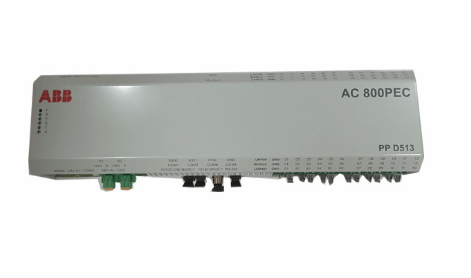 ABB 3BHE039724R2643 PPD513 high-performance programmable controller module
 -
.png) Samsung SSAS21-RTD Resistance Temperature Detector Input Module
Samsung SSAS21-RTD Resistance Temperature Detector Input Module -
.png) Samsung SSAS21-DO Digital Output Module
Samsung SSAS21-DO Digital Output Module -
Samsung SSAS21-DI Digital Input Module
-
.png) Samsung SSAS21-CPU Central Processing Unit Module
Samsung SSAS21-CPU Central Processing Unit Module -
 Samsung SMTB-RTD RTD/TC Terminal Board
 -
.png) Samsung SMTB-AI Analog Input/Output Terminal Board
Samsung SMTB-AI Analog Input/Output Terminal Board -
Samsung SMTB-DO Digital Output Terminal Board
-
.png) Samsung SMTB-DI Digital Input Terminal Board
Samsung SMTB-DI Digital Input Terminal Board -
SAMSUNG SMBK-12 IOU Rack Backplane
-
SAMSUNG SMBK-08 IOU Rack Backplane
-
SAMSUNG SMPS-08 Rack Power Module
-
.png) SAMSUNG SMCOM-08 Communication Expansion Card
SAMSUNG SMCOM-08 Communication Expansion Card -
SAMSUNG SMPI-8 Pulse Count Input Module
-
SAMSUNG SMTC-8 Thermocouple Input Module
-
SAMSUNG SMAOC-12 Analog Output Module (12CH)
-
SAMSUNG SMAOC-8 Analog Output Module (8CH)
-
SAMSUNG SMAIC-12 Analog Current Input Module (12CH)
-
SAMSUNG SMRTD-8 RTD Pt100 Temperature Input Module (8CH)
-
SAMSUNG SMAIC-8 Analog Input Module (8CH)
-
SAMSUNG SMDO-8 Digital Output Module (8CH)
-
SAMSUNG SMDI-8 Digital Input Module (8CH)
-
 SAMSUNG SMCPU-08 Central Processing Unit Controller
 -
 Embedded MXM GPU Modules EGX-MXM-A4500 ADLINK
 -
 Embedded MXM GPU Modules EGX-MXM-AD2000 ADLINK
 -
 ADLINK Embedded MXM GPU Modules EGX-MXM-AD3500
 -
 ADLINK Embedded MXM GPU Modules EGX-MXM-AD5000
 -
 Embedded MXM GPU Modules EGX-MXM-AD ADLINK
 -
 Embedded MXM GPU Modules MXM-AXe ADLINK
 -
 ADLINK Embedded MXM GPU Modules EGX-MXM-BW500
 -
 Embedded MXM GPU Modules EGX-MXM-BW2000 ADLINK
 -
 ADLINK Embedded MXM GPU Modules EGX-MXM-BW4000
 -
 Embedded MXM GPU Modules EGX-MXM-BW5000 ADLINK
 -
SAMSUNG SSAS-PRO SPTB-AI dedicated analog input terminal board
-
SAMSUNG SSAS-PRO SPTB-DO dedicated digital output terminal board
-
SAMSUNG SSAS-PRO SPTB-DI dedicated terminal board
-
SAMSUNG SSAS-PRO SPBK-X32-12 Heavy-duty 8-slot system chassis backplane
-
SAMSUNG SSAS-PRO SPBK-X32-08 Heavy-duty 8-slot system chassis backplane
-
SAMSUNG SSAS-PRO SPSU-X32 heavy-duty rack-mounted
-
SAMSUNG SSAS-PRO SPIRU-16 versatile universal mixed I/O module
-
SAMSUNG SSAS-PRO SPRI-16 RTD Temperature Input Module
-
SAMSUNG SSAS-PRO SPAO-8 Analog Output Module
-
SAMSUNG SSAS-PRO SPAI-16 Analog Input Module
-
.png) SAMSUNG SSAS-PRO SPRDO-16 Relay digital output module
SAMSUNG SSAS-PRO SPRDO-16 Relay digital output module -
SAMSUNG SSAS-PRO SPDO-16 (Transistor Digital Output Module)
-
SAMSUNG SSAS-PRO SPDI-24 high-density digital input module
-
SAMSUNG SPDI-16 (Digital Input Module)
-
 ADLINK 3U Enclosures & Systems AD-3100
 -
 Power Supplies cPS-H300S/AC ADLINK
 -
Power Supplies cPS-H300S/AC ADLINK


