
Woodward ESDR 4 Current Differential Protection Relay
mode until the terminal is de-energized.
If this input remains energized for at least 1 s, the faults detected in monitoring
level 2 are reset. This means that the relays will be de-energized and the text display
will be deleted from the screen as long as the monitored currents are not exceeding
the configured threshold level.
When this input is energized, the differential protection is disabled.This means that
the differential current is not monitored, no relay can be enabled and no text is dis
played.
This relay becomes enabled when the unit detects threshold limit 2 (main stage) has
been exceeded. The configured differential current characteristics and delay time will
determine how relay 1 functions.
This relay becomes enabled when the unit detects threshold limit 2 (main stage) has
been exceeded. The configured differential current characteristics and delay time will
determine how relay 2 functions.
This relay becomes enabled when the unit detects threshold limit 1 has been ex
ceeded. The configured differential current characteristics and delay time will deter
mine how relay 4 functions.
This relay is enabled when the unit is operational and the differential current is being
monitored. The relay becomes disabled if the monitoring is deactivated through any
of the following reasons:
• the internal self-monitoring has detected a malfunction of the unit. A correct func
tioning of the unit cannot be guaranteed and corrective action may be necessary.
• the set values for parameter "CT-ratio" or parameter "Generator Current" are out
side the permissible limits (see page 19).
• the digital input "Blocking" is energized.
• the parameter "Monitoring" is configured to "Off".
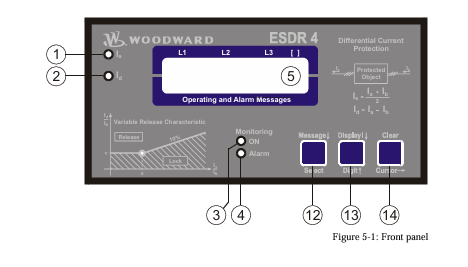
When in configuration mode (simultaneous pressing of "Digit↑" and "Cursor→"), the configuration screen can
be advanced by pressing the "Select" button. Should there be no entry, parameter change or other action for 60
seconds, the unit will automatically revert into Automatic mode.
During the configuration mode, the monitoring function is still active. This means inevitably, that while adjusting
parameters during operation, it is possible to cause a tripping of the relay.
adjust settings
[press "SELECT"]
Configuration mode "Select" button
Pressing the "Select" key activates the configuration mode, and the following pa
rameters can be enabled or changed within the given limits. Please you note that as
you advance through the configuration screens, by configuring some parameters as
"ON", additional screens must be configured relating to that parameter. If the pa
rameter is configured as "OFF", the additional screens will be disabled and not dis
played.
Software version
Software version
Displays the software version.
SPRACHE/LANGUAGE ----------------
Language selection english/german
The screens can be displayed in German or English.
curr. transform.
ratio 0000/x
CT-Ratio Selection 10 to 6.000/{x} A
The Ratio of the CTs being used is entered here. The CTs should be selected so that
in fault-free operation at generator rated current, at least 60 % of nominal current
flows in the CT-secondary. Failure to use properly a sized CT-Ratio leads to loss of
resolution and inaccuracies in the monitoring functions.
generator nomin.
current 0000A
Generator rated current 5 to 6.000 A
This value is used as reference value for the calculation and display of restraint cur
rent and differential current. The entered value of generator current must be at least
60% of the nominal current of the CT and must not exceed the entered value of CT
nominal current.
Example CT-Ratio 500/5 A
Range of Generator rated current 300 A to 500 A.
If the nominal value is less than 50% of the transformer ratio, the message "Wrong
Entry" will be displayed on the screen in Automatic mode and the unit will de
activate monitoring functions (the Monitoring LED goes out).
automatic reset
relay ON
Automatic reset of the relay ON/OFF
Applies only to monitoring level 2 (tripping).
Monitoring level 1 (warning) always Auto-resets.
ON................The relays de-energize automatically when the fault is no longer pre
sent. The screen input "Automatic reset of error text" determines
what happens to the Alarm-text in the display.
OFF..............The relays remain energized until they are reset.
monitoring
ON
Monitoring ON/OFF
ON................Monitoring of the differential current is active and the follow
ingscreens of this option are displayed.
OFF..............The monitoring is de-activated and the following screens are not dis
played.
release limit
Is/In X=000%
Trigger Value IS/IN (X12) 50 to 300 %
Definition of the threshold characteristic for the monitoring of levels 1 and 2.
This value determines the horizontal position (X12-coordinates of points
P [X12/Y1] and P [X2/Y2]) of the corner points of the Warning and Tripping char
acteristics.
release limit
Id/In Y=000%
Limit valueId
This value determines the vertical position (Y2-coordinate) of the corner point
P [X12/Y2] of the tripping characteristic (monitoring level2).
-
 DEIF RMF-112D Frequency relay
 -
 DEIF RMC-142D Current relay
 -
 DEIF RMC-132D Current relay
 -
 DEIF RMC-131D Current relay
 -
 DEIF RMC-122D Current relay
 -
 DEIF RMC-121D Current relay
 -
 DEIF RMC-111D Current relay
 -
 DEIF MVR-V211 Busbar Protection
 -
 DEIF MVR-T257 Transformer Differential Protection
 -
 DEIF MVR-T256 Transformer Differential Protection
 -
 DEIF MVR-T216 Transformer Differential Protection
 -
DEIF MVR-T215 Transformer Protection
-
 DEIF MVR-M257 Motor Differential Protection
 -
 DEIF MVR-M255 Motor Protection
 -
 DEIF MVR-M215 Motor Protection
 -
 DEIF MVR-M210 Motor Protection
 -
 DEIF MVR-G257 Generator Differential Protection
 -
 DEIF MVR-G215 Generator Protection
 -
 DEIF MVR-F255 Directional Feeder Protection
 -
 DEIF MVR-F215 Directional Feeder Protection
 -
DEIF MVR-F210 Feeder Protection
-
 DEIF MVR-F205 Directional Feeder Protection
 -
 DEIF MVR-F201 Basic Feeder Protection
 -
DEIF MVR-200 series Medium Voltage Relay
-
 DEIF MDR-2 Multi-differential relay
 -
 DEIF LMR-122D Loss of mains relay
 -
 DEIF LMR-111D Loss of mains relay
 -
 DEIF APU-4 Advanced G59 and G99 protection unit
 -
 DEIF iE 650 PLC - The most robust programmable automation controller available
 -
 DEIF iE 350 PLC - Programmable Automation PLC Controller
 -
 DEIF iE 250 PLC Versatile and modular intelligent energy PLC controller
 -
 DEIF PPM-3 EDG Protection and Power Management
 -
 DEIF AGC 3X 4198000234E AUTOMATIC GENSET CONTROLLER
 -
 SAUTER ASF123 Damper actuator with spring return
 -
SAUTER ASF122 Damper actuator with spring return
-
SAUTER ASF113F122 Damper actuator with spring return
-
SAUTER ASF113F120 Damper actuator with spring return
-
SAUTER ASF112F122 Damper actuator with spring return
-
SAUTER ASF112F120 Damper actuator with spring return
-
 SAUTER ASM 124/134 series - ASM134F130 Damper actuator
 -
SAUTER ASM 134 series - ASM134SF132 Damper actuator
-
SAUTER ASM 124/134 series - ASM124SF132 Damper actuator
-
SAUTER ASM 124/134 series - ASM124F122 Damper actuator
-
SAUTER ASM 124/134 series - ASM124F120 Damper actuator
-
 SAUTER Valve actuator ASM 105S/115S series ASM115SF152
 -
SAUTER Valve actuator ASM 105S/115S series ASM105SF152
-
SAUTER Valve actuator ASM 105S/115S series ASM115SF132
-
SAUTER Valve actuator ASM 105/115 series ASM105SF132
-
 SAUTER Valve actuator ASM 105/115 series ASM115F122
 -
SAUTER Valve actuator ASM 105/115 series ASM115F120
-
SAUTER Valve actuator ASM 105/115 series ASM105F122
-
SAUTER Valve actuator ASM 105/115 series ASM105F120
-
SAUTER Valve actuator ASM 105/115 series ASM105F10
-
 SAUTER AKF113S Rotating actuator AKF 112/113 series
 -
SAUTER AKF113F122 Rotating actuator AKF 112/113 series
-
SAUTER AKF113F120 Rotating actuator AKF 112/113 series
-
SAUTER AKF112F122 Rotating actuator AKF 112/113 series
-
SAUTER AKF112F120 Rotating actuator AKF 112/113 series
-
 SAUTER AKM115SAF332: Smart Actuator for ball valve, BACnet/IP
 -
 SAUTER AKM115SAF232 Rotating Actuator AKM 115SA Smart Actuator
 -
 SAUTER AKM115SF152 Rotating Actuator AKM 105S/115S Series
 -
SAUTER AKM115SF132 Rotating Actuator AKM 105S/115S Series
-
SAUTER AKM105SF132 Rotating Actuator AKM 105S/115S Series
-
 SAUTER AKM115F122 Rotating actuator AKM 105/115 series
 -
 SAUTER Rotating actuator AKM 105/115 series AKM115F120
 -
SAUTER Rotating actuator AKM 105/115 series AKM105F122
-
SAUTER Rotating actuator AKM 105/115 series AKM105F120
-
 SAUTER Continuous actuator for unit valves, with stroke AXS215S
 -
 SAUTER Linear valve actuator AXT/AXS series AXT211
 -
SAUTER Linear valve actuator AXT/AXS series AXT201
-
 SAUTER Linear valve actuator AXM/AXF series AXF217S
 -
SAUTER Linear valve actuator AXM/AXF series AXM217S
-
SAUTER AXM217SF404 is an electric actuator for unit valves.
-
SAUTER AXM217SF402 is an electric actuator for unit valves.
-
SAUTER Linear valve actuator AXM/AXF series AXM217
-
 SAUTER Linear valve actuator AVF 124/125 series AVF125S
 -
SAUTER Linear valve actuator AVF 124/125 series AVF124S
-
SAUTER Linear valve actuator AVF 124/125 series AVF124S
-
 SAUTER AVM322S-R Linear valve actuator AVM 234S series
 -
SAUTER AVM322-R Linear valve actuator AVM 234S series
-
SAUTER AVM322SF132 Linear valve actuator AVM 234S series
-
 SAUTER AVM321SF132 Linear Valve Actuator
 -
 GE Power Conversion P112-6053 Advanced Micro Controller (AMC2)
 -
GE Power Conversion P111-6053 Advanced Micro Controller (AMC2)
-
 GE Power Conversion P110-6053 Advanced Micro Controller (AMC2)
 -
 GE Power Conversion P122-6052 Advanced Micro Controller (AMC2)
 -
GE Power Conversion P121-6052 Advanced Micro Controller (AMC2)
-
 GE Power Conversion P112-6152 Advanced Micro Controller (AMC2)
 -
GE Power Conversion P110-6152 Advanced Micro Controller (AMC2)
-
GE Power Conversion P112-6052 Advanced Micro Controller (AMC2)
-
GE P106-6052 AMC2 Advanced Micro Controller Unit
-
SAUTER AVF234SF232 Linear valve actuator AVM 234S series
-
SAUTER AVF234SF132 Linear valve actuator AVM 234S series
-
 SAUTER Linear valve actuator AVM 234S series AVM234SF132-6
 -
SAUTER Linear valve actuator AVM 234S series AVM234SF132-5
-
SAUTER Linear valve actuator AVM 234S series AVM234SF132
-
SAUTER Linear valve actuator AVM215SF132-7
-
SAUTER Linear valve actuator AVM215SF132R
-
 Linear valve actuator AVM 115SA Smart Actuator AVM115SAF332
 -
Linear valve actuator AVM 115SA Smart Actuator AVM115SAF232
-
 SAUTER Linear valve actuator AVM 105S/115S series AVM115SF132
 -
SAUTER Linear valve actuator AVM 105S/115S series AVM105SF132
-
 SAUTER AVM115F901 Linear Valve Actuator
 -
SAUTER AVM115F122 Linear Valve Actuator
-
SAUTER AVM115F120 Linear Valve Actuator
-
SAUTER AVM105F122 Linear Valve Actuator
-
 SAUTER AVM105F120 Linear Valve Actuator
 -
 SAUTER AVM105F100 Linear Valve Actuator
 -
 AEROTECH SM Series High-Performance Stepper Motors
 -
 AEROTECH BLMSC Series Linear Motors
 -
 AEROTECH Custom Linear Motors
 -
 AEROTECH BMS Series Brushless, Slotless Rotary Motors
 -
 AEROTECH BM Series Brushless Rotary Motors
 -
 AEROTECH BLMX Series Linear Motors
 -
 AEROTECH BLMH Series Linear Motors
 -
 AEROTECH BLM Series Linear Motors
 -
 AEROTECH BLMC Series Linear Motors
 -
 AEROTECH BLMUC-143 Linear motor forcer with thermistor
 -
AEROTECH BLMUC-111 Linear motor forcer with thermistor
-
AEROTECH BLMUC-95 Linear motor forcer with thermistor
-
AEROTECH BLMUC-79 Linear motor forcer with thermistor
-
AEROTECH BLMUC Series Linear Motors
-
 AEROTECH Automation1 FLEX Distributed Amplifier Multi-Axis Servo Control System
 -
 AEROTECH Automation1 HXA4 6-Axis Hexapod Servo Drive
 -
 AEROTECH Automation1 iHXA4 6-Axis Hexapod Servo Drive with Motion Controller
 -
 AEROTECH Modular System Control Console
 -
 AEROTECH TV Series Transformers
 -
 AEROTECH TM Series Transformers


