parkerQUICK START MANUAL VM600 machinery protection system (MPS)
the connected equipment.
In addition, the power supply lead (power cord) must meet certain
requirements depending on whether it is used with an AC-input version or
a DC-input version of the RPS6U rack power supply.
For further information, refer to the VM600 machinery protection system
(MPS) hardware manual.
The AC-input rear panels with mains sockets used by VM600 racks have a power entry
module that requires temperature derating when a rack operates in environments with
temperatures greater than 50°C.
NOTE: Refer to the VM600 machinery protection system (MPS) hardware manual for
further information on the temperature derating required for AC-input rear panels.
1.3.4 Instructions for locating and mounting
A POPULATED VM600 SYSTEM RACK WITH CARDS AND RACK POWER SUPPLIES
INSTALLED IS A HEAVY OBJECT.
DEPENDING ON THE NUMBER OF VM600 CARDS AND RPS6U RACK POWER SUPPLIES
INSTALLED, A VM600 SYSTEM RACK (ABE04x) CAN BE TOO HEAVY TO LIFT, LOWER
OR OTHERWISE HANDLE MANUALLY BY A SINGLE PERSON AND THERE IS THE RISK OF
INJURY DURING INSTALLATION OR REMOVAL.
SEE ALSO HEAVY OBJECTS AND THE RISK OF INJURY ON PAGE IX.
The positioning of the VM600 rack shall allow easy access to the on/off
switch for the main supply.
A fully equipped VM600 rack can weigh 23 kg, so the following instructions
apply:
• Two people are required to carry or mount the VM600 rack in its cabinet.
• Shelves, guide rails and other devices used to support a VM600 rack must
be strong enough to bear the weight of the rack.
For the standard version (PNR: 204-040-100-0xx), separate-circuits version
(PNR: 204-040-100-1xx) and rear-mounting version (PNR: 204-042-100-0xx)
of the VM600 rack, deflection plates (barriers) must be installed both above
and below the VM600.
The barriers installed above and below a VM600 rack are required to
prevent unintentional access to the equipment in order to help reduce the
risk of electrical shock.
In addition, the barrier installed below a VM600 rack is also required in
order to help prevent the spread of fire in the unlikely event that one should
occur. Accordingly, the barrier below a VM600 must be a non-flammable
separation barrier made of metal or a UL94 V-1 rated (or better) material.
See also ELECTRICAL SAFETY AND INSTALLATION ON PAGE VIII.
When inclined plates are used with a VM600 rack in order to deflect airflow
and prevent warm air flowing into a rack, an inclined plate can also function
as a required deflection plate (barrier) if it is made from an appropriate
material. See 1.3.1 Ventilation.
Connecting power
For a typical VM600 MPS rack (ABE04x), the following versions of RPS6U rack power supply
are available:
• RPS6U power supply for use with an external AC-mains supply.
• RPS6U power supplies for use with different external DC-mains supplies.
The RPS6U rack power supply must be used with an appropriate connection panel mounted
at the rear of the VM600 rack. Several types of these associated rear panels exist
(see 1.4.2 DC-input rear panels, 1.4.3 AC-input rear panels and 1.4.4 Combined AC-input
and DC-input rear panels) in order to allow the connection of external AC-mains and/or
DC-mains power to the rack.
NOTE: For further information, refer to the VM600 RPS6U rack power supply data sheet.
As shown in Figure 1-4, one or two RPS6U power supplies can be installed in a VM600 rack
(ABE04x). When two RPS6Us are installed in a rack, the RPS6U on the right (slots 18 to 20)
is power supply 1 (PS1) and the RPS6U on the left (slots 15 to 17) is power supply 2 (PS2).
A rack can have two RPS6U power supplies installed for different reasons:
• In order to support rack power supply redundancy.
• In order to supply power to the cards (non-redundantly).
NOTE: A VM600 rack configuration with two RPS6U power supplies (330 W) operating
non-redundantly to supply power to the cards is typically only necessary for a full
rack of cards in an application where the operating environment requires RPS6U
output power derating.
The number and type of RPS6U power supplies installed in a VM600 rack, together with the
number of cards installed and the environmental conditions, helps determine the mode of
operation of the RPS6U power supplies as either redundant or non-redundant.
NOTE: For further information on RPS6U power supply configurations, including
‘redundant’ configurations, refer to the VM600 machinery protection system (MPS)
hardware manual.
To connect power to a VM600 rack:
• Determine the type of RPS6U rack power supply or supplies used by the VM600 rack:
DC-input, AC-input or both (that is, 1 x DC-input and 1 x AC-input).
See 1.4.1 Front panels.
• Connect the external mains power supply to the VM600 rack via the DC-input rear
panel(s) and/or AC-input rear panel(s), or combined AC-input and DC-input rear panel
using appropriate mains power supply leads (power cords).
See 1.4.2 DC-input rear panels, 1.4.3 AC-input rear panels and 1.4.4 Combined
AC-input and DC-input rear panels.
1.4.5 Power supply check relay
The power supply check relay provides an indication that the +5 V, +12 V and −12 V supplies
are being correctly generated and delivered by the RPS6U rack power supply or supplies to
the VM600 system rack (ABE04x) backplane. The connector for the power supply check relay
-
 SHINKAWA VM-21P1 Signal Conditioner 0-50MM 24VDC
 -
 Shinkawa RiverNew Vibration Transducer VK202 Series
 -
 Shinkawa Electric VM-3E2 Vibration Monitor Module
 -
 Shinkawa JBP-47 P-22-48A-1 / P-22-48B-1 Circuit Board Module
 -
Shinkawa MODEL VM-5K DUAL VIBRATION MONITOR
-
 Shinkawa CMU-15A (CMU15A) Industrial Camera Controller
 -
 Shinkawa CMU-13A CMU13A Industrial Camera Controller
 -
 Shinkawa EFU-10 (EFU10) Spark Generator Unit
 -
 Shinkawa UTC-1000 ZUP-02C Board
 -
 Shinkawa MDP-89 MDP89 P-24-674A P-24-674B Circuit Board Module
 -
 Shinkawa CB-1011005001 Signal Cable Assembly
 -
 SHINKAWA VL-202A08L-1002 Sensor VL-08020L01 Probe Cable F84N1695
 -
 Shinkawa VK-202A2 Driver & VL-202A08L-1A72 Proximity Sensor Probe
 -
 SHINKAWA VM-703B VIBRATION MONITORING SYSTEM CARD 2R05-002-P001C
 -
 Shinkawa BH-150-03 Signal Conditioner / Preamplifier Unit
 -
 Shinkawa BH-150 BH150 Signal Conditioner / Preamplifier Unit
 -
 Shinkawa Electric VM-3D2 Thrust Monitor Module
 -
 Shinkawa LCU-37 Monitoring module
 -
Shinkawa LCU-44B-06 Local Control Unit Module
-
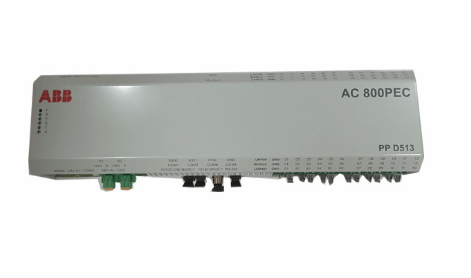 ABB 3BHE039724R2643 PPD513 high-performance programmable controller module
 -
.png) Samsung SSAS21-RTD Resistance Temperature Detector Input Module
Samsung SSAS21-RTD Resistance Temperature Detector Input Module -
.png) Samsung SSAS21-DO Digital Output Module
Samsung SSAS21-DO Digital Output Module -
Samsung SSAS21-DI Digital Input Module
-
.png) Samsung SSAS21-CPU Central Processing Unit Module
Samsung SSAS21-CPU Central Processing Unit Module -
 Samsung SMTB-RTD RTD/TC Terminal Board
 -
.png) Samsung SMTB-AI Analog Input/Output Terminal Board
Samsung SMTB-AI Analog Input/Output Terminal Board -
Samsung SMTB-DO Digital Output Terminal Board
-
.png) Samsung SMTB-DI Digital Input Terminal Board
Samsung SMTB-DI Digital Input Terminal Board -
SAMSUNG SMBK-12 IOU Rack Backplane
-
SAMSUNG SMBK-08 IOU Rack Backplane
-
SAMSUNG SMPS-08 Rack Power Module
-
.png) SAMSUNG SMCOM-08 Communication Expansion Card
SAMSUNG SMCOM-08 Communication Expansion Card -
SAMSUNG SMPI-8 Pulse Count Input Module
-
SAMSUNG SMTC-8 Thermocouple Input Module
-
SAMSUNG SMAOC-12 Analog Output Module (12CH)
-
SAMSUNG SMAOC-8 Analog Output Module (8CH)
-
SAMSUNG SMAIC-12 Analog Current Input Module (12CH)
-
SAMSUNG SMRTD-8 RTD Pt100 Temperature Input Module (8CH)
-
SAMSUNG SMAIC-8 Analog Input Module (8CH)
-
SAMSUNG SMDO-8 Digital Output Module (8CH)
-
SAMSUNG SMDI-8 Digital Input Module (8CH)
-
 SAMSUNG SMCPU-08 Central Processing Unit Controller
 -
 Embedded MXM GPU Modules EGX-MXM-A4500 ADLINK
 -
 Embedded MXM GPU Modules EGX-MXM-AD2000 ADLINK
 -
 ADLINK Embedded MXM GPU Modules EGX-MXM-AD3500
 -
 ADLINK Embedded MXM GPU Modules EGX-MXM-AD5000
 -
 Embedded MXM GPU Modules EGX-MXM-AD ADLINK
 -
 Embedded MXM GPU Modules MXM-AXe ADLINK
 -
 ADLINK Embedded MXM GPU Modules EGX-MXM-BW500
 -
 Embedded MXM GPU Modules EGX-MXM-BW2000 ADLINK
 -
 ADLINK Embedded MXM GPU Modules EGX-MXM-BW4000
 -
 Embedded MXM GPU Modules EGX-MXM-BW5000 ADLINK
 -
SAMSUNG SSAS-PRO SPTB-AI dedicated analog input terminal board
-
SAMSUNG SSAS-PRO SPTB-DO dedicated digital output terminal board
-
SAMSUNG SSAS-PRO SPTB-DI dedicated terminal board
-
SAMSUNG SSAS-PRO SPBK-X32-12 Heavy-duty 8-slot system chassis backplane
-
SAMSUNG SSAS-PRO SPBK-X32-08 Heavy-duty 8-slot system chassis backplane
-
SAMSUNG SSAS-PRO SPSU-X32 heavy-duty rack-mounted
-
SAMSUNG SSAS-PRO SPIRU-16 versatile universal mixed I/O module
-
SAMSUNG SSAS-PRO SPRI-16 RTD Temperature Input Module
-
SAMSUNG SSAS-PRO SPAO-8 Analog Output Module
-
SAMSUNG SSAS-PRO SPAI-16 Analog Input Module
-
.png) SAMSUNG SSAS-PRO SPRDO-16 Relay digital output module
SAMSUNG SSAS-PRO SPRDO-16 Relay digital output module -
SAMSUNG SSAS-PRO SPDO-16 (Transistor Digital Output Module)
-
SAMSUNG SSAS-PRO SPDI-24 high-density digital input module
-
SAMSUNG SPDI-16 (Digital Input Module)
-
 ADLINK 3U Enclosures & Systems AD-3100
 -
 Power Supplies cPS-H300S/AC ADLINK
 -
Power Supplies cPS-H300S/AC ADLINK
-
 CPCI Serial Peripheral cPCI-A3H10 ADLINK
 -
 ADLINK CPCI Serial Peripheral cPCI-A3XMC
 -
 CPCI Serial Peripheral cPCI-A3H20 ADLINK
 -
 CPCI Serial Peripheral cPCI-A3MXM ADLINK
 -
 ADLINK CPCI Serial Peripheral cPCI-A3COM
 -
 CPCI Serial Peripheral cPCI-A3USB ADLINK
 -
 ADLINK CPCI Serial Peripheral cPCI-A3ETH
 -
CPCI Serial Peripheral cPCI-A3CAN ADLINK
-
 3U CompactPCI Serial Blades cPCI-A3525 Series
 -
 3U CompactPCI Serial Blades cPCI-A3535 Series ADLINK
 -
 CompactPCI Backplanes cBP-6402 ADLINK
 -
ADLINK CompactPCI Backplanes cBP-6402R
-
 ADLINK CompactPCI Backplanes cBP-6105R
 -
 CompactPCI Backplanes cBP-6405R ADLINK
 -
 CompactPCI Backplanes cBP-6108F ADLINK
 -
 CompactPCI Backplanes cBP-6108R ADLINK
 -
 CompactPCI Backplanes cBP-6014R ADLINK
 -
 ADLINK 6U Enclosures & Systems cPCIS-6130R
 -
 ADLINK 6U Enclosures & Systems cPCIS-6230R/ 6240R Series
 -
 ADLINK 6U Enclosures & Systems cPCIS-6235R
 -
 ADLINK 6U Enclosures & Systems cPCIS-6400X Series
 -
 ADLINK 6U Enclosures & Systems cPCIS-6400U Series
 -
 ADLINK 6U Enclosures & Systems cPCIS-6418U
 -
 ADLINK ADLINK 6U Enclosures & Systems cPCIS-3300BLS
 -
 ADLINK 6U Enclosures & Systems cPCIS-3320/AC
 -
 ADLINK Power Supplies cPS-H640/AC
 -
 ADLINK Power Supplies cPS-H640/48
 -
 ADLINK 6U Rear Transition Modules cPCI-R6100 Series
 -
 ADLINK 6U Rear Transition Modules cPCI-R6002 Series
 -
 ADLINK 6U Rear Transition Modules cPCI-R6600 Series
 -
 ADLINK 6U CompactPCI 2.0 Blades cPCI-6660
 -
.png) ADLINK 6U CompactPCI 2.0 Blades cPCI-6636(KL) Series
ADLINK 6U CompactPCI 2.0 Blades cPCI-6636(KL) Series -
 ADLINK 6U CompactPCI 2.0 Blades cPCI-6640 Series
 -
 ADLINK 6U CompactPCI 2.0 Blades cPCI-6540 Series
 -
 ADLINK CompactPCI Backplanes cBP-3064
 -
 ADLINK CompactPCI Backplanes cBP-3213PR
 -
 ADLINK 3U Enclosures & Systems cPCIS-2500 Series
 -
 ADLINK 3U Enclosures & Systems cPCIS-2630 Series
 -
 ADLINK 3U Enclosures & Systems cPCIS-2632 Series
 -
 ADLINK 3U Enclosures & Systems cPCIS-2642 Series
 -
 ADLINK U Enclosures & Systems cPCIS-2633 Series
 -
 RS20 -2400M2M2SDAPHC09.0.14 Hirschmann Switch
 -
 ADLINK U Enclosures & Systems cPCIS-ET1100 Series
 -
 ADLINK Power Supplies cPS-H325/AC
 -
 ADLINK Power Supplies cPS-H325/48
 -
 ADLINK Power Supplies cPS-H325/110
 -
 ADLINK Power Supplies cPS-H325/24
 -
 ADLINK PCI-7841/cPCI-7841 Dual-port Isolated CAN Interface Cards
 -
 ADLINK Peripherals & Accessories cPCI-3548
 -
 ADLINK Peripherals & Accessories cPCI-8301
 -
 ADLINK Peripherals & Accessories cPCI-3W10
 -
 ADLINK Analog Output cPCI-6208/6216 Series
 -
 ADLINK Multi-Function DAQ cPCI-9116
 -
 ADLINK 3U CompactPCI Blades CT-3620
 -
 ADLINK 3U CompactPCI Blades cPCI-3620
 -
 ADLINK 3U CompactPCI Blades cPCI-3630
 -
 ADLINK 3U CompactPCI Blades cPCI-3640 Series
 -
 3U CompactPCI Blades cPCI-3520 Series
 -
 ADLINK IMB-M42H ATX Motherboards