FIREYEDESCRIPTION AND INSTALLATION
IMPORTANT NOTE
The information provided in this bulletin is directed to competent boiler and combustion service
technicians who are experienced in the installation and operation of Fireye Flame Safety equipment.
Persons not familiar with Fireye products should contact the nearest Fireye representative or other
qualified service group.
The 45UV5 scanners as well as all other Fireye scanners, are designed to be used exclusively with
the appropriate Fireye Flame Safeguard and Burner Management controls. The application of these
scanners to other than Fireye equipment should be reviewed for approval by Fireye.
APPLICATION
Fireye 45UV5 self-checking scanners are used to detect ultraviolet emissions from fossil fuel flames
such as natural gas, coke oven gas, propane, methane, butane, kerosene, light petroleum distillates
and diesel fuels.
These 45UV5 models are used only with the Flame-Monitor, BurnerLogix, D-Series, FlameWorx,
MicroM and some P-Series Fireye control models to provide flame safeguard and monitoring systems for supervised manual, semi-automatic and fully automatic single burner boilers, process ovens
and heaters.
PRINCIPLES OF OPERATION
The 45UV5 scanners use a UV-eye detector. This detector is a sealed, gas filled, UV-sensitive tube
containing two electrodes connected to a source of AC voltage. When UV radiation of sufficient
energy falls upon the electrodes, electrons are released and the inter-electrode gas becomes conductive, resulting in an electric current flow from one electrode to the other. The current flow starts and
ends abruptly and is known as an “avalanche.”
A very intense source of UV radiation will produce several hundred avalanches or pulses per second.
With less radiation there will be fewer pulses per second. Upon total disappearance of flame, the
detector output ceases. Thus, the presence or absence of pulses is an indication of the presence or
absence of flame; the frequency of the pulses is a measure of flame intensity. Pulses generated by the
scanner are transmitted to a compatible Fireye control via scanner wiring.
FEATURES
The components are contained in a cast aluminum housing sealed with an oil-resistant gasket. The
quartz lens is a planoconvex design, resulting in increased sensitivity. Also included in the scanner is
an electromagnetic shutter that permits a self-checking circuit to verify that the scanner and signal
circuits are producing valid flame presence or absence information. During the shutter closed period,
the detector’s optical path is blocked from flame radiation, allowing the amplifier control to verify
the proper operation of the ultraviolet tube. While the shutter is open, flame presence or absence is
detected. The resultant scanner output (while flame is detected) is a continuous, periodically interrupted, pulsed flame signal which is a prerequisite for energizing the associated Fireye control’s
Flame Relay.
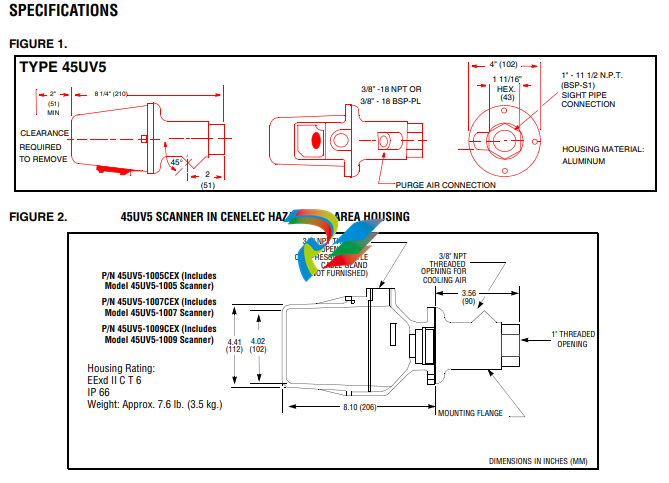
1. AN ACCEPTABLE SCANNER LOCATION MUST ENSURE THE FOLLOWING:
— Reliable pilot flame detection.
— Reliable main flame detection.
— Rejection of pilot flame too short or in the wrong position to ignite the main flame reliably,
thus prohibiting main fuel admission.
NOTE: Reliable signals must be obtained at all air flows and furnace loads (ranges of fuel firing).

2. If combustion air enters the furnace with a rotational movement of sufficient velocity to deflect
pilot flame in direction of rotation, position the scanner 0 to 30 degrees downstream of the pilot
burner and close to the periphery of the throat where the ultraviolet radiation is at a maximum.
(See Figure 4).
3. Having determined an appropriate location for the sight tube, cut a clearance hole for a 2 inch
pipe through the burner plate. If register vanes interfere with the desired line of sight, the interfering vane(s) should be trimmed to assure an unobstructed viewing path at all firing levels, see
Figure 3.
4. Mount scanner sight pipe by either:
— Centering a Fireye No. 60-1664-3 (NPT) or 60-1664-4 (BSP) swivel mount over the hole
and installing the sight pipe on the swivel mount,
or
— Inserting the end of the sight pipe into the hole, aligning the pipe to the desired viewing
angle and tack welding. (Welding must be adequate to temporarily support the weight of the
installed scanner). The sight pipe should be arranged to slant downward so that the dirt and
dust will not collect in it.

When a satisfactory sighting position has been confirmed by operational test, (see section on
alignment), the sight pipe should either be firmly welded in place or, if the swivel mount is used,
the base position should be secured by tightening the three hex head cap screw located on the
swivel mount ring. In certain older style swivel mounts, tack welding may be required.
6. Excessive flame signal can affect flame discrimination and prevent the control connected to the
scanner from performing properly. To reduce the signal level of the tube, or improve flame discrimination, orifices may be installed to decrease the scanner’s field of view and reduce its sensitivity. Installation of the orifice disk is shown in Figure 6.
7. The scanner viewing window must be kept free of contaminants (oil, smoke, soot, dirt) and the
scanner temperature must not exceed its maximum rating. Both requirements will be satisfied by
continuous injection of purge air.
The scanner mounting may be made with provision for purge air through the 3/8” opening as shown
in Figure 6, Item A or C, or through a 1" tee/wye connection as shown in Figure 6, Item B. Normally
only one of the two connections is provided with purge air and the other is plugged. When a Fireye
coupling is used as shown in Figure 6, the 1" tee/wye connection is used for the purge air (plug 3/8”
opening).
Under normal temperature conditions, with clean burning fuels and moderate ambient temperature
conditions, purge air flow of approximately 4 SCFM (113 L/min) is generally adequate. A 0.1 psig
positive pressure difference between the atmosphere and boiler pressure measured at right angle to the
purge air flow, should result in a purge air flow of 4 SCFM. Up to 15 SCFM (425 L/min) may be
required for fuels that may produce high levels of smoke of soot or for hot environments to maintain
scanner internal temperature within specifications.
NOTE: The maximum viewing field of the lens is one inch per foot. Do not use more than one foot of
one inch sight pipe. Increase sight pipe diameter one inch for every additional foot of sight pipe
length used, to avoid restricting the scanner’s field of view. Temperature in the scanner housing
should not exceed those temperature limits listed in the specifications. Excessive temperatures will
shorten scanner life.

CAUTION: Ultra-violet tubes can simulate flame when exposed to high levels of “X” and GAMMA
radiation. The table below indicates the maximum dose of radiation that a UV tube can be exposed to
safely.

SCANNER WIRING
All FIREYE controls are protected against short-circuited scanner input terminals. The following
recommendations apply for scanner control wiring:
• Keep scanner wiring as short as possible.
• Use wires rated for scanner voltage and its ambient conditions (temperature, humidity, oil resistant, flame retardant, etc.)
• Do not run scanner wires in the same conduit as other electrical wires.
• Avoid wire loops and poor groundings.
• Keep high voltage ignition wires well away from scanner wires.
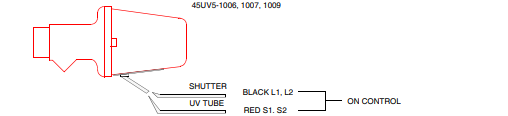
The 45UV5 self-check scanner has four 6 foot (1800mm) leads:
45UV5-1005 & 1105:
Two black leads which power the shutter from the associated control and two red leads which drive
the UV tube and carry the flame signal to the control amplifier.
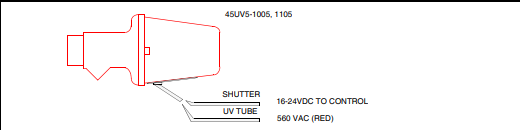
45UV5-1006, 1007 & 1009:
Two black leads which power the shutter via L1 & L2 and two red leads which drive the UV tube
and carry the flame signal to S1 & S2 on the control.
If it is necessary to extend the scanner wiring, the following instructions apply:
Scanner wires should be installed.in a separate conduit. The wires from several scanners may be
installed in a common conduit.
45UV5-1006, 1007, 1009.
1. Selection of wire
— Use #14, 16, or 18 wire with 75 C, 600 volt insulation for up to 100 foot distances (signal
loss approximately 20% at 100 feet).
— Asbestos insulated wire should be avoided.
— Multiconductor cable is not recommended without prior factory approval.
— Extended Scanner Wiring. For extended scanner wiring up to 1500 feet, and for shorter
lengths to reduce signal loss, use a shielded wire (Belden 8254-RG62U) coaxial cable, or
equal for each red wire of the 45UV5. The ends of the shielding must be taped individually
on both ends and not grounded.
For multiple burner installations:
2. Distances are decreased when more than one set of scanner leads are installed in a common conduit. For example, the maximum distance for 2 scanners is 750 feet and for 3 or more scanners
the distance decreases to 500 feet.
3. High voltage ignition wiring should not be installed in the same conduit with flame detector
wires.
WARNING: DO NOT CONNECT 45UV5 SCANNERS IN PARALLEL
45UV5-1005, 1105
1. Up to 25 foot conduit run.
— Use #18 AWG or heavier, 600V 90C minimum rated wire, installed in conduit.
2. Over 25 to 300 feet maximum:
— Use #18 AWG or heavier, 600V, 75C rated wire for the two black leads (shutter).
— Extended Scanner Wiring. For extended scanner wiring up to 1500 feet, and for shorter
lengths to reduce signal loss, use a shielded wire (Belden 8254-RG62U) coaxial cable, or equal
for each red wire of the 45UV5. The ends of the shielding must be taped individually on both
ends and not grounded.
For multiple burner installations:
3. Distances are decreased when more than one set of scanner leads are installed in a common conduit. For example, the maximum distance for 2 scanners is 750 feet and for 3 or more scanners the
distance decreases to 500 feet.
4. High voltage ignition wiring should not be installed in the same conduit with flame detector wires.
ALIGNMENT AND ADJUSTMENTS
The following procedures are recommended to ensure optimum flame detection and discrimination.
Flame discrimination is the ability to see only one burner or one pilot with other burners or pilots operating nearby. These procedures should be used whenever parts are replaced, when the scanner has been
moved, when the flame shape is altered (additional fuels, new burners, burner/register modifications)
as well as on all new installations.
Pilot Flame Scanner
1. Apply power to scanner and associated control.
2. Start pilot.
3. Adjust scanner sighting to detect pilot flame in the manner shown in Figure 4.
4. When flame is properly sighted, the flame signal should correspond to the acceptable ranges indicated in the appropriate bulletin for each compatible FIREYE control. If readings fluctuate widely,
readjust scanner sighting until highest, steadiest reading is obtained.
5. Spark Rejection Test: When the proper signal reading has been obtained, make sure that the scanner and the associated control do not respond to the ignition spark. This is accomplished by cutting
off the fuel to the pilot and attempting to start the pilot using the spark igniter. If the system
responds to the spark, the sighting should be realigned.
Minimum Pilot Test
This test assures that the flame detector will not detect a pilot flame too small to reliably light off the
main flame. The test should be made on every new installation, scanner replacement, and following
any repositioning of the flame detector. THE MINIMUM PILOT TESTS MUST BE ACCOMPLISHED BY A TRAINED AND QUALIFIED BURNER TECHNICIAN.

-
 Beckhoff FC1121 | EtherCAT slave card, 1 channel, PCIe® x1
-
 Beckhoff FC1100 | EtherCAT slave card, 1 channel, PCI™
-
 Beckhoff FC1028 | EtherCAT master card, 16 channels, PCIe® x4
-
 Beckhoff FC9062 | Gigabit Ethernet PCIe® module, 2-channel
-
 Beckhoff C9900-R266 | NOVRAM PCIe® module
-
Beckhoff FC3161 | PROFIBUS master/slave PCIe® module, 1 channel
-
 Beckhoff C9900-E301 | RS232 PCIe® module, 2 channels
-
 Beckhoff C9900-E277 | USB 3.0 PCIe® module, 2 channels
-
 Beckhoff C9900-E276 | PCIe® module for CP-Link 4 – The Two Cable Display Link
-
 Beckhoff C9900-E271 | USB Extender 2.0 Tx PCIe® module, 1 channel
-
 Beckhoff CU8803-000x | Transmitter box for CP-Link 4 – The One Cable Display Link
-
 Beckhoff CU8802-000x | Transmitter box for CP-Link-4 – The Two Cable Display Link
-
 Beckhoff CU8851 | USB extension, USB Extended 2.0 receiver box
-
 Beckhoff CU8801-0000 | USB extension, USB Extended 2.0 transmitter box
-
 Beckhoff CU8880-0010 | Ethernet controller with USB input
-
 Beckhoff CU8871 | USB CFast slot
-
 Beckhoff CU8870 | USB CompactFlash® slot
-
 Beckhoff CU8815 | DVI splitter
-
 Beckhoff CU8810-0010 | DVI splitter with USB extender
-
 Beckhoff CU8006 | 4-port USB 3.0 hub
-
 Beckhoff C9900-U332-0010 | Battery pack
-
 Beckhoff C9900-U330 | Battery pack
-
 Beckhoff C6670-0010 | Control cabinet industrial server
-
 Beckhoff C6670-0020 | Control cabinet industrial server
-
 Beckhoff C6240-0070 | Control cabinet Industrial PC
-
 Beckhoff C6240-0080 | Control cabinet Industrial PC
-
 Beckhoff C6675-0060 | Control cabinet Industrial PC
-
 Beckhoff C6675-0070 | Control cabinet Industrial PC
-
 Beckhoff C6650-0050 | Control cabinet Industrial PC
-
 Beckhoff C6650-0070 | Control cabinet Industrial PC
-
 Beckhoff C6640-0060 | Control cabinet Industrial PC
-
 Beckhoff C6640-0070 | Control cabinet Industrial PC
-
 Beckhoff C5210-0030 | 19-inch slide-in Industrial PC
-
 Beckhoff C5210-0040 | 19-inch slide-in Industrial PC
-
Beckhoff C5210-0050 | 19-inch slide-in Industrial PC
-
 Beckhoff C5240-0010 | 19-inch slide-in Industrial PC
-
 Beckhoff C5240-0030 | 19-inch slide-in Industrial PC
-
 Beckhoff C7015-0020 | Ultra-compact Industrial PC in IP65
-
Beckhoff C7015-0030 | Ultra-compact Industrial PC in IP65
-
 Beckhoff C6525-0060 | Fanless built-in Industrial PC
-
 Beckhoff C6525-0070 | Fanless built-in Industrial PC
-
 Beckhoff C6525-0080 | Fanless built-in Industrial PC
-
 Beckhoff C6515-0060 | Fanless built-in Industrial PC
-
 Beckhoff C6515-0070 | Fanless built-in Industrial PC
-
 Beckhoff C6515-0080 | Fanless built-in Industrial PC
-
 Beckhoff C6043-0090 | Ultra-compact Industrial PC with NVIDIA® GPU
-
 Beckhoff C6040-0090 | Ultra-compact Industrial PC
-
 Beckhoff C6032-0060 | Ultra-compact Industrial PC
-
Beckhoff C6032-0070 | Ultra-compact Industrial PC
-
 Beckhoff C6032-0080 | Ultra-compact Industrial PC
-
 Beckhoff C6030-0070 | Ultra-compact Industrial PC
-
 Beckhoff C6030-0080 | Ultra-compact Industrial PC
-
 Beckhoff C6027-0000 | Fanless ultra-compact Industrial PC
-
 Beckhoff C6027-0010 | Fanless ultra-compact Industrial PC
-
 Beckhoff C6025-0000 | Fanless ultra-compact Industrial PC
-
 Beckhoff C6025-0010 | Fanless ultra-compact Industrial PC
-
 Beckhoff C6025-0020 | Fanless ultra-compact Industrial PC
-
 Beckhoff C6930-0060 | Control cabinet Industrial PC
-
 Beckhoff C6930-0070 | Control cabinet Industrial PC
-
 Beckhoff C6930-0080 | Control cabinet Industrial PC
-
 Beckhoff C6925-0030 | Fanless control cabinet Industrial PC
-
Beckhoff C6925-0040 | Fanless control cabinet Industrial PC
-
 Beckhoff C6915-0010 | Fanless control cabinet Industrial PC
-
Beckhoff C6915-0020 | Fanless control cabinet Industrial PC
-
 Beckhoff C6905-0010 | Economy control cabinet Industrial PC
-
 Beckhoff C6905-0020 Economy control cabinet Industrial PC
-
 Beckhoff C6905-0030 Economy control cabinet Industrial PC
-
 Eaton SPN6084LEAXX2F Power Defense SB
-
 Eaton MPNC4N3LEAXXSW Magnum low voltage power circuit breaker
-
 EatonSP N8403YEAXX2H Power Defense SB
-
Eaton MPS8604WEAXX2C Magnum low voltage power circuit breaker
-
 Eaton MPS8404WEAXXSW Magnum low voltage power circuit breaker
-
 Eaton MPN6504LEAXX3A
-
Eaton MPSC323VEAXX2A Magnum low voltage power circuit breaker
-
 Eaton SPS6304WEAXX2F Power Defense SB
-
 Eaton MPN6504LEAXX2H Magnum low voltage power circuit breaker
-
 Eaton MPSC504HEAXX2H Magnum low voltage power circuit breake
-
 Eaton SPN85N3LEAXX2F Power Defense SB
-
 Eaton SPN6403CEAXX2F Power Defense SB
-
 Eaton MPSC5N4MEAXX3A Power Defense SB
-
Eaton SPSC124WEAXX2A Power Defense SB
-
 Eaton SPS85A4WEAXX2H Power Defense SB
-
 Eaton SPSC5N4MEAXX2A Power Defense SB
-
 Eaton MPN8403VEAXX2H Magnum low voltage power circuit breaker
-
 NZMB2-4-A200 MCCB NZM, NZM2 TM and Elec
-
 Eaton NZMN1-A63 Series NZM complete molded case circuit breaker
-
 Eaton NZMB1-S26-CNA Series NZM complete molded case circuit breaker
-
 Eaton NZMH2-A25-NA Series NZM complete molded case circuit breaker
-
 NZMH2-A200-BT-NA Eaton Series NZM complete molded case circuit breaker
-
 NZMN4-VEF1200-NA Eaton Series NZM complete molded case circuit breaker
-
 NZMH2-AF250-NA MCCB NZM, NZM2 TM and Elec
-
 NZMB1-AF60-NA Eaton Series NZM complete molded case circuit breaker
-
 NZMN1-A50 Eaton Series NZM complete molded case circuit breaker
-
 NZMH2-A80-NA Eaton Series NZM complete molded case circuit breaker
-
 Eaton Cutler-Hammer HFD3030 6639C86G87 3 Pole 30A 600V Circuit Breaker
-
 Moeller XV-230-57CNN-1-13-1 HMI PLC Panel Touchscreen 5.7"
-
 EATON CEAG CU CG-S , 40071360300 Control Unit
-
 EATON SDN90186 MOTOR CONTROL CENTER
-
EATON HMCP150U4 CIRCUIT BREAKER
-
 Eaton 7801C57 Digitrip Optimizer Hand Held Programmer
-
 Eaton HMCP400R5 Circuit Breaker
-
 EATON MP-3000 SAFETY RELAY 66D2032GX1 5A
-
 EATON PGGLOBL1701DPRO 1785T Touch Panel
-
 Eaton, Moeller, Easy MFD-CP8-NT
-
 Eaton WL-35717F Vacuum Interrupter
-
 EATON VICKERS EEA-PAM-535-A-32 AMPLIFIER CARD
-
 EATON FP5000-00 / FP5200-00 66D2041G11 FEEDER PROTECTION RELAY
-
 Eaton IQ-504 120VAC Modular Overload Relay
-
 Beckhoff CX5620-0225 CPU module
-
 Beckhoff CX5620-0220 CPU module
-
Beckhoff CX5620-0215 CPU module, Beckhoff RT Linux®
-
 Beckhoff CX5620-0210 CPU module, Beckhoff RT Linux®
-
 Beckhoff CX5620-0195 CPU module
-
Beckhoff CX5620-0190 CPU module
-
Beckhoff CX5620-0185 CPU module
-
Beckhoff CX5620-0175 CPU module
-
 Beckhoff CX5620-0170 CPU module
-
Beckhoff CX5620-0163 CPU module
-
Beckhoff CX5620-0161 CPU module
-
Beckhoff CX5620-0160 CPU module
-
Beckhoff CX5620-0100 CPU module
-
 Beckhoff CX5120-0195 CPU module
-
 Beckhoff CX5120-0190 CPU module
-
Beckhoff CX5120-0185 CPU module
-
Beckhoff CX5120-0175 CPU module
-
 Beckhoff CX5120-0170 CPU module
-
Beckhoff CX5120-0163 CPU module
-
Beckhoff CX5120-0162 CPU module,