
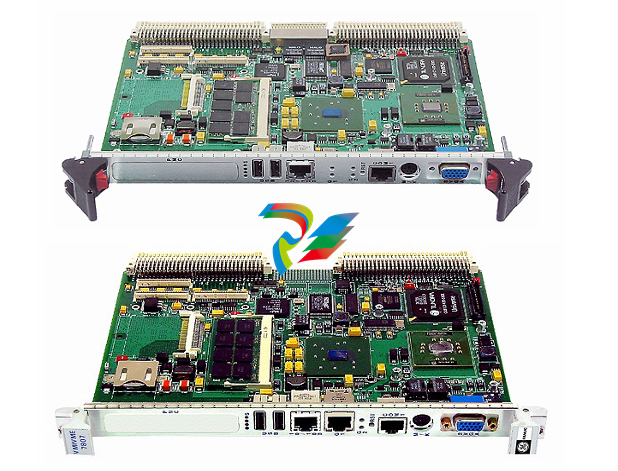
VMIVME-7807 VME-7807RC* Intel® Pentium® M-Based VME SBC
Pentium® M-based, single board computers (SBCs) in a single-slot, passively cooled,
VME Eurocard form factor. These products utilize the advanced technology of Intel®’s
855GME chipset.
VMIVME-7807
VME-7807RC*
Intel® Pentium® M-Based VME SBC
GE Fanuc Embedded Systems’ VMIVME-7807/VME-7807RC are full featured
Pentium® M-based, single board computers (SBCs) in a single-slot, passively cooled,
VME Eurocard form factor. These products utilize the advanced technology of Intel®’s
855GME chipset.
The VMIVME-7807/VME-7807RC provide features typically found on desktop
systems such as:
• 1.0GB DDR SDRAM using one SODIMM and an optional 512MB of solder-in
memory for a maximum of 1.5GB
• Built-in SVGA support (front panel connection)
• Digital video controller (rear I/O) DVI-D with dual head display capabilities
• 10/100 Mbit Ethernet controller (front panel connection)
• Dual Gigabit Ethernet supporting (front panel or rear I/O)
• Optional P0 with VITA 31.1 interface
• Serial ATA (SATA) support (rear I/O)
• Serial port COM1 (front panel connection)
• Ultra IDE drive support (rear I/O)
• Real-Time clock/calendar
• Front panel reset switch
• Miniature speaker
• Keyboard/Mouse port (front panel connection)
The 855GME chipset allows the VMIVME-7807/VME-7807RC to provide enhanced
features such as integrated video and Ultra ATA/100 IDE support. The
VMIVME-7807/VME-7807RC are capable of executing many of today’s desktop
operating systems such as Microsoft®’s Windows® XP, Windows 2000 and a wide
variety of Linux® based operating systems. The standard desktop features of the
VMIVME-7807/VME-7807RC are described in Chapter 2 of this manual.
The VMIVME-7807/VME-7807RC provide features useful to embedded applications
such as:
• Three serial ports: COM2. COM3 and COM4 (rear I/O)
• Four USB 2.0 ports (two on front panel and two rear I/O)
• 32KB of nonvolatile RAM
• Remote Ethernet booting
• Up to 2GB of CompactFlash on secondary IDE (optional)
• Software-selectable Watchdog Timer with reset
Additionally, the VMIVME-7807/VME-7807RC offer one PMC expansion site (PCI-X,
66MHz) with front panel access. The VMIVME-7807/VME-7807RC are capable of
executing many of today’s operating systems such as VxWorks®, Solaris™ or QNX®.
The embedded features of the VMIVME-7807/VME-7807RC are described in
Chapter 3 of this manual.
The VMIVME-7807/VME-7807RC are suitable for use in applications ranging from
telecommunications, simulation, instrumentation, industrial control, process control
and monitoring, factory automation, automated test systems, data acquisition
systems and anywhere that the highest performance processing power in a single
VME slot is desired.
The VMIVME-7807/VME-7807RC conform to the VME physical specification for a 6U
board. The VMIVME-7807/VME-7807RC can be used for system control or as a
peripheral board. They can be plugged directly into any standard chassis accepting
either type of board.
The following steps describe the GE Fanuc Embedded Systems-recommended
method for installation and powerup of the VMIVME-7807/VME-7807RC :
1. If a PMC module is to be used, connect it to the VMIVME-7807/VME-7807RC
prior to board installation (as shown in Figure 1-2 on page 29). Refer to the
Product Manual for the PMC module for configuration and setup.
2. Insert the VMIVME-7807/VME-7807RC into a VME chassis system controller or
peripheral slot. While ensuring that the board is properly aligned and oriented
in the supporting board guides, slide the board smoothly forward against the
mating connectors. Use the ejector handles to firmly seat the board.
3. All needed peripherals can be accessed from the front panel or the rear I/O
VMIACC-0586/ACC-0586RC or VMIACC-0590/ACC-0590RC Rear Transition
Modules (RTMs). Each connector is clearly labeled on the front panel and
detailed pinouts are in Appendix A.
4. Connect a keyboard and mouse if the system has not been previously
configured.
5. The VMIVME-7807/VME-7807RC feature an optional CompactFlash Disk
resident on the board. Refer to Chapter 3 for set up details.
6. If an external drive module is installed, the BIOS Setup program must be used to
configure the drive types. See Appendix B to properly configure the system.
7. If a drive module is present, install the operating system according to the
manufacturer’s instructions.
The VMIVME-7807/VME-7807RC have an onboard BIOS Setup program that controls
many configuration options. These options are saved in a special non-volatile,
battery-backed memory chip and are collectively referred to as the board’s ‘CMOS
Configuration’. The CMOS configuration controls many details concerning the
behavior of the hardware from the moment power is applied.
Details of the VMIVME-7807/VME-7807RC BIOS setup program are included in
Appendix B.
The VMIVME-7807/VME-7807RC provide front panel access for the PMC expansion
site, an optional Gigabit Ethernet port, one 10/100 RJ45 connector, one serial port,
SVGA, keyboard/mouse, the manual reset switch and the status LEDs. A drawing of
the VMIVME-7807/VME-7807RC front panels are shown in Figure 1-5. The front
panel connectors and indicators are labeled as follows:
• 10/100
• G1
• G2
• M/K
• COM1
•RST
• S
• SVGA
10/100 Mbit Ethernet connector
10/100/1000 Mbit Ethernet connector 1 (or LEDs) port 1
10/100/1000 Mbit Ethernet LEDs port 2
Mouse/keyboard connector
Serial Port
Manual reset switch
Status LEDs
-
 CTI 2500-ADP2-DISC Discrete Wiring Adapter for Series 500
 -
 CTI 2500-ADP1 Analog Wiring Adapter for Series 500
 -
 CTI 2500C-RADP-RS485 Remote Base Controller Adapter for Series 500
 -
 CTI 2500C-RADP-RBC Profibus RBC Adapter for Series 500
 -
 CTI 2500C-PADP-120V 120VAC 50W Power Supply for Series 500
 -
 CTI 2500-RADP RBC Adapter for Series 500
 -
 CTI 2500-R4500 520/530/DBC Adapter for Series 500 - MATURE
 -
 CTI 2500-PADP Power Supply Adapter for Series 500
 -
 CTI 2500-IADP I/O Adapter for Series 500
 -
 CTI 2500-VP15A-N4-W7 15" Flat-Panel PC with Windows® 7 Embedded
 -
 CTI 2500S-27-1750 Slice I/O, Ethernet, RS232/485. 900MHz, 2DIO / 4UAI / 2AI
 -
 CTI 2500S-26-1750 Slice I/O, Ethernet, RS232/485. 900MHz, 8DIO / 2UAI
 -
 CTI 2500S-23-1750 Slice I/O, Ethernet, RS232/485. 900MHz, 4DI / 4DO / 2UAI / 2AO
 -
 CTI 2500S-27-1550 Slice I/O, RS232/485. 2DIO / 4UAI / 2AI
 -
 CTI 2500S-26-1550 Slice I/O, RS232/485. 8DIO / 2UAI
 -
 CTI 2500S-23-1550 Slice I/O, RS232/485. 4DI / 4DO / 2UAI / 2AO
 -
 CTI 2500S-27-1050 Slice I/O, Ethernet, 2DIO / 4UAI / 2AI
 -
 CTI 2500S-26-1050 Slice I/O, Ethernet, 8DIO / 2UAI
 -
 CTI 2500S-23-1050 Slice I/O, Ethernet, 4DI / 4DO / 2UAI / 2AO
 -
 CTI 2500C-32F-CJC 32-Pin Field Wiring Connector with Cold Junction Compensation
 -
 CTI 2500C-32F 32-Pin Field Wiring Connector
 -
 CTI 2500C-8-TC Eight Thermocouple Inputs
 -
 CTI 2500C-8-RTD Eight RTD Inputs
 -
 CTI 2500C-8-RL-FC 8 Form-C Relay Outputs
 -
 CTI 2500C-8-IDO-24V 8 Isolated 24VDC Outputs
 -
 CTI 2500C-8-IDO-120V 8 Isolated 120VAC Outputs
 -
 CTI 2500C-16-DO-24V Sixteen 24VDC Digital Outputs
 -
 CTI 2500C-16-DO-120V Sixteen 120VAC Digital Outputs
 -
.png) CTI 500C-16-IDI-24V Sixteen Isolated 24V AC/DC Digital Inputs
CTI 500C-16-IDI-24V Sixteen Isolated 24V AC/DC Digital Inputs -
 CTI 2500C-16-IDI-120V Sixteen Isolated 120V AC/DC Digital Inputs
 -
 CTI 2500C-16-DIDO-SIM Sixteen Digital Input and Output SImulator
 -
 CTI 2500C-16-DI-24V Sixteen 24V AC/DC Digital Inputs
 -
 CTI 2500C-16-DI-120V Sixteen 120V AC/DC Digital Inputs
 -
 CTI 2500C-RBC-RS485 RS485 Remote Base Controller
 -
 CTI 2500C-RBC-PRF Profibus Remote Base Controller
 -
 CTI 2500C-PS-24V-35 35-Watt DC Power Supply
 -
 CTI 2500C-PS-120V-35 35-Watt AC Power Supply
 -
 CTI 2500C-R8 Eight-Slot Base
 -
 CTI 2500C-R4 Four-Slot Base
 -
 CTI 2500C-R16 Sixteen-Slot Base
 -
 CTI 2500C-2572-B Fast Ethernet TCP/IP Adapter
 -
 CTI 2500C-J750 Compact Janus PAC with 3MB Project Memory
 -
 CTI 2500C-C300 CPU with 512K User Memory
 -
 CTI 2500C-C200 CPU with 256K User Memory
 -
 CTI 2500C-C100 CPU with 128K User Memory
 -
 CTI 2500C-8-AO 8 Analog Outputs
 -
 CTI 2500C-8-AI 8 Analog Inputs
 -
 CTI 2559-FCAL Precision Calibration Connector
 -
 CTI 2559-FPC 40-Position Screw-Terminal Connector
 -
 CTI 2500-RFC PLC to RF Modem Cable
 -
 CTI 2500-40F 40-Position Standard Screw-Terminal Connector
 -
 CTI 2505 Vibration Sensor Interface Module
 -
 CTI 2554-A 4-Channel Isolated High Speed Counter Module
 -
 CTI 2553-A 2-Channel Mag Meter Input Module
 -
 CTI 2502 2-Channel High Speed Counter Input Module
 -
 CTI 2559-TC 8-Channel Thermocouple Input Module
 -
 CTI 2556-A 16-Channel Isolated Thermocouple Input Module
 -
 CTI 2556 16-Channel Isolated Thermocouple Input Module
 -
 CTI 2551-A 8-Channel Isolated Thermocouple Input Module
 -
 CTI 2559-RTD 8-Channel RTD Input Module
 -
 CTI 2557-A 16-Channel RTD Input Module
 -
 CTI 2557 16-Channel RTD Input Module
 -
 CTI 2552-A 8-Channel Isolated RTD Input Module
 -
 CTI 2534 8-Point Form-C Relay Output Module
 -
 CTI 2532 16-Point Form-A Relay Output Module
 -
 CTI 2531 32-Point Form-A Relay Output Module
 -
 CTI 2530 8-Point Form-C Relay Output Module
 -
 CTI 2562 8-Channel Analog Output Module
 -
 CTI 2560-A 8-Channel Isolated Analog Output Module
 -
 CTI 2501 8in/4out Analog Module
 -
 CTI 2558 8-Channel Analog Input Module
 -
 CTI 2555-A 16-Channel Analog Input Module
 -
 CTI 2550-A 8-Channel Isolated Analog Input Module
 -
 CTI 2599 8/16/32-Point AC Output Module
 -
 CTI 2598-8 8-Point AC Output Module
 -
 CTI 2598 8/16-Point AC Output Module
 -
 CTI 2597 8/16/32-Point DC Output Module
 -
 CTI 2596-8 8-Point DC Output Module
 -
 CTI 2596 8/16-Point DC Output Module
 -
 CTI 2595 16-Point TTL/Word Output Module
 -
 CTI 2591-EF 16-Point Isolated 11-146 VDC Output with Front Panel Accessible Fuses
 -
 CTI 2591-A 16-Point Isolated 11-146 VDC Output Module
 -
 CTI 2590-EF 16-Point Isolated 20-132 VAC Output with Front Panel Accessible Fuses
 -
 CTI 2590-A 16-Point Isolated Discrete 20-132 VAC Output Module
 -
 CTI 2589-B 8/16/32-Point Universal Discrete Input Module
 -
 CTI 2589-A 8/16/32-Point Universal Discrete Input Module
 -
 CTI 2588-8 8-Point Universal Discrete Input Module
 -
 CTI 2585 16-Point TTL/Word Input Module
 -
 CTI 2582 16-Point Isolated 125 VDC Input Module
 -
 CTI 2581 16-Point Isolated 12-56 VDC Input Module
 -
 CTI 2580 16-Point Isolated 95-132 VAC Input Module
 -
 CTI 2500-TAP RS485 Network Tap
 -
 CTI 2500-RIO-B RS485 Remote Base Controller
 -
 CTI 2500-RIO-A RS485 Remote Base Controller
 -
 CTI 2500-RBC Profibus Remote Base Controller
 -
 CTI 2515-A 100-Watt AC/DC Power Supply with Redundancy Support
 -
 CTI 2515 100-Watt AC Power Supply (MATURE - replaced by 2515-A)
 -
 CTI 2513-A 75-Watt DC Power Supply with Redundancy Support
 -
 CTI 2513 75-Watt 24VDC Power Supply
 -
 CTI 2512-A 75-Watt AC/DC Power Supply with Redundancy Support
 -
 CTI 2512 75-Watt AC/DC Power Supply
 -
 CTI 2510 125 VDC Power Supply
 -
 CTI 2500-SSB Single Slot Blank Front Panel
 -
 CTI 2500-R11-A Eleven-Slot Redundant Base
 -
 CTI 2500P-R16 Sixteen-Slot Base with High-Speed Channel
 -
 CTI 2500P-R8 Eight-Slot Base with High-Speed Channel
 -
 CTI 2500P-R4 Four-Slot Base with High-Speed Channel
 -
 CTI 2541 Redundant Processor Manager Module
 -
 CTI 2577 Profibus DP Slave Adapter
 -
 CTI 2573-MOD Serial Interface Adapter with MODBUS
 -
 CTI 2572-AF Fast Ethernet TCP/IP Adapter with Optical Fiber Connection
 -
 CTI 2572-A Fast Ethernet TCP/IP Adapter
 -
 CTI 2572 Ethernet TCP/IP Adapter
 -
 CTI 2572-B Fast Ethernet TCP/IP Adapter
 -
 CTI 2576 DeviceNet™ Scanner Module (MATURE)
 -
 CTI 2500P-ECC1 Ethernet Communications Coprocessor
 -
 CTI 2500P-JACP Janus Application Coprocessor
 -
 CTI 2500P-ACP1 Application Coprocessor (MATURE - replaced by 2500P-JACP)
 -
 CTI 2500P-J450 Janus PAC with 2MB Project Memory
 -
 CTI 2500-C400 CPU with 3072K User Memory
 -
 CTI 2500-C300 CPU with 512K User Memory
 -
 CTI 2500-C200 CPU with 256K User Memory
 -
 CTI 2500-C100 CPU with 128K User Memory
 -
 CTI 2500P-J750 Janus PAC with 3MB Project Memory
 -
 Shinkawa WHF3006M Displacement Converter
 -
Shinkawa JBP-220 (P-24-94A / P-24-94B) Circuit Board Module
-
 SHINKAWA WKN-142K5 2-WIRE VIBRATION TRANSDUCER
 -
Shinkawa FRP-321 (P-26-54A / P-26-54B) Circuit Board Module


