EMERSONUSER’S MANUAL MANUEL DE L’UTILISATEUR MANUAL DEL USUARIO UW40T SERIES
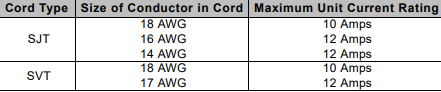
according to the current rating for the LED TV. Consult the table below for the
selection criteria of power cords used in the United States and Canada
FCC COMPLIANCE STATEMENT
This equipment has been tested and complies with the limits for a Class B digital
device, pursuant to part 15 of the FCC Rules. These limits are designed to provide
reasonable protection against harmful interference in a residential installation. This
equipment generates, uses, and can radiate radio frequency energy, and may cause
harmful interference to radio communications if not installed and used in accordance
with the instructions. However, there is no guarantee that interference will not occur
in a particular installation. If this equipment does cause harmful interference to radio
or television reception, which can be determined by turning the equipment off and
on, the user is encouraged to try to correct the interference by one or more of the
following measures:
• Reorient or relocate the receiving antenna.
• Increase the distance between the LED TV and the receiver.
• Connect the LED TV to an outlet on a circuit separate from to which the
receiver is connected.
• If the interference persists even after performing the above measures,
consult the Westinghouse Service Center or an experienced radio/TV
technician for assistance.
FCC Warning
To assure continued FCC compliance, use a grounded power supply cord and the
provided shielded video interface cable with bonded ferrite cores. If a BNC cable is
used, use only a shielded BNC (5) cable. Also, any unauthorized changes or
modifications not expressly approved by the manufacturer will void the user's
authority to operate this device.
IMPORTANT SAFETY INSTRUCTIONS
Make sure to note and follow all warnings and instructions marked on the LED TV.
Observe the following safety instructions.
• Read these instructions.
• Keep these instructions.
• Heed all warnings.
• Follow all instructions.
• Do not use this apparatus near water.
• Clean only with dry cloth.
• Do not block any ventilation openings. Install in accordance with the
manufacturer’s instructions.
• Do not install near any heat sources such as radiators, heat registers,
stoves, or other apparatus (including amplifiers) that produce heat.
• Do not defeat the safety purpose of the polarized or grounding-type plug. A
polarized plug has two blades with one wider than the other. A grounding
type plug has two blades and a third grounding prong. The wide blade or the
third prong are provided for your safety. If the provided plug does not fit into
your outlet, consult an electrician for replacement of the obsolete outlet.
• Protect the power cord from being walked on or pinched particularly at plugs,
convenience receptacles, and the point where they exit from the apparatus.
• Only use attachments/accessories specified by the manufacturer.
• Use only with the cart, stand, tripod, bracket, or table specified by the
manufacturer, or sold with the apparatus. When a cart is used, use caution
when moving the cart/apparatus combination to avoid injury from tip-over.
• Unplug this apparatus during lightning storms or when unused for long
periods of time.
• Refer all servicing to qualified service personnel. Servicing is required when
the apparatus has been damaged in any way, such as power-supply cord or
plug is damaged, liquid has been spilled or objects have fallen into the
apparatus, the apparatus has been exposed to rain or moisture, does not
operate normally, or has been dropped.
Circuit Overload
Do not overload wall outlets, extension cords, or power strips. This can result in a fire
or electronic shock.
Power Cord Protection
Power supply cords should be routed so that they are not likely to be walked on or
pinched by items placed upon or against them. Periodically inspect the cords for
damage. Install the LED TV near a wall socket outlet where the power cord can be
readily accessed.
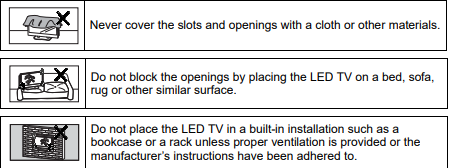
Ventilation
The slots and openings on the cabinet are provided for necessary ventilation. To
ensure reliable operation of the LED TV and to protect it from overheating, these
slots and openings must never be blocked or covered
WARNINGS AND PRECAUTIONS
• Do not orient the LED TV towards direct sunlight to reduce glare.
• If the LED TV will not be used for a long period of time, unplug the unit and
remove the batteries from the remote control.
• Avoid touching the display screen by hand or any object.
• Never remove the rear cover. The LED TV interior contains high-voltage
parts. You may be seriously injured if you touch them.
• Always handle the LED TV with caution when moving it.
• Do not install the LED TV in airtight compartments, or in areas where it can
be exposed to water or high temperature.
• Ensure that the area around the LED TV is clean and free of moisture.
• Do not place anything on the LED TV that can hinder heat dissipation.
• Do not place naked flame sources, such as lighted candles, on or near the
-
 Beckhoff FC1121 | EtherCAT slave card, 1 channel, PCIe® x1
 -
 Beckhoff FC1100 | EtherCAT slave card, 1 channel, PCI™
 -
 Beckhoff FC1028 | EtherCAT master card, 16 channels, PCIe® x4
 -
 Beckhoff FC9062 | Gigabit Ethernet PCIe® module, 2-channel
 -
 Beckhoff C9900-R266 | NOVRAM PCIe® module
 -
Beckhoff FC3161 | PROFIBUS master/slave PCIe® module, 1 channel
-
 Beckhoff C9900-E301 | RS232 PCIe® module, 2 channels
 -
 Beckhoff C9900-E277 | USB 3.0 PCIe® module, 2 channels
 -
 Beckhoff C9900-E276 | PCIe® module for CP-Link 4 – The Two Cable Display Link
 -
 Beckhoff C9900-E271 | USB Extender 2.0 Tx PCIe® module, 1 channel
 -
 Beckhoff CU8803-000x | Transmitter box for CP-Link 4 – The One Cable Display Link
 -
 Beckhoff CU8802-000x | Transmitter box for CP-Link-4 – The Two Cable Display Link
 -
 Beckhoff CU8851 | USB extension, USB Extended 2.0 receiver box
 -
 Beckhoff CU8801-0000 | USB extension, USB Extended 2.0 transmitter box
 -
 Beckhoff CU8880-0010 | Ethernet controller with USB input
 -
 Beckhoff CU8871 | USB CFast slot
 -
 Beckhoff CU8870 | USB CompactFlash® slot
 -
 Beckhoff CU8815 | DVI splitter
 -
 Beckhoff CU8810-0010 | DVI splitter with USB extender
 -
 Beckhoff CU8006 | 4-port USB 3.0 hub
 -
 Beckhoff C9900-U332-0010 | Battery pack
 -
 Beckhoff C9900-U330 | Battery pack
 -
 Beckhoff C6670-0010 | Control cabinet industrial server
 -
 Beckhoff C6670-0020 | Control cabinet industrial server
 -
 Beckhoff C6240-0070 | Control cabinet Industrial PC
 -
 Beckhoff C6240-0080 | Control cabinet Industrial PC
 -
 Beckhoff C6675-0060 | Control cabinet Industrial PC
 -
 Beckhoff C6675-0070 | Control cabinet Industrial PC
 -
 Beckhoff C6650-0050 | Control cabinet Industrial PC
 -
 Beckhoff C6650-0070 | Control cabinet Industrial PC
 -
 Beckhoff C6640-0060 | Control cabinet Industrial PC
 -
 Beckhoff C6640-0070 | Control cabinet Industrial PC
 -
 Beckhoff C5210-0030 | 19-inch slide-in Industrial PC
 -
 Beckhoff C5210-0040 | 19-inch slide-in Industrial PC
 -
Beckhoff C5210-0050 | 19-inch slide-in Industrial PC
-
 Beckhoff C5240-0010 | 19-inch slide-in Industrial PC
 -
 Beckhoff C5240-0030 | 19-inch slide-in Industrial PC
 -
 Beckhoff C7015-0020 | Ultra-compact Industrial PC in IP65
 -
Beckhoff C7015-0030 | Ultra-compact Industrial PC in IP65
-
 Beckhoff C6525-0060 | Fanless built-in Industrial PC
 -
 Beckhoff C6525-0070 | Fanless built-in Industrial PC
 -
 Beckhoff C6525-0080 | Fanless built-in Industrial PC
 -
 Beckhoff C6515-0060 | Fanless built-in Industrial PC
 -
 Beckhoff C6515-0070 | Fanless built-in Industrial PC
 -
 Beckhoff C6515-0080 | Fanless built-in Industrial PC
 -
 Beckhoff C6043-0090 | Ultra-compact Industrial PC with NVIDIA® GPU
 -
 Beckhoff C6040-0090 | Ultra-compact Industrial PC
 -
 Beckhoff C6032-0060 | Ultra-compact Industrial PC
 -
Beckhoff C6032-0070 | Ultra-compact Industrial PC
-
 Beckhoff C6032-0080 | Ultra-compact Industrial PC
 -
 Beckhoff C6030-0070 | Ultra-compact Industrial PC
 -
 Beckhoff C6030-0080 | Ultra-compact Industrial PC
 -
 Beckhoff C6027-0000 | Fanless ultra-compact Industrial PC
 -
 Beckhoff C6027-0010 | Fanless ultra-compact Industrial PC
 -
 Beckhoff C6025-0000 | Fanless ultra-compact Industrial PC
 -
 Beckhoff C6025-0010 | Fanless ultra-compact Industrial PC
 -
 Beckhoff C6025-0020 | Fanless ultra-compact Industrial PC
 -
 Beckhoff C6930-0060 | Control cabinet Industrial PC
 -
 Beckhoff C6930-0070 | Control cabinet Industrial PC
 -
 Beckhoff C6930-0080 | Control cabinet Industrial PC
 -
 Beckhoff C6925-0030 | Fanless control cabinet Industrial PC
 -
Beckhoff C6925-0040 | Fanless control cabinet Industrial PC
-
 Beckhoff C6915-0010 | Fanless control cabinet Industrial PC
 -
Beckhoff C6915-0020 | Fanless control cabinet Industrial PC
-
 Beckhoff C6905-0010 | Economy control cabinet Industrial PC
 -
 Beckhoff C6905-0020 Economy control cabinet Industrial PC
 -
 Beckhoff C6905-0030 Economy control cabinet Industrial PC
 -
 Eaton SPN6084LEAXX2F Power Defense SB
 -
 Eaton MPNC4N3LEAXXSW Magnum low voltage power circuit breaker
 -
.png) EatonSP N8403YEAXX2H Power Defense SB
EatonSP N8403YEAXX2H Power Defense SB -
Eaton MPS8604WEAXX2C Magnum low voltage power circuit breaker
-
 Eaton MPS8404WEAXXSW Magnum low voltage power circuit breaker
 -
 Eaton MPN6504LEAXX3A
 -
Eaton MPSC323VEAXX2A Magnum low voltage power circuit breaker
-
 Eaton SPS6304WEAXX2F Power Defense SB
 -
 Eaton MPN6504LEAXX2H Magnum low voltage power circuit breaker
 -
 Eaton MPSC504HEAXX2H Magnum low voltage power circuit breake
 -
 Eaton SPN85N3LEAXX2F Power Defense SB
 -
 Eaton SPN6403CEAXX2F Power Defense SB
 -
 Eaton MPSC5N4MEAXX3A Power Defense SB
 -
Eaton SPSC124WEAXX2A Power Defense SB
-
 Eaton SPS85A4WEAXX2H Power Defense SB
 -
 Eaton SPSC5N4MEAXX2A Power Defense SB
 -
 Eaton MPN8403VEAXX2H Magnum low voltage power circuit breaker
 -
 NZMB2-4-A200 MCCB NZM, NZM2 TM and Elec
 -
 Eaton NZMN1-A63 Series NZM complete molded case circuit breaker
 -
 Eaton NZMB1-S26-CNA Series NZM complete molded case circuit breaker
 -
 Eaton NZMH2-A25-NA Series NZM complete molded case circuit breaker
 -
 NZMH2-A200-BT-NA Eaton Series NZM complete molded case circuit breaker
 -
 NZMN4-VEF1200-NA Eaton Series NZM complete molded case circuit breaker
 -
 NZMH2-AF250-NA MCCB NZM, NZM2 TM and Elec
 -
 NZMB1-AF60-NA Eaton Series NZM complete molded case circuit breaker
 -
 NZMN1-A50 Eaton Series NZM complete molded case circuit breaker
 -
 NZMH2-A80-NA Eaton Series NZM complete molded case circuit breaker
 -
 Eaton Cutler-Hammer HFD3030 6639C86G87 3 Pole 30A 600V Circuit Breaker
 -
 Moeller XV-230-57CNN-1-13-1 HMI PLC Panel Touchscreen 5.7"
 -
 EATON CEAG CU CG-S , 40071360300 Control Unit
 -
 EATON SDN90186 MOTOR CONTROL CENTER
 -
EATON HMCP150U4 CIRCUIT BREAKER
-
 Eaton 7801C57 Digitrip Optimizer Hand Held Programmer
 -
 Eaton HMCP400R5 Circuit Breaker
 -
 EATON MP-3000 SAFETY RELAY 66D2032GX1 5A
 -
 EATON PGGLOBL1701DPRO 1785T Touch Panel
 -
 Eaton, Moeller, Easy MFD-CP8-NT
 -
 Eaton WL-35717F Vacuum Interrupter
 -
 EATON VICKERS EEA-PAM-535-A-32 AMPLIFIER CARD
 -
 EATON FP5000-00 / FP5200-00 66D2041G11 FEEDER PROTECTION RELAY
 -
 Eaton IQ-504 120VAC Modular Overload Relay
 -
 Beckhoff CX5620-0225 CPU module
 -
 Beckhoff CX5620-0220 CPU module
 -
Beckhoff CX5620-0215 CPU module, Beckhoff RT Linux®
-
 Beckhoff CX5620-0210 CPU module, Beckhoff RT Linux®
 -
 Beckhoff CX5620-0195 CPU module
 -
Beckhoff CX5620-0190 CPU module
-
Beckhoff CX5620-0185 CPU module
-
Beckhoff CX5620-0175 CPU module
-
 Beckhoff CX5620-0170 CPU module
 -
Beckhoff CX5620-0163 CPU module
-
Beckhoff CX5620-0161 CPU module
-
Beckhoff CX5620-0160 CPU module
-
Beckhoff CX5620-0100 CPU module
-
 Beckhoff CX5120-0195 CPU module
 -
 Beckhoff CX5120-0190 CPU module
 -
Beckhoff CX5120-0185 CPU module
-
Beckhoff CX5120-0175 CPU module
-
 Beckhoff CX5120-0170 CPU module
 -
Beckhoff CX5120-0163 CPU module
-
Beckhoff CX5120-0162 CPU module,